
Understanding Your Cash App Card: A Versatile Financial Tool
The Cash App Card, often referred to as a “Cash Card,” transcends the capabilities of a mere debit card, positioning itself as a pivotal tool for modern personal finance management. Issued by Sutton Bank and powered by Visa, it grants users the ability to spend funds directly from their Cash App balance, both online and in physical stores, anywhere Visa is accepted. For many, especially those navigating the digital economy or seeking alternatives to traditional banking, the Cash App Card offers an accessible and agile solution for managing daily finances, budgeting, and making seamless transactions.
The Role of the Cash App Card in Personal Finance
Integrating the Cash App Card into your financial routine provides several key advantages. It acts as a central hub for funds received through peer-to-peer payments, direct deposits, or linked bank accounts, consolidating your digital cash flow. This consolidation simplifies budgeting, allowing users to track expenditures directly within the app, providing a clearer picture of their spending habits. For individuals who may not have access to traditional banking services, or those who prefer a more digital-centric approach, the Cash App Card offers a robust alternative, facilitating bill payments, online shopping, and cash withdrawals from ATMs. Its seamless integration with the broader Cash App ecosystem also extends its utility to features like investing in stocks or Bitcoin, further cementing its role as a multifaceted financial instrument.
Key Benefits of Funding Your Card
Ensuring your Cash App Card is adequately funded unlocks its full potential. The primary benefits include instant access to your money, enabling immediate purchases or transfers without delays. This immediacy is crucial for managing unexpected expenses or seizing time-sensitive opportunities. Furthermore, funding your card allows for enhanced spending control. By pre-loading specific amounts or relying on direct deposits, users can stick to a budget, preventing overspending that might occur with traditional credit or debit cards linked directly to larger bank accounts. The security features inherent in Cash App, such as PIN protection and transaction notifications, add an extra layer of confidence, knowing your funds are managed securely.
Method 1: Direct Deposit – The Automated Approach to Funding
Direct deposit is arguably the most efficient and financially savvy method for regularly funding your Cash App Card. By setting up direct deposit, you can have your paycheck, government benefits, tax refunds, or other regular income streams sent directly to your Cash App balance, transforming your Cash Card into your primary financial vehicle. This method not only simplifies your financial life but also provides consistency and reliability that aids in proactive financial planning.
Setting Up Direct Deposit: Streamlining Your Income
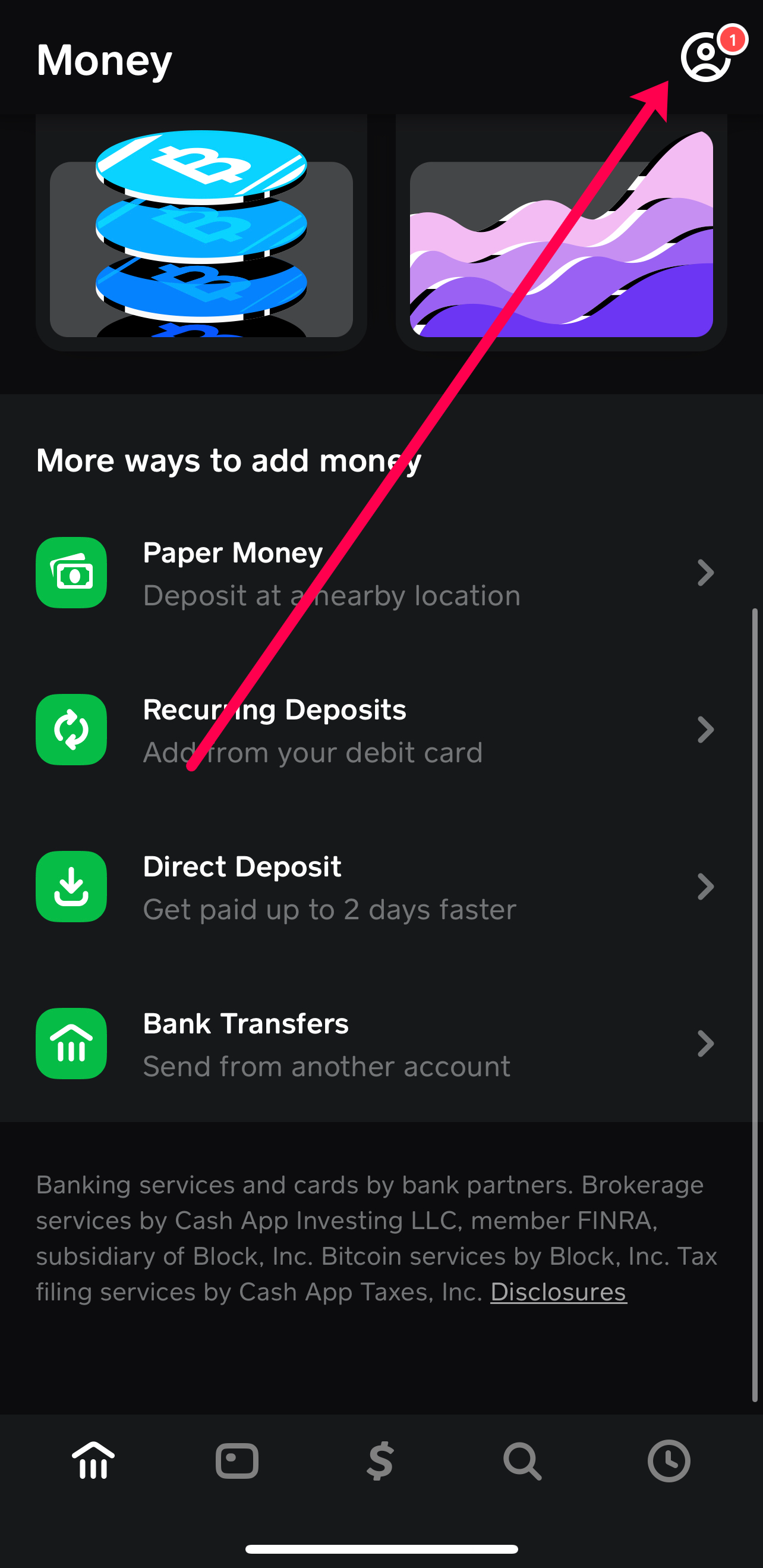
To set up direct deposit, you will need your unique Cash App account and routing numbers. These are readily available within the Cash App by tapping the Banking tab (the house icon), then selecting “Direct Deposit,” and finally “Get Account Number.” Once you have these details, you simply provide them to your employer’s payroll department, the government agency, or any other payer. This process typically involves filling out a direct deposit form, which usually takes only a few minutes.
The benefits of utilizing direct deposit are substantial. It eliminates the need for physical checks, reducing the risk of loss or theft and bypassing inconvenient check-cashing fees that can eat into your earnings. Funds are usually available much faster, often on payday or even up to two days earlier, offering a distinct financial advantage. This consistent influx of funds directly into your Cash App balance makes budgeting easier, as you can reliably anticipate when your money will arrive, allowing for better allocation towards bills, savings, and discretionary spending.
Considerations for Direct Deposit
While largely beneficial, there are a few considerations. Initially, some employers may require a verification period to ensure the account details are correct. It’s also important to confirm that your employer supports direct deposit to third-party financial services like Cash App. Cash App imposes a limit on direct deposit amounts, typically up to $25,000 per deposit and $50,000 per day, which should accommodate most users’ income needs. Standard processing times mean funds are usually available as soon as your payer releases them, but occasional delays can occur depending on banking holidays or specific payroll processes.
Method 2: Cash Deposits – Bridging the Physical and Digital
For users who primarily deal in physical cash, Cash App offers a convenient solution to load money onto their card: retail cash deposits. This method effectively bridges the gap between traditional cash-based transactions and the digital financial ecosystem, ensuring that even physical currency can be readily utilized with your Cash App Card.
Depositing Physical Cash at Retailers
Cash App has partnered with numerous major retailers across the United States, including Walmart, 7-Eleven, Walgreens, CVS, and Dollar General, allowing users to deposit physical cash directly into their Cash App balance. The process is straightforward:
-
Generate a Barcode: Open your Cash App, tap the Banking tab, select “Deposit Cash,” and follow the prompts to generate a unique barcode.
-
Visit a Participating Store: Locate the nearest participating retailer.
-
Present Barcode and Cash: At the cashier, inform them you want to add money to your Cash App, present the barcode, and hand over the cash. The cashier will scan the barcode, and the funds will typically be instantly added to your Cash App balance. You will receive a digital receipt within the app and often a paper receipt from the store.
This method is particularly valuable for individuals who receive cash payments for odd jobs, sell items, or simply prefer to manage their finances using physical currency for some transactions. It offers immediate access to funds, which can then be spent via the Cash App Card, transferred, or invested.
Understanding Fees and Limits for Cash Deposits
It’s crucial to be aware of the fees and limits associated with cash deposits. Retailers typically charge a small fee for this service, which can range from $1 to $4 per transaction. This fee is deducted from the deposited amount or charged separately, so it’s wise to factor this into your financial planning. Cash App also imposes limits on how much cash you can deposit:
-
Per Transaction: Generally, a minimum of $5 and a maximum of $500.
-
Daily: Up to $1,000.
-
Weekly: Up to $4,000.
-
Monthly: Up to $4,000.
These limits are designed to prevent money laundering and ensure compliance with financial regulations. Users should be mindful of these thresholds, especially if planning to deposit larger sums over a short period. To minimize costs, consider consolidating smaller cash amounts into fewer, larger deposits to pay fewer transaction fees, aligning with sound financial management principles.
Method 3: Linking Bank Accounts and Debit Cards – Seamless Digital Transfers
For users already integrated into the traditional banking system, linking existing bank accounts and debit cards to Cash App provides a convenient and flexible way to transfer funds. This method facilitates seamless movement of money between your conventional financial institutions and your Cash App balance, offering both speed and control.
Transferring Funds from a Linked Bank Account
Connecting your bank account to Cash App is a secure process that typically involves verifying your banking credentials through a third-party service like Plaid, or by Cash App sending small micro-deposits to your account for you to confirm. Once linked, you can initiate transfers directly from your bank account to your Cash App balance.
-
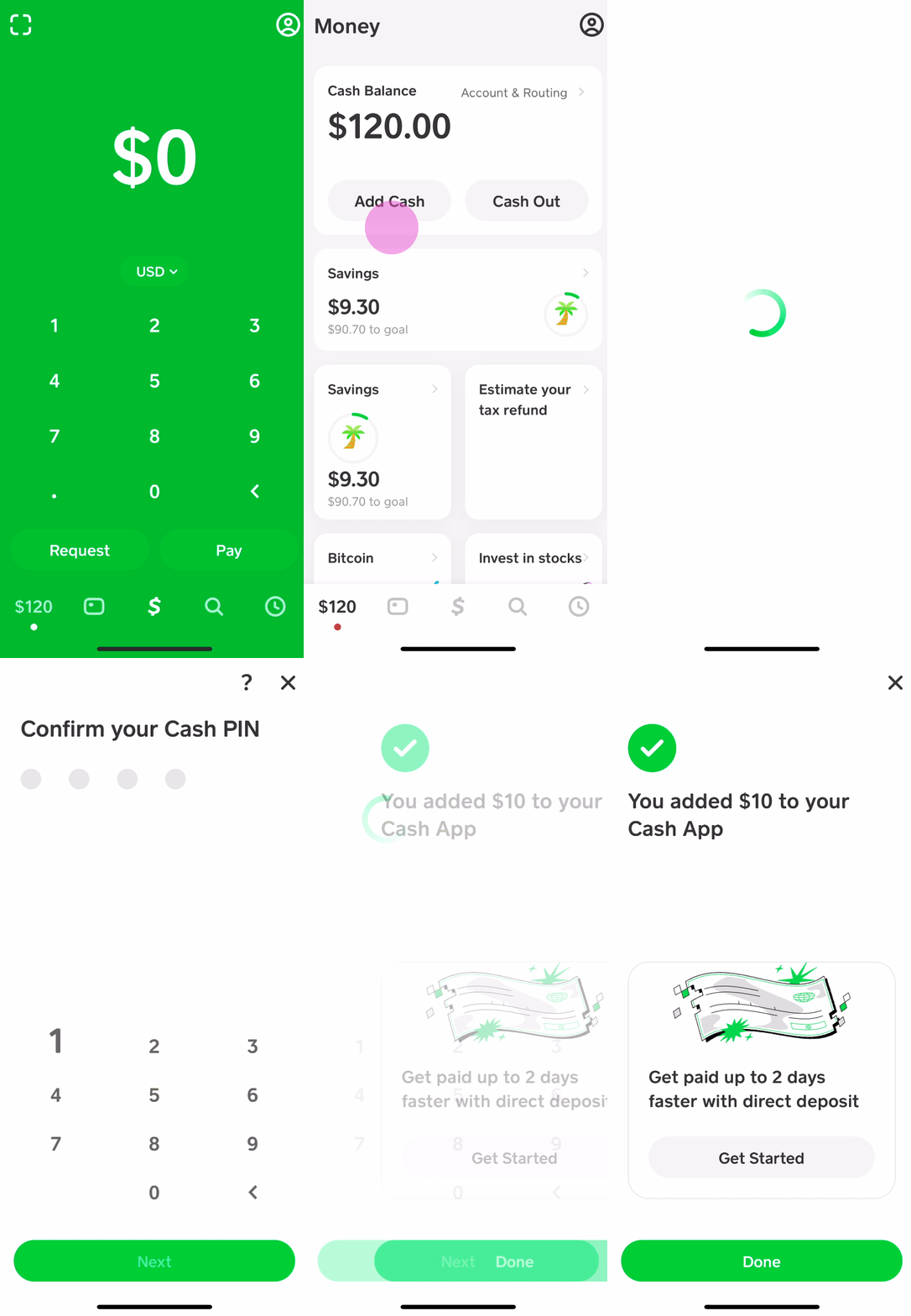
Navigate to the Banking Tab: In Cash App, select the Banking tab.
-
Add Cash: Tap the “Add Cash” button.
-
Enter Amount: Input the desired amount.
-
Confirm Transfer: Confirm the transaction.
Standard transfers from a linked bank account usually take 1-3 business days to clear, with no associated fees from Cash App. This method is ideal for moving larger sums or for routine transfers where immediate access isn’t critical. It integrates your Cash App balance into your broader financial ecosystem, making it easy to pull funds from your main checking or savings account as needed.
Using a Linked Debit Card for Instant Funding
For situations requiring immediate access to funds, linking a debit card is the fastest option.
-
Add Debit Card: Go to the “Linked Banks” section in Cash App and link your debit card if you haven’t already. This usually involves entering the card number, expiration date, CVV, and zip code.
-
Initiate Instant Transfer: Similar to bank transfers, go to the Banking tab, tap “Add Cash,” enter the amount, and confirm the instant transfer.
Funds transferred via a linked debit card are typically available in your Cash App balance instantly. However, Cash App charges a small fee for instant transfers, usually ranging from 0.5% to 1.75% of the transaction amount, with a minimum fee of $0.25. While this fee provides immediate liquidity, financially savvy users will weigh the cost against the urgency of the need. Instant transfers are best reserved for emergencies, last-minute payments, or when you absolutely cannot wait for a standard bank transfer to process.
Method 4: Receiving Funds from Other Cash App Users – Peer-to-Peer Power
One of Cash App’s foundational strengths lies in its robust peer-to-peer (P2P) payment system. This feature allows users to send and receive money from friends, family, or even customers for small services directly within the app, making it an incredibly convenient way to load funds onto your Cash App Card.
The Simplicity of Peer-to-Peer Payments
Receiving money from another Cash App user is effortlessly simple. If someone sends you money, it automatically appears in your Cash App balance. You can also actively request money from other users:
-
Tap the “Request” Icon: On the main Cash App screen, enter the amount you wish to request.
-
Select Contact: Choose the person you want to request money from (or manually enter their $Cashtag, phone number, or email).
-
Add Note (Optional): Include a brief note explaining the request.
-
Send Request: Tap the “Request” button.
Once the sender approves the request, the funds are instantly added to your Cash App balance. There are typically no fees for standard P2P transfers, making it a cost-effective solution for splitting bills, repaying debts, or receiving payments for small gigs or informal services. This method fosters a social aspect of finance, simplifying transactions among a network of users.
Managing Received Funds
Funds received from other Cash App users are immediately available in your Cash App balance. This means you can instantly spend them using your Cash App Card, transfer them to a linked bank account, or even use them to invest through Cash App’s integrated features. It’s important to always verify the sender and the amount received, especially if you were expecting a specific payment, to ensure accuracy and prevent any potential misunderstandings. The real-time nature of these transfers makes Cash App an excellent tool for managing incoming funds from various personal and informal sources.
Maximizing Your Cash App Card for Optimal Financial Management
Beyond merely loading funds, optimizing your use of the Cash App Card involves strategic financial practices that enhance budgeting, security, and overall financial health.
Budgeting and Tracking Spending
The Cash App provides an intuitive interface for monitoring your financial activity. By consistently reviewing your transaction history, you can gain valuable insights into your spending patterns. Categorizing your expenditures (mentally or through external budgeting tools) can further aid in identifying areas where you might be overspending or where savings can be made. Integrating your Cash App Card into a broader personal budgeting strategy – perhaps by dedicating it to specific spending categories like groceries or entertainment – can help maintain fiscal discipline and achieve financial goals.
Security and Best Practices
Maintaining the security of your Cash App account and Card is paramount. Always enable strong security features within the app, such as a PIN, Face ID, or Touch ID for transactions, and two-factor authentication (2FA) for logging in. Regularly review transaction alerts for any unusual activity and report suspicious transactions immediately. Be vigilant against phishing attempts and scams; Cash App will never ask for your PIN or sign-in code via email or text. Treat your Cash App Card like any other debit card, guarding your card details and reporting lost or stolen cards promptly. Financial vigilance is your first line of defense against potential fraud.

Strategic Use of Boosts and Rewards
One of the unique advantages of the Cash App Card is access to “Boosts.” These are instant discounts applied to purchases made with your Cash Card at specific merchants. Boosts can range from percentages off at coffee shops to specific dollar amounts off at grocery stores. By actively checking and selecting relevant Boosts before making a purchase, you can effectively reduce your daily expenses and save money on items you would buy anyway. This acts as a form of immediate cashback or discount, enhancing your purchasing power and contributing to your overall financial well-being. Smart users integrate Boosts into their spending habits, turning everyday purchases into opportunities for savings.
aViewFromTheCave is a participant in the Amazon Services LLC Associates Program, an affiliate advertising program designed to provide a means for sites to earn advertising fees by advertising and linking to Amazon.com. Amazon, the Amazon logo, AmazonSupply, and the AmazonSupply logo are trademarks of Amazon.com, Inc. or its affiliates. As an Amazon Associate we earn affiliate commissions from qualifying purchases.