
In an increasingly interconnected world, the security of our homes and businesses has become a paramount concern. While wireless security solutions offer convenience, wired security camera systems continue to stand out for their unparalleled reliability, stability, and robust performance. Opting for a wired setup provides a dedicated, consistent connection that minimizes interference and maximizes data integrity, making it a preferred choice for serious security needs. This comprehensive guide will walk you through the entire process of installing a wired security camera system, empowering you to take control of your property’s safety with confidence and technical proficiency.
1. Why Choose Wired Security Cameras? Understanding the Advantages
Before diving into the installation process, it’s crucial to understand the inherent benefits that wired security camera systems offer over their wireless counterparts. These advantages contribute significantly to a more reliable and secure surveillance infrastructure.
Reliability and Stability
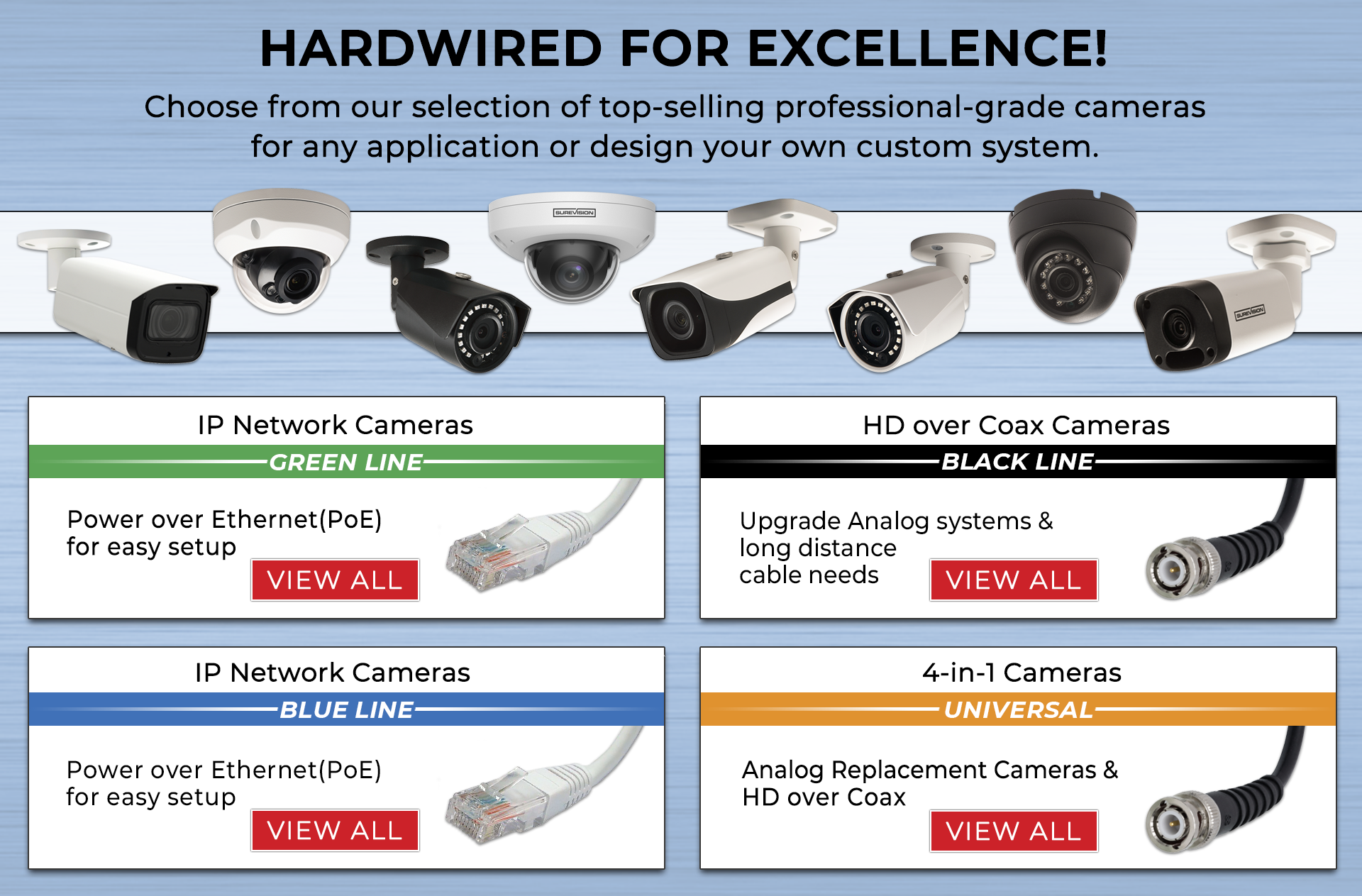
Wired cameras, particularly those utilizing Ethernet cables for power over Ethernet (PoE) or coaxial cables, establish a direct, physical connection to your network and power source. This direct link virtually eliminates common wireless issues such as signal drops, Wi-Fi interference, and bandwidth congestion. The result is a consistently stable video feed, crucial for continuous monitoring and critical event capture, ensuring you never miss a moment due to connectivity woes. This stability is particularly important in environments with many wireless devices, where signal saturation can cripple less robust systems.
Enhanced Security Features
Beyond mere connectivity, wired systems often boast superior security features. Data transmitted over a dedicated cable is inherently more secure against interception and jamming compared to wireless signals, which can be vulnerable to sophisticated hacking attempts if not properly encrypted. Furthermore, wired cameras typically connect to a Network Video Recorder (NVR) or Digital Video Recorder (DVR) for local storage, reducing reliance on cloud services that may pose privacy concerns or incur subscription fees. NVRs/DVRs often offer advanced encryption protocols and tamper detection features, safeguarding your footage from unauthorized access. Their physical connection also makes them harder to disable or tamper with remotely, adding an extra layer of physical security.
Superior Image Quality
The dedicated bandwidth provided by wired connections allows for higher resolution video transmission without compression artifacts or latency. This means clearer, sharper images, and smoother video playback, which is vital for identifying faces, license plates, or other critical details. While wireless cameras are improving, they often still compromise on resolution or frame rate to manage bandwidth constraints. Wired systems, especially those using Cat5e or Cat6 Ethernet cables, can effortlessly handle 4K and even 8K video streams, ensuring that your surveillance footage is of the highest possible quality for forensic analysis or general monitoring. This distinction can be critical when detailed evidence is required.
Long-Term Cost-Effectiveness
While the initial setup of a wired system might seem more involved due to cabling, it often proves more cost-effective in the long run. There are no batteries to replace or recharge, no reliance on fluctuating Wi-Fi signals that might require range extenders, and frequently, no ongoing cloud storage subscription fees. The durable nature of wired connections and the robust construction of professional-grade wired cameras mean fewer maintenance issues and a longer operational lifespan. The peace of mind from a system that reliably works day in and day out, with minimal intervention, translates into significant savings in time and resources over its lifetime.
2. Pre-Installation Planning: Laying the Foundation for Success
A successful wired security camera installation hinges on meticulous planning. Rushing this phase can lead to inefficiencies, compromised coverage, and future headaches. Thoughtful preparation ensures optimal performance and simplifies the entire process.
Site Survey and Camera Placement
Begin with a thorough site survey. Walk around your property, identifying key areas that require surveillance: entry points (doors, windows), high-value asset locations, blind spots, and common areas. Consider the field of view (FoV) for each camera and potential obstacles like trees, walls, or glare from direct sunlight. Aim for overlapping coverage where possible to eliminate blind spots. Also, consider legal aspects, especially if cameras face public areas; privacy laws vary by region. Mark precise mounting locations, taking into account cable routing paths. Optimal camera height is typically 8-10 feet to deter tampering while still capturing clear facial features.
Equipment Selection
Choosing the right components is crucial.
-
NVR (Network Video Recorder) or DVR (Digital Video Recorder): NVRs are for IP cameras (Ethernet/PoE), offering higher resolutions and advanced features. DVRs are for analog (coaxial) cameras. Select one with enough channels for your current and future camera count and sufficient storage capacity (HDD size) for your desired recording duration.
-
Cameras: IP cameras (PoE) are generally preferred for new installations due to superior image quality and flexibility. Choose camera types based on location: dome cameras for discreet indoor use, bullet cameras for outdoor visibility and deterrent, PTZ (Pan-Tilt-Zoom) for active monitoring, and specialized cameras like fisheye for wide-angle views. Consider resolution (1080p, 4K), night vision capabilities, and weatherproofing (IP rating) for outdoor units.
-
Cabling: For IP cameras, use Cat5e or Cat6 Ethernet cables, preferably solid core for longer runs. For analog cameras, RG59 or RG6 coaxial cables are standard. Purchase bulk cable and connectors (RJ45 for Ethernet, BNC for coaxial) along with a crimping tool. Ensure outdoor cables are UV-resistant and rated for direct burial if needed.
-
Power Supplies: If not using PoE, individual power adapters for each camera will be necessary. For PoE systems, a PoE-enabled NVR or a separate PoE switch will power the cameras directly through the Ethernet cable.
-
Tools: Essential tools include a drill (with various bits), screwdrivers, a wire stripper, cable cutters, a crimping tool, a cable tester, zip ties, conduit (for outdoor runs), and a ladder.
Network and Power Considerations
For IP cameras, ensure your network infrastructure can handle the increased traffic. A dedicated PoE switch is often recommended to isolate camera traffic from your main home network and simplify power delivery. Verify your router has enough available LAN ports or plan for an additional network switch. For power, assess electrical outlet availability near the NVR/DVR and consider surge protectors. If using individual power adapters, ensure outlets are available near each camera’s mounting point. Plan for an Uninterruptible Power Supply (UPS) for the NVR/DVR to ensure continued recording during power outages.
Cable Management Strategy
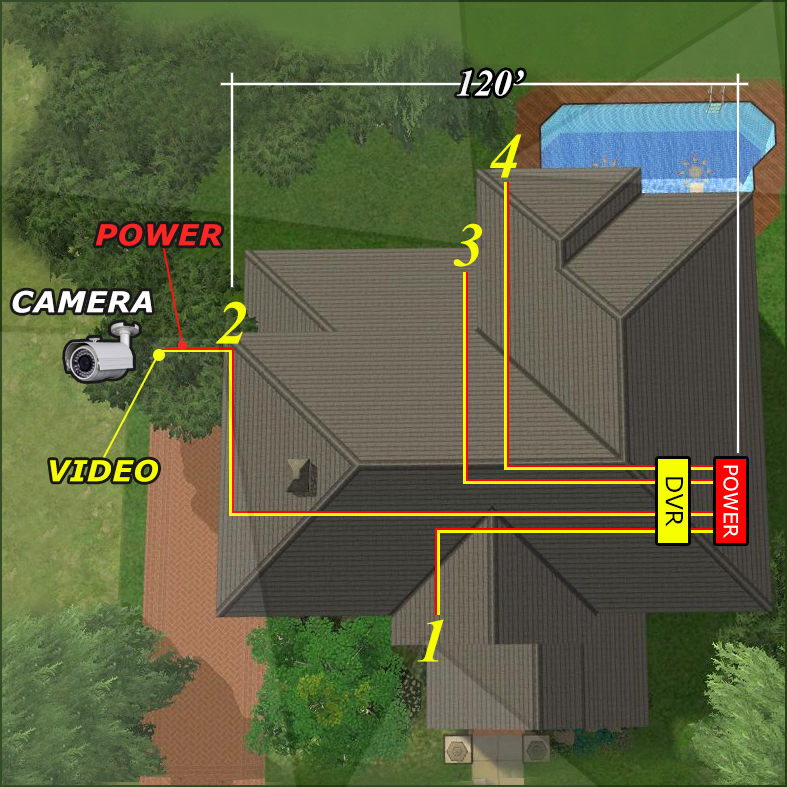
Effective cable management is critical for aesthetics, protection, and ease of maintenance. Plan the shortest yet safest routes for your cables. Avoid running cables near high-voltage lines or sources of electromagnetic interference. For outdoor runs, use weatherproof conduit to protect cables from the elements, pests, and potential damage. Inside, run cables through walls, attics, or basements to keep them hidden and secure. Use cable clips, ties, and wall plates for a neat and professional finish. Document your cable runs for future troubleshooting.
3. The Installation Process: Step-by-Step Implementation
With meticulous planning complete, you’re ready to physically install your wired security camera system. Patience and attention to detail during this phase will ensure a robust and reliable setup.

Mounting the Cameras
Using your pre-marked locations, securely mount each camera. For outdoor cameras, use appropriate hardware for the surface (wood, brick, stucco) and ensure the mounting screws are tightened firmly. Position the camera for optimal viewing angles, referring to your site survey. Crucially, pay attention to weatherproofing. If your camera has a movable base, ensure all cable entry points are sealed with silicone caulk to prevent moisture intrusion, even if the camera itself is weatherproof. Test the camera’s range of motion and lock it into place.
Running the Cables
This is often the most time-consuming part.
-
Indoor Routing: For a professional look, run cables through walls, ceilings, and floors. Use a fish tape to pull cables through difficult spaces. Drill small, strategically placed holes (e.g., behind molding, inside closets) to conceal the cables. Ensure you’re not drilling into electrical wires or plumbing.
-
Outdoor Routing: Utilize conduit for all outdoor cable runs. This protects cables from UV degradation, moisture, rodents, and physical damage. Bury conduit if possible for maximum protection and aesthetics, ensuring it’s deep enough to avoid accidental damage. If running along exterior walls, use appropriate cable clips or ties, keeping cables taut and tidy.
-
Cable Lengths: Measure and cut cables to the required lengths, adding a little extra slack for future adjustments. Avoid excessive slack inside walls, but also ensure cables aren’t stretched too tightly. Label both ends of each cable as you run them to identify which camera they belong to at the NVR/DVR.
Connecting to the NVR/DVR and Power
Once all cables are run, it’s time to make the connections.
-
Terminating Cables: If you bought bulk cable, you’ll need to terminate the ends. For Ethernet (Cat5e/Cat6) cables, use an RJ45 connector and a crimping tool, following either the T568A or T568B wiring standard consistently. For coaxial (RG59/RG6) cables, attach BNC connectors. Use a cable tester to verify continuity and proper wiring for each terminated cable.
-
NVR/DVR Connection: Connect the terminated cables to the appropriate ports on your NVR or DVR. For PoE systems, simply plug the Ethernet cables into the PoE ports on the NVR or PoE switch. For analog systems, connect the BNC video cables and separate power cables (if not using power-over-coax) to the DVR.
-
Powering the System: Connect your NVR/DVR to a power outlet, preferably through a surge protector and UPS. Power on the system. If using individual camera power adapters, connect them to their respective cameras and power outlets.
Initial System Setup and Configuration
With physical connections established, the software setup begins.
-
Software Installation: Connect a monitor and mouse/keyboard to your NVR/DVR. Follow the on-screen prompts to complete the initial setup, which typically involves creating an administrator password (crucial for security), setting the date and time, and configuring basic network settings.
-
Network Setup: Ensure your NVR/DVR is connected to your local network (LAN) via an Ethernet cable. Configure its IP address (static IP is often recommended) and subnet mask. This will allow you to access the system from other devices on your network.
-
Camera Pairing/Detection: Most NVRs will automatically detect and add connected PoE IP cameras. For others, you may need to manually add cameras by entering their IP addresses or scanning for them on the network. For DVRs, cameras should appear instantly once connected. Verify that all cameras are recognized and displaying video feeds.
-
Password Creation: Immediately change default camera passwords (if applicable) and ensure your NVR/DVR has a strong, unique password. This is your first line of defense against unauthorized access.
4. Post-Installation Optimization and Maintenance
A well-installed system is just the beginning. Ongoing optimization and regular maintenance are essential to ensure your wired security cameras operate at peak performance for years to come.
Fine-Tuning Camera Settings
Access your NVR/DVR’s interface to customize settings for each camera.
-
Motion Detection Zones: Define specific areas within the camera’s view where motion detection should be active. This reduces false alarms from passing cars or swaying branches. Adjust sensitivity levels to minimize unnecessary recordings.
-
Recording Schedules: Set continuous recording, motion-triggered recording, or scheduled recording based on your needs. For instance, you might record continuously during business hours but only on motion at night.
-
Resolution and Frame Rate: While your wired system supports high quality, you might adjust resolution and frame rate to balance image quality with storage consumption. Higher settings mean clearer footage but fill your hard drive faster.
-
Image Enhancements: Experiment with brightness, contrast, and backlight compensation (BLC) or wide dynamic range (WDR) settings to optimize image clarity in challenging lighting conditions.
Remote Access Setup
The ability to view your camera feeds remotely from a smartphone or computer is a key feature.
-
Mobile App Configuration: Download the manufacturer’s dedicated mobile app. You’ll typically register an account and then add your NVR/DVR using a QR code or its serial number.
-
Network Configuration (DDNS/P2P): Many modern NVRs offer P2P (peer-to-peer) connectivity, simplifying remote access without complex network configurations. If P2P isn’t available or preferred, you might need to configure Dynamic DNS (DDNS) and perform port forwarding on your router. This involves assigning specific ports for your NVR/DVR and forwarding external traffic to them, allowing remote access. Consult your NVR/DVR manual and router documentation carefully for this advanced step, as incorrect settings can compromise network security.
Regular Maintenance Checks
Proactive maintenance prevents issues and extends the life of your system.
-
Cleaning Lenses: Periodically clean camera lenses with a soft, lint-free cloth to remove dust, dirt, and spiderwebs that can obscure the view.
-
Checking Connections: Physically inspect cable connections at both the camera and NVR/DVR ends to ensure they are secure and free from corrosion or damage.
-
Firmware Updates: Regularly check the manufacturer’s website for firmware updates for your NVR/DVR and cameras. Updates often include security patches, bug fixes, and new features. Apply them following manufacturer instructions.
-
Data Backup and Review: Periodically review recorded footage to ensure cameras are capturing what they should. Consider backing up critical footage to external storage if your NVR/DVR doesn’t have redundant storage options.
Troubleshooting Common Issues
Even with a robust wired system, minor issues can arise.
-
No Video/Blank Screen: Check power to the camera and NVR/DVR. Verify cable connections and ensure the cable itself isn’t damaged. Use a cable tester. Restart the NVR/DVR and the problematic camera.
-
Network Connectivity Problems: Ensure the NVR/DVR is properly connected to your router. Check IP address settings. Ping the NVR/DVR’s IP address from another device on your network.
-
Power Loss: If a camera loses power, check its power adapter or, for PoE, verify the PoE switch or NVR port is functioning. Test the power outlet.
-
False Motion Alarms: Adjust motion detection sensitivity, define narrower detection zones, or consider scheduling motion detection only during specific hours.
5. Integrating with Smart Home Ecosystems and Future-Proofing
A wired security camera system can be more than just standalone surveillance; it can become an integral part of a larger, intelligent security framework.
Smart Home Integration
Many modern NVRs and IP cameras offer integration capabilities with popular smart home platforms like Amazon Alexa, Google Assistant, or Apple HomeKit. This allows for voice control (e.g., “Alexa, show me the front door camera”), scene automation (e.g., lights turn on when motion is detected by a camera at night), and centralized management alongside other smart devices. Research compatibility before purchasing to ensure seamless integration if this feature is important to you. Such integration enhances convenience and elevates the security system from reactive monitoring to proactive automation.
Scalability and Upgrades
When planning your wired system, consider future scalability. An NVR with more channels than your initial camera count allows for easy expansion. Similarly, running extra conduit or larger gauge cables during the initial installation can save significant effort if you decide to add more cameras or upgrade to higher-resolution models in the future. As technology advances, you might want to switch to cameras with advanced analytics (e.g., facial recognition, license plate recognition) or higher resolution. A robust cabling infrastructure will support these upgrades with minimal disruption.
Cybersecurity Best Practices
Even a wired system requires vigilance against digital threats.
-
Strong, Unique Passwords: Use complex passwords for your NVR/DVR, cameras, and remote access accounts. Avoid default passwords at all costs.
-
Network Segmentation: For advanced users, consider placing your NVR/DVR and cameras on a separate VLAN (Virtual Local Area Network) to isolate them from your main home or business network, minimizing the risk if one device is compromised.
-
Regular Updates: As mentioned, keep firmware updated to patch vulnerabilities.
-
Disable Unused Services: Turn off any NVR/DVR services (e.g., UPnP, Telnet) that you don’t actively use to reduce the attack surface.
Conclusion
Installing a wired security camera system is a significant undertaking that, when executed correctly, provides an unparalleled level of security and peace of mind. By diligently planning your layout, carefully selecting your equipment, meticulously running your cables, and committing to ongoing maintenance, you can build a robust, reliable surveillance infrastructure that stands the test of time. This guide has equipped you with the knowledge and steps necessary to confidently embark on your DIY installation journey, transforming your property into a more secure environment through the power of wired technology. Embrace the control and reliability that wired security cameras offer, and rest assured that your most valuable assets are under vigilant watch.
aViewFromTheCave is a participant in the Amazon Services LLC Associates Program, an affiliate advertising program designed to provide a means for sites to earn advertising fees by advertising and linking to Amazon.com. Amazon, the Amazon logo, AmazonSupply, and the AmazonSupply logo are trademarks of Amazon.com, Inc. or its affiliates. As an Amazon Associate we earn affiliate commissions from qualifying purchases.