
In the rapidly evolving landscape of web development, speed and efficiency are no longer luxuries but absolute necessities. As users demand lightning-fast experiences and developers strive for seamless workflows, the tools we choose to build our digital products become paramount. Enter Vite, a modern frontend build tool that has quickly become a game-changer, fundamentally rethinking how we develop for the web.
Vite, pronounced /vit/ like “veet” (French for “fast”), lives up to its name by offering an incredibly fast development experience. It leverages native ES modules in the browser during development, allowing for instant server start-ups and blazing-fast Hot Module Replacement (HMR). This innovative approach drastically reduces the time spent waiting for your dev server to compile, enabling a more fluid and productive coding session. For businesses, this translates directly into faster time-to-market, reduced development costs, and an enhanced ability to innovate and respond to market demands. For brands, it means delivering superior user experiences from the outset, reinforcing a commitment to quality and efficiency.
This comprehensive guide will walk you through the process of installing and setting up Vite, from understanding its core principles to launching your first project. We’ll explore not just the technical “how-to,” but also delve into why Vite matters for your tech stack, your brand’s digital presence, and your overall financial bottom line. Whether you’re a seasoned developer, a project manager, or a business owner keen on optimizing your digital strategy, mastering Vite installation is a crucial step towards building high-performance, future-proof web applications.
Understanding Vite’s Power: Why It’s Revolutionizing Frontend Development
Before diving into the installation specifics, it’s essential to grasp the underlying philosophy and advantages that make Vite a compelling choice for modern web development. Its emergence has challenged traditional bundlers, offering a fresh perspective on how applications should be built and served during development.
The Performance Edge: Instantaneous Development and Blazing HMR
Vite’s most celebrated feature is its unparalleled speed. Traditional bundlers often build your entire application before serving it, leading to noticeable delays, especially in larger projects. Vite circumvents this by using a “no-bundle” development server. It serves source code over native ES modules, allowing the browser to handle the module resolution. This means your development server starts almost instantly, regardless of your project’s size.
Furthermore, Vite’s Hot Module Replacement (HMR) is exceptionally fast. When you make a change to your code, only the modified module is reloaded and injected into the browser, rather than a full page refresh or a complete rebuild of the module graph. This leads to near-instantaneous feedback, drastically improving the developer experience (DX). From a technical standpoint, this translates to more iterations in less time, fostering a cycle of rapid experimentation and refinement. Financially, fewer idle minutes for developers means more features shipped per hour, optimizing resource allocation and accelerating product delivery schedules.
Beyond Speed: Developer Experience and Productivity
While speed is a significant factor, Vite’s design also heavily prioritizes developer experience. A delightful DX can significantly impact a team’s morale, productivity, and ultimately, a company’s ability to innovate. Vite achieves this through several mechanisms:
- Simplified Configuration: Unlike some older build tools that require extensive and often complex configuration files, Vite aims for sensible defaults and a minimal setup. For most projects, you can get up and running with very little custom configuration. When customization is needed, Vite’s plugin API is powerful yet straightforward.
- Rich Feature Set Out-of-the-Box: Vite supports TypeScript, JSX, CSS pre-processors (Sass, Less, Stylus), and PostCSS without requiring extra configuration. This “batteries-included” approach reduces friction and allows developers to focus on writing application logic rather than wrestling with build tool setups.
- Optimized Build for Production: While Vite shines in development with its no-bundle approach, it still uses Rollup under the hood for production builds. Rollup is highly optimized for outputting small, efficient bundles, ensuring that your users get the best possible performance when your application goes live. This dual-pronged approach offers the best of both worlds: lightning-fast development and highly optimized production assets.
For brands, investing in tools that enhance DX contributes to a strong employer brand. Attracting and retaining top tech talent is competitive, and providing a modern, efficient, and enjoyable development environment is a key differentiator. A positive developer experience fosters innovation, reduces burnout, and ultimately strengthens the brand’s reputation as a tech-forward organization.
Vite in the Modern Ecosystem: Framework Agnostic Power
Vite is not tied to a single framework. While it gained initial traction within the Vue.js ecosystem (being created by Evan You, the creator of Vue.js), it offers official templates and robust support for a wide array of popular frontend frameworks, including:
- React
- Vue (2 and 3)
- Svelte
- Lit
- Preact
This framework agnosticism makes Vite a versatile choice for teams working with different technologies or for organizations that need a flexible solution capable of supporting diverse project requirements. Its adaptability ensures that as technology trends shift, your investment in Vite remains relevant, providing a scalable and future-proof foundation for your web development efforts.
The Prerequisites: Gearing Up for Your Vite Project
Before you can harness the power of Vite, you need to ensure your development environment is properly set up. Like most modern JavaScript development tools, Vite relies on a few fundamental components to function correctly. These prerequisites are standard for web development and, if you’re already involved in the ecosystem, you likely have them installed.
Node.js: The Foundation of Modern JavaScript Development
Node.js is an open-source, cross-platform JavaScript runtime environment that allows JavaScript to be run outside a web browser. It’s the backbone for almost all modern frontend build tools, including Vite, as it provides the environment for executing package managers and build scripts.
How to Check If Node.js is Installed:
Open your terminal or command prompt and type:
node -v
If Node.js is installed, you’ll see a version number (e.g., v18.17.1).
How to Install Node.js:
If Node.js is not installed, or if your version is significantly outdated (Vite generally recommends Node.js versions 16.0.0 or higher), you have a few options:
- Official Website: The simplest method is to download the installer directly from the official Node.js website. Choose the “LTS” (Long Term Support) version, as it’s the most stable and recommended for most users.
- Node Version Manager (NVM): For developers who work on multiple projects that might require different Node.js versions,
nvm(Node Version Manager) is an excellent tool. It allows you to easily install, switch, and manage multiple Node.js versions on your machine.- Installation instructions for nvm can be found on its GitHub repository.
- Once nvm is installed, you can install a specific Node.js version with
nvm install <version>(e.g.,nvm install 18) and switch to it withnvm use <version>.
Ensuring you have a stable and up-to-date Node.js environment is the first critical step toward a smooth Vite installation.
Package Managers: npm, Yarn, or pnpm
Package managers are essential tools for installing, updating, and managing project dependencies. They automate the process of downloading and organizing libraries and frameworks that your project relies on. Vite can be used with any of the three dominant JavaScript package managers: npm, Yarn, or pnpm.
1. npm (Node Package Manager):
npm is the default package manager that comes bundled with Node.js. If you have Node.js installed, you automatically have npm.
How to Check If npm is Installed:
npm -v
You’ll see a version number (e.g., 9.6.7).
2. Yarn:
Yarn was developed by Facebook to address some performance and security concerns with npm at the time. It offers similar functionality to npm but with some notable differences in how it manages dependencies.
How to Check If Yarn is Installed:
yarn -v
You’ll see a version number (e.g., 1.22.19).
How to Install Yarn:
If you prefer Yarn, you can install it globally via npm:
npm install -g yarn
3. pnpm:
pnpm is a newer package manager that focuses on disk space efficiency and speed. It uses a content-addressable filesystem to store all packages on your disk, and links them into your node_modules folders, which means packages are never duplicated.
How to Check If pnpm is Installed:
pnpm -v
You’ll see a version number (e.g., 8.6.10).
How to Install pnpm:
You can install pnpm globally via npm:
npm install -g pnpm
Or use a standalone script provided by pnpm’s official documentation for a more robust installation.
While all three package managers will work perfectly with Vite, choosing one often comes down to team preference or specific project requirements. For beginners, npm is perfectly adequate as it’s included with Node.js.
Choosing Your Environment: IDE and Command Line
Finally, ensure you have a comfortable Integrated Development Environment (IDE) like Visual Studio Code, WebStorm, or Sublime Text, and are familiar with using your operating system’s command line interface (Terminal on macOS/Linux, Command Prompt or PowerShell on Windows). These tools are where you’ll be writing code and executing Vite commands.
With Node.js and your preferred package manager in place, you’re ready to move on to the core installation steps and kickstart your first Vite project.
Step-by-Step Vite Installation: Building Your First Project
With your development environment prepared, installing Vite and creating a new project is remarkably straightforward. Vite’s creators have streamlined this process to get you up and running with minimal friction. This section will guide you through initiating a new Vite project using popular package managers and exploring the basic project structure.
Vite projects are typically created using create-vite, a scaffolding tool that sets up a new project with your chosen framework and a basic configuration.
Creating a New Vite Project
The command to create a new Vite project is similar across all package managers, primarily differing in the initial keyword used (npm create, yarn create, pnpm create).
Initiating with npm
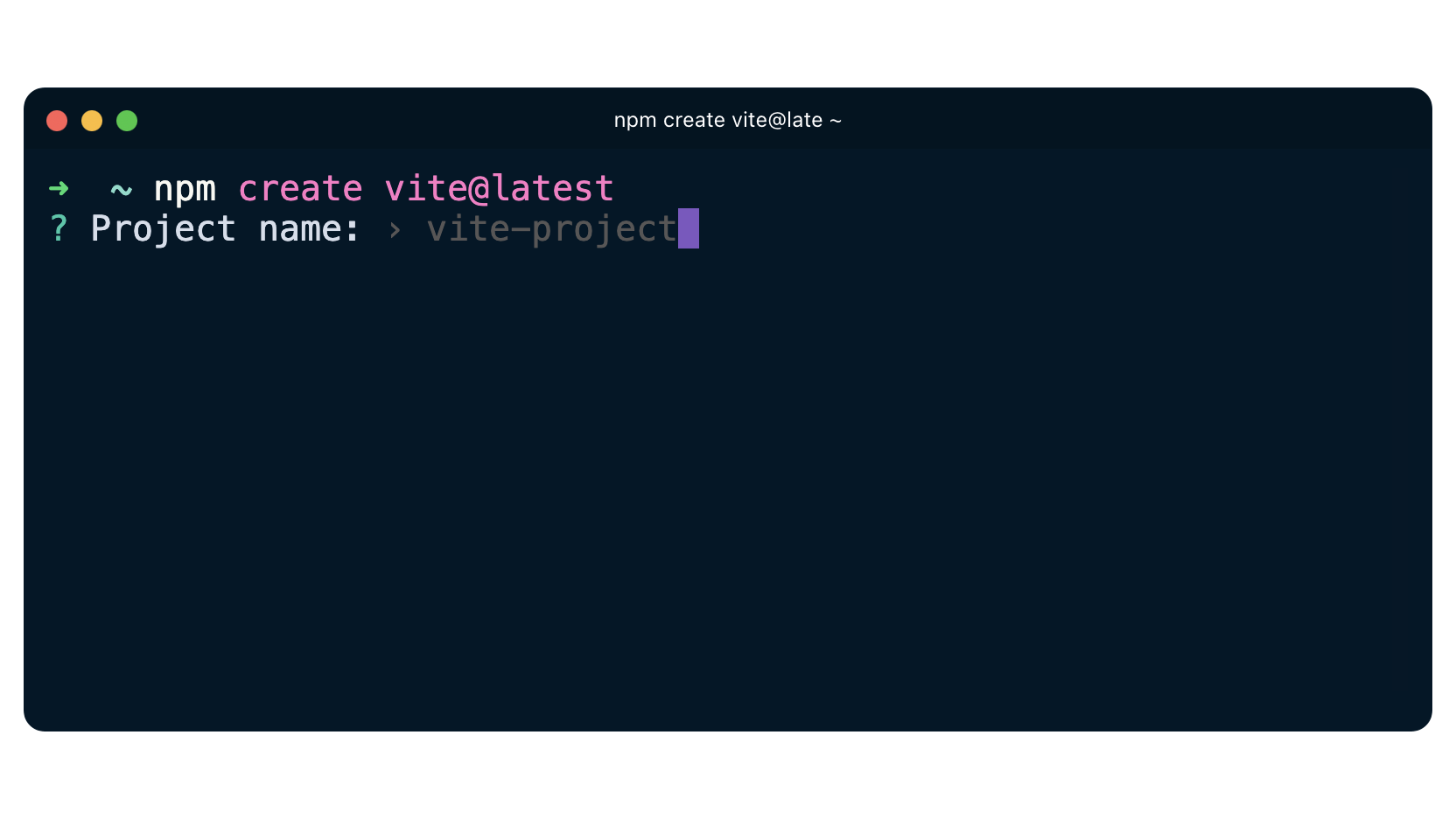
To create a new Vite project using npm, open your terminal or command prompt, navigate to the directory where you want to create your project, and run the following command:
npm create vite@latest
When you run this, create-vite will prompt you for a few pieces of information:
- Project Name: You’ll be asked to provide a name for your project (e.g.,
my-vite-app). This will be the name of the folder created for your project. - Select a Framework: You’ll then be presented with a list of popular frameworks. Use your arrow keys to navigate and Enter to select:
Vanilla(for plain JavaScript/TypeScript)VueReactPreactLitSvelte
- Select a Variant: After selecting a framework, you’ll choose a variant, typically offering options for JavaScript or TypeScript (e.g.,
ReactorReact-TS).
After making your selections, create-vite will scaffold the project structure.
Starting with Yarn
If Yarn is your preferred package manager, the command is very similar:
yarn create vite
The subsequent prompts for project name, framework, and variant will be the same as with npm.
Launching with pnpm
For pnpm users, the command follows the same pattern:
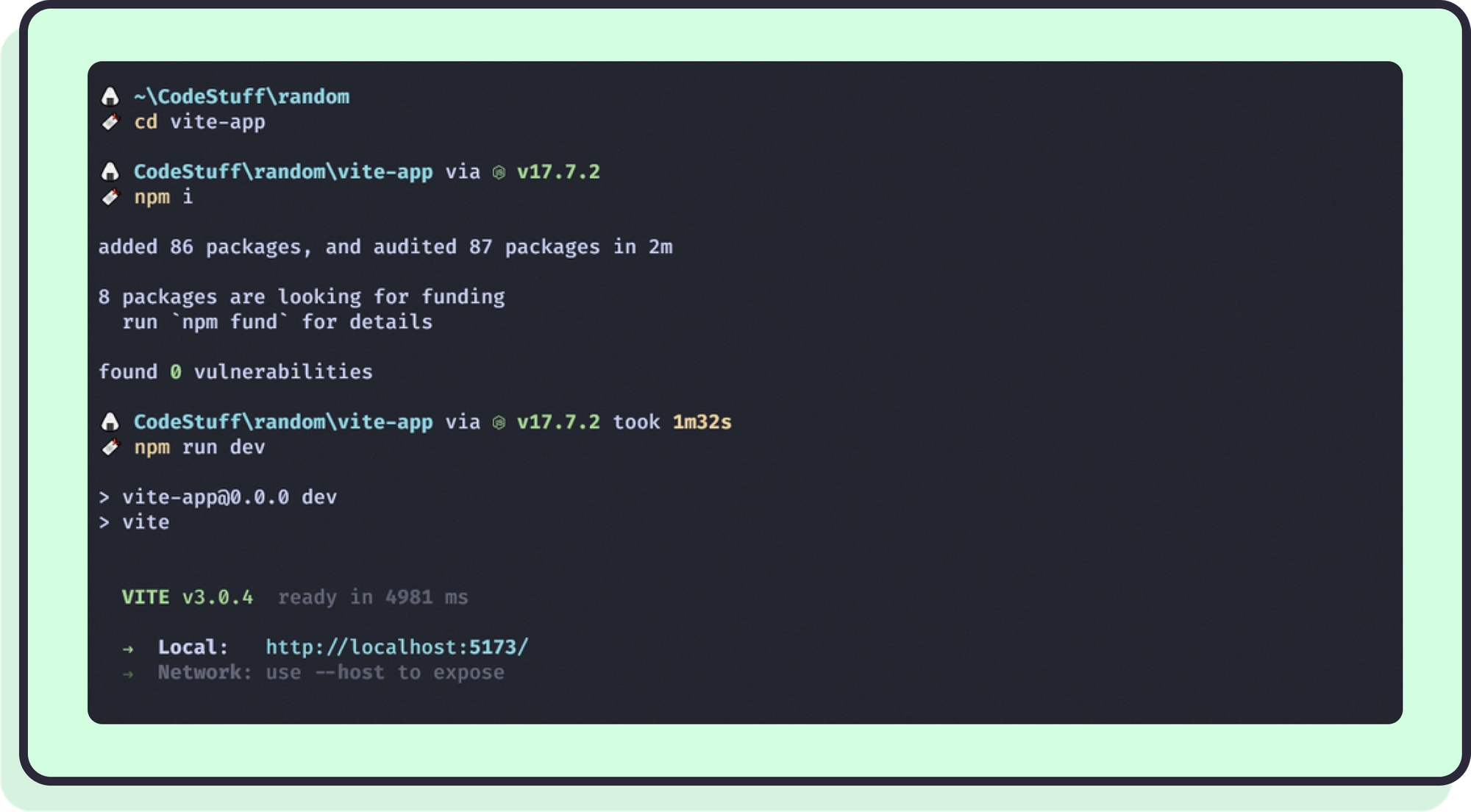
pnpm create vite
Again, you’ll be guided through the same interactive prompts to define your project.
Regardless of the package manager you choose, once the scaffolding is complete, you’ll see a message similar to this (example for a React project named my-vite-app):
Done. Now run:

  cd my-vite-app
  npm install
  npm run dev
These instructions guide you to the next crucial steps.
Navigating Your New Project and Installing Dependencies
The first instruction, cd my-vite-app (or whatever you named your project), tells you to change your current directory into the newly created project folder. This is where all your project files reside.
Once inside your project directory, the next step is to install the project’s dependencies. These are the external libraries and packages that Vite and your chosen framework need to function. Use the installation command corresponding to your chosen package manager:
- npm:
npm install - Yarn:
yarn(oryarn install) - pnpm:
pnpm install
This process might take a few moments as the package manager downloads and configures all the necessary dependencies. This step is crucial for setting up the local development environment that Vite utilizes.
Running Your Development Server
After the dependencies are installed, you’re ready to fire up your Vite development server and see your brand new application in action. The command for this is consistent across all package managers because it typically runs a script defined in your project’s package.json file.
npm run dev
# or
yarn dev
# or
pnpm dev
Upon running this command, Vite will start its development server. You’ll see output in your terminal indicating that the server is running, along with a local URL (usually http://localhost:5173/ or similar) where your application is accessible.
Open your web browser and navigate to the provided URL. You should see a basic “Hello Vite + [Your Framework]” starter page. Congratulations! You’ve successfully installed Vite and launched your first project.
Building for Production: Optimizing for the Real World
While npm run dev (or yarn dev, pnpm dev) is perfect for local development, you’ll need to create an optimized, production-ready bundle of your application when you’re ready to deploy it to a live server. Vite handles this with another simple command:
npm run build
# or
yarn build
# or
pnpm build
This command triggers Vite’s build process, which uses Rollup to bundle, minify, and optimize all your project’s assets (JavaScript, CSS, images, etc.) into a dist (distribution) folder. This dist folder contains static files that are highly optimized for performance, smaller in size, and ready to be served by any static file host (e.g., Netlify, Vercel, AWS S3, GitHub Pages).
For businesses, this optimization is critical. Smaller bundle sizes mean faster load times for end-users, which directly impacts user experience, SEO rankings, and conversion rates. Furthermore, optimized bundles can reduce hosting costs due to lower bandwidth consumption. Vite’s efficient build process ensures that your final product is not only fast to develop but also fast to deliver to your audience, aligning technical efficiency with tangible business benefits.
Optimizing Your Workflow: Vite’s Impact on Brand and Business
Vite’s technical prowess extends far beyond just fast development. Its core advantages ripple through various aspects of a business, significantly impacting brand perception, financial efficiency, and long-term strategic growth. Integrating Vite into your workflow is an investment that yields returns across multiple organizational pillars.
Speed and SEO: Boosting Your Digital Presence
In today’s competitive digital landscape, website performance is a critical factor for both user satisfaction and search engine rankings. Google and other search engines heavily favor fast-loading websites, penalizing slow ones. Vite’s ability to produce highly optimized, small production bundles directly contributes to faster page load times.
- Enhanced User Experience: A fast website means users spend less time waiting and more time engaging with your content or products. This leads to lower bounce rates, higher user retention, and a more positive overall experience, directly reflecting on your brand’s commitment to quality.
- Improved SEO: Faster load times are a key factor in search engine optimization (SEO). Websites that perform well in metrics like Core Web Vitals (Largest Contentful Paint, First Input Delay, Cumulative Layout Shift) are more likely to rank higher in search results. Higher rankings mean increased organic traffic, which translates to greater visibility for your brand and potentially more conversions or sales, directly impacting your financial returns on digital marketing efforts.
- Conversion Rate Optimization (CRO): For e-commerce sites or lead generation platforms, every second counts. Studies consistently show that even a one-second delay in page load time can lead to a significant drop in conversions. Vite’s optimizations help ensure your site loads quickly, maximizing the chances of converting visitors into customers, thereby boosting revenue.
Developer Retention and Talent Acquisition
A company’s tech stack and development practices play a crucial role in attracting and retaining top-tier talent. Developers, particularly those at the forefront of modern web development, seek environments that are efficient, enjoyable, and forward-thinking.
- Superior Developer Experience (DX): As discussed, Vite offers an exceptional DX with its instant server starts, lightning-fast HMR, and minimal configuration. This reduces frustration, allows developers to stay in a productive flow state, and makes the coding process more enjoyable.
- Attracting Top Talent: Companies using modern, efficient tools like Vite signal to potential candidates that they prioritize cutting-edge technology and developer well-being. This can be a significant advantage in the highly competitive tech job market, helping to attract skilled engineers who want to work with the best tools available.
- Increased Team Productivity and Morale: Happy and efficient developers are more productive. By minimizing build times and maximizing feedback loops, Vite helps teams ship features faster, leading to a greater sense of accomplishment and higher morale. This directly impacts project timelines and overall operational efficiency, ultimately reducing development costs per feature.
This focus on DX contributes to a strong “employer brand,” making your organization a more desirable place to work and reducing the high costs associated with developer turnover and recruitment.
Rapid Prototyping and Iteration: Accelerating Time-to-Market
The speed of Vite’s development server is not just about making developers happy; it has profound business implications, especially in areas like product development, design iteration, and marketing campaigns.
- Faster Feature Development: With instant feedback, developers can build and test new features more rapidly. This agile workflow allows businesses to iterate on ideas quickly, gather user feedback sooner, and push updates to market with unprecedented speed.
- Accelerated Design Sprints: Designers and frontend developers can collaborate more effectively. UI changes can be implemented and previewed almost instantly, allowing for quicker design iterations and a faster path to a polished user interface.
- Dynamic Marketing Campaigns: For marketing teams, the ability to rapidly develop and deploy landing pages, micro-sites, or interactive campaign elements can be a game-changer. Vite empowers quick creation and A/B testing, allowing campaigns to respond dynamically to market trends and optimize performance in real-time.
By shortening development cycles and accelerating time-to-market, Vite enables businesses to be more responsive, innovative, and competitive, directly influencing their revenue generation capabilities and strategic positioning.
Scalability and Future-Proofing: A Long-Term Investment
Vite’s modern architecture and reliance on native browser features position it as a future-proof tool for web development.
- Modern Web Standards: By leveraging native ES modules, Vite aligns with the direction of modern web standards, ensuring that your projects are built on a robust and evolving foundation.
- Support for Large-Scale Applications: Vite’s on-demand compilation scales well with large codebases, maintaining its speed advantages even as projects grow in complexity. This means your initial investment in Vite pays off over the long term, avoiding the need for costly migrations or refactoring down the line due to build tool limitations.
- Community and Ecosystem: With strong community support and a growing ecosystem of plugins and integrations, Vite is continuously evolving, ensuring its relevance and continued improvement.
Choosing Vite is not just about solving today’s development challenges; it’s about making a strategic investment in a tool that will support your brand’s growth and innovation for years to come, minimizing future technical debt and maximizing the longevity of your digital assets.
Beyond Installation: Leveraging Vite for Advanced Projects
While mastering the basic installation gets your foot in the door, Vite offers a rich ecosystem and advanced features that can further enhance your development workflow and the capabilities of your applications. Exploring these aspects allows you to fully harness Vite’s potential for more complex and robust projects.
Exploring Vite Plugins and Configuration
Vite’s default configuration is excellent for most projects, but its flexibility truly shines through its plugin API and vite.config.js (or vite.config.ts) file.
-
Customizing Build Processes: You can extend Vite’s functionality by installing and configuring plugins. These plugins can handle a wide range of tasks, such as integrating specific frameworks, optimizing assets, transforming code, or adding server-side features. For example, there are plugins for image optimization, SVG loading, GraphQL integration, and much more.
-
Tailoring Your Environment: The
vite.config.jsfile allows you to define aliases for easier imports, configure CSS pre-processors, set up proxies for API calls, adjust build options, and fine-tune various aspects of both the development server and the production build. This level of control ensures Vite can adapt to almost any project requirement, no matter how specialized. -
Examples of Common Configurations:
-
Proxying API Requests: Crucial for development to avoid CORS issues when your frontend and backend are on different origins:
javascript

// vite.config.js

export default {

  server: {

    proxy: {

      '/api': 'http://localhost:3000', // Proxy /api requests to your backend

    },

  },

};
-
Environment Variables: Vite provides a straightforward way to manage environment variables, which is essential for handling different settings between development and production (e.g., API keys, database URLs). Variables prefixed with
VITE_are exposed to your client-side code:// .env VITE_API_KEY=your_dev_api_key // In your app console.log(import.meta.env.VITE_API_KEY);
-
This configurability means that Vite isn’t just a starter tool but a powerful and adaptable foundation capable of supporting sophisticated web applications, providing the technical flexibility often required by large brands and complex products.
SSR and SSG with Vite: Enhancing Performance and SEO for Dynamic Content
For applications that require faster initial page loads, improved SEO for dynamic content, or better user experience on slower connections, Server-Side Rendering (SSR) and Static Site Generation (SSG) are crucial techniques. Vite offers excellent support for both.
- Server-Side Rendering (SSR): With SSR, your application’s initial HTML is rendered on the server, rather than entirely in the browser. This means users see content much faster, and search engine crawlers can more easily index dynamic content. Vite provides robust APIs and integration points to facilitate SSR setups, especially with frameworks like Vue and React. This is particularly beneficial for content-heavy sites, e-commerce platforms, or applications where initial load performance is paramount for user engagement and brand perception.
- Static Site Generation (SSG): SSG involves pre-rendering all possible pages of an application at build time, generating static HTML files. These files can then be served very quickly from a CDN, offering unparalleled performance, security, and scalability. Vite can be configured to work seamlessly with SSG frameworks and libraries, making it an excellent choice for blogs, documentation sites, marketing landing pages, and other content-focused websites where maximum performance and SEO are critical.
Implementing SSR or SSG with Vite can significantly boost your application’s performance metrics, contributing directly to better SEO, reduced bounce rates, and a more positive brand image, all of which have tangible financial benefits.
Community and Resources: Staying Connected and Up-to-Date
The strength of any open-source tool lies in its community. Vite boasts a vibrant and active community, which is a significant asset for troubleshooting, learning, and staying abreast of new developments.
- Official Documentation: The Vite official documentation is exceptionally well-written and comprehensive, serving as the primary resource for all things Vite.
- GitHub Repository: The Vite GitHub repository is where you can find the source code, report issues, and see upcoming features.
- Discord Server: The Vite Discord server is an active hub for discussions, getting help, and connecting with other developers in real-time.
- Blogs and Tutorials: The broader web development community constantly publishes articles, tutorials, and video guides on using Vite with various frameworks and advanced techniques.
Staying engaged with the Vite community ensures you can leverage the collective knowledge, find solutions to challenges, and keep your projects on the cutting edge of web technology. This continuous learning and adaptation are vital for any tech professional and for brands aiming to maintain a competitive edge.
Conclusion
Installing Vite is more than just running a few commands; it’s an adoption of a philosophy centered around speed, efficiency, and an exceptional developer experience. As we’ve explored, Vite’s technical innovations translate directly into profound benefits for your brand and financial health.
From significantly reducing development times and operational costs to boosting SEO, improving user engagement, and attracting top-tier talent, Vite offers a compelling value proposition. It allows development teams to be more productive, marketing teams to be more agile, and businesses to deploy faster, higher-performing digital products.
By embracing Vite, you’re not just choosing a build tool; you’re investing in a future-proof foundation that empowers rapid innovation, solidifies your brand’s digital presence, and ultimately drives better financial outcomes. The journey to mastering modern web development begins with a lightning-fast start, and for that, Vite is the definitive choice.
aViewFromTheCave is a participant in the Amazon Services LLC Associates Program, an affiliate advertising program designed to provide a means for sites to earn advertising fees by advertising and linking to Amazon.com. Amazon, the Amazon logo, AmazonSupply, and the AmazonSupply logo are trademarks of Amazon.com, Inc. or its affiliates. As an Amazon Associate we earn affiliate commissions from qualifying purchases.