
In the vibrant world of PC gaming, Grand Theft Auto V stands as a monument to open-world design, offering players unparalleled freedom within its expansive Los Santos and Blaine County. Yet, for many, the default experience, no matter how rich, is merely a canvas awaiting custom embellishment. This is where the powerful and often essential tool known as Script Hook V enters the scene, unlocking a universe of modifications that can transform gameplay, introduce new features, or simply add a touch of personal flair. This guide delves into the technical intricacies and practical steps required to successfully install Script Hook V, empowering you to navigate the exciting, albeit sometimes complex, landscape of GTA V modding.
Understanding Script Hook V and Its Fundamental Role
Before embarking on the installation journey, it’s crucial to grasp what Script Hook V is, why it’s indispensable for the GTA V modding community, and what fundamental prerequisites must be met to ensure a smooth operation. This foundational knowledge will not only facilitate the installation process but also aid in troubleshooting should any issues arise.
What is Script Hook V? The Modding Gateway
At its core, Script Hook V is a library that allows custom scripts to be used in Grand Theft Auto V. Think of it as a bridge or an API (Application Programming Interface) interceptor that hooks into the game’s executable. When the game launches, Script Hook V injects a custom DLL (Dynamic Link Library) file—dinput8.dll—into the game’s process. This specific DLL filename is often used by legitimate game components, making it a clever method for injecting custom code without immediately triggering anti-tampering measures.
Once dinput8.dll is loaded, it then loads ScriptHookV.dll, which contains the actual framework for running custom scripts written in various languages, primarily .asi (Another Scripting Interface), but also enabling .NET scripts (via Script Hook V .NET) and LUA scripts (via specific plugins). Without Script Hook V, the vast majority of user-created mods, from custom vehicles and weapons to complex mission scripts and graphical overhauls, would simply not function. It provides the essential interface that allows external code to interact with the game engine, reading game data, executing functions, and creating entirely new experiences.
Why Do Players Use Script Hook V? Unlocking Creative Freedom
The reasons for adopting Script Hook V are as diverse as the mods it supports. For many, it’s about pushing the boundaries of what’s possible within Los Santos. Script Hook V enables:
-
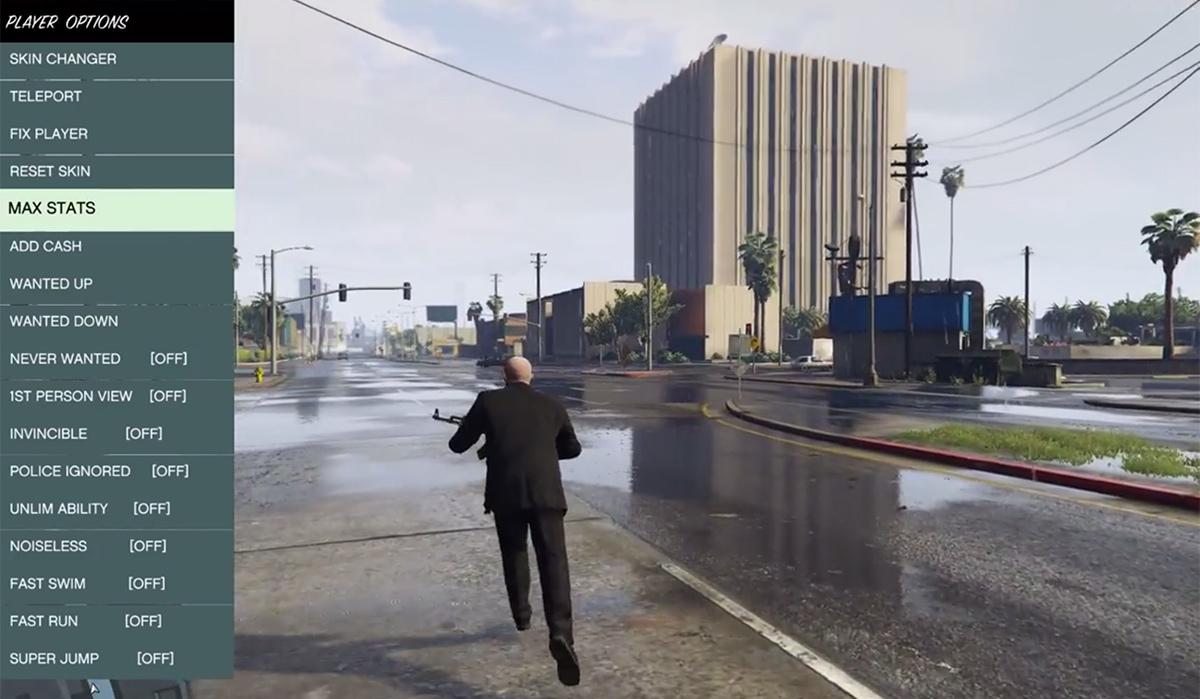
Enhanced Gameplay: Introducing features like teleportation, invincibility, infinite ammo, or even the ability to spawn any item or vehicle in the game. These “trainers” are often built upon Script Hook V.
-
Custom Scripting: Allowing modders to create entirely new missions, events, or character behaviors that extend beyond Rockstar’s original design. Imagine flying a jetpack or turning into a superhero—these often rely on Script Hook V.
-
Visual and Audio Overhauls: While many visual mods (like texture packs) don’t strictly require Script Hook V, some complex graphical enhancements or interactive visual effects might leverage its capabilities to dynamically alter the game world.
-
Troubleshooting and Debugging: For aspiring mod developers, Script Hook V provides tools and a stable environment to test and debug their creations, ensuring they function correctly before release.
Ultimately, Script Hook V transforms GTA V from a fixed, albeit expansive, game into a highly customizable platform, empowering players to tailor their single-player experience precisely to their desires.
Compatibility and Prerequisites: Ensuring a Smooth Foundation
Before proceeding with any file downloads or modifications, it’s critical to ensure your system and game installation meet the necessary prerequisites. Ignoring these can lead to frustrating errors, game crashes, or an incomplete modding experience.
-
Grand Theft Auto V PC Version: Script Hook V is specifically designed for the PC version of GTA V. It is not compatible with console versions (PlayStation, Xbox).
-
Up-to-Date Game: Rockstar Games frequently updates GTA V. Each game update almost invariably breaks Script Hook V. Therefore, you must ensure you have the latest version of Script Hook V that is compatible with your current version of GTA V. The official Script Hook V website (dev-c.com) is the authoritative source for these updates. Attempting to use an outdated Script Hook V with an updated game (or vice-versa) will result in an “unsupported game version” error or immediate crashes.
-
Windows Operating System: Script Hook V is developed for Windows operating systems (Windows 7, 8, 10, 11).
-
Administrator Privileges: You may need administrator privileges to copy files into your GTA V directory, especially if it’s installed in a protected location like Program Files.
-
Archiving Software: Tools like WinRAR or 7-Zip are required to extract the contents of the downloaded Script Hook V archive.
-
Crucial Caveat: GTA Online: It cannot be stressed enough: DO NOT USE SCRIPT HOOK V OR ANY MODS IN GTA ONLINE. Doing so will almost certainly result in a permanent ban from Rockstar’s online services. Script Hook V is strictly for the single-player experience. The game’s anti-cheat systems will detect the modified files, even if you are not actively using a “cheat” mod.
Essential Preparations Before Installation
A successful mod installation often hinges on meticulous preparation. Rushing this stage can lead to corrupted game files, frustrating errors, and a general loss of enjoyment. Taking a few proactive steps can save hours of troubleshooting down the line.
Backing Up Your Game Files: The Golden Rule of Modding
This is perhaps the single most important step in any modding endeavor. Modifying game files always carries an inherent risk of corruption, especially if the installation goes wrong, or if a mod conflicts with another.
-
Why Backup? A backup provides a safety net. If your game crashes persistently, files become corrupted, or you simply want to revert to a clean, unmodded state, a readily available backup saves you from having to re-download or re-install the entire game, which can be a time-consuming process for GTA V’s large file size.
-
What to Backup: At a minimum, consider backing up the entire GTA V installation directory. Alternatively, if disk space is a concern, focus on backing up the
ScriptHookV.dll,dinput8.dll, and anyupdatefolder contents, along with yoursave games(located inDocumentsRockstar GamesGTA VProfiles[YourProfileID]). -
How to Backup:
-
Locate your GTA V Installation Directory: (See next section for detailed instructions).
-
Copy the Entire Folder: Simply right-click on the
Grand Theft Auto Vfolder and select “Copy,” then paste it to a safe location on another drive or a dedicated “Game Backups” folder. -
Compress the Folder (Optional): To save space, you can right-click the copied folder and use WinRAR or 7-Zip to “Add to archive…” This will compress the files.
-
Disabling Antivirus/Firewall (Temporarily): Mitigating False Positives
Some antivirus programs, particularly those with aggressive real-time protection, might flag Script Hook V files as suspicious. This is usually a “false positive” because Script Hook V injects code into another application (GTA V.exe), a behavior that can mimic certain types of malware.
-
Why Temporarily Disable? Your antivirus might quarantine or delete
dinput8.dllorScriptHookV.dllduring or immediately after installation, preventing Script Hook V from loading correctly. -
How to Disable:
-
Pause Real-Time Protection: Most antivirus software allows you to temporarily pause real-time scanning for a set duration (e.g., 10 minutes, 1 hour). Do this before downloading and installing Script Hook V.
-
Add Exceptions: After installation, if you still face issues, you might need to add exceptions for the GTA V installation folder and specifically for
dinput8.dllandScriptHookV.dllin your antivirus software settings. This allows the files to operate unhindered while keeping your general protection active. -
Re-enable Protection: Remember to re-enable your antivirus protection once the installation is complete and verified.
-
Acquiring the Official Script Hook V Download: The Safe Source
Downloading mods from unofficial or untrusted sources is a major security risk. These files can be bundled with malware, viruses, or other unwanted software.
-
The Official Source: The one and only official website for Script Hook V is www.dev-c.com. Always download directly from this site.
-
What to Look For: On the homepage, locate the “Download” link for the latest version of Script Hook V. Ensure the version number explicitly states compatibility with the most recent GTA V patch.
-
File Verification (Optional): Experienced users might choose to verify file hashes (MD5, SHA-256) of the downloaded archive against values provided by the developer (if available) to ensure the integrity and authenticity of the downloaded file.
Understanding the Downloaded Files: Knowing Your Tools
Once you download the ScriptHookV.zip (or similar archive) from dev-c.com, you’ll find a few key files inside:
-
dinput8.dll: This is the primary component of Script Hook V. It acts as the “injector” that hooks into the game’s process. When the game launches, it automatically tries to loaddinput8.dll(a legitimate Windows DLL often used by games), and Script Hook V capitalizes on this to load its own custom code. -
ScriptHookV.dll: This is the core Script Hook V library itself. It contains the framework that allows other.asiscripts to function and provides the API for mod developers. -
NativeTrainer.asi: This is an optional, but highly recommended, example mod included with Script Hook V. It provides an in-game menu (accessible by pressing F4 by default) that demonstrates Script Hook V’s capabilities, offering various cheats like spawning vehicles, changing weather, or becoming invincible. It’s an excellent way to verify that Script Hook V is working correctly. -
license.txt&readme.txt: These files contain important legal information and basic installation instructions. Always a good idea to skim through them.
Step-by-Step Installation Guide
With the preparations complete and a clear understanding of the components, you’re ready to proceed with the actual installation of Script Hook V. Follow these steps meticulously to ensure a successful setup.
Locating Your Grand Theft Auto V Directory: The Destination
The first crucial step is to pinpoint the exact location of your GTA V installation. This can vary depending on where you purchased the game (Steam, Epic Games Store, Rockstar Games Launcher, or a retail disc).
-
Steam:
-
Open your Steam client.
-
Go to your “Library.”
-
Right-click on “Grand Theft Auto V.”
-
Select “Manage” -> “Browse local files.” This will open the correct directory.
-
-
Epic Games Store:
-
Open the Epic Games Launcher.
-
Go to your “Library.”
-
Find “Grand Theft Auto V.”
-
Click the three dots (…) next to the game title.
-
Select “Manage.”
-
Click the folder icon next to “Installation Location.”
-
-
Rockstar Games Launcher:
-
Open the Rockstar Games Launcher.
-
Go to “Settings.”
-
Select “Grand Theft Auto V” under “My installed games.”
-
The installation path will be displayed. Click “Open” next to “View Installation Folder.”
-
-
Retail Disc / Custom Install: If you installed from a disc or chose a custom path, navigate directly to that location (e.g.,
C:Program FilesRockstar GamesGrand Theft Auto V).
Once located, you should see files like GTA5.exe, GTAVLauncher.exe, and folders like update, x64, etc. This is your game’s “root directory.”
Extracting the Script Hook V Files: Unpacking the Mod
Using your archiving software (WinRAR, 7-Zip), extract the contents of the ScriptHookV.zip file you downloaded.

-
Right-click on
ScriptHookV.zip. -
Select “Extract Files…” or “Extract Here.” If you choose “Extract Files…”, ensure you select a temporary folder first to avoid clutter.
-
Inside the extracted folder, you’ll find a
binfolder. Open it. -
Inside the
binfolder, you will seedinput8.dll,ScriptHookV.dll, andNativeTrainer.asi.
Copying Core Files to the Game Directory: The Integration
Now, copy the essential Script Hook V files into your GTA V root directory.
-
Select
dinput8.dllandScriptHookV.dllfrom the extractedbinfolder. -
Right-click and select “Copy” (or use Ctrl+C).
-
Navigate to your Grand Theft Auto V root directory (the one containing
GTA5.exe). -
Right-click anywhere in an empty space within this folder and select “Paste” (or use Ctrl+V).
-
If prompted about replacing existing files, confirm to replace them (though for a fresh install, this is unlikely).
-
Ensure both
dinput8.dllandScriptHookV.dllare now present directly within the GTA V root directory.
Installing Optional Components: Native Trainer (Verification Tool)
The Native Trainer is not strictly required for Script Hook V to function, but it’s an invaluable tool for verifying the installation and for basic in-game modding.
-
From the extracted
binfolder, copyNativeTrainer.asi. -
Paste
NativeTrainer.asiinto your Grand Theft Auto V root directory, alongsidedinput8.dllandScriptHookV.dll.
Verifying Installation: The Moment of Truth
With the files in place, it’s time to launch the game and confirm that Script Hook V is operating correctly.
-
Launch Grand Theft Auto V. You can do this via your preferred launcher (Steam, Epic, Rockstar) or by double-clicking
GTAVLauncher.exeorGTA5.exedirectly. -
As the game loads (during the initial splash screens, before the main menu), you should briefly see a small text box appear in the top-left corner of the screen. This box will display the Script Hook V version number and confirm that it has loaded successfully.
-
Once in single-player mode, press F4 on your keyboard. This should open the Native Trainer menu.
- You can navigate this menu using the number pad keys:
8and2for up/down,4and6for left/right,5to select, and0orBackspaceto go back.
- You can navigate this menu using the number pad keys:
-
If you see the version text and can open the Native Trainer, congratulations! Script Hook V is correctly installed.
Troubleshooting Common Installation Issues
Despite careful preparation, issues can sometimes arise. Knowing how to diagnose and address common problems is essential for any aspiring modder.
“Unsupported Game Version” Error: The Most Frequent Culprit
This is by far the most common error encountered by Script Hook V users. It indicates a mismatch between your GTA V game version and the Script Hook V version.
-
Cause: Rockstar Games updates GTA V, and these updates often change the game’s executable (
GTA5.exe), rendering older versions of Script Hook V incompatible. -
Solution:
-
Update Script Hook V: The primary fix is to visit
www.dev-c.comand download the latest version of Script Hook V. Replace your olddinput8.dllandScriptHookV.dllfiles with the new ones. -
Wait for an Update: If a new GTA V patch has just been released, Script Hook V might not have been updated yet. In this scenario, you’ll need to wait for the developer (Alexander Blade) to release a compatible version. Check the dev-c.com site frequently.
-
Roll Back Game Version (Advanced): For experienced users, it’s technically possible (though not officially supported by Rockstar) to roll back your GTA V to an older version. This is complex and generally not recommended for beginners.
-
Game Crashing on Startup: Diagnosing the Instability
If your game crashes immediately after launching or during the loading screens, several factors could be at play.
-
Antivirus Interference: As mentioned, your antivirus might be quarantining or blocking Script Hook V files. Check your antivirus history/quarantine and add exceptions for
dinput8.dllandScriptHookV.dll, and your entire GTA V folder. -
Incorrect File Placement: Double-check that
dinput8.dllandScriptHookV.dllare directly in the GTA V root directory (whereGTA5.exeresides), not in a subfolder. -
Conflicting Mods: If you have other
.asimods or Script Hook V .NET installed, one of them might be outdated or conflicting with Script Hook V itself.-
Remove all
.asifiles (exceptNativeTrainer.asiif you installed it for testing) and anyscriptsfolder you might have. -
Try launching the game. If it works, gradually reintroduce your other mods one by one to identify the culprit.
-
-
Corrupted Game Files: Very rarely, game files themselves might be corrupted.
-
Verify Game Files: Most launchers have an option to verify game file integrity (Steam: Right-click GTA V -> Properties -> Local Files -> Verify integrity of game files; Epic/Rockstar: Check game settings/management options). This will download and replace any corrupted files.
-
Revert to Backup: If all else fails, delete your modded GTA V folder and replace it with your clean backup.
-
Script Hook V Not Loading (No Splash Screen/Native Trainer): Silent Failure
If there’s no visible indication of Script Hook V loading (no splash text, F4 doesn’t work), it means the injector isn’t doing its job.
-
Check File Names: Ensure the files are named exactly
dinput8.dllandScriptHookV.dll. Even a slight typo will prevent them from loading. -
Administrator Rights: Ensure you have the necessary permissions to write to the GTA V folder. Run your game launcher or GTA5.exe as an administrator.
-
Other DLLs: Check if there are other
dinput8.dllor similar named DLLs (e.g.,dsound.dll,xinput1_3.dll) from other mods in your root directory. Sometimes, only one of these “injector” DLLs can load, causing conflicts. Temporarily remove others to test. -
Outdated/Incorrect Game Version: Revisit the “Unsupported Game Version” section. Even if it’s not explicitly showing that error, an outdated Script Hook V will simply fail to load.
Addressing Persistent Problems: Seeking Community Support
If you’ve exhausted all common troubleshooting steps and are still facing issues, don’t despair. The GTA V modding community is vast and generally helpful.
-
Modding Forums: Websites like GTA5-Mods.com often have active forums or comment sections where you can post your specific problem. Provide as much detail as possible (game version, Script Hook V version, error messages, steps taken).
-
Official Script Hook V Comments: Check the comment section on the dev-c.com download page. Others might have encountered and solved similar issues.
-
YouTube Tutorials/Troubleshooting Guides: Many content creators offer visual walkthroughs and common error fixes.
Maintaining and Updating Script Hook V: Sustained Modding
Installing Script Hook V is often just the beginning. To ensure a stable and enjoyable modding experience, ongoing maintenance and careful management are crucial, especially as both the game and mods evolve.
Keeping Script Hook V Current: The Update Cycle
As discussed, Grand Theft Auto V receives regular updates from Rockstar Games. Each major update has the potential to break Script Hook V.
-
Regular Checks: Make it a habit to check
www.dev-c.comfor new Script Hook V versions, especially after GTA V has received a new patch. The website typically states which game build the current Script Hook V version supports. -
Prioritize Script Hook V: When a new GTA V update drops, resist the urge to immediately jump into modded gameplay. First, ensure a compatible Script Hook V update is available. Installing other mods before Script Hook V is updated will likely lead to instability.
-
Replacement Process: Updating Script Hook V is straightforward: simply download the new version from the official site, extract the
dinput8.dllandScriptHookV.dllfiles, and paste them into your GTA V root directory, overwriting the older files.
Managing Other Mods: Preventing Conflicts
Script Hook V is the foundation, but many players layer numerous other mods on top. Proper management is key to preventing conflicts and maintaining performance.
-
Install Mods Incrementally: Never install dozens of mods at once. Add them one by one, testing the game after each addition to ensure stability. This makes it easier to identify which mod is causing a problem if one arises.
-
Dedicated
scriptsFolder: While Script Hook V’s core files reside in the root directory, many.asimods and all.cs(C# via Script Hook V .NET) and.luascripts should be placed in ascriptsfolder within your GTA V directory. Create this folder if it doesn’t exist. This keeps your root directory cleaner and makes mod management easier. -
Read Mod Descriptions: Always read the installation instructions and compatibility notes provided by other mod authors. Some mods have specific requirements or known conflicts.
-
Use a Mod Manager (Optional but Recommended): For extensive modding, tools like OpenIV (for texture/model replacements) and various mod managers can simplify the installation, activation, and deactivation of mods, though Script Hook V itself is a manual installation.

Safety and Online Play: The Unbreakable Rule
This cannot be overemphasized: Script Hook V and any mods dependent on it are strictly for Grand Theft Auto V’s single-player story mode.
-
Risk of Ban: Attempting to play GTA Online with Script Hook V or any other modifications present in your game directory will lead to a swift and permanent ban from Rockstar’s online services. Rockstar’s anti-cheat systems are highly effective and automatically detect modified game files.
-
Modded vs. Unmodded Game: If you wish to play GTA Online, you must revert your game to a completely unmodded state. This typically involves removing
dinput8.dll,ScriptHookV.dll,NativeTrainer.asi, and any other.asifiles orscriptsfolders from your GTA V root directory. Some users maintain two separate installations of GTA V (one modded, one clean) to easily switch, but this requires significant disk space. -
Automatic Disconnection: Even if you simply launch GTA V with Script Hook V installed and don’t actively try to load into GTA Online, the game may still detect the modified files and automatically disconnect you from online services or prevent you from joining.
By diligently following these guidelines for installation, troubleshooting, and ongoing maintenance, you can unlock a vast realm of custom content and enhance your Grand Theft Auto V single-player experience without compromising your online access or game stability. Happy modding!
aViewFromTheCave is a participant in the Amazon Services LLC Associates Program, an affiliate advertising program designed to provide a means for sites to earn advertising fees by advertising and linking to Amazon.com. Amazon, the Amazon logo, AmazonSupply, and the AmazonSupply logo are trademarks of Amazon.com, Inc. or its affiliates. As an Amazon Associate we earn affiliate commissions from qualifying purchases.