
In an increasingly connected world, a robust and reliable network infrastructure is the backbone of almost every modern home and business. While wireless technologies have gained immense popularity, the unparalleled speed, stability, and security of wired Ethernet connections remain indispensable for critical applications, high-bandwidth activities, and ensuring network integrity. At the heart of these wired connections lies the humble yet crucial RJ45 connector.
Often, pre-made Ethernet cables suffice. However, there are numerous scenarios where custom cable lengths are not just convenient but essential. Imagine needing to run a cable through a conduit too narrow for a pre-terminated connector, or wanting to perfectly tailor cable lengths to avoid messy tangles and improve aesthetics. Mastering the art of installing an RJ45 connector empowers you with the flexibility to create bespoke network solutions, troubleshoot connectivity issues more effectively, and save on professional installation costs. This guide will demystify the process, transforming what seems like a daunting task into an accessible skill for any tech enthusiast.
Understanding the RJ45 Connector and Ethernet Cable Basics
Before diving into the hands-on installation, a fundamental understanding of what an RJ45 connector is and how it interacts with Ethernet cables is paramount. This foundational knowledge ensures you make informed decisions and execute the installation correctly.
What is an RJ45 Connector?
The RJ45 connector, formally known as an 8P8C (8 position, 8 contact) modular connector, is the standard interface for Ethernet cables. It’s designed to terminate twisted-pair cables, allowing network devices like computers, routers, switches, and servers to communicate over a local area network (LAN). Each RJ45 connector has eight pins, each intended to make contact with one of the eight individual wires within an Ethernet cable. The precision of this connection dictates the reliability and performance of your network link.
Types of Ethernet Cables
Ethernet cables are categorized by their “Category” (Cat), indicating their performance capabilities in terms of speed and bandwidth. The most common types include:
-
Cat5e (Category 5e): Supports speeds up to 1 Gigabit per second (Gbps) over distances up to 100 meters. It’s the minimum standard for most modern home networks.
-
Cat6 (Category 6): Supports speeds up to 1 Gbps over 100 meters and 10 Gbps over shorter distances (up to 55 meters). Cat6 cables often feature a separator (spline) to reduce crosstalk.
-
Cat6a (Category 6 augmented): Designed for 10 Gbps speeds over the full 100-meter distance, offering superior performance in high-density data environments.
-
Cat7 (Category 7): Supports 10 Gbps and beyond, with individual shielding for each wire pair, reducing noise and increasing performance. It’s less common for consumer applications due to its stiffness and cost.
Cables also come in two main shielding types:
-
UTP (Unshielded Twisted Pair): The most common and flexible type, suitable for most indoor environments.
-
STP (Shielded Twisted Pair): Features an extra layer of shielding (foil or braid) around the twisted pairs to protect against electromagnetic interference (EMI). STP cables require proper grounding for the shielding to be effective and are often stiffer and more expensive.
TIA/EIA Wiring Standards
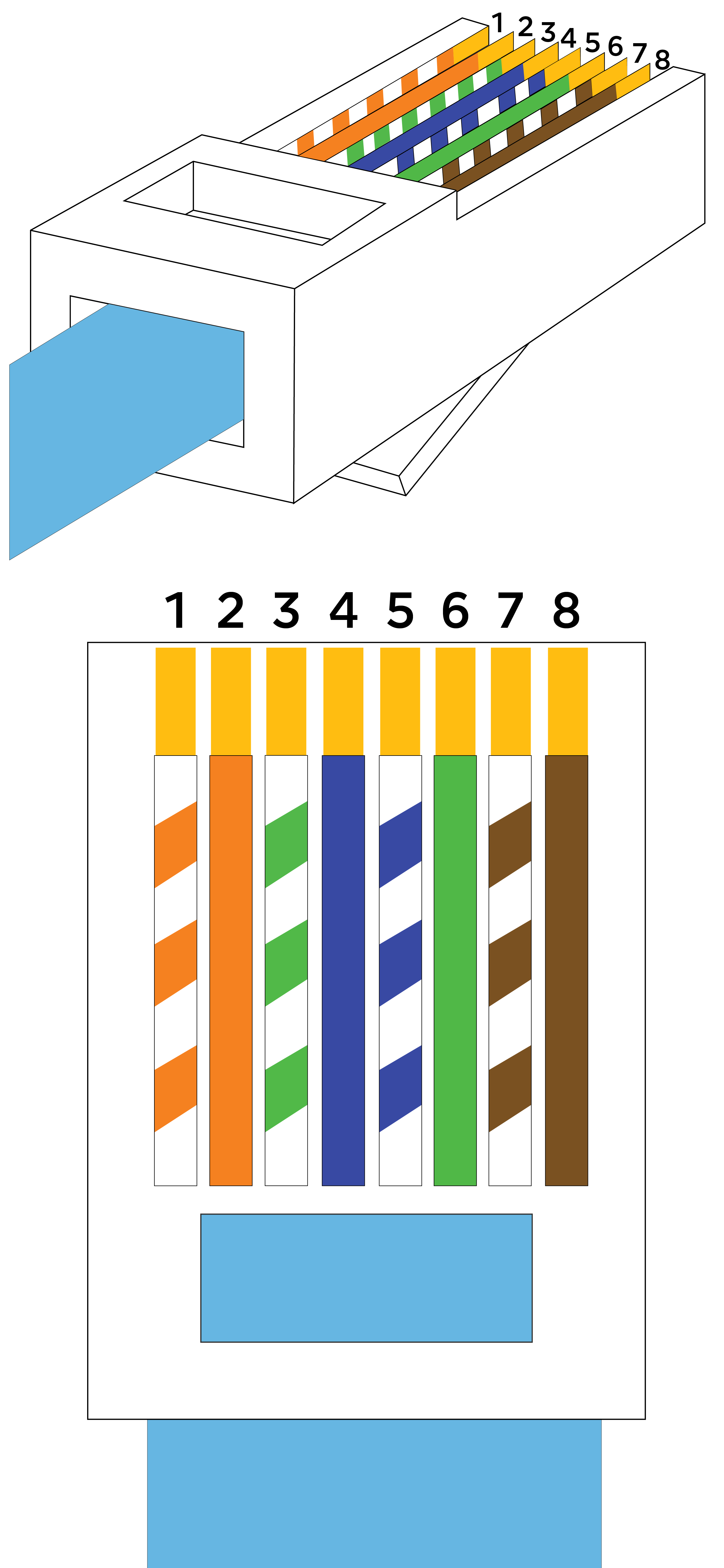
The orderly arrangement of the eight individual wires within an RJ45 connector is dictated by specific industry standards, primarily TIA/EIA-568-A and TIA/EIA-568-B. These standards specify the color code and pinout for terminating twisted-pair cables.
-
T568A: (White/Green, Green, White/Orange, Blue, White/Blue, Orange, White/Brown, Brown)
-
T568B: (White/Orange, Orange, White/Green, Blue, White/Blue, Green, White/Brown, Brown)
While both standards are functionally identical for straight-through cables, T568B is the more commonly used standard in North America and many other parts of the world. The crucial aspect is consistency: for a standard “straight-through” Ethernet cable (used for connecting a computer to a switch/router), both ends of the cable must be wired to the same standard (e.g., T568B on both ends). A “crossover” cable (used for connecting two similar devices directly, like PC to PC, though largely obsolete due to auto-MDI/MDIX) requires one end to be T568A and the other T568B. For this guide, we will focus on the T568B standard for straight-through cables.
Essential Tools and Materials for RJ45 Installation
Equipping yourself with the right tools and materials is half the battle. Using appropriate, good-quality equipment will not only make the process smoother but also significantly increase your chances of a successful termination.
The Right Cable for the Job
As discussed, select your Ethernet cable (Cat5e, Cat6, Cat6a) based on your network speed requirements, the distance it needs to cover, and the environment (indoor/outdoor, plenum-rated for air ducts). For most home users, Cat5e or Cat6 UTP will suffice.
Connector Selection
-
Modular Plugs: Ensure your RJ45 connectors are compatible with your cable category (e.g., Cat6 connectors for Cat6 cable). Cat6 and Cat6a connectors often have a larger internal structure to accommodate thicker wires and the spline, if present.
-
Standard vs. Pass-Through Connectors: Standard connectors require precise wire trimming before insertion, as the wires only go partway into the connector. Pass-through (or EZ-RJ45) connectors allow the wires to pass completely through the front of the connector, making it easier to verify the wiring order and trim the excess evenly with a specialized crimping tool. While slightly more expensive, pass-through connectors are highly recommended for beginners.
-
Shielded vs. Unshielded: If using STP cable, you must use shielded RJ45 connectors to maintain the cable’s EMI protection.
Necessary Hand Tools
-
Cable Stripper: A dedicated network cable stripper is designed to safely remove the outer jacket without damaging the inner twisted pairs. Avoid using utility knives unless you have extensive experience, as nicking the inner wires can degrade performance.
-
Crimping Tool (RJ45 Crimper): This specialized tool is essential for compressing the RJ45 connector onto the cable, securing the wires and piercing their insulation to make electrical contact with the pins. If using pass-through connectors, ensure your crimper supports the cut-off function.
-
Wire Cutters/Snips: Small, sharp cutters are useful for trimming the individual wires before inserting them into a standard RJ45 connector. The crimping tool often has a built-in cutter.
-
Cable Tester (RJ45 Tester): This device is indispensable for verifying that your newly terminated cable has continuity and that all wires are in the correct order. It’s a small investment that saves hours of troubleshooting.
Safety Precautions
Always handle tools with care. Cable strippers and cutters are sharp, and crimping tools exert significant force. Keep your fingers clear of moving parts. While low voltage, never work on live electrical circuits without proper training.
Step-by-Step Guide to RJ45 Connector Installation (T568B Standard)
This section provides a detailed, step-by-step walkthrough for terminating an RJ45 connector using the T568B standard.
1. Preparation: Stripping the Cable Jacket
Using your cable stripper, carefully remove about 1 to 1.5 inches (2.5 to 3.8 cm) of the outer jacket from the end of the Ethernet cable. Be gentle and ensure you only cut through the jacket, not the inner insulation of the twisted pairs. A good stripper will have an adjustable blade depth. Twist the cable slightly in the stripper, then pull the jacket off. If there’s a rip cord, use it to split the jacket further.
2. Untwisting and Straightening Wires
Inside the jacket, you’ll find four twisted pairs of wires. Carefully untwist each pair and straighten out the individual wires as much as possible. It’s crucial to keep the untwisted length as short as possible, ideally less than 0.5 inches (1.2 cm), as excessive untwisting can introduce crosstalk and degrade signal quality. If your cable has a nylon spline or separator, trim it off flush with the remaining jacket.
3. Arranging Wires According to T568B
Now, arrange the eight straightened wires in the precise T568B order, from left to right, with the copper contacts facing away from you (or toward the top if you’re holding it with the clip down):
-
White/Orange
-
Orange
-
White/Green
-
Blue
-
White/Blue
-
Green
-
White/Brown
-
Brown
Hold them tightly together to maintain this flat, parallel arrangement.
4. Trimming Wires Evenly
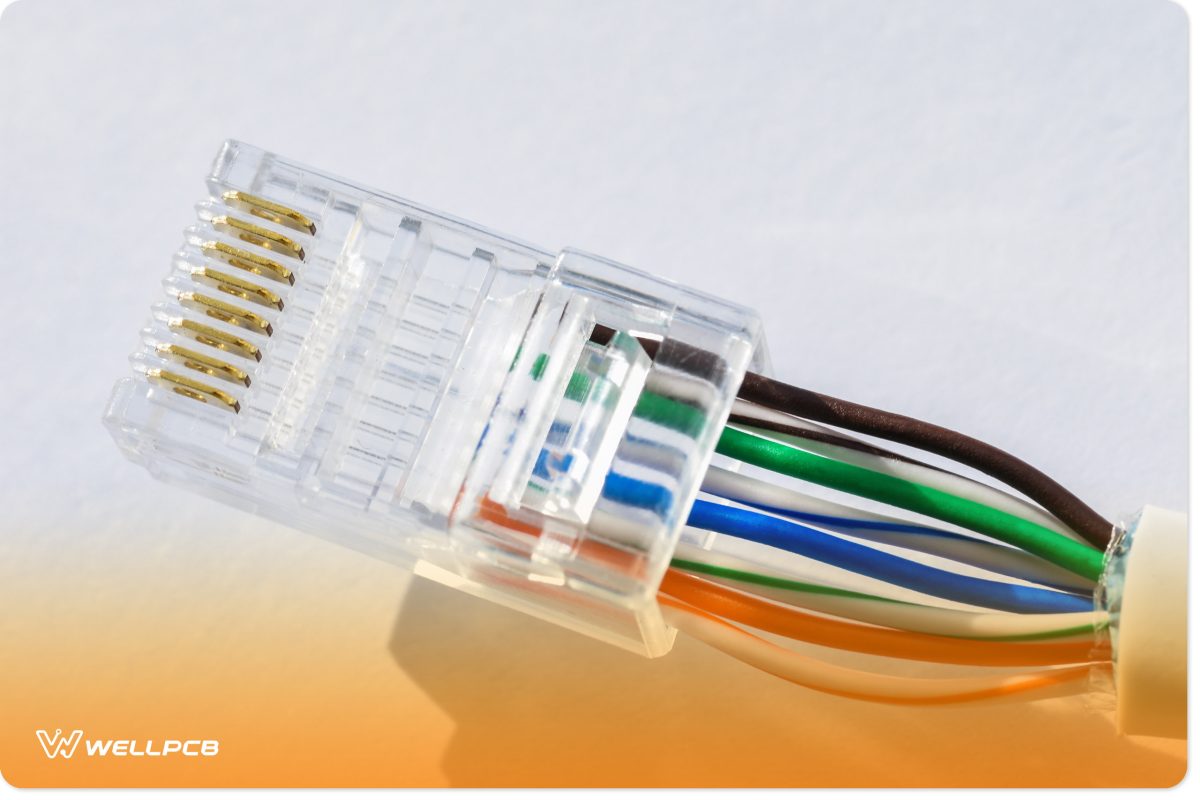
If using a standard RJ45 connector, trim the wires straight across, ensuring they are all the same length. The ideal length is about 0.5 inches (1.2 cm) from the edge of the jacket, allowing the jacket to extend slightly into the connector for strain relief. Precision here is key; uneven wires will not make proper contact.
If using pass-through connectors, you don’t need to trim yet, just ensure they are mostly even and long enough to pass through the connector.
5. Inserting Wires into the RJ45 Connector
Carefully insert the organized wires into the RJ45 connector, ensuring they maintain their T568B order. Push them firmly until the wires reach the front of the connector. For standard connectors, you’ll see the end of each wire against the internal wall. For pass-through connectors, the wires will poke out the other end.
Visually inspect the connector:
-
Verify that the wire order is correct (T568B, looking at the connector from the clip side, pins facing up/away).
-
Ensure that the cable jacket is seated well within the connector body, underneath the strain relief tab, providing crucial support. This prevents individual wires from being pulled out.
-
Confirm that all 8 wires are fully seated, making contact with the metal pins.
6. Crimping the Connector
Place the RJ45 connector into the appropriate slot of your crimping tool. For standard connectors, ensure it’s fully seated. For pass-through connectors, ensure the crimper’s blade is aligned to trim the excess wires. Squeeze the handles of the crimping tool firmly and completely until you hear a click or feel the crimper bottom out. This action pushes the pins down, piercing the insulation of each wire and securing the connection, while also pressing the strain relief tab onto the cable jacket.
7. Verification and Testing
Once crimped, remove the connector from the tool. Give the cable a gentle tug to ensure it’s securely fastened to the connector.
The final and most crucial step is testing. Plug both ends of your newly terminated Ethernet cable into an RJ45 cable tester. The tester will illuminate a sequence of lights, usually from 1 to 8, on both the main unit and the remote unit.
-
Success: A sequential illumination of lights (e.g., 1-1, 2-2, 3-3, etc.) on both units indicates a correctly wired and functional cable.
-
Errors: If lights are out of sequence, missing, or not illuminating at all, it indicates a wiring error, a short circuit, or an open circuit. Refer to the troubleshooting section.
Repeat the entire process for the other end of the cable, ensuring both ends are terminated with the T568B standard for a straight-through cable.
Common Pitfalls and Troubleshooting Tips
Even experienced technicians encounter issues occasionally. Knowing the common problems can help you quickly diagnose and resolve them.
Incorrect Wiring Order
This is by far the most frequent error. If your cable tester shows wires out of sequence (e.g., 1-2, 2-1 instead of 1-1, 2-2) or specific pins failing, re-check your T568B color code meticulously. A miswired cable will either not work at all or perform sporadically. The only solution is to cut off the faulty connector and re-terminate.
Poorly Trimmed Wires
-
Uneven Lengths: If wires are not trimmed to an even length, some may not reach the pins properly, leading to an open circuit on those lines.
-
Too Short: If wires are trimmed too short, they might not extend far enough into the connector to make contact with the pins, or the jacket won’t enter the connector for strain relief.
-
Too Long: Wires that are too long before crimping can potentially short out against each other, especially if the twists are untwisted too far.
Improper Crimping
-
Loose Connection: If the crimper wasn’t squeezed firmly enough, the pins might not have fully seated, or the strain relief didn’t secure the jacket. This can lead to intermittent connectivity.
-
Damaged Pin: Over-crimping or misaligning the connector in the crimper can damage the pins or the connector itself.
-
Jacket Not Under Strain Relief: If the outer cable jacket isn’t secured by the connector’s strain relief, individual wires are more susceptible to being pulled out or damaged by bending.
Damaged Cable Jacket or Inner Wires
Accidentally nicking the inner wire insulation while stripping the outer jacket can lead to short circuits or signal interference, severely degrading performance. Always use a proper cable stripper and exercise caution. Kinking the cable excessively can also damage internal conductors.
Cable Tester Readings
A good cable tester will not only tell you if there’s a problem but often which specific wires are affected. Pay attention to the light sequence. If light 3 on one end illuminates light 6 on the other, you know pins 3 and 6 are swapped. A completely dark pin indicates an open circuit (broken wire or bad contact).
Beyond the Basics: Advanced Considerations and Best Practices
Once you’ve mastered the fundamental installation, consider these points for optimizing your network cabling.
Managing Cable Bend Radius
Ethernet cables have a minimum bend radius. Bending a cable too sharply can damage the internal conductors and impair signal transmission, especially with higher category cables (Cat6, Cat6a). Avoid tight turns, using cable management accessories like radius clips where necessary.
Strain Relief and Cable Management
Proper cable management isn’t just about aesthetics; it contributes significantly to cable longevity and network reliability. Use zip ties, Velcro straps, and cable trays to organize runs and prevent strain on connectors. Ensure the cable’s jacket is always properly seated under the RJ45 connector’s strain relief tab.
Shielding and Grounding for STP Cables
If you’re using STP (Shielded Twisted Pair) cables to combat EMI, it’s crucial to use shielded RJ45 connectors and ensure proper grounding. If the shielding is not correctly grounded at both ends (or at least one end for certain applications), it can act as an antenna, actually increasing noise.
Future-Proofing Your Network
While Cat5e might be sufficient today, upgrading to Cat6 or Cat6a for new installations is a wise investment. The cost difference is often minimal, but it provides headroom for future network upgrades and higher bandwidth demands, extending the life of your infrastructure.
The Benefits of Pass-Through Connectors
As mentioned earlier, pass-through connectors simplify the termination process significantly, especially for beginners. The ability to push wires completely through and verify the order visually before crimping reduces errors and waste. The specialized crimping tool then trims the excess wires perfectly flush. This often results in more reliable connections and a faster installation time.

Conclusion
Installing an RJ45 connector is a skill that opens up a world of possibilities for customizing and maintaining your wired network infrastructure. From tailoring cable lengths to diagnosing connectivity issues, the ability to properly terminate an Ethernet cable is an invaluable asset in today’s digital landscape. While the first few attempts might feel challenging, patience and practice are key.
By understanding the basics, utilizing the right tools, and meticulously following the step-by-step instructions, you can confidently create reliable, high-performance Ethernet connections. Remember to always test your cables thoroughly, and don’t be afraid to cut off a faulty connector and try again. With each successful termination, you’re not just building a cable; you’re building confidence and competence in your tech skills, ensuring your network remains fast, stable, and secure.
aViewFromTheCave is a participant in the Amazon Services LLC Associates Program, an affiliate advertising program designed to provide a means for sites to earn advertising fees by advertising and linking to Amazon.com. Amazon, the Amazon logo, AmazonSupply, and the AmazonSupply logo are trademarks of Amazon.com, Inc. or its affiliates. As an Amazon Associate we earn affiliate commissions from qualifying purchases.