
Modding, the act of modifying a video game’s software to alter its content or behavior, has long been a cornerstone of the PC gaming experience. For enthusiasts of Payday 2, OVERKILL Software’s cooperative first-person shooter, mods offer an unparalleled opportunity to customize everything from the user interface and visual aesthetics to gameplay mechanics and sound design. This guide delves into the intricate world of Payday 2 modding, providing a professional and insightful walkthrough on how to safely and effectively integrate these community-created enhancements into your game. We’ll explore the essential tools, best practices, and crucial considerations to ensure a stable and enjoyable modded experience, strictly adhering to the technological aspects of software manipulation and digital security within the gaming context.
Understanding the Payday 2 Modding Ecosystem
The Payday 2 modding scene is vibrant and well-established, supported by a robust framework that allows for extensive customization. Before diving into installation, it’s critical to understand the foundational components that make Payday 2 modding possible and the various forms these modifications take. This foundational knowledge ensures you select the right tools and approach for the specific mods you wish to use.
Types of Payday 2 Mods
Payday 2 mods generally fall into a few key categories, each impacting the game in different ways and often requiring distinct installation methods:
-
BLT/SuperBLT Mods (Lua Scripts): These are the most common and powerful types of mods. They leverage the BeardLib Trainer (BLT) or its successor, SuperBLT, which injects Lua scripting capabilities into the game. This allows modders to create complex changes to gameplay, add new features, integrate quality-of-life improvements, and even introduce entirely new content. Examples include custom HUDs, skill reworks, new weapons, and extensive game modifiers. SuperBLT acts as a crucial framework, enabling these scripts to run smoothly.
-
Mod_Overrides (Asset Replacements): These mods replace existing game assets with custom ones. This can include texture replacements, custom weapon models, new character skins, UI reskins, sound effects, and even entirely new level textures.
mod_overridesmods are generally simpler to install as they don’t involve scripting; they merely swap files in a designated directory, making them less prone to compatibility issues with other scripting mods, though asset conflicts can arise. -
Standalone Executables/Injectors: Less common but still present, these are external programs that might run alongside Payday 2 or inject code directly into its process without relying on BLT. These often provide highly specific functionalities, such as advanced debug tools or very niche cheats, and typically carry a higher risk of detection by anti-cheat systems or causing system instability if not from reputable sources. Due to their nature, they often require advanced technical understanding and are generally not recommended for casual users.
Essential Modding Tools: SuperBLT and BeardLib
At the heart of Payday 2‘s scripting modding capability lies SuperBLT, a sophisticated mod loader that has largely superseded the original BLT. SuperBLT is a dynamic link library (DLL) that injects itself into the game process, providing a Lua environment for other mods to run. It’s an indispensable component for the vast majority of Payday 2 mods that offer gameplay alterations or new functionalities.
-
SuperBLT: This framework is a modern, improved version of the original BLT. It offers enhanced stability, better compatibility with game updates, and often comes with automatic mod updating features. Installing SuperBLT correctly is the first and most critical step for anyone looking to use scripting mods. It acts as a bridge, allowing the game to understand and execute the Lua scripts provided by individual mods.
-
BeardLib: While SuperBLT handles the scripting framework, BeardLib is another foundational mod that expands the game’s ability to load custom content like weapons, characters, music, and more. Many mods, especially those adding new assets that go beyond simple texture swaps, rely on BeardLib to correctly integrate their content into the game. Think of BeardLib as an asset manager specifically designed for custom content. If a mod states it requires BeardLib, you must install it alongside SuperBLT.
Where to Find Reliable Mods
The source of your mods significantly impacts their safety and functionality. Relying on reputable platforms is paramount for digital security and a stable gaming experience.
-
ModWorkshop: This is the primary and most reputable hub for Payday 2 mods. It hosts a vast collection of mods, often with direct downloads, clear installation instructions, and user reviews. Modders frequently update their creations here, and the community aspect helps identify problematic mods quickly.
-
GitHub/Modding Forums: Many modders host their projects on GitHub, especially for more complex or actively developed mods. Relevant Payday 2 modding communities on platforms like Reddit or dedicated forums can also point to reliable sources and offer troubleshooting support. Always exercise caution and verify the reputation of the modder before downloading from less centralized sources.
-
Avoid Shady Sites: Steer clear of unknown or suspicious websites offering “free” or “premium” mods. These are frequently vectors for malware, viruses, or outdated/broken mods that can corrupt your game files or compromise your system security. Always prioritize digital safety over convenience.
Step-by-Step Installation Guide for SuperBLT Mods
Installing SuperBLT and its dependent mods requires a systematic approach to ensure everything functions as intended. Following these steps precisely will mitigate common issues and provide a solid foundation for your modded Payday 2 experience.
Prerequisites and Backup Recommendations
Before commencing any mod installation, take these crucial preparatory steps:
-
Ensure a Clean Game Installation: Start with a fresh, unmodded installation of Payday 2. If you’ve previously modded the game, consider verifying game files through Steam (Right-click Payday 2 in Steam Library > Properties > Local Files > Verify integrity of game files) or even reinstalling for the cleanest slate.
-
Locate Your Payday 2 Directory: The default path is usually
C:Program Files (x86)SteamsteamappscommonPAYDAY 2. Knowing this location is vital for placing mod files correctly. -
Backup Your Save File: Although modding generally doesn’t affect save files directly, it’s a good practice to back up your
savegame.savfile. You can find it in%LOCALAPPDATA%PAYDAY 2(type this into Windows Run dialog or File Explorer address bar). Copy this file to a safe location. -
Install Required Software: Ensure you have the latest version of 7-Zip or WinRAR for extracting compressed mod files. Some mods may also require specific Visual C++ Redistributables (often
vc_redist.x64.exeorvc_redist.x86.exe) which are typically handled by Steam, but a fresh install from Microsoft’s website won’t hurt if issues arise.
Downloading and Installing SuperBLT
SuperBLT is the gateway to most Payday 2 scripting mods. Its installation is straightforward but critical.
-
Download SuperBLT: Visit the official SuperBLT website (often found via ModWorkshop or a quick search for “SuperBLT Payday 2”). You’ll typically find a “Stable Release” or “Latest Version.” Download the
wsock32.dllfile. -
Place
wsock32.dll: Move the downloadedwsock32.dllfile directly into your Payday 2 game directory (e.g.,C:Program Files (x86)SteamsteamappscommonPAYDAY 2). This file acts as the primary injector. -
Launch Payday 2 (First Time): Start Payday 2. SuperBLT will detect that its core files are missing and will prompt you to download the “base files.” Crucially, allow it to do so. This process will create a new folder named
modsin your Payday 2 directory and place essential SuperBLT files within it. -
Verify Installation: Once the base files are downloaded, you can exit the game. Check your Payday 2 directory; you should now see a
modsfolder, and within it, typically abasefolder containing SuperBLT’s core components.
Installing BLT-Dependent Mods
With SuperBLT successfully installed, you can now add individual scripting mods.
-
Download Your Chosen Mod: Obtain the mod file, usually a
.zipor.rararchive, from a reputable source like ModWorkshop. -
Extract the Mod: Using 7-Zip or WinRAR, extract the contents of the mod archive. Most BLT mods will have a structure where the main mod folder contains a
mod.txtfile and often aluafolder. -
Place the Mod Folder: Copy the entire extracted mod folder into the
modsfolder located within your Payday 2 game directory (e.g.,PAYDAY 2modsYourModName). Do not place individual files; always place the full mod folder. -
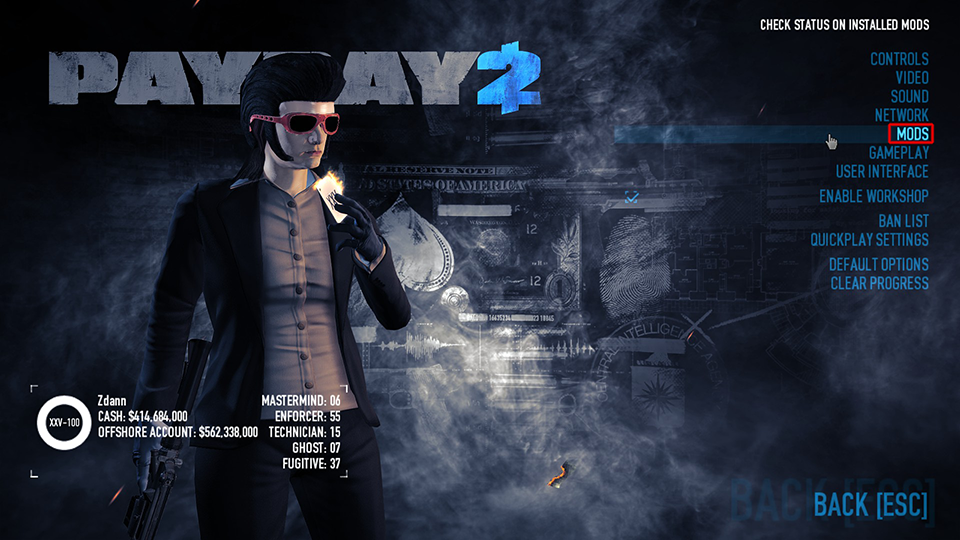
Launch Payday 2: Start the game. SuperBLT will automatically detect the new mod. You should typically see a “Mods” option in the main menu, where you can manage and configure your installed mods.
-
Install BeardLib (If Required): If any of your chosen mods list BeardLib as a dependency, follow the same steps as above to download and place the BeardLib mod folder into your
modsdirectory. Ensure BeardLib is installed before launching the game with mods that rely on it.
Common Issues and Troubleshooting
Modding can sometimes lead to unexpected issues. Here’s how to address some common problems:
-
Game Crashing on Startup:
-
Outdated Mods: A mod might not be compatible with the latest Payday 2 update. Check ModWorkshop for updates or compatibility notes.
-
Corrupted SuperBLT: Reinstall SuperBLT by deleting
wsock32.dlland themodsfolder, then repeat the SuperBLT installation process. -
Conflicting Mods: Two mods might be trying to alter the same game aspect. Try disabling mods one by one to identify the culprit.
-
Missing Dependencies: Ensure all required mods (like BeardLib) are installed.
-
-
Mod Not Appearing/Working:
-
Incorrect Folder Structure: Double-check that the mod’s main folder (containing
mod.txt) is directly inside themodsfolder. -
Mod Disabled: Check the in-game Mod Manager to ensure the mod is enabled.
-
Game Update: Game updates can sometimes break mod compatibility. Wait for modders to release updates.
-
-
Performance Degradation: Some mods, especially graphical overhauls or those adding numerous new assets, can impact performance. Refer to the “Performance Impact” section for more details.
Installing Mod_Overrides Mods
mod_overrides mods offer a simpler, direct method for altering game assets without relying on scripting frameworks. They are ideal for visual changes, sound swaps, or minor asset tweaks.
Understanding the mod_overrides Folder
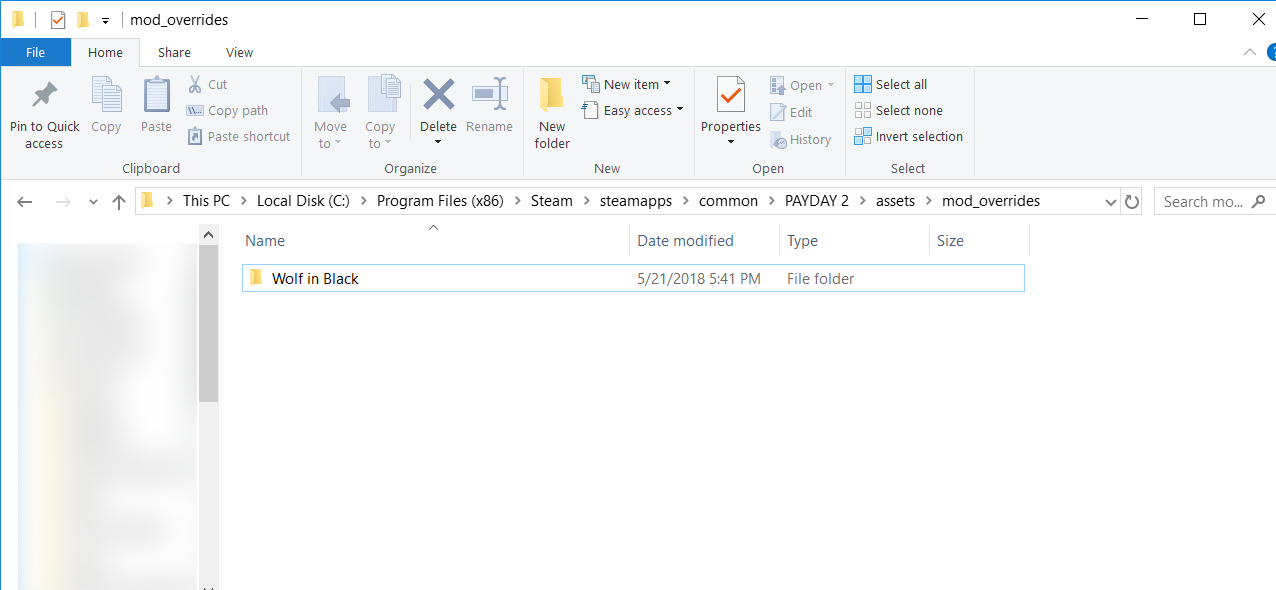
The mod_overrides folder is a specific directory within your Payday 2 installation designed to house asset replacement mods. When the game loads, it checks this folder for custom assets and prioritizes them over the default game files, effectively “overriding” them.
- Creation: If you’ve installed SuperBLT, the
modsfolder already exists. Themod_overridesfolder is located inside thismodsfolder (e.g.,PAYDAY 2modsmod_overrides). If it doesn’t exist, you can simply create it manually.
Manual Installation Steps
Installing mod_overrides mods is primarily a drag-and-drop operation.
-
Download Mod: Obtain your
mod_overridesmod, typically a.zipor.rarfile containing textures, sounds, or models. -
Extract Mod: Extract the archive. Inside, you’ll usually find a single folder (e.g., “Custom Scope Texture,” “New Chains Mask”) which contains the actual asset files.
-
Place Mod Folder: Copy the entire extracted mod folder into your
PAYDAY 2modsmod_overridesdirectory. Eachmod_overridesmod should reside in its own distinct folder withinmod_overrides. -
Launch Game: Start Payday 2. The game will automatically load the overridden assets. There is typically no in-game menu for managing these mods as they are loaded passively.
Managing Conflicts
While mod_overrides mods are generally straightforward, conflicts can arise if multiple mods attempt to replace the exact same game asset.
-
Asset Hierarchy: Payday 2 loads assets from
mod_overridesalphabetically. If two mods modify the same file (e.g.,texture_atlas_mask_chains.pdmod), the one whose folder name comes later alphabetically will take precedence. -
Troubleshooting Conflicts: If you notice unexpected visual glitches or an override not working, check if you have multiple
mod_overridesaffecting the same asset. Rename mod folders to test priority (e.g.,_AA_Mod1vs_ZZ_Mod2) or temporarily remove one to see if the issue resolves.
Best Practices and Safety Considerations
Modding, while rewarding, carries inherent risks. Adhering to best practices ensures not only a smooth technical experience but also the digital security of your system and the integrity of your game.
Verifying Mod Authenticity and Security
The primary concern with any software modification is security. Malicious code disguised as a mod can compromise your system.
-
Reputable Sources Only: As stressed earlier, only download mods from trusted sites like ModWorkshop or official GitHub repositories. Avoid direct links from unknown forum posts or YouTube comments unless verified.
-
Read Comments and Reviews: User feedback on ModWorkshop often highlights issues, including potential malware or game-breaking bugs. A mod with many positive reviews and active development is generally safer.
-
Virus Scans: While not foolproof, running a reputable antivirus scan on downloaded mod archives can catch known threats. However, remember that many game mods utilize techniques that can be flagged by antiviruses as “suspicious” even if they are harmless (e.g., injecting DLLs), so use discretion.
-
Understand Permissions: Be wary of any mod that requires unusual system permissions or attempts to access files outside your Payday 2 directory.
Performance Impact and Optimization
Mods, especially those that introduce high-resolution textures, complex scripts, or numerous new assets, can impact game performance.
-
Monitor FPS: Pay attention to your frame rate after installing new mods. Significant drops might indicate an overly demanding mod or a conflict.
-
Gradual Installation: Install mods incrementally. This allows you to identify which specific mod is causing performance issues or instability, making troubleshooting much easier.
-
Resource Management: Some mods are designed with performance options. Check mod descriptions or in-game mod menus for settings that allow you to scale back graphical fidelity or disable resource-intensive features.
-
Hardware Limitations: Be realistic about your system’s capabilities. If you have an older GPU or less RAM, heavy graphical overhauls might be beyond your system’s capacity for smooth gameplay.
Keeping Mods Updated and Compatibility
Payday 2 receives regular updates, and these can frequently break mod compatibility.
-
Game Updates and Mod Breakage: When Payday 2 updates, SuperBLT might need an update, and individual mods might also require updates to function correctly. If your game crashes after an update, this is often the first place to check.
-
SuperBLT Auto-Update: SuperBLT often has an auto-update feature for itself and compatible mods, which can simplify maintenance. Ensure this feature is enabled if available.
-
Manual Mod Updates: For mods without auto-update functionality, regularly check ModWorkshop or the modder’s official page for new versions. Outdated mods are a common source of crashes and unexpected behavior.
-
Version Control: Some mod managers or even manual folder naming conventions can help you keep track of which mod versions you have installed.
Ethical Modding and Anti-Cheat Concerns
Payday 2 is a cooperative game, and its anti-cheat system (VAC – Valve Anti-Cheat) is primarily concerned with preventing unfair advantages in multiplayer.
-
VAC Status: Payday 2 is VAC-enabled. While most aesthetic and quality-of-life mods are generally safe (as they don’t provide an unfair advantage), any mod that could be perceived as giving a competitive edge (e.g., unlimited ammo, aimbots, wallhacks) can result in a VAC ban.
-
Reputable Modding Philosophy: The Payday 2 community generally embraces mods that enhance the experience without making the game trivially easy or explicitly cheating. Stick to UI, visual, sound, or balanced gameplay tweaks.
-
Host’s Discretion: In multiplayer lobbies, the host can see what mods you are using (via the “Mod List” feature). Using highly intrusive or “cheaty” mods might lead to being kicked or ostracized from the community. Always consider the impact on other players. When in doubt, err on the side of caution or only use controversial mods in private games with friends.

Conclusion
The ability to install Payday 2 mods fundamentally transforms the game, allowing players to tailor the experience to their exact preferences. From enhancing user interfaces with quality-of-life improvements to overhauling visual fidelity and introducing entirely new gameplay mechanics, the technical versatility offered by SuperBLT and the mod_overrides system is truly remarkable. By diligently following the installation guidelines, prioritizing reputable sources, understanding the nuances of mod compatibility, and practicing responsible digital security, you can unlock a vastly expanded and personalized Payday 2 universe. While modding always comes with a learning curve and potential troubleshooting, the professional satisfaction of a perfectly optimized, custom-tailored gaming experience is an undeniable testament to the power of community-driven software enhancement in the digital age. Embrace the technological journey, and prepare to heist like never before.