
In an increasingly connected world, the fear of losing valuable personal items remains a persistent anxiety for many. From keys and wallets to backpacks and luggage, misplacing an item can lead to significant stress, wasted time, and financial loss. Enter Apple AirTag, a compact, coin-shaped device designed to help you locate your belongings with remarkable precision and ease. Seamlessly integrated into Apple’s vast ecosystem, the AirTag leverages the global Find My network, transforming millions of Apple devices into silent helpers in your search.
This article delves into the straightforward process of “installing” – or more accurately, setting up and attaching – your AirTag. Beyond the basic steps, we’ll explore why AirTag stands out in the realm of tracking technology, how to maximize its features for optimal security and convenience, and its broader implications within the “Tech,” “Brand,” and “Money” landscapes. Whether you’re a tech enthusiast, someone keen on digital security, or simply looking to protect your investments, understanding the AirTag’s capabilities and setup is a valuable step towards greater peace of mind.
Understanding AirTag: A Glimpse into Apple’s Tracking Technology
Before diving into the setup process, it’s beneficial to understand what an AirTag is and what makes it a compelling choice for item tracking. Apple has a knack for making complex technology feel intuitive, and the AirTag is a prime example of this philosophy.
What is an AirTag?
At its core, an AirTag is a small, lightweight, and elegantly designed tracking device. It’s approximately the size of a large coin, featuring a polished stainless steel front and a removable plastic back. Inside this tiny package lies a sophisticated blend of technologies:
- Bluetooth Low Energy (BLE): This is the primary method for communicating with your paired Apple device and nearby devices on the Find My network.
- Apple U1 Chip: For iPhone 11 and later models, this ultra-wideband chip enables “Precision Finding.” This technology allows for highly accurate directional guidance, showing you exactly how far away your AirTag is and in which direction, using a combination of visual, haptic, and audio feedback.
- NFC (Near Field Communication): When an AirTag is in Lost Mode and found by someone, they can tap it with an NFC-capable smartphone (Android or iPhone) to view a contact phone number or message left by the owner.
- Replaceable CR2032 Battery: Designed for longevity, the AirTag uses a standard coin-cell battery that lasts for over a year and is user-replaceable.
- Built-in Speaker: This allows the AirTag to play a sound, guiding you to its location when it’s nearby but out of sight.
The real magic of the AirTag lies in its integration with Apple’s Find My network. This vast, anonymous, and encrypted network comprises hundreds of millions of Apple devices worldwide. When an AirTag is out of your device’s Bluetooth range, it sends out a secure Bluetooth signal that can be detected by any nearby device on the Find My network. This device then securely relays the AirTag’s location back to iCloud, allowing you to see its last known location on a map in your Find My app. This innovative approach provides an unparalleled reach for locating lost items, even in bustling urban environments or remote locations.
Why Choose AirTag for Item Tracking?
The market for item trackers isn’t new, but AirTag distinguishes itself through several key advantages that align perfectly with modern technological expectations and personal security needs.
- Seamless Apple Ecosystem Integration: For users already invested in Apple products (iPhone, iPad, Mac), the AirTag is a natural extension. Setup is incredibly simple, and tracking is managed directly through the familiar Find My app, which also tracks your other Apple devices and even friends/family if shared. This deep integration offers a cohesive and intuitive user experience that standalone trackers often struggle to match.
- Unrivaled Find My Network: As mentioned, the sheer scale of the Find My network is AirTag’s most significant competitive advantage. No other tracking solution boasts such a wide-reaching, always-on, and passive network of devices. This means a higher probability of locating a lost item, even if it’s far from your personal devices.
- Precision Finding: The U1 chip’s ultra-wideband technology truly elevates the tracking experience. Instead of just a general location, Precision Finding guides you with AR-like accuracy right to your item, making searches quicker and less frustrating. This feature is a game-changer for finding items tucked under a sofa cushion or lost in a cluttered room.
- Robust Privacy and Security Features: Apple has baked privacy into the core design of AirTag. Location data is anonymous and encrypted end-to-end, meaning neither Apple nor third parties know the location of your AirTag or the identity of the Apple devices that helped find it. Crucially, AirTag also includes anti-stalking measures, such as alerts for unwanted tracking if an unknown AirTag is traveling with you over time, and the ability for an unknown AirTag to play a sound after a period away from its owner. These features address significant concerns related to digital security and responsible technology use.
- Durability and Battery Life: With IP67 water and dust resistance, AirTag is built to withstand everyday wear and tear. Its year-plus battery life from a standard coin cell means less frequent maintenance and greater reliability.
For anyone seeking a reliable, secure, and integrated solution to keep tabs on their valuables, AirTag presents a compelling argument, embodying Apple’s commitment to user-friendly technology and robust digital security.
Step-by-Step Guide to Installing Your AirTag
The process of setting up and attaching an AirTag is designed to be as simple and intuitive as possible, fitting seamlessly into the Apple user experience. This section provides a comprehensive guide to get your AirTag up and running.
Pre-Installation Checklist: What You’ll Need
Before you begin, ensure you have the following ready to make the setup process smooth and hassle-free:
- An Apple Device: You’ll need an iPhone, iPad, or iPod touch running iOS 14.5 or iPadOS 14.5 or later. Ensure your device is updated to the latest software version for optimal compatibility and access to all features.
- Apple ID: You must be signed in to iCloud with your Apple ID on your device. This is crucial for linking the AirTag to your account and accessing it via the Find My network.
- Stable Internet Connection: A Wi-Fi or cellular connection is required for the initial setup and registration of your AirTag with your Apple ID.
- The AirTag: Naturally, you’ll need the AirTag itself, fresh out of its packaging.
- An Item to Track: Decide which item you want to track (e.g., keys, wallet, backpack, camera bag).
- Compatible Accessory (Optional but Recommended): While you can technically slip an AirTag into a pocket, dedicated accessories like keyrings, loops, or adhesive mounts provide a more secure and practical way to attach it to your belongings.
Having these items prepared will ensure a quick and efficient “installation” process, allowing you to integrate this new gadget into your daily routine without delay.
Pairing Your AirTag with Your Apple Device
The initial pairing of an AirTag is remarkably simple, often described as a “magic moment” due to its ease, mirroring the setup experience of AirPods.
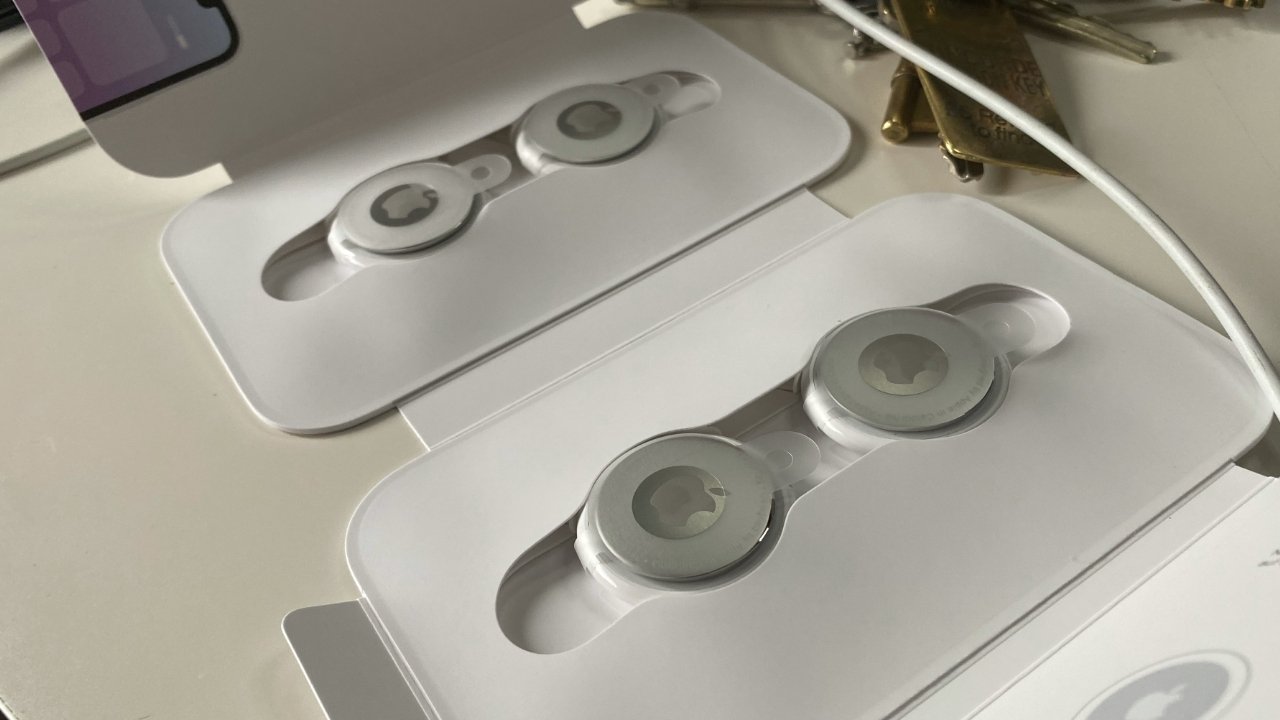
- Unbox Your AirTag: Remove the AirTag from its packaging. You’ll notice a small plastic tab protruding from the side. This tab prevents the battery from making contact until you’re ready to set it up.
- Activate the Battery: Pull the plastic tab completely out of the AirTag. You should hear a chime, indicating that the battery is now activated and the AirTag is powered on. This sound signifies its readiness for pairing.
- Bring It Close to Your Device: Hold the activated AirTag within a few inches of your unlocked iPhone, iPad, or iPod touch.
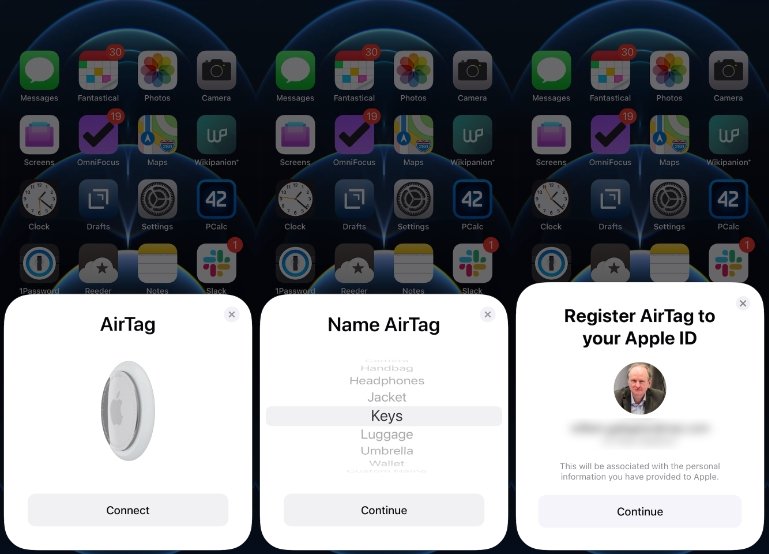
- On-Screen Prompt: Almost instantly, a card will pop up on your device’s screen, displaying the AirTag and a “Connect” button. This automatic recognition is a testament to Apple’s intuitive design.
- Name Your AirTag: Tap “Connect.” Your device will then prompt you to name your AirTag. Apple provides a list of common items (e.g., “Keys,” “Wallet,” “Backpack,” “Jacket”), but you can also choose a custom name. Select the most appropriate name for the item you intend to track. This helps you quickly identify it in the Find My app.
- Assign to Your Apple ID: After naming, you’ll be asked to confirm that you want to register the AirTag to your Apple ID. Tap “Continue.”
- Final Confirmation: The AirTag will take a moment to link with your account. Once complete, you’ll see a confirmation message, and the AirTag will appear in the “Items” tab of your Find My app.
- View in Find My App: Open the Find My app (if it’s not already open) and navigate to the “Items” tab. You should see your newly paired AirTag listed with its chosen name, displaying its current location on the map.
And just like that, your AirTag is “installed” and ready to track! This seamless pairing process highlights Apple’s focus on user productivity and ease of use, making complex technology accessible to everyone.
Attaching Your AirTag to an Item
While the digital setup is complete, the physical “installation” – attaching the AirTag to your item – is equally important for effective tracking. The AirTag is designed to be versatile, but selecting the right accessory and placement is key to its functionality and security.
-
Choose the Right Accessory:
- Keyrings and Loops: These are the most common accessories, ideal for attaching AirTags to keys, bags, luggage, or pet collars (ensure the collar is specifically designed for trackers and your pet is comfortable). Apple offers its own range of loops, and many third-party options are available in various materials and styles.
- Adhesive Mounts: For items without a loop or ring attachment point, like remote controls, bicycle frames, or under a car seat (though tracking vehicles has specific legal and ethical considerations), adhesive mounts can provide a secure solution. Ensure the adhesive is strong and suitable for the surface.
- Pouches and Sleeves: For items like wallets or passports, small pouches or sleeves designed to hold an AirTag securely inside without adding significant bulk are excellent options.
- Hidden Compartments: For luggage or backpacks, placing an AirTag in a discreet, interior pocket can offer both security and functionality, making it less obvious to potential thieves.
-
Secure Attachment: Regardless of the accessory, ensure the AirTag is securely fastened. You don’t want it to accidentally detach and fall off your item, rendering it useless. Test the attachment by gently tugging on it.
-
Consider Visibility vs. Discretion: For items like keys, visibility isn’t an issue. However, for luggage or other valuables, you might prefer a more discreet placement to deter theft. For instance, tucking an AirTag inside a lining pocket of a backpack rather than openly attaching it to an exterior zipper.
-
Avoid Obstructions (if possible): While AirTags are quite resilient, try to avoid completely encasing them in thick metal or heavily shielded compartments, as this could potentially slightly reduce the range of the Bluetooth signal. In most practical scenarios, this is rarely an issue given the power of the Find My network.
By carefully selecting an accessory and securely attaching your AirTag, you complete the physical “installation,” turning your everyday objects into trackable assets and significantly enhancing your productivity and peace of mind.
Maximizing Your AirTag Experience and Security
Once your AirTag is set up and attached, understanding how to leverage its full potential and maintain it properly is crucial. This involves actively using the Find My app, managing its power, and being aware of its built-in security features.
Using the Find My App for Tracking
The Find My app is your central hub for all things AirTag. It offers various methods for locating your items, from a broad overview to hyper-specific directions.
- View on a Map: Open the Find My app and tap the “Items” tab. You’ll see a list of your AirTags and their last known locations displayed on a map. This is useful for general tracking, especially if an item is lost far from you.
- Play Sound: If your item is nearby (within Bluetooth range), but you can’t spot it (e.g., under a cushion, in a messy room), tap your AirTag in the Find My app and select “Play Sound.” The AirTag will emit a series of chimes, guiding you directly to it.
- Precision Finding: For iPhone 11, 12, 13, 14, and 15 series users, “Precision Finding” is a standout feature.
- When an AirTag is nearby, tap “Find” in the Find My app.
- Your iPhone will then use ultra-wideband technology to display an arrow pointing towards the AirTag, along with a distance estimate (e.g., “3 feet away”).
- As you move, the feedback becomes more precise, including haptic vibrations and audio cues, guiding you right to your item. This provides an almost augmented reality experience, making forgotten keys a thing of the past.
- Lost Mode: If you realize your item is genuinely lost and not just misplaced nearby, activate “Lost Mode.”
- In the Find My app, select your AirTag and scroll down to “Lost Mode.”
- Tap “Enable” and follow the prompts. You can enter a phone number or email address where you can be contacted.
- You’ll also have the option to receive a notification when your AirTag is found by the Find My network.
- When someone finds your AirTag and taps it with an NFC-enabled smartphone, they’ll see your contact information, facilitating its return. This feature significantly enhances your chances of recovering lost property, turning the “digital security” aspect of AirTag into real-world peace of mind.
Battery Management and Maintenance
While AirTags are designed for low maintenance, understanding their battery and how to replace it is part of being a responsible tech user.
- Battery Type: AirTags use a standard, readily available CR2032 coin-cell battery. These can be purchased at most supermarkets, electronics stores, or online.
- Battery Life: Apple estimates the battery life to be over a year with typical usage. This longevity is due to the efficient Bluetooth Low Energy technology.
- Checking Battery Status: You can check the approximate battery level of your AirTag in the Find My app. Simply tap on your AirTag, and you’ll see a small battery icon next to its name if the charge is low, or a general status. You’ll also receive a notification on your iPhone when the battery is critically low and needs replacement.
- Replacing the Battery: The process is straightforward:
- Press down firmly on the stainless steel side of the AirTag.
- Twist counter-clockwise until the cover stops rotating.
- Remove the cover and the old battery.
- Insert a new CR2032 battery with the positive (+) side facing up.
- Replace the cover, aligning the three tabs on the cover with the three slots on the AirTag.
- Twist clockwise until it clicks into place and stops rotating. You should hear a chime confirming the battery is correctly installed.
Regular battery checks and timely replacements ensure your AirTag remains a reliable tracking device, upholding its role as a valuable gadget.
Addressing Privacy and Security Concerns
Apple has taken significant steps to address the potential for misuse of location-tracking devices, particularly concerns around unwanted tracking or “stalking.” AirTag’s design incorporates several key privacy and security features that are integral to its “digital security” profile:
- Unwanted Tracking Alerts: If an unknown AirTag is traveling with you over time, your iPhone will notify you that an “AirTag Found Moving With You” has been detected. This is a critical anti-stalking measure, allowing you to locate the unknown AirTag, play a sound on it, and get instructions on how to disable it.
- Automatic Sound Playback: If an AirTag has been separated from its owner for an extended period (the exact duration can vary with updates but is designed to be timely), it will automatically play a sound when it moves, alerting anyone nearby to its presence. This provides an additional layer of protection for individuals without an Apple device.
- Encrypted and Anonymous Location Data: All location data transmitted through the Find My network is anonymous and encrypted end-to-end. Only the owner of the AirTag can see its location. Neither Apple nor any third party has access to this information.
- No Personal Identifiers: AirTags do not store personal data. The identifiers they use rotate frequently to prevent long-term tracking.
- Opt-Out from Network (for your device): While the Find My network is a collective effort, you can technically disable your own device from participating in relaying AirTag locations if you wish (though this isn’t recommended as it benefits the community).
These features underscore Apple’s commitment to user safety and privacy, making AirTag a responsible choice in the category of personal tracking gadgets. Users are encouraged to utilize AirTags ethically and responsibly, adhering to local laws and respecting the privacy of others.
The Broader Impact: AirTag in the Digital Ecosystem and Beyond
Beyond its immediate utility as a personal item tracker, the AirTag represents a significant technological advancement with broader implications for Apple’s brand strategy, the tech industry, and even how we perceive the “money” value of our possessions.
AirTag’s Role in Apple’s “Brand” and “Tech” Strategy
The introduction of AirTag solidifies Apple’s position as a leader in creating a cohesive and user-centric ecosystem.
- Ecosystem Reinforcement: AirTag isn’t just a standalone product; it’s a critical component that enhances the value of owning an iPhone, iPad, and other Apple devices. It leverages existing infrastructure (the Find My network) and integrates seamlessly, making the Apple ecosystem even stickier for users. This strategy, where each product adds value to others, is a core tenet of Apple’s brand identity and marketing.
- Innovation in Tracking: Apple didn’t invent item tracking, but it refined it, bringing ultra-wideband technology and a vast, privacy-focused network to the mass market. This positions Apple as an innovator in practical, everyday technology, aligning with its “Technology Trends” and “Gadgets” profile. It demonstrates Apple’s ability to take existing concepts and elevate them through superior integration and user experience.
- Customer Loyalty and Convenience: By solving a common pain point (losing things) with an elegant and effective solution, AirTag boosts customer satisfaction and loyalty. The convenience it offers becomes another reason for users to remain within the Apple family, strengthening the brand’s reputation for providing thoughtful, user-friendly tech solutions. From a “Brand Strategy” perspective, AirTag is a testament to Apple’s focus on enriching the customer journey beyond just communication or entertainment.
AirTag and “Money”: Value, Investment, and Practical Applications
While AirTag itself is a relatively inexpensive gadget, its true value extends into the realm of personal finance and the protection of monetary investments.
- Protecting Your Investments: The cost of an AirTag (or a pack of them) is a small investment when compared to the potential financial loss of losing an expensive item like a laptop, a designer handbag, or even a set of car keys that require costly replacement. AirTag essentially acts as a low-cost insurance policy for your valuable possessions, aligning with principles of “Personal Finance” and smart spending.
- Peace of Mind as a Return on Investment: Beyond monetary value, the peace of mind offered by knowing your valuables are trackable is immeasurable. Reducing stress and the time spent searching for lost items contributes to overall productivity and well-being, representing a significant return on a modest “investment” in tracking technology.
- Potential for Business Applications (with caveats): While primarily designed for personal use, the underlying technology of AirTag and the Find My network holds potential for certain “Business Finance” applications. Small businesses might consider them for tracking easily misplaced tools, equipment within a specific site, or even inventory for specific use cases (though larger-scale asset tracking solutions typically use more robust, enterprise-grade technologies). However, the privacy features and focus on personal use mean they are not suited for covert or large-scale commercial surveillance.
- Cost-Effectiveness Compared to Alternatives: When evaluating the effectiveness per dollar, AirTag’s reliance on the free and expansive Find My network gives it an edge over some alternatives that may require subscriptions or have smaller, less effective tracking networks. This makes it a financially savvy choice for comprehensive item tracking.
In essence, AirTag isn’t just a gadget; it’s a strategic offering that underpins Apple’s tech dominance, enhances its brand appeal, and offers tangible “money” value by safeguarding personal assets and providing invaluable peace of mind.

Conclusion
The “installation” of an AirTag is far more than just a technical setup; it’s the gateway to a more secure, less stressful relationship with your personal belongings. From the moment you pull the battery tab, through the swift pairing with your Apple device, to its secure attachment to your most valued items, the process is designed for maximum ease and efficiency.
AirTag stands out not only for its simplicity but also for its sophisticated underlying technology, leveraging Apple’s vast Find My network and advanced ultra-wideband chip for unparalleled tracking precision. Furthermore, Apple’s robust commitment to user privacy and digital security ensures that this powerful tracking tool is employed ethically, featuring safeguards against unwanted tracking.
As a gadget, AirTag exemplifies Apple’s prowess in integrating cutting-edge technology into everyday life. From a brand perspective, it reinforces the strength and convenience of the Apple ecosystem. And from a financial standpoint, it offers an incredibly cost-effective way to protect your investments and enjoy profound peace of mind.
Embrace the simplicity and power of AirTag. With a few easy steps, you can transform the way you manage your valuables, adding a layer of smart, invisible protection to your daily life and freeing yourself from the worry of what might be lost.
aViewFromTheCave is a participant in the Amazon Services LLC Associates Program, an affiliate advertising program designed to provide a means for sites to earn advertising fees by advertising and linking to Amazon.com. Amazon, the Amazon logo, AmazonSupply, and the AmazonSupply logo are trademarks of Amazon.com, Inc. or its affiliates. As an Amazon Associate we earn affiliate commissions from qualifying purchases.