
In today’s tech-forward world, the wall-mounted television has become a staple in modern home design. It’s not just about saving space; it’s about creating a streamlined, integrated entertainment experience that enhances both aesthetics and functionality. Whether you’re looking to declutter your living room, optimize viewing angles, or simply achieve that coveted minimalist look, installing a wall TV is a project that offers significant rewards. This comprehensive guide, drawing upon insights from technology trends and practical application, will walk you through every step of the process, ensuring a secure and professional-looking installation.

This guide is designed for anyone with a DIY spirit and a desire to elevate their home entertainment. We’ll cover everything from selecting the right mount to making the final connections, ensuring you have the knowledge and confidence to tackle this project. By understanding the underlying principles of mounting and considering the technological aspects of your TV, you can achieve a result that’s both visually appealing and built to last.
Planning Your Wall TV Installation: Location, Mount, and Tools
Before you even think about drilling holes, meticulous planning is paramount. This initial phase sets the foundation for a successful installation and prevents costly mistakes. It’s about understanding your space, your television, and the most appropriate mounting solution.
Choosing the Optimal Location
The “best” location for your wall-mounted TV isn’t always the most obvious one. Consider several factors to ensure optimal viewing pleasure and aesthetic integration.
Determining the Ideal Viewing Height
The golden rule for TV height is to have the center of the screen at eye level when you’re in your primary seating position. This means you shouldn’t have to crane your neck up or feel like you’re looking down at the screen.
- Measure Your Seating: Sit on your sofa or armchair and have someone measure the height from the floor to your eye level. This is your target for the center of the TV screen.
- Account for TV Size: Larger TVs might benefit from being slightly lower, as their sheer size can make a higher position feel overwhelming. Conversely, smaller TVs might need to be a tad higher to avoid being dwarfed by the furniture.
- Consider Furniture Placement: Ensure the TV won’t obstruct doorways, windows, or other essential furniture. Think about how the TV will complement the overall layout of your room.
- Minimize Glare: Position the TV away from direct sunlight or bright artificial lights to prevent glare. If glare is unavoidable, consider an anti-glare screen protector or a mount that allows for tilt adjustments.
Identifying Suitable Wall Structures
Not all walls are created equal, and the structural integrity of your chosen mounting location is non-negotiable.
- Studs are Your Best Friend: For a secure installation, you must mount your TV bracket into wall studs. These are the vertical wooden or metal beams that provide the structural support for your drywall. A stud finder is an essential tool for this step.
- Drywall vs. Brick/Concrete: Mounting on drywall requires locating studs. Mounting on brick or concrete offers more flexibility in placement but requires specialized anchors and potentially masonry drills. This guide primarily focuses on drywall installations, as they are most common in residential settings.
- Avoid Plumbing and Electrical Wires: Before drilling, use a stud finder that can also detect electrical wires and pipes. Drilling into these can be extremely dangerous and costly to repair. If you’re unsure, consult a professional.
Selecting the Right TV Mount
The variety of TV mounts available can be overwhelming, but understanding your needs will quickly narrow down the options. The type of mount you choose will depend on your TV’s size and weight, your desired viewing flexibility, and your aesthetic preferences.
Types of TV Mounts
- Fixed Mounts: These are the simplest and most budget-friendly option. They hold your TV flat against the wall, typically just a few inches away, offering a clean, minimalist look. They are ideal if you have a perfect viewing angle from your primary seating and don’t require much flexibility.
- Tilting Mounts: These mounts allow you to tilt the TV up or down, which is useful for reducing glare or when mounting the TV higher than eye level. They offer a good balance between a slim profile and adjustability.
- Full-Motion (Articulating) Mounts: These are the most versatile mounts, offering tilt, swivel, and extension capabilities. They allow you to pull the TV out from the wall, turn it in various directions, and adjust the tilt. This is ideal for rooms with multiple viewing areas or for those who want maximum flexibility in positioning their screen.
- Low-Profile Mounts: Similar to fixed mounts but designed to get the TV even closer to the wall, creating a picture-frame effect.
- Corner Mounts: Specifically designed for mounting a TV in a corner, utilizing otherwise awkward space.
Checking Compatibility and Weight Limits
It’s crucial to ensure the mount is compatible with your TV and the wall structure.
- VESA Compatibility: Most TVs and mounts adhere to the VESA (Video Electronics Standards Association) mounting interface standard. This standard dictates the distance between the mounting holes on the back of your TV. Check your TV’s manual or look for VESA dimensions (e.g., 200x200mm, 400x400mm). Your mount’s VESA pattern must match your TV’s.
- Weight Capacity: Every TV mount has a maximum weight capacity. Exceeding this limit is a recipe for disaster. Check the weight of your TV and ensure the mount you choose can safely support it. It’s always wise to have some margin of safety.
- TV Size Range: Mounts are typically rated for a specific range of TV screen sizes (e.g., 32-55 inches). While this is a general guideline, the VESA pattern and weight capacity are more critical for ensuring compatibility.
Gathering Essential Tools and Materials
Having the right tools at hand will make the installation process smoother and more efficient.
- Stud Finder: Essential for locating wall studs. Some models can also detect electrical wiring and pipes.
- Drill and Drill Bits: You’ll need a drill for pilot holes and potentially for drilling into brick or concrete. The size of the drill bits will depend on the screws and anchors you use.
- Level: Crucial for ensuring your TV is mounted straight. A spirit level or a digital level will work.
- Measuring Tape: For precise measurements of height and placement.
- Pencil: For marking drilling points and alignment lines.
- Screwdriver Set (Phillips and Flathead): For attaching brackets to the TV and potentially securing the mount to the wall.
- Socket Wrench Set or Adjustable Wrench: For tightening nuts and bolts, especially on articulating mounts.
- Safety Glasses: Always protect your eyes when drilling or working overhead.
- Wall Anchors (if applicable): If mounting into brick or concrete, you’ll need appropriate masonry anchors. For drywall into studs, the screws provided with the mount are usually sufficient.
- Cable Management Solutions: Think about how you’ll hide your cables for a clean look (e.g., in-wall cable kits, raceways, or zip ties).
The Installation Process: Mounting Your TV Securely
With your planning complete and tools gathered, it’s time to get hands-on. This section details the crucial steps of attaching the mount to the wall and then securing your TV. Safety and precision are paramount here.
Attaching the Wall Bracket to the Wall
This is the most critical step, as the security of your entire setup depends on it.
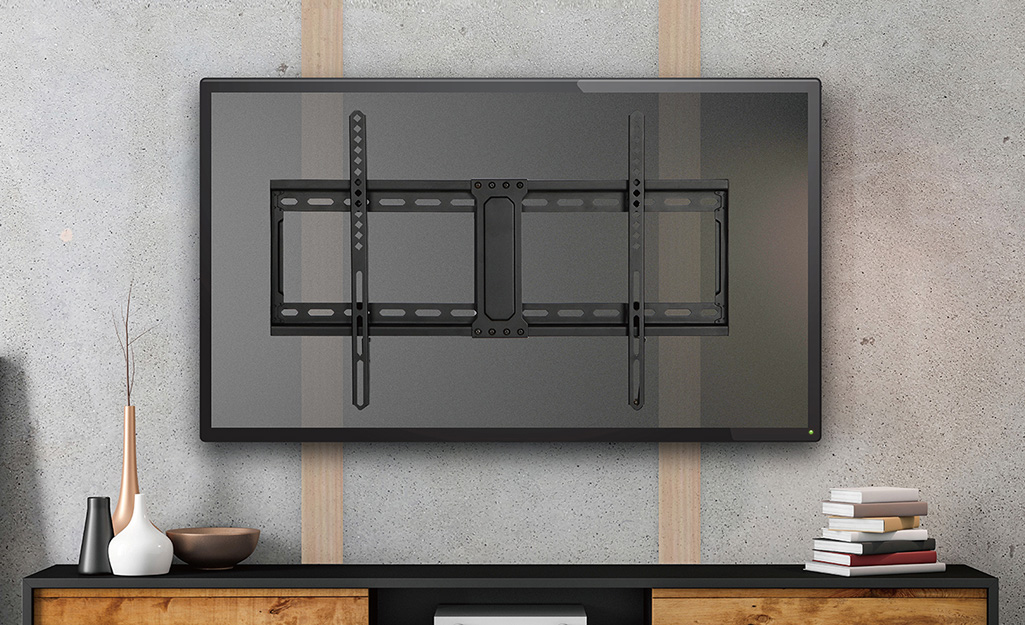
Locating and Marking Studs
- Use the Stud Finder: Glide the stud finder horizontally across the wall where you plan to mount the TV. Mark the edges of each stud you detect.
- Confirm Stud Edges: Once you have potential stud locations, use a thin nail or awl to gently poke holes at the marked edges to confirm you’ve found solid wood or metal. Do this within the area where the mount will cover.
- Mark Centerlines: Identify the center of each stud and mark it clearly. This is where your mounting screws will go.
- Measure and Align: Hold the wall bracket against the wall, aligning the mounting holes with the centerlines of the studs. Use your level to ensure the bracket is perfectly horizontal. Mark the drilling points for the screws.
Drilling Pilot Holes and Securing the Bracket
- Drill Pilot Holes: Using a drill bit slightly smaller than the diameter of your lag screws (the large screws that attach the mount to the studs), drill pilot holes at your marked points. This makes driving the screws easier and prevents the wood from splitting.
- Consider Wall Anchors (for Brick/Concrete): If you are mounting into brick or concrete, you will need to use a masonry drill bit to create holes of the appropriate size for your wall anchors. Follow the anchor manufacturer’s instructions carefully.
- Attach the Bracket: Hold the wall bracket in place, aligning the holes with your pilot holes (or anchors). Drive the lag screws (or appropriate fasteners for your wall type) through the bracket and into the studs (or anchors).
- Tighten Securely: Use a socket wrench or adjustable wrench to tighten the screws firmly. Ensure the bracket is snug against the wall and does not move. Do not overtighten, which could strip the screws or damage the studs.
- Double-Check Level: Once the bracket is secured, place your level on top of it one last time to confirm it is perfectly horizontal.
Attaching the TV Brackets to Your Television
The brackets that attach to the back of your TV are often the part of the mount that allows for articulation or tilting.
Identifying VESA Mounting Holes
- Locate the Holes: On the back of your TV, you will find four threaded holes arranged in a square or rectangular pattern. These are your VESA mounting holes. Refer to your TV’s manual to confirm their location and size.
- Match with Mount Hardware: The TV mount will come with a variety of screws and spacers. You need to select the screws that are the correct length and thread pattern for your TV’s VESA holes. The included manual or hardware guide will help you identify the right ones. Use spacers if the TV’s back is curved or if the screws are too long.
Securing the Brackets to the TV
- Attach Brackets: Align the TV brackets with the VESA mounting holes on the back of your television.
- Insert and Tighten Screws: Insert the correct screws (and any necessary spacers) through the brackets and into the VESA holes.
- Tighten Firmly: Using a screwdriver, tighten the screws securely. Be careful not to overtighten, which could damage the TV’s internal components. The brackets should feel solid and not wiggle.
Mounting the TV onto the Wall Bracket
This is the moment of truth, where your hard work comes together. It’s advisable to have a second person for this step, especially for larger TVs.
- Lift and Align: With the help of another person, carefully lift the TV. Align the brackets on the back of the TV with the corresponding slots or hooks on the wall bracket.
- Engage the Mount: Gently slide or hook the TV brackets onto the wall bracket. Many mounts have a system where the TV “clicks” or locks into place. Refer to your mount’s instructions for the specific engagement mechanism.
- Secure the TV: Most mounts have safety screws or a locking mechanism to prevent the TV from accidentally being dislodged. Tighten these screws or engage the lock as per your mount’s manual. This is a critical safety step.
- Test Stability: Gently try to wiggle the TV. It should feel solid and secure.
Finalizing Your Wall TV Setup: Cable Management and Calibration
Once your TV is securely mounted, the focus shifts to making the setup functional and aesthetically pleasing. This involves neatly managing cables and optimizing your viewing experience.
Managing Your Cables for a Clean Look
Visible cables can detract from the sleekness of a wall-mounted TV. There are several effective ways to conceal them.
In-Wall Cable Routing
- In-Wall Cable Management Kits: These kits typically include a paintable plastic cover and a way to route cables through the wall. They require cutting access holes in your drywall, but the result is the cleanest look. Always ensure you are not drilling into studs or existing electrical wires.
- Power Outlet Kits: Some kits allow you to relocate an outlet behind the TV, providing a clean power source.
External Cable Management Solutions
- Raceways and Channels: These are adhesive or screw-on plastic conduits that attach to the wall to cover and organize cables. They come in various colors to match your wall.
- Cable Sleeves and Ties: For simpler setups or for cables running behind furniture, cable sleeves or zip ties can bundle cables together neatly.
Connecting and Calibrating Your TV
With the TV mounted and cables managed, it’s time to power up and fine-tune your viewing experience.
Making Connections
- Connect Power: Plug the TV’s power cord into the nearest outlet or your in-wall power solution.
- Connect Input Devices: Connect your HDMI cables for devices like Blu-ray players, gaming consoles, streaming sticks, and soundbars. Ensure you’re using high-quality HDMI cables for the best signal.
- Connect Audio (if applicable): If you’re using a soundbar or external speakers, connect them via HDMI ARC, optical audio, or other designated ports.
- Connect Network: Connect your TV to your home network via Ethernet cable or Wi-Fi for smart TV features and streaming.

Initial TV Setup and Calibration
- Power On and Initial Setup: Turn on your TV. It will likely guide you through an initial setup process, including language selection, network connection, and scanning for channels.
- Picture Calibration: Most TVs come with several picture modes (e.g., Standard, Movie, Vivid). Experiment with these to find the one that best suits your viewing preferences and room lighting. For a more professional approach, consider using calibration discs or online calibration tools to fine-tune brightness, contrast, color, and sharpness.
- Sound Calibration: Adjust the TV’s audio settings. If you have a soundbar or external speakers, follow their setup instructions and ensure the TV’s audio output is configured correctly.
By following these detailed steps, you’ll not only have a TV securely mounted on your wall but also a seamlessly integrated entertainment system that enhances your living space. Enjoy your elevated viewing experience!
aViewFromTheCave is a participant in the Amazon Services LLC Associates Program, an affiliate advertising program designed to provide a means for sites to earn advertising fees by advertising and linking to Amazon.com. Amazon, the Amazon logo, AmazonSupply, and the AmazonSupply logo are trademarks of Amazon.com, Inc. or its affiliates. As an Amazon Associate we earn affiliate commissions from qualifying purchases.