
In the contemporary technological landscape, the ability to visualize data is no longer reserved for mathematicians and academics. As we move deeper into the era of Big Data and Artificial Intelligence, understanding the foundational elements of data visualization—specifically, how to graph linear equations—has become a vital skill for software developers, data analysts, and tech enthusiasts alike. While the manual method of plotting points on graph paper remains a valuable pedagogical exercise, the modern professional relies on a sophisticated suite of digital tools, programming languages, and AI-driven platforms to transform abstract algebraic expressions into actionable visual insights.

Graphing a linear equation, typically represented in the slope-intercept form $y = mx + b$, is the first step toward understanding linear regression, predictive modeling, and algorithm development. This guide explores the technological evolution of graphing, providing a comprehensive tutorial on using current software and tech stacks to master this fundamental concept.
1. The Digital Evolution: Graphing Software and Specialized Apps
The transition from physical graphing calculators to cloud-based, interactive software has revolutionized how we interact with mathematical functions. Today’s tech tools offer precision, real-time updates, and collaborative features that were once unimaginable.
The Rise of Interactive Web Tools: Desmos and GeoGebra
Desmos and GeoGebra have emerged as the industry standards for quick, high-fidelity graphing. Unlike the pixelated screens of legacy handheld calculators, these web-based platforms utilize HTML5 and JavaScript to provide fluid, high-resolution rendering. When graphing a linear equation like $y = 2x + 3$, these tools allow users to implement “sliders” for variables. By changing the value of $m$ (slope) or $b$ (y-intercept) in real-time, users can visually witness how the steepness and position of the line react. This immediate feedback loop is essential for debugging models and understanding data trends in a sandbox environment.
Leveraging Mobile Apps for Field Graphing
For engineers and tech professionals working outside a traditional office setting, mobile applications like “Graphing Calculator by Mathlab” or “Algeo” have turned smartphones into powerful computational engines. These apps utilize the device’s GPU to render complex linear systems quickly. In a tech-centric workflow, these apps are often used for “back-of-the-napkin” calculations, allowing users to verify linear relationships in network latency, battery depletion rates, or signal strength before moving to a more robust desktop environment.
2. Programmatic Visualization: Graphing with Python and R
For those in software development and data science, graphing is rarely done through a GUI (Graphical User Interface). Instead, it is integrated into a codebase using programming languages that offer immense control over the aesthetic and functional properties of the graph.
Utilizing Matplotlib and Seaborn in Python
Python is the undisputed king of data science tech. To graph a linear equation, developers typically utilize the Matplotlib library. By defining a range of $x$ values using NumPy and applying the linear function to create corresponding $y$ values, a single line of code—plt.plot(x, y)—can generate a professional-grade visualization.
Beyond basic plotting, the Seaborn library builds on top of Matplotlib to provide “Statistical Data Visualization.” This is particularly useful when graphing linear equations derived from actual datasets. Seaborn’s lmplot function can automatically calculate the “line of best fit” for a scatter plot of data points, effectively automating the process of identifying the $m$ and $b$ values that characterize a linear relationship.
R and ggplot2 for Statistical Integrity
While Python is general-purpose, the R programming language remains a powerhouse for statistical computing. The ggplot2 package is the gold standard for creating publication-quality graphs. Tech professionals use R to graph linear equations when the priority is statistical rigor. The “Grammar of Graphics” approach used by ggplot2 allows users to layer components—data, aesthetics, and geometric objects—providing a modular way to build complex visualizations that start with a simple linear trend.
3. Data Visualization in Enterprise Software: Excel and Google Sheets
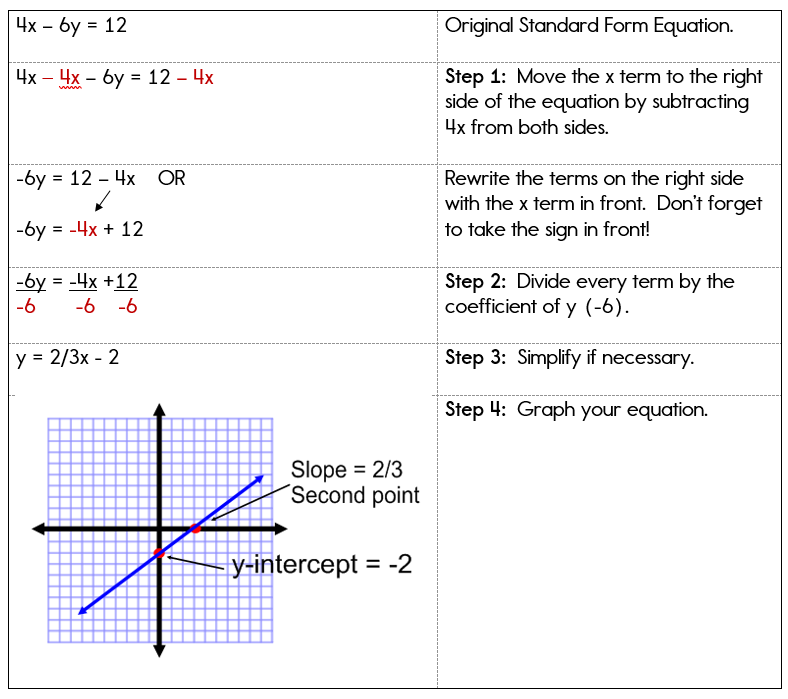
In the corporate tech world, linear equations are frequently graphed within spreadsheet software. This is the bridge between raw data entry and high-level business intelligence.
Creating Dynamic Linear Charts in Microsoft Excel
Excel remains a staple in the tech professional’s toolkit for financial modeling and performance tracking. To graph a linear equation in Excel, one typically creates two columns: one for the independent variable ($x$) and one for the calculated dependent variable ($y$). By highlighting these cells and inserting a “Scatter with Smooth Lines” chart, the linear equation is visualized.
The real power of Excel lies in its “Trendline” feature. By right-clicking a data point in a chart, users can “Add Trendline” and select “Linear.” This tells Excel’s backend algorithms to perform a least-squares regression, displaying the equation $y = mx + b$ directly on the chart. This is a critical tech skill for analyzing server uptime, user growth rates, or load-testing results.
Collaborative Graphing with Google Sheets
Google Sheets has mirrored many of Excel’s graphing capabilities while adding the advantage of real-time collaboration. The “Chart Editor” in Google Sheets provides a streamlined UI for customizing linear plots. Because Google Sheets integrates with Google Apps Script, developers can automate the generation of linear graphs based on incoming API data, such as real-time stock prices or IoT sensor readings, creating a live dashboard of linear trends.
4. The AI Frontier: Automated Modeling and Solving
Artificial Intelligence is changing the way we approach mathematics. We are moving from a world where we manually input equations to a world where AI suggests the equations based on our intent.
AI-Powered Equation Solvers and Plotters
Tools like Wolfram Alpha and ChatGPT (with Advanced Data Analysis enabled) have simplified the process of graphing linear equations. A user can now type a natural language prompt, such as “Graph the linear equation representing a 15% increase in cloud storage costs over 12 months,” and the AI will generate the mathematical model, solve for the variables, and produce the visual output. This shift allows tech professionals to focus more on the interpretation of the graph rather than the mechanics of its construction.
Predictive Modeling and Linear Regression in Machine Learning
In the realm of AI and Machine Learning (ML), graphing linear equations is the foundation of “Linear Regression.” Tech companies use ML frameworks like TensorFlow or PyTorch to find the linear relationship between variables in massive datasets. Graphing these equations helps developers visualize the “loss function”—a way of measuring how far off an AI’s prediction is from the actual data. By graphing the linear descent of the error rate, engineers can tune their algorithms for maximum efficiency.
5. Optimization and Best Practices for Digital Graphics
Creating a graph is only half the battle; the other half is ensuring that the graph is accurate, accessible, and performant within a digital interface.
UI/UX Considerations in Mathematical Visualization
When integrating graphs into a software application or a dashboard, developers must consider User Experience (UX). A linear graph should be responsive, meaning it scales correctly across mobile and desktop screens. Using SVG (Scalable Vector Graphics) instead of raster images (like PNG or JPEG) ensures that the lines of the linear equation remain sharp at any zoom level. Furthermore, accessibility is key—ensuring high color contrast and providing ARIA labels for screen readers allows all users to understand the data being presented.

Precision and Computational Limits
While tech tools are powerful, they are not immune to errors. Floating-point arithmetic errors in programming can lead to slight inaccuracies in how a line is plotted over very large or very small scales. Tech professionals must be aware of “machine epsilon” and the limits of their chosen environment. When graphing linear equations in a high-stakes environment—such as aerospace software or high-frequency trading platforms—the choice of data type (e.g., using decimal instead of float) can be the difference between a successful model and a catastrophic failure.
In conclusion, the journey from understanding $y = mx + b$ to deploying a linear regression model in a cloud environment is a testament to the power of modern technology. Whether you are using a simple web app like Desmos, writing complex Python scripts, or leveraging the latest AI tools, the ability to graph linear equations remains a cornerstone of the tech industry. By mastering these digital tools, you empower yourself to see beyond the numbers and visualize the future of your data.
aViewFromTheCave is a participant in the Amazon Services LLC Associates Program, an affiliate advertising program designed to provide a means for sites to earn advertising fees by advertising and linking to Amazon.com. Amazon, the Amazon logo, AmazonSupply, and the AmazonSupply logo are trademarks of Amazon.com, Inc. or its affiliates. As an Amazon Associate we earn affiliate commissions from qualifying purchases.