
Navigating the complexities of the tax season can be a daunting endeavor for even the most financially savvy individuals. At the heart of this annual ritual lies the fundamental task of gathering the correct documentation. Whether you are an individual taxpayer filing a standard return, a freelancer managing a growing side hustle, or a small business owner overseeing corporate compliance, the ability to source and organize tax forms efficiently is critical. In the realm of personal and business finance, preparation is the ultimate hedge against audits, penalties, and missed opportunities for deductions.
Acquiring tax forms has evolved significantly with the advent of digital financial tools. While the days of browsing physical racks at the local library are not entirely gone, the modern financial landscape offers a variety of streamlined, secure, and immediate methods to get the paperwork you need. This guide provides an in-depth look at how to secure your federal and state tax forms, manage third-party documentation, and maintain a robust financial record-keeping system.
Understanding Your Tax Form Requirements
Before you begin the process of downloading or ordering forms, you must identify the specific documents required for your unique financial situation. The “one size fits all” approach rarely applies to taxation, as your filing status, income sources, and investment portfolio dictate your needs.
Individual vs. Business Needs
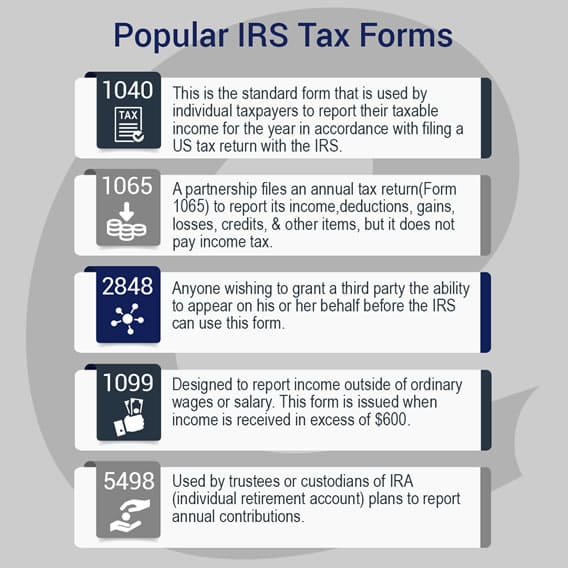
For most individual filers, the primary document is Form 1040, the U.S. Individual Income Tax Return. However, the modern economy has blurred the lines between individual and business filings. If you are a participant in the “gig economy” or operate as a sole proprietor, you will likely need Schedule C to report profit or loss from business.
Investors, on the other hand, must look toward Schedule D for capital gains and losses. If your financial strategy includes rental properties or pass-through income from partnerships (S-corps), Schedule E becomes a necessity. Understanding these distinctions early prevents the last-minute scramble that often leads to filing errors.
Federal vs. State Obligations
It is a common pitfall to focus solely on federal requirements while neglecting state obligations. Except for states with no income tax—such as Florida, Texas, or Washington—you will need a separate set of forms for your state’s Department of Revenue. While federal forms are standardized across the country, state forms vary wildly in structure and submission requirements. Some states mirror the federal 1040 structure, while others utilize entirely different calculation methods for adjusted gross income.
Digital Sourcing: The Most Efficient Way to Acquire Forms
In the current financial era, digital procurement is the gold standard. It offers the most up-to-date versions of forms, including the “Instructions” booklets which are often more valuable than the forms themselves for identifying tax-saving opportunities.
The IRS Official Website (IRS.gov)
The Internal Revenue Service (IRS) has invested heavily in its digital infrastructure. The “Forms, Instructions & Publications” search tool on IRS.gov is the most reliable source for federal documents. You can search by form number (e.g., “Form 8863” for education credits) or by keyword.
A significant advantage of using the official IRS portal is access to “Fillable Forms.” These are PDF documents that allow you to input data directly on your computer, performing basic calculations automatically. This reduces the risk of legible errors that often trigger manual reviews by IRS processing centers. Furthermore, the site offers “Prior Year Products,” which are essential if you need to file back taxes or amend a previous return using Form 1040-X.
State Department of Revenue Portals
Each state maintains its own treasury or revenue website. These portals are the primary source for state-specific forms such as the California 540 or the New York IT-201. Most state websites now offer “e-file” portals that bypass the need for physical forms entirely. If you prefer to file via mail, ensure you are downloading the version specifically designated for the current tax year, as state tax codes often undergo more frequent adjustments than federal codes.
Online Tax Software Platforms
For many, the most seamless way to “get” tax forms is to use professional tax preparation software. Platforms like TurboTax, H&R Block, and TaxSlayer do not simply provide blank forms; they generate the forms based on your answers to an interview-style questionnaire. When you complete your return through these services, the software automatically populates the necessary schedules and forms in the background. At the end of the process, you can download a complete PDF packet of your “Tax Return for Your Records,” which includes every form filed on your behalf.
Physical Procurement: Traditional Methods for Hard Copies
Despite the shift toward digital, there are still valid reasons to seek physical tax forms. Some taxpayers find it easier to draft their returns by hand before finalizing them digitally, while others may lack consistent internet access or a reliable printer.

Local Libraries and Post Offices
Historically, post offices and public libraries were the primary distribution hubs for tax forms. In recent years, the IRS has scaled back the “Tax Forms Outlet Program” (TFOP) to save costs. However, many local libraries still receive a limited supply of the basic Form 1040 and its primary instructions. It is advisable to call ahead to verify availability. If they do not have the forms in stock, most libraries provide public computer terminals and printers where you can print the forms for a small per-page fee.
IRS Taxpayer Assistance Centers (TACs)
If you require specific forms that are difficult to find or if you need face-to-face assistance identifying which forms you need, you can visit an IRS Taxpayer Assistance Center. These offices are located across the country, though most now require an appointment. They can provide hard copies of forms and publications that might not be available at a local library, such as complex corporate forms or specialized international tax documents.
Ordering via Telephone
The IRS maintains a dedicated toll-free line for ordering forms, instructions, and publications. By calling 800-829-3676, you can request that specific forms be mailed to your home address. While this is a convenient option for those who cannot print documents, keep in mind that mail delivery can take 7 to 15 business days. In the weeks leading up to the April filing deadline, this delay can be a significant bottleneck in your financial planning.
Managing Employer and Financial Institution Forms
The forms you download from the IRS are “blank” templates. The “filled” forms—those that report your income—are generated by third parties. Securing these is perhaps the most critical step in the tax preparation process.
W-2s and 1099s from Online Portals
Employers are required to provide Form W-2 by January 31st. Most medium-to-large corporations now deliver these through payroll portals like ADP, Workday, or Gusto. If you have not received your W-2, your first step should be to check your employee dashboard.
For freelancers and independent contractors, the Form 1099-NEC (Non-Employee Compensation) is the standard. If you utilize payment processors like Stripe or PayPal for your business, they often provide a 1099-K. These are typically found in the “Tax” or “Reporting” section of your account settings. If a client fails to send a 1099, you are still legally obligated to report the income; in such cases, your own accounting records and bank statements serve as the primary source of truth.
Investment and Banking Statements
Your financial growth is also a taxable event. Banks and brokerage firms provide various versions of Form 1099.
-
1099-INT: Reports interest earned on savings and checking accounts.
-
1099-DIV: Reports dividends and distributions from stocks or mutual funds.
-
1099-B: Reports proceeds from the sale of securities (crucial for calculating capital gains).
Most modern brokerages (e.g., Fidelity, Charles Schwab, Vanguard) provide a “Consolidated Tax Statement” in February. This digital document combines all 1099s into a single PDF, making it significantly easier to manage than multiple individual forms.
Best Practices for Organizing and Securing Your Tax Documentation
Getting the forms is only half the battle; managing them securely is what defines professional financial management. Tax forms contain highly sensitive information, including Social Security numbers and detailed income data.
Creating a Digital Paper Trail
A “paperless” tax season is more than just an environmental choice—it is a strategic one. Use a dedicated, encrypted cloud storage folder or a secure external drive to store your tax forms. As you receive W-2s, 1099s, and receipts for deductible expenses throughout the year, scan them immediately. Naming conventions are vital for retrieval: use a format like “2023Form1099ClientName” or “2023ReceiptOfficeSupplies.”

Record-Keeping Timelines
From a financial security standpoint, how long you keep these forms is as important as how you get them. The IRS generally has three years to audit a return, but this can extend to six years if a substantial understatement of income is identified. A best practice is to maintain digital copies of your filed returns and all supporting forms for at least seven years. This ensures that if you are ever asked to substantiate a deduction or income claim, the “forms” you worked so hard to gather are readily available to defend your financial position.
By mastering the various channels for acquiring tax forms—from official government portals to automated software and third-party financial institutions—you transform a chaotic seasonal chore into a streamlined component of your broader financial strategy. Organized documentation is not merely a requirement of the law; it is the foundation of financial clarity and long-term wealth management.
aViewFromTheCave is a participant in the Amazon Services LLC Associates Program, an affiliate advertising program designed to provide a means for sites to earn advertising fees by advertising and linking to Amazon.com. Amazon, the Amazon logo, AmazonSupply, and the AmazonSupply logo are trademarks of Amazon.com, Inc. or its affiliates. As an Amazon Associate we earn affiliate commissions from qualifying purchases.