
In an increasingly digital financial landscape, platforms like Venmo have revolutionized how individuals send and receive money, making transactions instantaneous and often seamless. While the convenience is undeniable, the ability to track and account for these financial movements remains a critical aspect of sound personal finance and business management. Obtaining statements from Venmo is not just a regulatory necessity for some; it’s a fundamental practice for budgeting, tax preparation, dispute resolution, and maintaining a clear overview of one’s financial health. Understanding how to efficiently access these statements empowers users to take full control of their digital money flow.
Understanding Venmo Statements: Why They Matter
Venmo statements serve as official records of your account activity, detailing every transaction that flows through your digital wallet. Unlike traditional bank statements which often focus on a checking or savings account, Venmo statements specifically track peer-to-peer payments, business payments, and transfers to and from your linked bank accounts. For many, Venmo has become a primary method for splitting bills, paying freelancers, managing household expenses, or even receiving income, making these statements indispensable.
What a Venmo Statement Contains
A typical Venmo statement or transaction history export provides a comprehensive breakdown of your financial interactions. This includes:
-
Transaction Dates: The exact date and time each transaction occurred.
-
Transaction IDs: Unique identifiers for each payment, crucial for tracking or dispute resolution.
-
Sender/Recipient Information: The Venmo username of the person or business you transacted with.
-
Transaction Type: Clearly indicating if money was sent, received, added to your balance, or withdrawn.
-
Amount: The specific monetary value of each transaction.
-
Transaction Status: Whether a payment is complete, pending, or declined.
-
Notes/Descriptions: The brief messages associated with each transaction, which can be helpful for recalling the purpose of a payment.
-
Fees (if applicable): Any charges associated with instant transfers or specific business transactions.
This detailed ledger provides the transparency needed to understand your spending patterns and income sources within the Venmo ecosystem.
Common Reasons for Needing Statements
The necessity for Venmo statements extends across various personal and professional financial scenarios:
-
Budgeting and Expense Tracking: Regular review of statements helps users categorize spending, identify areas for savings, and adhere to financial plans. It provides a real-world snapshot of where money is going.
-
Tax Preparation: For freelancers, small business owners, or those using Venmo for income-generating activities, statements are vital for reporting earnings and expenses to tax authorities. Specific tax documents like Form 1099-K are generated for high-volume business accounts.
-
Dispute Resolution: In cases of unauthorized transactions, errors, or disagreements over payments, a detailed statement provides concrete evidence to support your claim.
-
Proof of Payment: Whether you’re proving you paid a landlord, repaid a friend, or completed a purchase, a Venmo statement serves as official documentation.
-
Financial Audits or Reviews: For personal financial reviews, loan applications, or even legal proceedings, comprehensive transaction histories can be requested.
Step-by-Step Guide to Downloading Statements on Desktop
While Venmo is predominantly a mobile application, the most robust and comprehensive statement generation features are accessible through its website on a desktop or laptop computer. This method is recommended for downloading official monthly statements or detailed transaction history exports.
Accessing Your Account
Begin by navigating to the official Venmo website (venmo.com) using a web browser. Log in to your account using your registered email address or phone number and password. If you have two-factor authentication enabled, you’ll need to complete that verification step as well. Ensure you are on the legitimate Venmo site to protect your account security.
Navigating to Statements & Reports
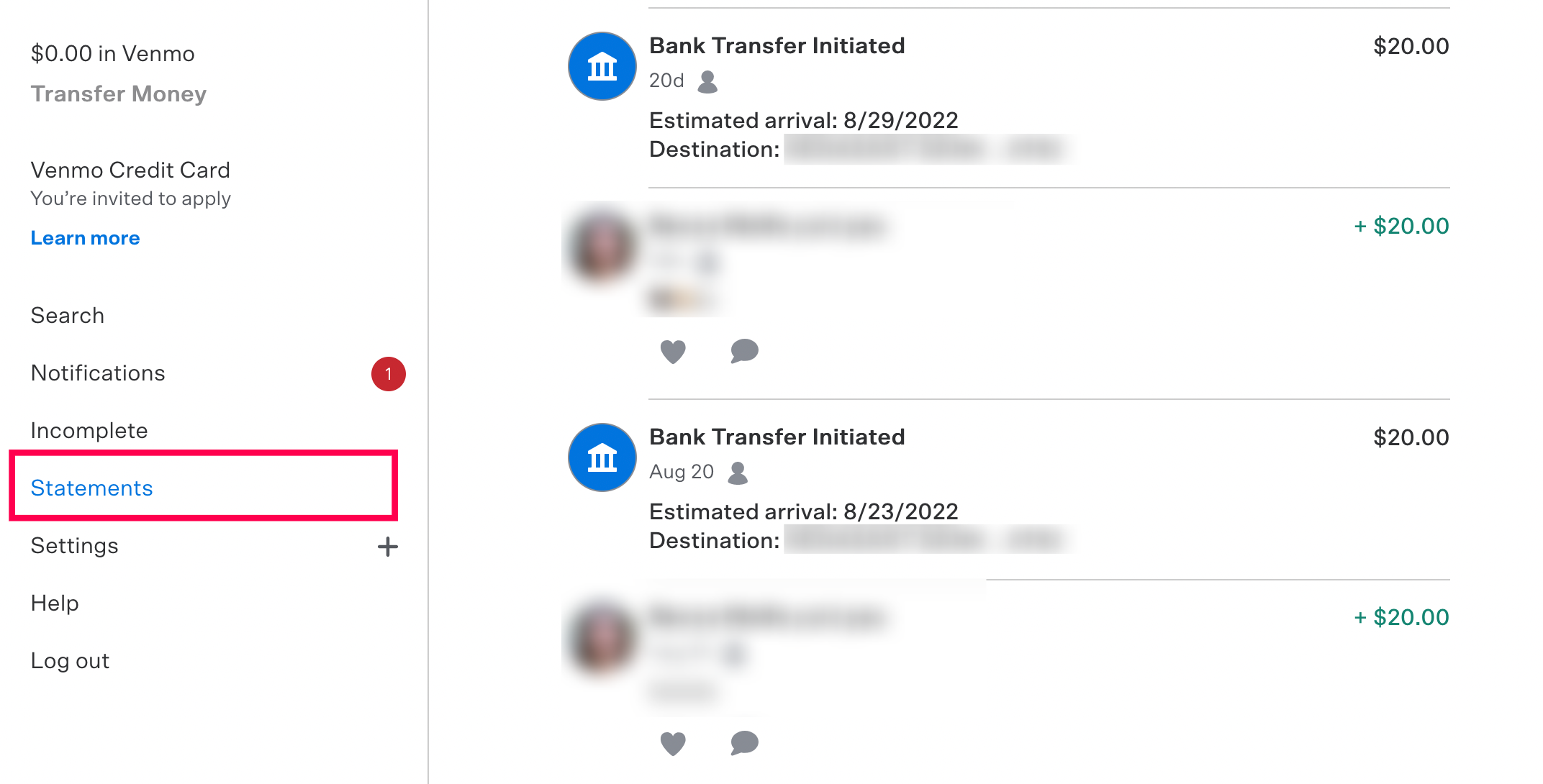
Once logged in, locate your profile icon or name, usually in the upper right-hand corner of the screen. Click on it to reveal a dropdown menu. From this menu, select “Statements & reports.” This section is specifically designed to house all your official financial documents and transaction history.
Selecting Your Statement Type and Date Range
Within the “Statements & reports” section, you will typically find a few options:
-
Monthly Statements: For official, summary statements by month.
-
Annual Statements: Sometimes available for a yearly overview, though often a collection of monthly statements is preferred.
-
Transaction History (CSV/Excel): This is often the most useful option for detailed analysis, allowing you to export all your transactions within a custom date range into a spreadsheet format.
-
Tax Documents: If you’re eligible for a 1099-K (usually due to high volume business transactions), it will appear here.
For monthly statements, select the desired year and month from the available dropdown menus, then click “Download” or “Generate.” The statement will typically download as a PDF file.
For transaction history, choose the “Custom” or “Export” option. You will then be prompted to select a start date and an end date. Venmo allows you to select a broad range, sometimes up to a few years of history, depending on account age. After selecting your dates, click “Download CSV” or “Export.” This file will download as a .csv (Comma Separated Values) file, which can be opened and manipulated in spreadsheet software like Microsoft Excel, Google Sheets, or Apple Numbers.
Downloading and Reviewing
Once you click “Download,” the file will save to your computer’s default downloads folder. It’s crucial to open and review the downloaded statement immediately to ensure it contains the correct information for the specified period. Check for completeness and accuracy, especially if you are using it for tax purposes or dispute resolution. Consider saving these documents in a secure, organized folder on your computer or cloud storage for easy future access.
Accessing Statements via the Venmo Mobile App
While the desktop website offers the most comprehensive tools for downloading official statements, the Venmo mobile app does provide access to your transaction history for quick review. However, it’s important to understand the limitations.
Limitations of Mobile Access

The Venmo mobile app primarily focuses on managing current transactions and initiating new payments. It does not typically offer the functionality to download official monthly PDF statements or large, custom-range CSV transaction history exports directly. For these specific, formal documents, the desktop website remains the definitive method.
Exporting Transaction History (for Quick Overview)
On the mobile app, you can view your full transaction history by navigating to the “Me” tab (your profile icon). Scroll down, and you’ll see a feed of all your past transactions. While you can scroll indefinitely through this history, there isn’t a direct “export to CSV” or “download PDF statement” button within the app interface itself.
If you need a quick record for a single transaction or a very short period, you might:
-
Take Screenshots: Navigate to the relevant transactions and capture screenshots. This is not an official statement but can serve as informal proof.
-
Individual Transaction Details: Tap on any individual transaction to see its full details, including transaction ID, date, and participants. You can copy and paste information from here if needed, but this is impractical for a large volume of transactions.
For any formal or extensive financial record-keeping, always revert to the desktop method.
Types of Venmo Statements Available
Understanding the different types of statements Venmo provides is key to requesting the correct documentation for your specific financial needs.
Monthly Statements
These are official PDF documents summarizing your activity for a given calendar month. They typically include an opening balance, total money in, total money out, and a closing balance, alongside a detailed list of all transactions within that period. Monthly statements are excellent for periodic financial reviews and can be compiled to form an annual record.
Annual Statements
While Venmo may not always generate a single “annual statement” PDF in the same way a bank might, you can easily compile one by downloading all 12 monthly statements for a calendar year. For a more granular annual overview, a custom transaction history export covering the full year (January 1st to December 31st) is often preferred.
Custom Date Range Statements (Transaction History Exports)
This is arguably the most powerful tool for personal finance management and business accounting. By selecting a specific start and end date, you can generate a CSV file containing every single transaction within that custom period. This allows for unparalleled flexibility in analyzing specific projects, tracking expenses for a particular event, or preparing quarterly financial reports. The CSV format is highly versatile, allowing users to sort, filter, and calculate data using spreadsheet software.
Tax Documents (1099-K)
For users who receive payments for goods and services through Venmo and meet certain IRS thresholds, Venmo is required to issue a Form 1099-K. This form reports the gross amount of reportable payment transactions for the calendar year. These thresholds can change, so it’s essential to stay updated with IRS guidelines. If you qualify, your 1099-K document will be available in the “Statements & reports” section alongside your other statements. This document is critical for accurately filing your income taxes.
Tips for Managing and Utilizing Your Venmo Data
Obtaining your Venmo statements is just the first step. Effectively managing and utilizing this data is crucial for robust financial health.
Regular Review for Financial Health
Make it a habit to download and review your Venmo statements monthly or quarterly. This proactive approach helps you:
-
Catch unauthorized transactions or errors quickly.
-
Monitor spending patterns and identify areas where you might be overspending.
-
Verify income streams if you use Venmo for receiving payments.
-
Ensure the “notes” section for each transaction adequately describes its purpose, which is vital for later recall or tax purposes.
Record Keeping Best Practices
Once downloaded, treat your Venmo statements like any other critical financial document.
-
Secure Storage: Save PDF statements and CSV exports in a secure, encrypted folder on your computer or a reputable cloud storage service. Avoid leaving them in easily accessible, unencrypted locations.
-
Consistent Naming Convention: Name your files logically (e.g., “VenmoStatementYYYY-MM.pdf” or “VenmoTransactionsYYYY-MM-DDtoYYYY-MM-DD.csv”) for easy retrieval.
-
Backup: Regularly back up your financial records to prevent data loss.
Security Considerations
When downloading statements, always ensure you are logged into the official Venmo website. Be wary of phishing attempts that try to mimic Venmo’s login page. Never share your login credentials or downloaded statements with unauthorized individuals. If downloading to a public computer, ensure you log out completely and delete the downloaded files afterwards.
Integrating with Other Financial Tools
The CSV export feature is particularly valuable for integration with other personal finance software. Many budgeting apps, accounting software, or personal spreadsheets can import CSV files. This allows you to consolidate your Venmo transactions with data from your bank accounts, credit cards, and other financial platforms, providing a holistic view of your financial standing. Categorize transactions within your spreadsheet for deeper insights into where your money is going and coming from.
By regularly accessing and intelligently managing your Venmo statements, you transform a convenient payment app into a powerful tool for informed financial decision-making and robust record-keeping.
aViewFromTheCave is a participant in the Amazon Services LLC Associates Program, an affiliate advertising program designed to provide a means for sites to earn advertising fees by advertising and linking to Amazon.com. Amazon, the Amazon logo, AmazonSupply, and the AmazonSupply logo are trademarks of Amazon.com, Inc. or its affiliates. As an Amazon Associate we earn affiliate commissions from qualifying purchases.