
Amazon Prime has evolved from a simple expedited shipping service into one of the most robust digital ecosystems in the technology sector. For the modern consumer, navigating this ecosystem often begins with a 30-day free trial. This trial serves as a gateway to a suite of software, streaming services, and cloud-based tools that integrate seamlessly across various devices. Understanding how to secure this trial—and more importantly, how to maximize the technological benefits included within it—is essential for any tech-savvy user looking to optimize their digital life.
Understanding the Amazon Prime Value Proposition in the Modern Tech Landscape
To the uninitiated, Amazon Prime might seem like a utility for physical retail. However, from a technical perspective, it is a comprehensive subscription-as-a-service (SaaS) model that provides access to high-bandwidth streaming, cloud storage, and digital content distribution. Before initiating a free trial, it is important to understand the infrastructure you are gaining access to.
Beyond Fast Shipping: The Digital Content Suite
The Prime ecosystem is anchored by several key software platforms. Prime Video, for instance, utilizes advanced compression algorithms to deliver 4K UHD and HDR content to a wide array of hardware, from smart TVs to mobile devices. Similarly, Amazon Music provides a massive library of lossless audio, catering to audiophiles who demand high-fidelity sound. When you sign up for a free trial, you aren’t just getting “free shipping”; you are gaining a temporary license to a massive repository of proprietary and licensed digital media.
The Integration of Prime Video and Music
One of the most significant technical advantages of a Prime membership is the cross-platform synchronization. Whether you are using the Prime Video app on an iPad or a dedicated Fire TV stick, your watch history, preferences, and “X-Ray” data (powered by IMDb) are synced in real-time via Amazon’s cloud infrastructure. The free trial allows users to test the latency and UI/UX of these applications across their personal hardware suite, ensuring the software meets their performance standards before a financial commitment is made.
Step-by-Step Technical Guide to Securing Your Free Trial
Securing a Prime free trial is a straightforward process, but there are technical nuances regarding account eligibility and device compatibility that users should be aware of. To ensure a smooth onboarding experience, follow these specific steps within the Amazon interface.
Eligibility Requirements and Account Setup
To qualify for a 30-day free trial, your account must generally be in good standing and not have had an active Prime membership within the last 12 months. From a database perspective, Amazon tracks eligibility based on your email address, physical address, and the credit card metadata associated with your account.
-
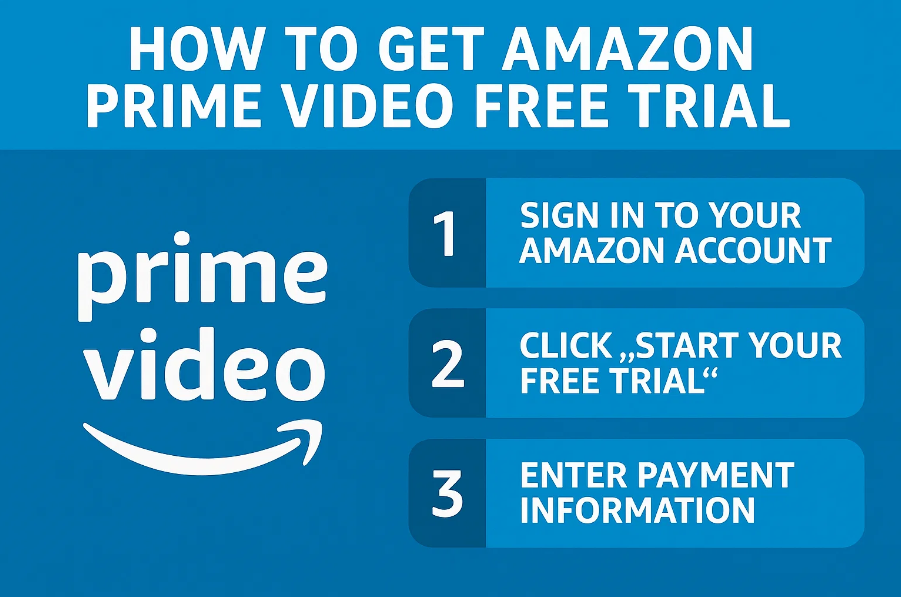
Navigate to the Official Portal: Access the Amazon homepage and look for the “Try Prime” or “Prime” link in the navigation header.
-
Account Authentication: Log in with your existing credentials or create a new account. If creating a new account, ensure you use a primary email address, as this will become the hub for your digital receipts and security notifications.
-
Payment Method Verification: While the trial is free, Amazon’s backend requires a valid payment method to verify your identity and ensure a seamless transition should you choose to continue the service. They accept major credit cards, debit cards, and in some regions, direct bank transfers.
-
Confirmation of Digital Terms: Review the terms of service, focusing on the sections regarding digital content usage rights and data privacy, then click “Start your 30-day free trial.”
Navigating the Mobile App vs. Desktop Interface
The sign-up process can vary slightly depending on the hardware you are using. On a desktop browser, the interface is designed for high information density, allowing you to see all the included services at a glance. On the Amazon mobile app (available on iOS and Android), the “Hamburger” menu or the user profile icon typically houses the Prime management settings. The mobile experience is often streamlined for biometric authentication, making the “One-Click” sign-up process exceptionally fast. However, users should ensure their app is updated to the latest version to avoid API errors during the payment verification phase.
Advanced Strategies for Maximizing Your Trial Period
Once the trial is active, the goal shifts from acquisition to optimization. A Prime membership offers several “hidden” tech features that are often overlooked by casual users. To truly test the value of the service, you should engage with the high-end digital tools available.
Utilizing Prime Early Access and Exclusive Tech Deals
For technology enthusiasts, Prime is a vital tool for hardware acquisition. Members get “Early Access” to Lightning Deals, which often include significant discounts on SSDs, networking gear, smart home devices, and peripherals. During your free trial, you can use the Amazon app to set “Watch this Deal” notifications. This technical integration allows the Amazon servers to push real-time alerts to your smartphone the moment a specific piece of hardware goes on sale, giving you a competitive edge over non-Prime users.
Exploring Prime Gaming and Twitch Integration
One of the most significant perks for the gaming community is Prime Gaming (formerly Twitch Prime). By linking your Amazon account to your Twitch account, you unlock a monthly “Prime Sub” to support your favorite streamer, along with a rotating selection of free PC games and in-game loot for titles like League of Legends, Apex Legends, and Call of Duty. This is a distinct software ecosystem that requires its own setup. You must visit the Prime Gaming portal, sign in with your Amazon credentials, and claim your digital keys. These games are yours to keep even after the trial ends, providing lasting value from a 30-day window.
Managing Your Subscription: Security and Renewal Settings
A critical aspect of utilizing any digital trial is managing the automated renewal system. Amazon, like most SaaS providers, defaults to an “opt-out” model, meaning the trial will convert to a paid subscription once the 30 days expire.
Setting Up Renewal Reminders and Digital Security
To avoid unexpected charges, you can navigate to the “Manage Prime Membership” section of your account immediately after signing up. Amazon provides a “Remind me before renewing” feature, which triggers an automated email three days before the trial concludes. From a digital security standpoint, this is also the ideal time to ensure your account is protected by Multi-Factor Authentication (MFA). Since your Prime account contains sensitive payment data and access to digital purchases, enabling hardware-based security keys or an authenticator app is a recommended best practice.
The Process of Canceling Without Losing Access
A common question among tech users is whether canceling the trial early will result in an immediate loss of service. Currently, Amazon’s policy typically allows users to “End Membership” and still retain access to Prime benefits until the original 30-day window expires. This allows you to sign up, immediately toggle the “End Membership” setting to prevent future billing, and then spend the remainder of the month exploring the 4K streaming and cloud storage features without the psychological burden of a pending charge.
Specialized Trials: Student and Low-Income Digital Access
Amazon offers tailored versions of its Prime trial for specific demographics, often providing extended trial periods or deep discounts that align with the technical needs of these groups.
Prime Student: Six Months of Tech Benefits
The Prime Student program is perhaps the most generous trial in the tech world. It offers a six-month free trial to anyone with a valid .edu email address or proof of enrollment. Beyond the standard Prime features, students gain access to specialized software deals, such as discounted subscriptions to Adobe Creative Cloud or LinkedIn Learning. This extended period is designed to integrate the Amazon ecosystem into the student’s academic workflow, from purchasing textbooks to utilizing Amazon Photos for unlimited full-resolution image storage—a critical tool for photography or design students.
Access Program for EBT and Medicaid Recipients
In an effort to bridge the digital divide, Amazon provides a specialized Prime Access program. While the initial free trial remains 30 days, the subsequent monthly fee is discounted by over 50% for users with valid EBT or Medicaid cards. This ensures that essential digital services, including access to grocery delivery and digital educational content, are accessible to a wider socio-economic range. For these users, the trial is a vital period to assess how the service can reduce the “hidden costs” of physical shopping and provide access to the digital economy.
By approaching the Amazon Prime free trial not just as a consumer perk, but as a technical evaluation of a massive digital platform, users can make informed decisions about their subscription stack. From the high-bitrate streaming of Prime Video to the gaming rewards of Prime Gaming, the 30-day trial offers a comprehensive window into the future of integrated digital services. Whether you are a developer looking for hardware deals or a cinephile testing 4K delivery, the Prime free trial is the essential starting point for exploring the Amazon tech ecosystem.
aViewFromTheCave is a participant in the Amazon Services LLC Associates Program, an affiliate advertising program designed to provide a means for sites to earn advertising fees by advertising and linking to Amazon.com. Amazon, the Amazon logo, AmazonSupply, and the AmazonSupply logo are trademarks of Amazon.com, Inc. or its affiliates. As an Amazon Associate we earn affiliate commissions from qualifying purchases.