
In the dynamic world of live entertainment, securing tickets to highly anticipated events often feels like a digital gladiatorial contest. The general public sale can be a frantic dash, leaving many fans empty-handed. This is where presale tickets emerge as a strategic advantage, offering early access to coveted seats before the wider audience. Far from a simple transaction, navigating Ticketmaster’s presale ecosystem demands a keen understanding of its technological infrastructure, digital protocols, and strategic preparation. This comprehensive guide will delve into the tech-driven strategies required to master the art of obtaining presale tickets, transforming a potentially frustrating experience into a streamlined, successful digital quest.
Understanding the Digital Presale Ecosystem
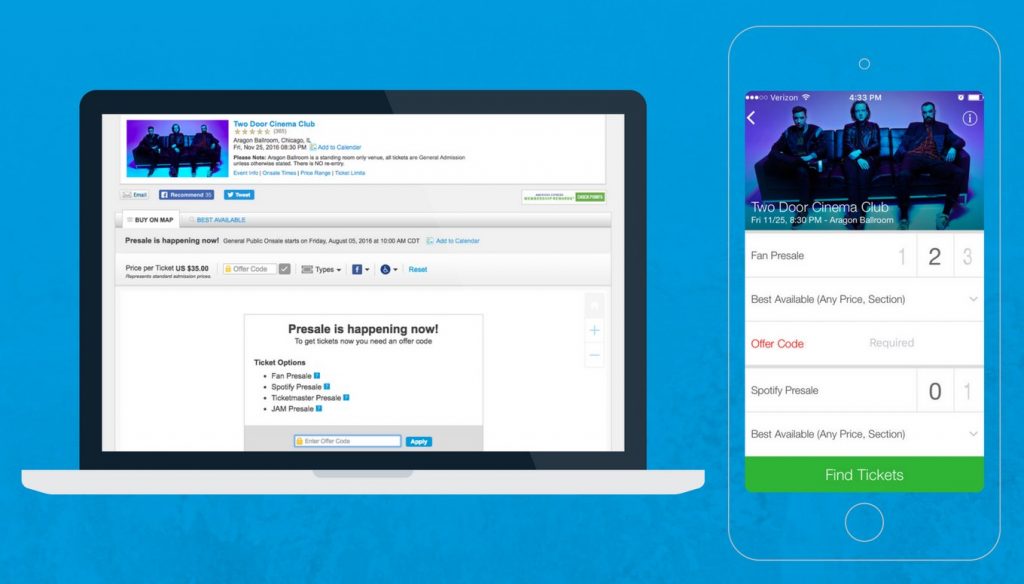
At its core, a presale is an exclusive window of opportunity to purchase tickets before they become available to the general public. For events with immense demand, this early access can be the difference between attending and missing out. Ticketmaster, as the predominant digital ticketing platform, orchestrates these intricate sales, leveraging a sophisticated array of online tools and security measures. Grasping the underlying technology of this ecosystem is the first step toward success.
What are Presale Tickets in a Digital Context?
Presale tickets are not just “early access”; they are a form of controlled digital distribution. Event organizers, artists, venues, and even credit card companies utilize presales to reward loyal fans, generate early buzz, or provide exclusive benefits. From a technological standpoint, this involves segmenting inventory and creating specific digital gates that only authorized users, armed with unique codes or verified memberships, can pass through. These gates are typically activated for a limited time, making swift digital navigation and execution paramount. It’s a carefully managed bandwidth and inventory allocation challenge that Ticketmaster’s backend systems handle.
The Role of Ticketmaster’s Platform and Its Digital Infrastructure
Ticketmaster functions as the central nervous system for countless live events globally. Its website and mobile application are not merely storefronts; they are complex digital ecosystems designed to handle immense traffic, process secure transactions, and manage vast ticket inventories. For presales, this infrastructure becomes particularly critical. The platform employs advanced algorithms for queue management, robust security protocols to deter bots, and intricate database management to ensure tickets are allocated correctly. Users interact with this infrastructure through intuitive (and sometimes less intuitive) interfaces, making familiarization with the digital layout crucial. Understanding the platform’s capacity, limitations, and standard operating procedures (like its virtual waiting room technology) is vital for anyone aiming to secure presale access.
Types of Presales and Their Digital Triggers
Presales are not monolithic; they come in various forms, each with its own digital access requirements. Recognizing these differences is key to knowing where to focus your digital efforts:
- Artist/Fan Club Presales: Often requiring membership to an artist’s official fan club or email list. Access is granted via unique codes distributed digitally (email, fan portal) or through specific login credentials. These are typically the earliest presales, leveraging direct digital communication channels established by the artist.
- Venue Presales: Many venues maintain their own digital mailing lists or social media channels. Subscribers receive presale codes specific to events hosted at that venue. This highlights the importance of local digital engagement.
- Credit Card Presales: Partnerships with credit card companies (e.g., American Express, Citi) allow cardholders exclusive access. The “code” often involves using a specific credit card type for purchase, with the first few digits (BIN range) acting as the digital authenticator.
- Promoter Presales: Event promoters (e.g., Live Nation, AEG Presents) often have their own presale opportunities, distributed via their respective digital newsletters or social media.
- Spotify/Streaming Presales: Some artists offer presales to their top listeners on streaming platforms, with codes often delivered directly through the app or email associated with the platform. This is a fascinating example of leveraging user data for targeted digital access.
Each type of presale necessitates a different digital approach to acquire the access code or meet the specific criteria, underscoring the need for a multi-pronged digital strategy.
Mastering the Digital Preparation Phase
Success in the presale arena hinges significantly on thorough preparation. This isn’t just about having your credit card ready; it involves optimizing your digital footprint, leveraging communication channels, and ensuring your hardware and internet connectivity are in peak condition. Think of it as a pre-launch checklist for a critical digital operation.
Optimizing Your Ticketmaster Account for Digital Readiness
Your Ticketmaster account is your primary gateway. Ensuring it’s fully optimized is non-negotiable.
- Complete Profile: Verify all personal details are accurate and up-to-date. Incomplete profiles can cause delays during critical checkout moments.
- Secure Login: Enable two-factor authentication (2FA) for enhanced security. This protects your account and ensures you can access it quickly without password recovery delays.
- Linked Payment Methods: Add and verify multiple payment methods (credit cards, digital wallets like Apple Pay or Google Pay) in advance. Ensure all card details are current, including expiration dates and billing addresses. A single failed transaction due to an expired card can cost you valuable time and tickets.
- Address Verification: Double-check your billing and shipping addresses. Inconsistent data can trigger security flags, delaying or canceling your order.
These steps streamline the checkout process, minimizing friction when every second counts, and reduce the chance of encountering digital authentication failures.
Subscribing to Digital Alerts and Communication Channels
Information is power, especially in the digital realm. Proactive subscription to relevant digital communication channels is critical for presale code acquisition:
- Artist Mailing Lists: Sign up for email newsletters directly from your favorite artists. These are primary channels for fan presale codes.
- Venue Newsletters: Subscribe to emails from local arenas and theaters. They often distribute venue-specific presale codes.
- Promoter Alerts: Join the mailing lists of major promoters like Live Nation and AEG Presents.
- Ticketmaster Alerts: Customize your Ticketmaster preferences to receive notifications for artists and venues you follow.
- Social Media Monitoring: Follow artists, venues, and Ticketmaster’s official social media accounts. Presale announcements and codes are frequently shared there, sometimes at the last minute. Utilize tools to track keywords or get immediate notifications for specific accounts.
This multi-channel digital approach ensures you’re positioned to receive presale codes from various sources, increasing your chances of securing one.
The Art of Presale Code Acquisition: Digital Sleuthing
Presale codes are the digital keys to early access. Beyond direct subscriptions, mastering “digital sleuthing” can uncover opportunities:
- Dedicated Forums and Communities: Online communities like Reddit (e.g., r/tickets, artist-specific subreddits), Discord servers, and fan forums are often hotbeds of shared information. Users frequently post codes they’ve received or found.
- Aggregator Websites: Some websites specialize in compiling presale codes as they are released. A quick search before a sale can reveal a treasure trove of codes.
- Social Media Hashtags: Monitor specific hashtags on platforms like X (formerly Twitter) or Instagram related to the artist or event. Real-time updates and shared codes are common.
- Credit Card Company Portals: If a credit card presale is announced, check your card provider’s dedicated entertainment portal or benefits page.
Remember, codes can be generic or unique. Generic codes can be widely shared, while unique codes (often tied to a specific account or email) are more restrictive. Understand the type of code you’re seeking.
Device and Internet Readiness: The Technical Foundation
Your technical setup is as important as your account readiness.
- Stable Internet Connection: A fast, reliable wired connection (Ethernet) is generally preferred over Wi-Fi, which can be prone to interference and latency. Minimize other devices using bandwidth.
- Dedicated Device: Use a desktop or laptop computer. While Ticketmaster’s app is robust, the desktop experience often provides more stability and a clearer view of seating maps, especially during high-demand sales. Ensure your operating system and browser are up to date.
- Browser Optimization: Use a popular browser (Chrome, Firefox, Edge) and ensure it’s updated. Clear your browser’s cache and cookies prior to the sale. Consider using an incognito/private browsing window to avoid extensions or conflicting cookies. Avoid using VPNs, as Ticketmaster’s security systems can sometimes flag them as suspicious, leading to captchas or temporary blocks.
- Disable Unnecessary Tabs/Apps: Close any non-essential browser tabs or applications that might consume bandwidth or system resources, ensuring your computer is solely focused on the Ticketmaster transaction.
These technical preparations minimize potential points of failure, ensuring your system is optimized for speed and reliability when the presale window opens.
Executing Your Presale Strategy on the Platform
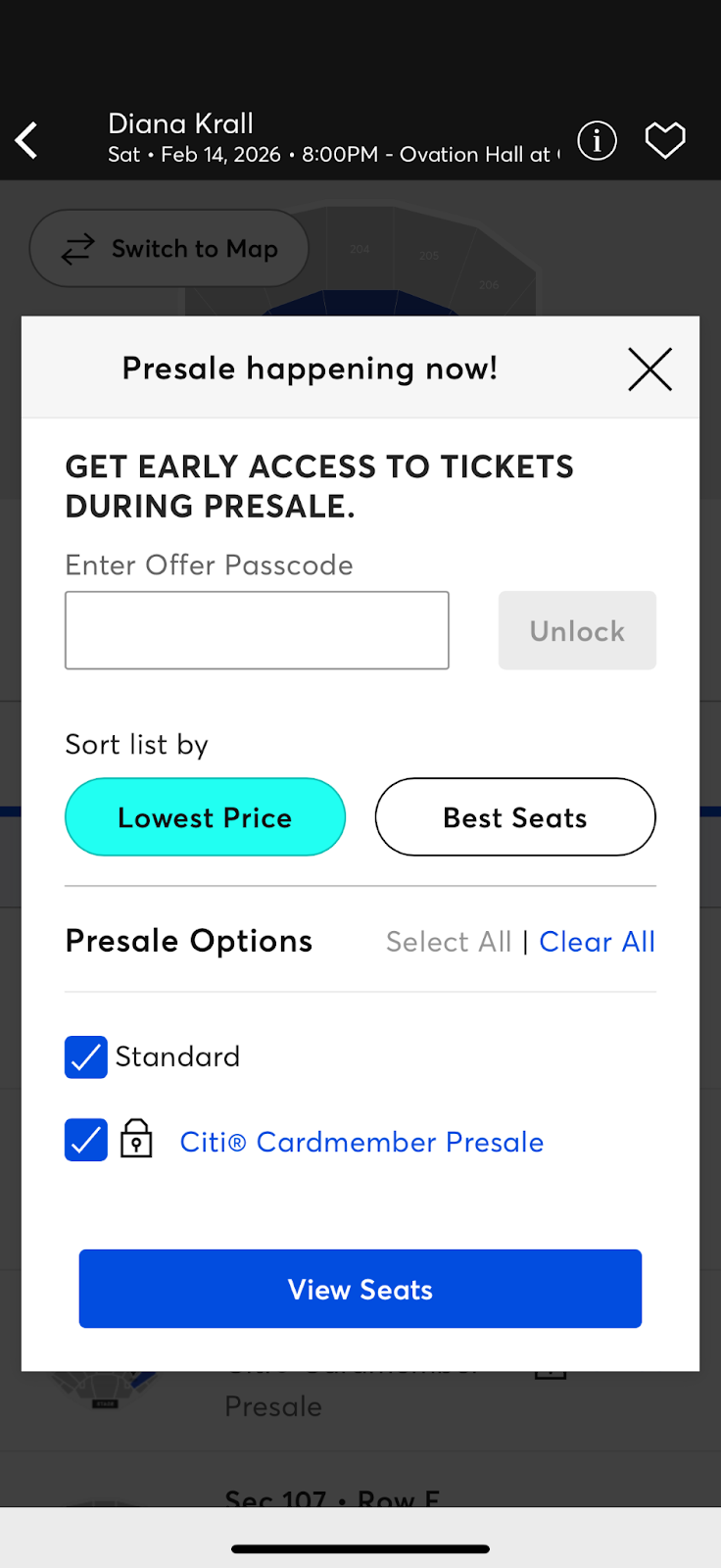
With preparation complete, the next phase is flawless execution. This involves navigating Ticketmaster’s digital architecture with precision, from the virtual waiting room to the final click of purchase.
Navigating the Digital Queue: The Virtual Waiting Room
Ticketmaster’s virtual waiting room is a critical piece of its technology designed to manage server load during high-demand sales.
- Early Arrival: Log into your Ticketmaster account and navigate to the event page 10-15 minutes before the presale officially begins. This allows you to be placed in the waiting room.
- The Waiting Room Interface: Understand that being in the waiting room does not guarantee an early spot in the queue. Positions are often randomized when the sale officially starts.
- “Do Not Refresh” Rule: Once in the waiting room or the queue, resist the urge to refresh your browser. Ticketmaster’s system automatically refreshes your page when it’s your turn to enter the sale. Manual refreshing can send you to the back of the line or trigger security warnings.
- Browser Tabs: Open only one tab per event. Multiple tabs for the same event can confuse the system and potentially lead to being flagged or placed in multiple queues.
Patience and adherence to the platform’s specific instructions are paramount in this phase.
Speedy Selection and Checkout: Digital Transaction Efficiency
Once you’re through the queue, speed and precision are vital.
- Interactive Seat Maps: Familiarize yourself with how Ticketmaster’s interactive seat maps work. Learn to filter by price, section, or accessibility. Have a backup plan for seating areas if your primary choice isn’t available.
- Quick Decision-Making: Tickets, especially for popular events, disappear in seconds. Have a clear idea of your desired seating section and price range. Don’t hesitate or overanalyze once options appear.
- Auto-Fill Integration: Use your browser’s auto-fill feature for payment and address details, but double-check that the information is correct. This shaves off precious seconds during the checkout process.
- Mobile Entry Confirmation: Many tickets are mobile-only. Confirm that you select mobile entry options if available, as this simplifies the digital delivery process.
The goal here is to minimize human interaction with the digital interface while maximizing accuracy, allowing the system to process your request as quickly as possible.
Troubleshooting Common Digital Glitches: Contingency Planning
Despite best efforts, digital systems can encounter hiccups. Knowing how to react to common glitches can save your sale.
- Browser Compatibility Issues: If experiencing layout problems or unresponsive buttons, try switching to a different, updated browser (e.g., if Chrome fails, try Firefox or Edge).
- Payment Processing Errors: Ensure your payment method has sufficient funds and is not flagged by your bank for unusual activity. Have a backup card ready. If a transaction fails, try re-entering the payment information carefully.
- “Tickets Unavailable” Messages: These can be disheartening. It often means the tickets were snatched by someone else a fraction of a second faster, or a batch has temporarily been held in other users’ carts. Don’t give up immediately; keep refreshing the search (not the page) or try different sections/quantities, as tickets sometimes release from abandoned carts.
- CAPTCHA Challenges: Ticketmaster uses CAPTCHAs to deter bots. Be prepared to quickly and accurately complete these challenges. If you encounter an “I’m not a robot” checkbox, click it immediately. If it presents a visual puzzle, solve it efficiently. Repeated failures can lead to temporary blocks.
A calm, methodical approach to troubleshooting digital issues can often salvage a sale.
Security and Bot Prevention Measures: Playing by the Rules
Ticketmaster invests heavily in technology to combat bots and ensure fair access for human fans. Understanding these measures helps you avoid being mistakenly flagged:
- Rate Limiting: The platform monitors rapid-fire requests. Excessive refreshing or using automated tools will trigger security warnings or temporary IP bans.
- Unique Links/Codes: Presale links and codes are often personalized or time-sensitive. Do not share unique codes widely, as this can invalidate them or lead to your account being flagged.
- IP Address Monitoring: Ticketmaster tracks IP addresses. Attempting to access the sale from multiple devices on the same network or using VPNs might trigger suspicious activity alerts.
- Account Verification: Periodically, Ticketmaster might ask for additional account verification (e.g., re-entering passwords, email verification). Have access to your linked email for swift confirmation.
Playing by Ticketmaster’s rules, respecting its security measures, and operating as a legitimate user are key to an unimpeded experience.
Post-Purchase and Digital Ticket Management
Securing the presale ticket is a victory, but the digital journey continues with managing your purchase and preparing for the event.
Accessing Your Digital Tickets and Mobile Entry
The shift towards digital-only ticketing is almost complete.
- Ticketmaster App is Key: Most tickets are delivered directly to your Ticketmaster mobile app. Download it well in advance and ensure you can log in.
- Mobile Entry Protocol: Understand that mobile entry usually means your phone is your ticket. Screenshots are often invalid due to rotating barcodes or dynamic QR codes. Learn how to access your tickets within the app.
- Wallet Integration: Many tickets can be added to digital wallets (Apple Wallet, Google Pay). This is highly recommended for quick access at the venue, even if cellular service is spotty.
- Ticket Transfer: If you bought tickets for others, familiarize yourself with Ticketmaster’s digital transfer feature. This allows you to securely send tickets to their own Ticketmaster accounts.
These digital tools ensure seamless entry and flexible management of your tickets.
Utilizing Ticketmaster’s Fan-to-Fan Resale Platform (If Applicable)
Should your plans change or you find yourself with an extra ticket, Ticketmaster often provides an integrated, secure fan-to-fan resale platform.
- Secure Resale: This platform ensures the legitimacy of tickets and often caps resale prices to prevent scalping. It’s the safest digital marketplace for buying or selling Ticketmaster-verified tickets.
- Digital Listing: Listing tickets for resale is done directly through your account in the app or website, mirroring the original purchase experience. Funds are typically transferred digitally upon sale.
This internal digital marketplace reduces the risks associated with third-party sites, offering a secure environment for ticket exchange.
Digital Security Best Practices for Ticket Holders
Even after purchase, digital security remains crucial.
- Protect Your Account: Never share your Ticketmaster login credentials. Use strong, unique passwords.
- Phishing Awareness: Be extremely wary of unsolicited emails or messages claiming to be from Ticketmaster, especially those asking for personal information or payment details. Always verify the sender and URL.
- Scam Prevention: Only purchase tickets from official sources or Ticketmaster’s verified resale platform. Avoid unofficial third-party sellers who may offer fake digital tickets.
- Event Details: Keep an eye on your email and the Ticketmaster app for any event changes or updates.
Maintaining vigilance over your digital presence ensures your investment and event experience remain secure.
Conclusion
Securing presale tickets on Ticketmaster is a nuanced, technologically-driven process that rewards preparation, digital literacy, and strategic execution. It transcends a simple online purchase, demanding an understanding of digital queues, security protocols, communication channels, and swift interaction with a sophisticated platform. By meticulously optimizing your account, diligently acquiring presale codes, ensuring technical readiness, and executing with precision during the sale, you significantly enhance your chances of bypassing the general sale frenzy. The journey from event announcement to holding that coveted digital ticket is a testament to mastering the modern digital landscape of live entertainment. Embrace the tech, plan your approach, and you’ll consistently find yourself on the winning side of the presale dash, ready to experience the magic of your favorite events.
aViewFromTheCave is a participant in the Amazon Services LLC Associates Program, an affiliate advertising program designed to provide a means for sites to earn advertising fees by advertising and linking to Amazon.com. Amazon, the Amazon logo, AmazonSupply, and the AmazonSupply logo are trademarks of Amazon.com, Inc. or its affiliates. As an Amazon Associate we earn affiliate commissions from qualifying purchases.