
Understanding which pages link to a specific URL, whether within your own domain (internal links) or from external websites (backlinks), is a foundational skill in modern web management and digital strategy. This process, known as link analysis, transcends basic curiosity, serving as a critical diagnostic and strategic tool for webmasters, SEO professionals, and content creators. In the rapidly evolving digital landscape, identifying these connections is not merely about tracking popularity; it’s about dissecting the very architecture of the web to enhance visibility, authority, and user experience.
The Technical Imperative of Link Analysis
In the realm of technology and web development, links are the digital arteries that carry traffic, distribute authority, and define relationships between online content. Analyzing these connections is paramount for several technical and strategic reasons, all falling squarely within the purview of website performance and digital security.
Deciphering SEO Value and Search Engine Algorithms
Search engine optimization (SEO) relies heavily on understanding how search engines perceive the relevance and authority of a webpage. Backlinks, in particular, act as “votes of confidence” from other websites. The quantity and quality of these votes significantly influence a page’s ranking in search engine results. By identifying pages linking to yours, you can assess the strength of your backlink profile, benchmark against competitors, and uncover opportunities for strategic link building. This involves a deep dive into domain authority (DA) or domain rating (DR) metrics of linking sites, evaluating anchor text relevance, and understanding the crawlability and indexability implications of your internal link structure.
Enhancing Website Health and User Experience
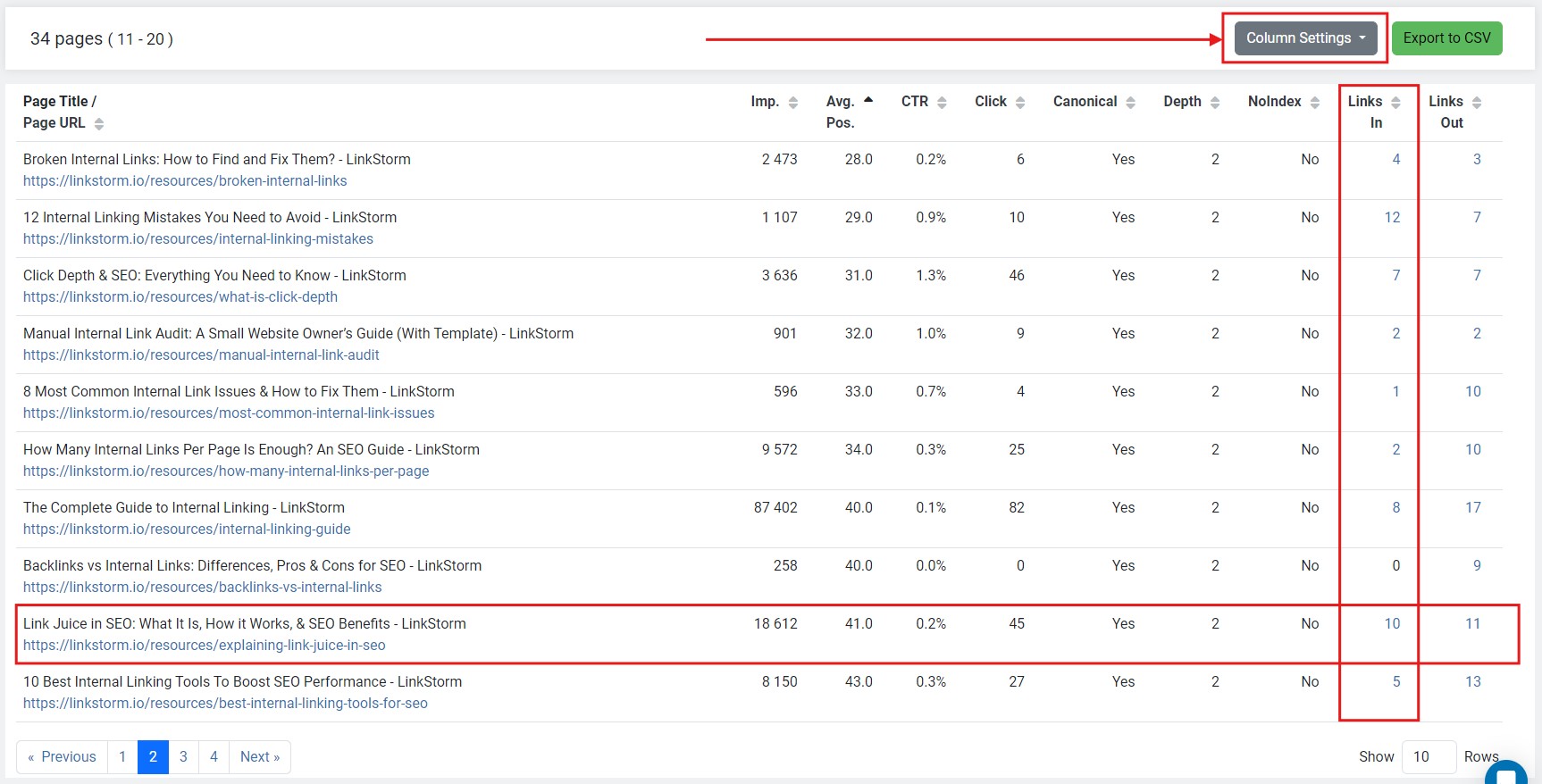
Internal links are just as crucial, albeit for different reasons. A robust internal linking structure guides users and search engine crawlers through your website, improving discoverability of content, reducing bounce rates, and increasing time on site. Identifying which pages link to specific internal assets helps in optimizing content flow, fixing broken links, and ensuring that important pages receive adequate internal equity. From a user experience perspective, clear internal navigation, facilitated by well-placed and descriptive links, is a hallmark of a technically sound and user-friendly website.
Competitive Intelligence and Digital Security Audits
Beyond your own domain, understanding the backlink profiles of your competitors offers invaluable competitive intelligence. By analyzing where their authority originates, you can identify potential linking opportunities or content gaps in your own strategy. Furthermore, link analysis plays a role in digital security. Identifying spammy or malicious backlinks pointing to your site can be crucial for mitigating potential penalties from search engines or preventing negative SEO attacks. Regular audits allow for timely identification and disavowal of such harmful connections, preserving the integrity and ranking potential of your digital assets.
Leveraging Google Search Console for Link Discovery
Google Search Console (GSC) is a free web service from Google that helps webmasters monitor their site’s performance in Google Search. It’s an indispensable tool for understanding both internal and external links pointing to any page on your domain.
Setting Up and Navigating GSC
Before you can analyze links, your website must be verified with Google Search Console. This typically involves adding a DNS record, uploading an HTML file, or using Google Analytics or Tag Manager. Once verified, navigate to the property associated with your website.
Locating Internal Links Report
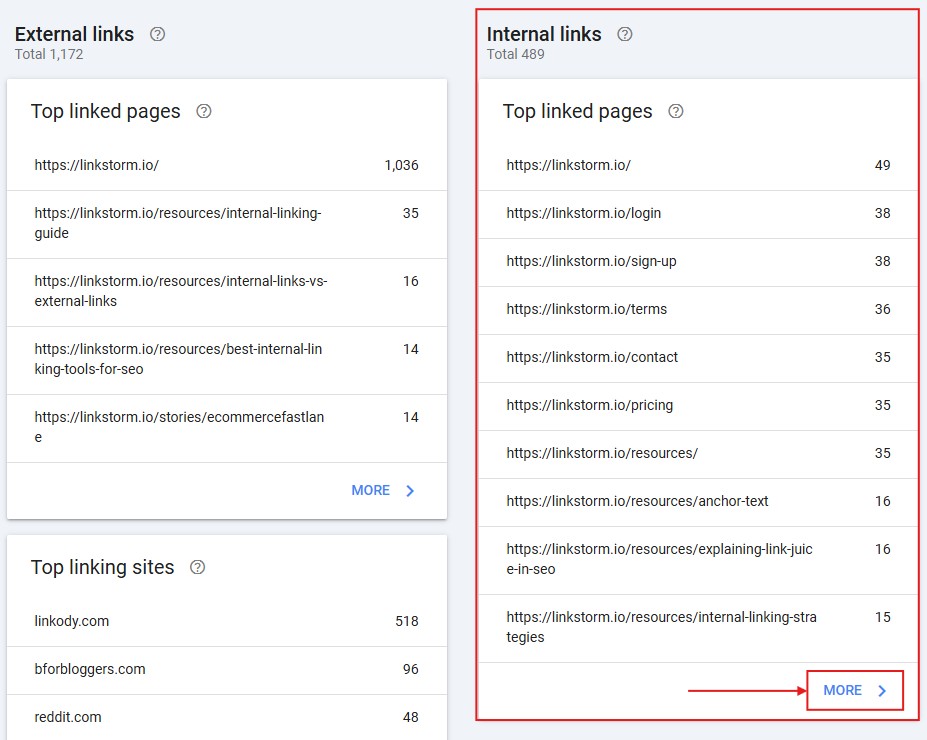
Within GSC, the “Links” section (found under the “Legacy tools and reports” or sometimes “Improvements” or directly visible in the left-hand navigation, depending on GSC’s UI updates) provides a comprehensive overview. Click on “Internal links” to see a list of your most linked-to pages within your own domain. Clicking on a specific URL in this report will show you all the other internal pages that link to it, along with the number of internal links pointing to each. This report is critical for:
- Identifying important pages: Pages with many internal links are generally considered more important by Google.
- Optimizing link equity: Ensuring that crucial content receives sufficient internal linking.
- Spotting orphaned pages: Pages that have few or no internal links might be hard for users and search engines to find.
Accessing External Links (Backlinks) Data
Still within the “Links” section, the “External links” report is where you’ll find data on backlinks from other websites. GSC typically provides:
- Top linking sites: A list of domains linking to your website, ordered by the number of links. This helps identify your most valuable referring domains.
- Top linked pages: A list of your pages that receive the most backlinks. This highlights your most authoritative content in the eyes of external sites.
- Top linking text: The most common anchor text used in backlinks. This provides insights into how external sites perceive and describe your content, which is vital for relevance signals.
While GSC provides valuable insights, it’s important to note its limitations. It only shows a sample of your backlinks and may not be as comprehensive as dedicated third-party SEO tools. It also primarily focuses on what Google considers important, which might not be the full picture.
Utilizing Third-Party SEO Tools for Comprehensive Audits
For a deeper, more comprehensive analysis of backlinks, specialized third-party SEO tools are indispensable. These platforms crawl vast segments of the internet to build their own link indexes, offering granular data that goes beyond what GSC provides.
SEMrush
SEMrush offers a powerful “Backlink Analytics” tool. By entering a URL or domain, you can access an extensive dashboard detailing:
- Referring Domains: Unique domains linking to the target.
- Backlinks: Total number of links.
- Anchor Texts: The text used in the links.
- Referring IPs: The IP addresses of linking domains.
- Indexed Pages: Which of your pages have backlinks.
- New & Lost Backlinks: Track changes over time.
SEMrush allows for sophisticated filtering, enabling users to sort backlinks by various attributes like domain authority, link type (dofollow/nofollow), and geographic location of the linking domain. Its “Backlink Gap” tool can also identify domains that link to competitors but not to your site.
Ahrefs
Widely regarded for its backlink index, Ahrefs’ “Site Explorer” is a must-have for serious link analysis. Key features include:
- Backlinks Report: A comprehensive list of every backlink detected, including the referring page URL, target URL, anchor text, and surrounding text.
- Referring Domains Report: Lists all unique domains linking to the target, with metrics like Domain Rating (DR) and number of backlinks.
- New/Lost Backlinks: Real-time tracking of new and lost links.
- Broken Backlinks: Identifies broken links pointing to your site, which can be opportunities for reclamation.
Ahrefs’ “Link Intersect” feature allows users to find websites that link to multiple competitors but not to their own site, providing highly targeted outreach opportunities.
Moz Link Explorer
Moz’s “Link Explorer” offers a robust suite for backlink analysis. Users can input a URL or domain to see:
- Domain Authority (DA) and Page Authority (PA): Proprietary metrics indicating the ranking strength of a domain or page.
- Linking Domains: Unique domains linking to the target.
- Inbound Links: Total number of links.
- Anchor Text Breakdown: Analysis of the most used anchor texts.
- Spam Score: A metric to identify potentially harmful or low-quality backlinks.
Moz is particularly useful for assessing the quality and potential risk associated with a backlink profile due to its Spam Score and detailed metrics for evaluating linking domain quality.
Other Notable Tools
- Majestic SEO: Specializes in link intelligence, offering unique metrics like Trust Flow and Citation Flow to assess link quality.
- Ubersuggest: Provides a more budget-friendly option with good backlink analysis features, including a backlink overview, lost links, and backlink opportunities.
When using these tools, focus on metrics like Domain Rating (DR) or Domain Authority (DA) of linking sites, the relevance of the linking page’s content, the anchor text used, and whether the link is dofollow or nofollow. These details are critical for understanding the true value and impact of each link.
Manual Review and Browser Extensions for Quick Checks
While comprehensive audits demand specialized tools, there are situations where a quick, on-the-fly check or a focused manual review can be beneficial, particularly for internal links or inspecting a single page.
Browser Developer Tools for On-Page Links
For any given webpage, you can inspect all the links present directly within your browser.
- Right-click anywhere on the page and select “Inspect” or “Inspect Element” (depending on your browser). This opens the browser’s developer tools.
- Navigate to the “Elements” tab.
- Press
Ctrl + F(Windows) orCmd + F(Mac) to open the search bar within the developer tools. - Type
<a href="and press Enter. This will highlight all anchor (<a>) tags with anhrefattribute, allowing you to quickly scroll through and identify all the links on that specific page, whether internal or external.
This method is primarily useful for auditing a single page’s outbound links or verifying internal links after a content update.
Browser Extensions for Enhanced Link Visibility
Several browser extensions can enhance your ability to see and analyze links directly as you browse:
- LinkMiner (by Mangools): This extension highlights all outbound links on a webpage. It also shows HTTP status codes for each link, helping identify broken links quickly, and provides basic SEO metrics for the linking domain.
- SEOquake: A free extension that provides real-time SEO metrics for any page you visit, including information about external and internal links. While not a backlink auditor in itself, it gives a quick snapshot of link data.
- MozBar: Offers a quick look at Page Authority (PA) and Domain Authority (DA) for any page or site, along with highlighting links (internal, external, followed, nofollowed).
These manual methods and extensions are best suited for quick checks, troubleshooting specific page issues, or verifying the presence of particular links rather than conducting a full-scale backlink audit.
Advanced Strategies for Backlink Interpretation and Action
Finding out which pages link to a page is only the first step. The true value comes from interpreting this data and taking strategic action.
Identifying and Disavowing Harmful Links
Not all links are beneficial. “Bad” or “spammy” backlinks from low-quality, irrelevant, or malicious sites can harm your search rankings. Using tools like Moz’s Spam Score or manually evaluating link sources for relevance and quality is crucial. If you identify a significant number of harmful links, you can use Google’s Disavow Tool to tell Google to ignore these links, preventing them from negatively impacting your site’s SEO. This is a delicate process and should be done with caution and deep understanding.
Discovering Link Gaps and Building New Connections
By analyzing the backlink profiles of your top competitors, you can identify “link gaps”—websites that link to your rivals but not to you. This intelligence forms the basis for targeted outreach campaigns. Crafting compelling content that naturally attracts links, pitching guest posts, or requesting links from relevant, authoritative sites are all tactics informed by robust link gap analysis. This isn’t just about getting more links; it’s about acquiring high-quality, relevant links that pass significant authority.

Monitoring New and Lost Backlinks
The web is dynamic, and backlink profiles are constantly changing. Regularly monitoring new backlinks helps you capitalize on fresh opportunities, thank linking sites, and build relationships. Conversely, tracking lost backlinks allows you to identify why a link was removed (e.g., page deletion, site redesign) and potentially reclaim it. Setting up alerts in tools like Ahrefs or SEMrush for new and lost links ensures you stay informed about your evolving link landscape.
Mastering the art of finding and analyzing links is a continuous process that underpins robust web management, advanced SEO strategies, and competitive digital intelligence. By consistently employing these technical tools and analytical approaches, you can ensure your digital assets are well-connected, authoritative, and optimized for success in the challenging online environment.
aViewFromTheCave is a participant in the Amazon Services LLC Associates Program, an affiliate advertising program designed to provide a means for sites to earn advertising fees by advertising and linking to Amazon.com. Amazon, the Amazon logo, AmazonSupply, and the AmazonSupply logo are trademarks of Amazon.com, Inc. or its affiliates. As an Amazon Associate we earn affiliate commissions from qualifying purchases.