
In the modern era of air travel, managing your flight details has become an increasingly digital endeavor. From booking tickets online to checking in via mobile apps, technology underpins nearly every step of the journey. One crucial piece of information that often becomes necessary, yet can sometimes be elusive, is your American Airlines ticket number. This guide delves deep into the technological avenues and digital strategies you can employ to swiftly and securely locate your ticket number, ensuring you’re well-equipped for any travel-related query or adjustment. We’ll explore the various digital touchpoints American Airlines provides, offering insights into their utility and how to best navigate them.
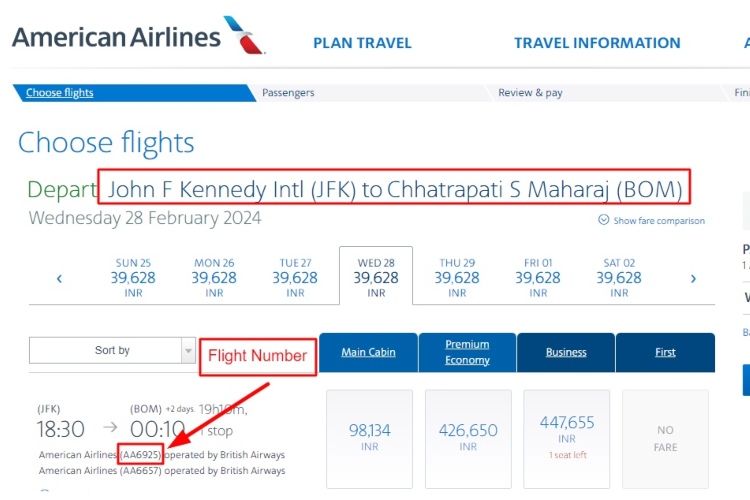
Understanding the Digital Significance of Your American Airlines Ticket Number
Before we dive into the ‘how-to,’ it’s paramount to understand what a ticket number represents in the digital airline ecosystem and why it holds such importance. In an age where digital identifiers dictate access and functionality, your ticket number is more than just a random sequence; it’s a unique digital key.
What is a Ticket Number and Why is it Essential?
A ticket number is a unique 13-digit identifier assigned to each individual flight segment or entire journey purchased from an airline. For American Airlines, these numbers typically begin with ‘001’, their airline code, followed by a 10-digit sequence. Digitally, this number is a fundamental data point that links your payment to your specific travel entitlements. It confirms the issuance of your ticket and acts as the primary reference for everything from fare rules and refunds to baggage claims and re-issuance. Without this digital anchor, much of the post-booking management becomes significantly more challenging. It’s a critical element for American Airlines’ backend systems to track your journey and ensure seamless service delivery. For passengers, it serves as an authoritative proof of purchase and a necessary component for many online self-service features.
Differentiating from PNRs and Confirmation Codes
It’s common for travelers to confuse a ticket number with other digital identifiers like the Passenger Name Record (PNR) or a confirmation code. While all are vital in the digital travel landscape, they serve distinct functions within the technological framework of an airline.
- Confirmation Code (or Record Locator/PNR): This is typically a 6-character alphanumeric code (e.g., ABCDEF) that identifies your reservation. A single confirmation code can include multiple passengers and multiple flights within the same itinerary. It’s the digital key to retrieve your booking details and manage your entire trip via the American Airlines website or app. Think of it as the digital folder for your trip.
- Ticket Number: As discussed, this is the unique 13-digit number for each individual ticket issued within that reservation. If your booking includes multiple passengers or multiple flight segments that are ticketed separately, you will have multiple ticket numbers under a single confirmation code. Each ticket number is a unique digital record of a specific passenger’s right to fly on a particular segment or journey.
Understanding these distinctions is crucial, especially when interacting with automated systems or customer service portals, as providing the correct digital identifier can significantly expedite your request.
Navigating American Airlines’ Digital Ecosystem to Retrieve Your Ticket Number
The primary methods for finding your American Airlines ticket number leverage the airline’s robust digital infrastructure. These methods are designed for self-service and offer the most immediate access to your information.
The American Airlines Website: Your Primary Digital Portal
The American Airlines website is a comprehensive digital hub offering a plethora of self-service options, including easy access to your ticket number.
- Accessing Your Reservation: Start by navigating to AA.com. Locate the “My Trips” section, usually prominently displayed on the homepage.
- Inputting Your Details: You’ll be prompted to enter your 6-character confirmation code (PNR) and the last name of one of the passengers on the reservation. This digital authentication step ensures only authorized individuals can access the booking details.
- Viewing Itinerary Details: Once authenticated, your full itinerary will be displayed. Look for a section often labeled “Ticket Information,” “Receipt,” or “E-ticket Number.” The ticket number (or numbers, if multiple passengers or segments) will typically be listed clearly here, usually starting with ‘001’.
- Printing/Saving: The website often provides options to print an e-ticket receipt or save a digital copy, which will include the ticket number for your records. This ensures you have a physical or digital backup.
Leveraging the American Airlines Mobile App for On-the-Go Access
For travelers who prefer managing their trips via smartphone, the American Airlines mobile app is an indispensable digital tool.
- Download and Login: Ensure you have the latest version of the American Airlines app installed on your device. If you have an AAdvantage account, logging in beforehand can streamline access to all your booked trips.
- Accessing “My Trips”: Similar to the website, the app features a “My Trips” or “Trips” section.
- Retrieve Reservation: You can either retrieve a specific reservation using the confirmation code and last name, or if you’re logged into your AAdvantage account, your upcoming trips should be automatically listed.
- Locating the Ticket Number: Within the detailed trip view, navigate through the options to find “Ticket Details,” “E-ticket,” or “Receipt.” The ticket number will be displayed. The app’s interface is designed for quick access, making it a convenient option for retrieving information while traveling. Many apps even offer offline access to these details once loaded, a significant technological advantage.
Deciphering Your Digital Confirmation Emails
After booking a flight, American Airlines sends a confirmation email, which is a treasure trove of digital information.
- Locate the Email: Search your email inbox for messages from “American Airlines,” “AA,” or “eTicket.” Check your spam or junk folders if you can’t find it in your primary inbox.
- Identify Key Information: These emails are structured to provide all essential booking details. Look for sections titled “E-Ticket Number,” “Ticket Number,” or “Passenger Ticket.” The 13-digit number, starting with ‘001’, will be prominently displayed alongside each passenger’s name.
- Saving for Reference: It’s wise to digitally archive these emails or convert them to PDF for easy retrieval later. Email clients often have robust search functionalities, making this a reliable digital archive.
Advanced Digital Strategies and Alternative Channels for Retrieval
Sometimes, the most straightforward digital paths might not yield the desired information, or you might have booked through an intermediary. Here’s how to approach those scenarios.
Utilizing Online Travel Agencies (OTAs) and Their Digital Platforms

If you booked your American Airlines flight through an Online Travel Agency (OTA) like Expedia, Booking.com, or Travelocity, their digital platforms are your first point of contact.
- Log into Your OTA Account: Access your booking through the OTA’s website or app.
- Find Your Itinerary: Navigate to your trips or bookings section.
- Locate Ticket Details: The OTA’s itinerary page should display the American Airlines confirmation code and, critically, the individual ticket numbers. OTAs typically act as an interface, presenting the underlying airline’s data. If the ticket number isn’t immediately visible, look for links to “View Receipt,” “Airline Confirmation,” or “E-ticket details.” This will usually open a separate digital window or PDF with the comprehensive information.
Accessing Past Trips via Your AAdvantage Account
For frequent flyers, your American Airlines AAdvantage account is a powerful digital tool for managing current and past travel.
- Login to AAdvantage: Go to AA.com and log in with your AAdvantage number/username and password.
- Review “My Trips” or “Activity”: Within your account dashboard, navigate to “My Trips” or a similar section that lists your past travel.
- Retrieve Past Itineraries: Select the specific past trip for which you need the ticket number. The detailed itinerary will provide access to the ticket information, often under “Receipt” or “E-ticket details.” This digital archive is incredibly useful for expense reporting or recalling past travel specifics.
The Role of Digital Boarding Passes
While not the primary source, a digital boarding pass can sometimes serve as a quick reference, particularly for domestic flights.
- Inspect Your Mobile Boarding Pass: On the American Airlines app, after checking in, your digital boarding pass will display your flight details. Sometimes, especially on expanded views or within the “details” section of the mobile pass, the 13-digit ticket number might be subtly present, often near your name or the flight details.
- Printed Boarding Passes: If you opted for a physical boarding pass printed at the airport or a self-service kiosk, the ticket number is almost always printed on it, usually at the bottom or side. This provides a tangible, albeit less tech-centric, backup.
Troubleshooting Digital Roadblocks and Secure Contact Methods
Despite the robust digital tools, you might occasionally encounter issues. Knowing how to troubleshoot and securely contact American Airlines is key.
Common Digital Access Issues and Quick Fixes
- Login Problems: If you can’t access your AAdvantage account, ensure your credentials are correct. Use the “Forgot Password” or “Forgot Username” features. Browsing in incognito/private mode or clearing browser cache can also resolve website display issues.
- Lost Confirmation Code: If you’ve lost your confirmation code and didn’t book via an AAdvantage account, American Airlines’ website often has a “Find My Trip” option that allows retrieval using your name, email, and flight date, demonstrating a multi-faceted digital recovery system.
- Missing Emails: Use advanced search functions in your email client, checking all folders, including spam, trash, and promotional tabs. Broaden your search terms to just “American” or the specific flight date.
Engaging American Airlines Customer Support Digitally
When self-service options hit a roadblock, American Airlines offers several digital channels for support.
- Online Chat/Chatbots: The AA.com website and mobile app often feature an online chat function, sometimes starting with an AI chatbot. These bots are programmed to handle common queries, including retrieving ticket numbers, by asking for your confirmation code and name. If the bot can’t help, it usually escalates to a live agent.
- Social Media: American Airlines maintains active presences on platforms like Twitter and Facebook. Sending a direct message (DM) to their official accounts can be an effective way to get assistance. Provide your booking details discreetly in a private message.
- Online Contact Forms: The “Contact Us” section on AA.com provides various online forms for specific issues. While generally slower than chat, these provide a documented digital record of your request.
When using any digital communication channel, always be prepared to provide identifying information (confirmation code, full name, flight date) to verify your identity.
Best Practices for Digital Security When Accessing Travel Information
In the digital age, protecting your personal and travel information is paramount.
- Secure Wi-Fi: When accessing your travel details online, ensure you are on a secure, private Wi-Fi network. Public Wi-Fi can be vulnerable.
- Strong Passwords: Use strong, unique passwords for your AAdvantage account and OTA accounts. Enable two-factor authentication (2FA) if available, adding an extra layer of digital security.
- Phishing Awareness: Be wary of suspicious emails or messages purporting to be from American Airlines or an OTA. Always verify the sender’s address and avoid clicking on dubious links.
- Device Security: Keep your devices updated with the latest security patches and antivirus software.
The Future of Digital Travel Documents and Ticket Management
The evolution of technology continues to reshape how we interact with airlines and manage our travel documents. The ticket number, while foundational, is part of a broader shift towards even more integrated and secure digital solutions.
Emerging Technologies in Digital Ticketing
The travel industry is constantly exploring cutting-edge technologies to enhance the passenger experience and streamline operations. Biometrics, such as facial recognition at check-in or boarding gates, are already becoming more common, reducing the reliance on physical documents or even recalling numerical identifiers. Blockchain technology is also being investigated for creating immutable, secure digital records of tickets and passenger identities, potentially making ticket numbers even more resilient to fraud and easier to verify across multiple platforms. These innovations aim to make the process of identifying and validating a passenger’s right to fly even more seamless and secure, potentially abstracting away the need for passengers to manually find their ticket numbers in the future.

Enhancing User Experience Through Digital Innovation
Ultimately, the drive behind these technological advancements is to create a more intuitive and frictionless travel experience. Future iterations of airline apps and websites will likely offer even more personalized and predictive services, anticipating your needs before you even realize them. This could mean your ticket number, along with all relevant travel documents, being automatically presented at the precise moment you need it, perhaps even integrated into wearable tech or smart assistants. The focus remains on leveraging digital tools to empower travelers, making information like your ticket number not just accessible, but intelligently presented within a highly connected travel ecosystem.
In conclusion, while technology continually evolves, knowing how to efficiently find your American Airlines ticket number remains a crucial digital skill for any modern traveler. By mastering the use of American Airlines’ website, mobile app, and understanding the role of confirmation emails and other digital channels, you ensure that you are always in control of your travel information, ready for any journey ahead.
aViewFromTheCave is a participant in the Amazon Services LLC Associates Program, an affiliate advertising program designed to provide a means for sites to earn advertising fees by advertising and linking to Amazon.com. Amazon, the Amazon logo, AmazonSupply, and the AmazonSupply logo are trademarks of Amazon.com, Inc. or its affiliates. As an Amazon Associate we earn affiliate commissions from qualifying purchases.