
In the increasingly digital landscape of personal finance, managing your money has become more convenient than ever, largely thanks to sophisticated banking apps. For Wells Fargo customers, the mobile application serves as a powerful financial tool, putting account management, transactions, and crucial information right at your fingertips. Among the most vital pieces of information you might need to access is your bank’s routing number. This seemingly simple nine-digit code is the backbone of numerous financial operations, from setting up direct deposits to facilitating online bill payments and wire transfers. While often overlooked until needed, knowing how to quickly locate your Wells Fargo routing number through the official app is an essential skill for modern financial management.
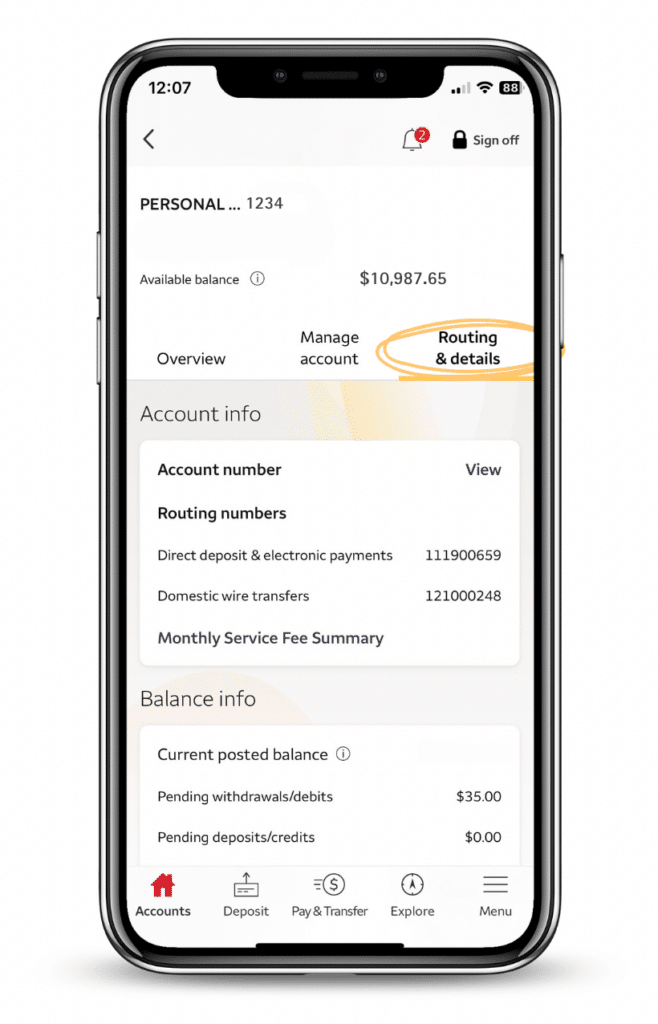
This guide will demystify the routing number, explain its importance within the broader context of your financial health, and provide a clear, step-by-step walkthrough on how to find it using the Wells Fargo mobile app. We’ll also touch upon the security implications of handling such sensitive information and how the app integrates into a holistic approach to managing your personal finances.
Understanding the Importance of Your Routing Number
A routing number, also known as an ABA (American Bankers Association) routing transit number, is a nine-digit code used to identify financial institutions in the United States. Its primary purpose is to facilitate the electronic transfer of funds between banks. Think of it as a postal code for your bank, ensuring that money transfers reach the correct destination. Without it, transactions like direct deposits, automated clearing house (ACH) payments, and wire transfers would lack the necessary identification to be processed accurately and securely.
What is a Routing Number?
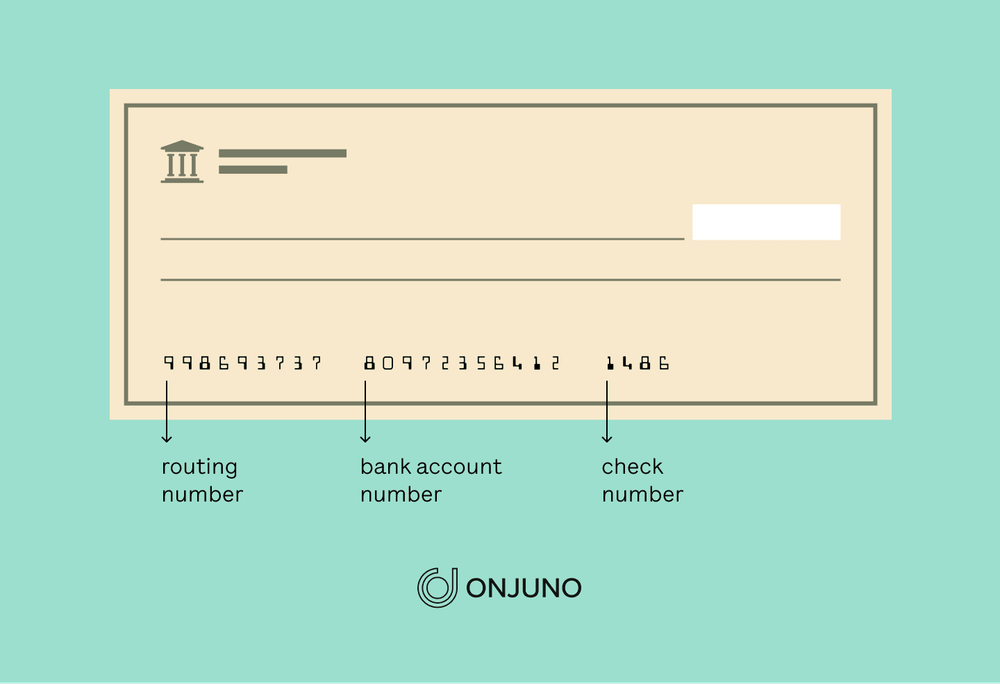
At its core, a routing number tells other financial institutions which bank to send money to or receive money from. When you write a check, for instance, your routing number is printed at the bottom, alongside your account number. This allows the bank processing the check to correctly route the funds. In the digital age, this functionality extends to countless online financial interactions. Every Wells Fargo branch or region might share a common routing number, or certain account types might have specific numbers. It’s crucial to use the correct one associated with your specific account to avoid delays or rejections in your transactions, which can have significant financial implications, such as missed bill payments or delayed income.
Common Scenarios Requiring a Routing Number
The need for your routing number arises in numerous common financial situations, highlighting its pervasive importance in personal finance. One of the most frequent uses is setting up direct deposit for your paycheck or government benefits like Social Security. Your employer or benefit provider will typically request both your routing number and account number to ensure your funds are deposited directly into your Wells Fargo account. Similarly, when you set up automated bill payments (ACH payments) directly from your bank account for utilities, rent, or loan repayments, you’ll need to provide this information.
Furthermore, wire transfers, whether incoming or outgoing, always require a routing number. If you’re receiving a tax refund via direct deposit from the IRS, you’ll need your routing number. Even linking third-party financial apps or services, like peer-to-peer payment platforms or investment accounts, often necessitates providing your bank’s routing number for initial verification and fund transfers. Understanding these scenarios underscores why quick and easy access to this number is a fundamental aspect of modern money management.
Distinguishing Between Checking and Savings Routing Numbers
A common point of confusion for many individuals is whether their checking and savings accounts share the same routing number. For many large banks, including Wells Fargo, it’s common for all accounts (checking, savings, money market) within a specific geographic region or state to use the same routing number for most transactions. However, this is not universally true, and there can be exceptions, especially for wire transfers which sometimes use a different, specific routing number (SWIFT/BIC code for international wires, often a different ABA for domestic wires).
It’s always best practice to verify the routing number directly from your account information, as provided by Wells Fargo, to ensure accuracy. Relying on an old check or a generalized number found online without verification can lead to costly errors. The Wells Fargo app simplifies this by showing the routing number specifically tied to the account you are viewing, thereby eliminating guesswork and enhancing the reliability of your financial transactions.
Navigating the Wells Fargo App for Financial Information
The Wells Fargo mobile app is more than just a tool for checking your balance; it’s a comprehensive financial hub designed to empower users with control over their money. Its intuitive interface and robust features make it an indispensable part of managing your personal finances in today’s fast-paced world. Understanding how to efficiently navigate the app not only helps you find specific information like your routing number but also allows you to leverage its full potential for better financial planning and security.
Benefits of Using the Mobile App for Banking
The convenience offered by mobile banking apps is unparalleled. You can perform virtually any banking task from the palm of your hand, anytime, anywhere. This includes checking account balances, reviewing transaction history, transferring funds between accounts, depositing checks via photo, and setting up alerts. For financial management, this means constant oversight of your money, making it easier to track spending, identify unusual activity, and stay on top of your budget. The 24/7 accessibility ensures that even critical information, such as your routing number, is available immediately when you need it, preventing delays in crucial financial operations. This level of control fosters greater financial independence and responsiveness, allowing users to make informed decisions swiftly.
Ensuring App Security and Privacy
While convenience is a major draw, the security and privacy of your financial data are paramount. Wells Fargo employs multiple layers of security to protect your information within the app. This includes strong encryption for data transmission, multi-factor authentication (like usernames, passwords, and one-time passcodes or biometric verification), and continuous fraud monitoring. As a user, it’s equally important to adopt best practices:
- Use strong, unique passwords and enable biometric login (fingerprint or facial recognition) if available.
- Avoid using public Wi-Fi for sensitive banking transactions.
- Keep your device’s operating system and the Wells Fargo app updated to benefit from the latest security patches.
- Be wary of phishing attempts that try to trick you into revealing your login credentials. Always access the app directly, never through links in suspicious emails or texts.
By adhering to these guidelines, you create a secure environment for managing your finances, ensuring that crucial details like your routing number remain protected.
Step-by-Step Guide: Locating Your Routing Number
Finding your routing number on the Wells Fargo app is a straightforward process once you know where to look. The app is designed for user-friendliness, placing key information logically within your account details. This step-by-step guide will walk you through the process, ensuring you can quickly and confidently retrieve the correct routing number for your specific account.
Initial Login and Account Selection
- Download and Install: First, ensure you have the official Wells Fargo Mobile app downloaded from your device’s app store (Apple App Store or Google Play Store).
- Log In: Open the app and log in using your Wells Fargo username and password. If you have biometric authentication set up (Face ID, Touch ID, or fingerprint), you can use that for quicker access.
- Select Account: Once logged in, you’ll typically see an overview of your accounts. Tap on the specific account (e.g., your Checking account or Savings account) for which you need the routing number. It’s crucial to select the correct account as routing numbers can sometimes vary depending on the account type or the region where the account was opened.
Accessing Account Details
After selecting your desired account, you will be taken to that account’s specific details page. This page usually displays the current balance, recent transactions, and other pertinent information. To find the routing number, you’ll need to look for a section that details your account information.
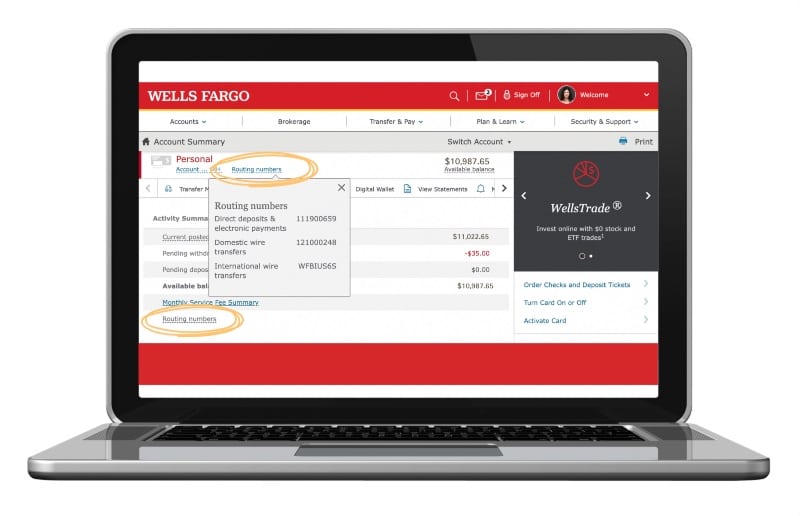
- Look for “Show Details” or “Account Info”: On the account’s overview page, scroll down or look for an option like “Show Details,” “Account Info,” “Account Settings,” or a similar link. This section is designed to provide comprehensive information about your account.
- Expand Information: Sometimes, the routing number might be hidden behind an expandable section for security or to keep the interface clean. You may need to tap on an arrow or a “Show more details” button to reveal all the account specifics.
Identifying the Routing Number
Once you’ve navigated to the account details, the routing number should be clearly displayed.
- Locate the Routing Number: Look for a label like “Routing Number,” “Routing & Account Number,” or “ACH Routing Number.” It will be a nine-digit code. For Wells Fargo, you might also see your full account number listed here, often partially masked for security.
- Verify Accuracy: While the app provides the correct information, it’s always a good habit to double-check against what you know, if possible, especially if you have multiple Wells Fargo accounts opened in different regions or at different times.
What to Do if You Can’t Find It
While the app is usually reliable, technical glitches or specific account setups might occasionally make it challenging to find. If you encounter difficulties:
- Check Your Checks: If you have a physical checkbook, the routing number is printed at the bottom-left corner of your checks.
- Wells Fargo Website: Log in to your Wells Fargo account through their official website on a desktop or laptop. The routing number is typically found within your account summary or account details.
- Contact Customer Service: As a last resort, you can call Wells Fargo customer service or visit a local branch. They will be able to provide you with the correct routing number after verifying your identity.
Safeguarding Your Financial Information
Knowing where to find your routing number is only half the battle; understanding how to protect this sensitive information is equally crucial for your financial security. A routing number, combined with your account number, can be used to initiate electronic transactions. While it’s generally considered less risky than revealing your full bank card details or online banking login, it still requires careful handling.
When and How to Share Your Routing Number Securely
You will legitimately need to share your routing number in several scenarios, as discussed earlier (direct deposit, bill pay, wire transfers). When doing so, always ensure you are providing it to a trusted entity. For employers, government agencies, or reputable financial institutions, sharing this information electronically through secure portals is standard. Avoid sending it via unencrypted email or text messages unless explicitly requested by a trusted party through a secure, verified channel. If you’re physically filling out a form, double-check that the form is official and from a legitimate source before writing down your numbers. Remember, you should never provide your full Social Security Number, routing number, and account number all together to an unsolicited request.
Recognizing and Avoiding Phishing Scams
Phishing attacks are a pervasive threat to financial security. Scammers often impersonate banks or other legitimate organizations to trick individuals into revealing sensitive information. Be vigilant for:
- Suspicious emails or texts: Unsolicited messages asking you to “verify” your bank account details, routing numbers, or login credentials by clicking a link are almost always scams. Wells Fargo will never ask for this information via unprompted email or text.
- Urgent or threatening language: Scammers often use fear tactics to create a sense of urgency, pressuring you to act quickly without thinking.
- Grammatical errors or unusual sender addresses: These are telltale signs of a scam.
Always navigate directly to the Wells Fargo app or website to log in, rather than clicking on links in emails. If in doubt, contact Wells Fargo directly using their official customer service number.
Regular Monitoring of Your Accounts
Even with the best precautions, financial fraud can sometimes occur. Regularly monitoring your Wells Fargo accounts through the app is one of the most effective ways to detect and mitigate potential issues quickly. Make it a habit to:
- Review transaction history: Check for any unfamiliar transactions, no matter how small.
- Monitor account balances: Ensure your balances align with your expectations.
- Set up alerts: Utilize the app’s notification features to receive alerts for large transactions, login attempts from new devices, or low balances.
Early detection of unauthorized activity is critical. If you spot anything suspicious, contact Wells Fargo immediately to report it and protect your funds.
Beyond the Routing Number: Leveraging the Wells Fargo App for Financial Management
While finding your routing number is a practical utility, the Wells Fargo app offers a suite of features that extend far beyond basic information retrieval, transforming it into a powerful tool for holistic personal financial management. Embracing these functionalities can significantly enhance your ability to budget, save, and secure your financial future.
Budgeting and Spending Analysis Tools
Many modern banking apps, including Wells Fargo’s, integrate tools designed to help you understand and manage your spending habits. These tools often categorize your transactions automatically, providing visual breakdowns of where your money is going (e.g., dining out, groceries, utilities). By regularly reviewing these insights within the app, you can identify areas for potential savings, adjust your budget in real-time, and make more informed financial decisions. For instance, if you notice an unexpected spike in a particular spending category, the app provides the data to help you investigate and address it, preventing minor issues from becoming major financial drains. This proactive approach to budgeting is a cornerstone of sound personal finance.
Setting Up Alerts and Notifications
The app’s alert system is a critical, yet often underutilized, feature for proactive financial management and security. You can customize alerts for a variety of events:
- Low balance alerts: To prevent overdrafts and manage cash flow effectively.
- Large transaction alerts: To monitor significant debits or credits, aiding in fraud detection.
- Deposit notifications: To confirm when your paycheck or other income has arrived.
- Suspicious activity alerts: For enhanced security against unauthorized access.
These real-time notifications ensure you’re always informed about the status of your accounts, allowing you to respond promptly to any financial changes or potential security threats. They act as your personal financial watchguard, providing peace of mind and an extra layer of protection.
Mobile Check Deposit and Bill Pay Features
Beyond finding static information like routing numbers, the Wells Fargo app empowers you to perform active financial transactions with ease. Mobile Check Deposit allows you to deposit checks simply by taking a photo with your smartphone, eliminating the need to visit a branch or ATM. This saves time and makes managing incoming funds incredibly convenient. Similarly, the Online Bill Pay feature enables you to schedule and pay bills directly from your Wells Fargo account to various payees. You can set up one-time payments or recurring payments, ensuring that your bills are paid on time and helping you avoid late fees, which directly contributes to a healthier credit score and overall financial stability. These features streamline essential banking tasks, making the Wells Fargo app a central hub for daily financial operations and a valuable asset in your journey towards financial well-being.
In conclusion, mastering the Wells Fargo app, starting with understanding how to locate crucial details like your routing number, is an essential step towards effective personal financial management. It not only simplifies routine tasks but also provides the tools and security features necessary to protect and grow your money in the digital age.
aViewFromTheCave is a participant in the Amazon Services LLC Associates Program, an affiliate advertising program designed to provide a means for sites to earn advertising fees by advertising and linking to Amazon.com. Amazon, the Amazon logo, AmazonSupply, and the AmazonSupply logo are trademarks of Amazon.com, Inc. or its affiliates. As an Amazon Associate we earn affiliate commissions from qualifying purchases.