
In an increasingly data-driven world, understanding growth, change, and performance is paramount. Whether you’re tracking sales figures, analyzing website traffic, monitoring project progress, or simply budgeting personal expenses, the ability to quickly and accurately calculate percentage increase is a fundamental skill. For many, this isn’t about complex manual computations but rather leveraging the power of readily available digital tools. This article serves as your comprehensive guide to finding, evaluating, and effectively using percentage increase calculators across various technological platforms, ensuring you’re equipped with the right digital aid for every scenario.
The Indispensable Role of Percentage Increase Calculators in the Digital Age
The digital age thrives on metrics and analytics. From the smallest startups to multinational corporations, decisions are increasingly informed by data points that represent growth or decline. A percentage increase calculator, while seemingly simple, is a cornerstone tool for interpreting these vital statistics, allowing users to quantify progress and project future trends with precision. Its significance has transcended basic mathematics to become a critical component of digital literacy and operational efficiency.
Understanding the Core Concept: Why It Matters Digitally
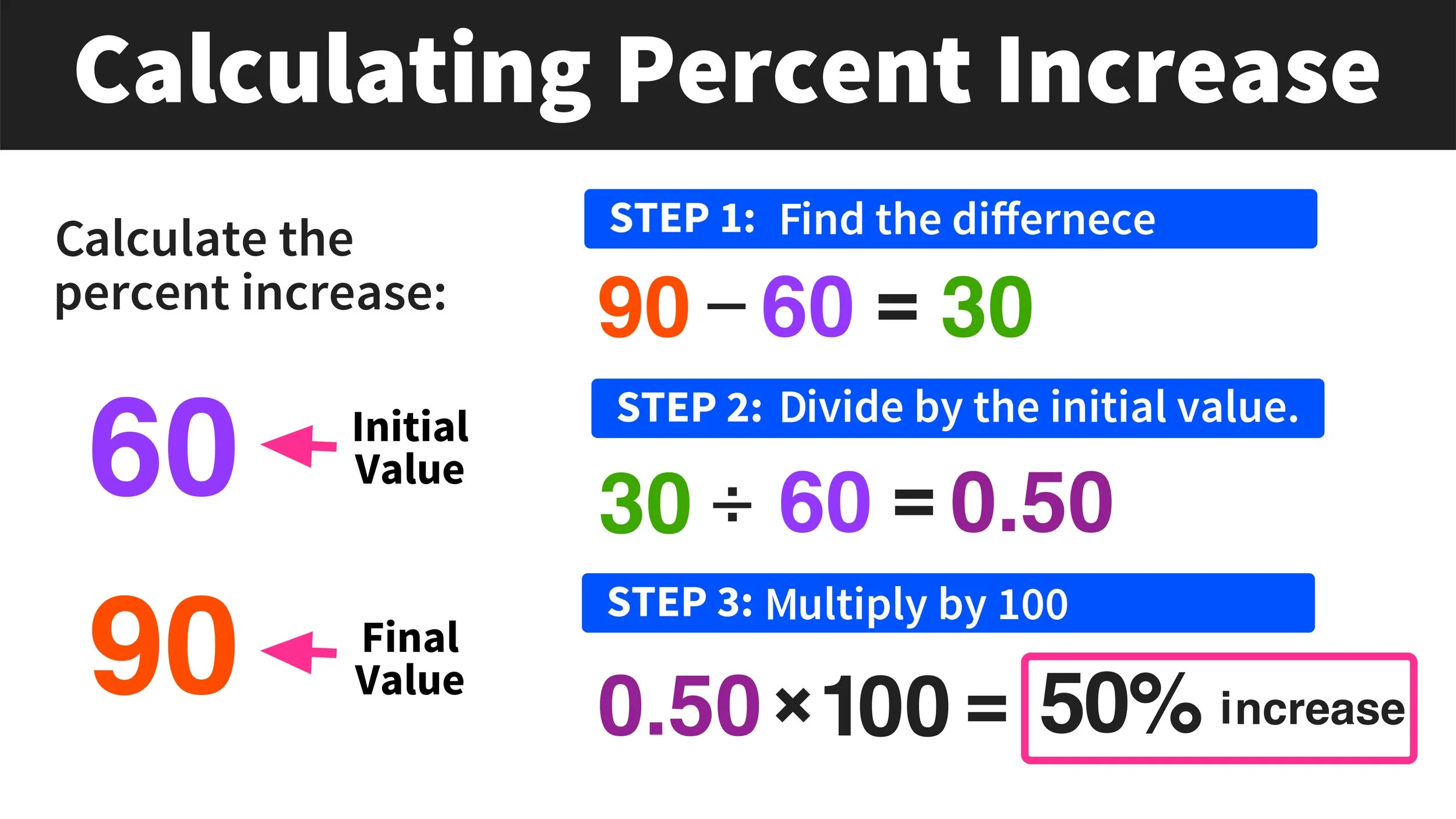
At its heart, a percentage increase represents the relative change between an initial value and a final value, expressed as a percentage of the initial value. In a digital context, this calculation is applied to an astonishing array of data points: the growth of app downloads over a quarter, the percentage increase in website conversions after a UI update, the rise in user engagement following a new feature release, or the scaling of cloud storage needs year-over-year. Without a clear understanding of these percentage shifts, raw numbers can be misleading, and strategic digital decisions cannot be made effectively. These calculators democratize access to this critical analytical insight, making complex data digestible for everyone from data scientists to digital marketers and individual tech enthusiasts.
Beyond Basic Math: The Need for Digital Efficiency
While the formula for percentage increase is straightforward ((Final Value – Initial Value) / Initial Value * 100), performing these calculations manually for large datasets or on a frequent basis is not only tedious but also prone to human error. This is where digital percentage increase calculators shine. They eliminate the manual overhead, offering instant results with guaranteed accuracy. Moreover, many digital tools go beyond just providing a single number; they offer features like historical tracking, data visualization, and integration with other analytical platforms, transforming a simple mathematical operation into a powerful data interpretation capability. In an environment where speed and accuracy dictate competitive advantage, relying on efficient digital solutions for such calculations is not merely convenient—it’s essential. The demand for such tools reflects a broader trend in technology towards automating routine tasks to free up human capacity for higher-level analysis and strategic thinking.
Navigating the Digital Landscape: Where to Find Your Calculator
The digital realm offers a plethora of options for percentage increase calculators, each catering to different needs and user preferences. Understanding where to look and what type of tool best suits your requirements is the first step in harnessing their power. From quick web searches to integrated software solutions, the accessibility of these tools is a testament to their universal utility in the tech ecosystem.
Web-Based Calculators: Instant Access and Simplicity
For quick, one-off calculations or when you don’t need to save data, web-based calculators are the go-to solution. A simple search query like “percentage increase calculator” will yield countless results from reputable financial news sites, educational platforms, and dedicated calculator websites. These tools are typically very user-friendly, requiring only two input fields (initial value and final value) and providing an instant result. They are platform-agnostic, accessible from any device with an internet connection and a web browser, making them incredibly convenient for on-the-fly calculations. Many offer additional features like calculation history or options for calculating percentage decrease, further enhancing their utility without the need for downloads or installations. They embody the principle of “utility computing” where a service is consumed as needed.
Mobile Applications: On-the-Go Convenience
As smartphones become our primary computing devices, mobile applications offer a powerful and portable way to perform calculations. App stores (like Apple’s App Store and Google Play Store) host a vast selection of calculator apps, many of which include specific functions for percentage increase. These apps often boast intuitive interfaces optimized for touchscreens, sometimes offering features like unit conversion, scientific functions, and even data storage for frequently used calculations. For professionals who are constantly on the move, monitoring real-time metrics, or making quick decisions based on changing data, a dedicated mobile percentage calculator app ensures that critical analytical capabilities are always at their fingertips. The integration with other phone features, like sharing results via messaging apps or email, adds another layer of convenience.
Spreadsheet Software: The Power User’s Integrated Solution
For those who work extensively with data, spreadsheet software like Microsoft Excel, Google Sheets, or Apple Numbers offers the most robust and flexible environment for calculating percentage increases. The beauty of spreadsheets lies in their ability to handle large datasets, perform batch calculations, and integrate these calculations into more complex analytical models. Users can input their data, write a simple formula (e.g., =(B2-A2)/A2*100 where A2 is the initial value and B2 is the final value), and then drag this formula across hundreds or thousands of cells to calculate percentage increase for an entire dataset. Furthermore, spreadsheets excel at data visualization, allowing users to instantly turn these percentage changes into charts and graphs, which is invaluable for presentations and reports. For anyone involved in data analysis, reporting, or business intelligence, mastering percentage calculations within a spreadsheet environment is an essential tech skill.
Specialized Software & AI Tools: Beyond the Basics
Beyond general-purpose calculators and spreadsheets, specialized software and increasingly, AI-powered tools, are incorporating percentage increase calculations as part of broader analytical frameworks. Business intelligence (BI) platforms like Tableau or Power BI automatically calculate and visualize growth rates as part of their dashboard functionalities. Financial modeling software integrates these calculations into complex forecasting models. Even some CRM systems and marketing automation platforms will display percentage increases for key performance indicators (KPIs) directly within their dashboards. Emerging AI tools are taking this a step further, not just calculating but also interpreting the significance of these percentage changes, highlighting anomalies, and even predicting future percentage shifts based on historical data patterns. For niche applications or large-scale enterprise analytics, these integrated and intelligent solutions represent the cutting edge of percentage calculation technology.
Evaluating and Selecting the Right Digital Tool
With so many options available, choosing the best percentage increase calculator can seem daunting. The “right” tool depends heavily on your specific needs, the context of your calculations, and your comfort level with different technologies. A thoughtful evaluation process ensures you select a digital aid that enhances your workflow rather than complicating it.
Key Features to Look For in a Calculator
When assessing different percentage increase calculators, consider features that go beyond the basic calculation:
- Clarity of Input/Output: Are the input fields clearly labeled? Is the result displayed in an easy-to-understand format, perhaps with options for decimal places or rounding?
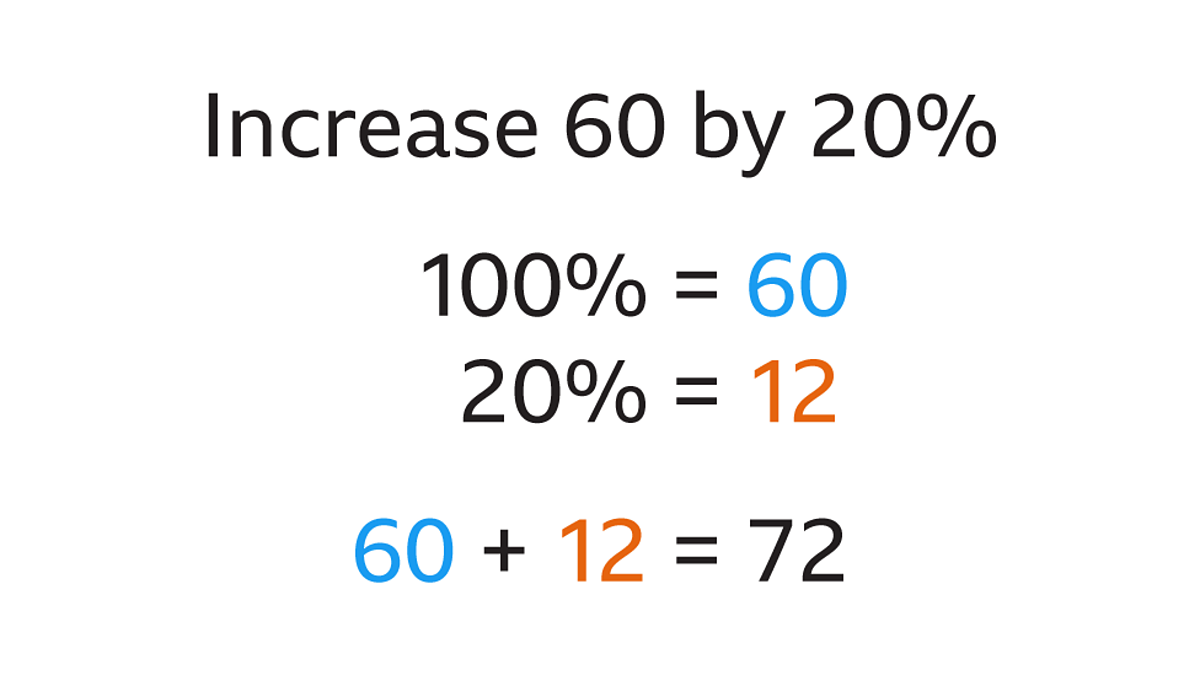
- Additional Functions: Does it offer percentage decrease, percentage change, or other related calculations? Some even include functions for compound growth or reverse percentage calculations, which can be highly useful.
- History and Memory: Can it save previous calculations for reference? A memory function is invaluable for comparing multiple figures.
- Export/Share Options: For tools that handle more than one calculation, the ability to export results to a CSV, PDF, or share them directly via email or messaging apps is a significant plus.
- Ad-Free Experience: While many free web tools are ad-supported, an intrusive ad experience can detract from usability. Premium apps often offer an ad-free experience.
- Accessibility Features: Consider tools that offer accessibility options for users with disabilities, such as screen reader compatibility or keyboard navigation.
User Interface and Experience (UI/UX) Considerations
A calculator’s usability is largely determined by its UI/UX. An intuitive interface makes a tool a pleasure to use, while a poorly designed one can lead to frustration and errors.
- Clean Design: A cluttered interface can be confusing. Look for tools with a clean, minimalist design that focuses on the core functionality.
- Ease of Navigation: Can you quickly find the percentage increase function? Is it easy to switch between different calculation types if offered?
- Responsive Design: For web-based tools, ensure they are responsive and work well on various screen sizes, from desktops to tablets and smartphones. Mobile apps should feel native to the operating system they run on.
- Error Handling: Does the tool provide clear feedback if invalid inputs are entered? Good error handling prevents user frustration.
- Learning Curve: While some specialized software may have a steeper learning curve, basic calculators should be immediately understandable without a manual.
Accuracy, Reliability, and Digital Security
These are non-negotiable aspects, especially when dealing with critical data.
- Verified Accuracy: For critical applications, ensure the calculator comes from a reputable source. Cross-reference results with another trusted tool if in doubt. For spreadsheet formulas, double-check your syntax.
- Reliability: Does the tool consistently function without glitches or crashes? This is particularly important for software and apps. Regular updates and good customer support can be indicators of reliability.
- Data Security: If you’re using a tool that requires inputting sensitive financial or proprietary data, investigate its privacy policy and data security measures. Cloud-based spreadsheets like Google Sheets have robust security protocols, but less-known online calculators might not. For enterprise solutions, compliance with data protection regulations (e.g., GDPR, CCPA) is crucial. Always be wary of browser extensions or apps that request excessive permissions.
Mastering the Calculation: How to Effectively Use These Tools
Finding the right tool is only half the battle; knowing how to use it effectively is where the real value lies. Each platform, from simple web tools to complex spreadsheets, requires a slightly different approach to maximize efficiency and accuracy.
Step-by-Step Usage Guides for Common Platforms
- Web-Based/Mobile App:
- Open the calculator.
- Locate the input field for “Initial Value” or “Old Value” and enter your starting number.
- Locate the input field for “Final Value” or “New Value” and enter your ending number.
- Click “Calculate” or “Compute.” The percentage increase will be displayed.
- Spreadsheet (e.g., Excel/Google Sheets):
- Enter your “Initial Value” in a cell (e.g., A2).
- Enter your “Final Value” in an adjacent cell (e.g., B2).
- In a third cell (e.g., C2), type the formula:
=(B2-A2)/A2*100. - Press Enter. The cell C2 will display the percentage increase.
- To apply this to a column of data, click on cell C2, then drag the small square at the bottom right corner of the cell downwards.
- Optionally, format the cell as a “Percentage” and adjust decimal places for clarity if you omit the
*100from the formula (e.g.,=(B2-A2)/A2).
Real-World Tech Applications: From Data Analysis to Project Growth
The application of percentage increase calculators spans numerous tech domains:
- Website Analytics: Measuring the percentage growth of unique visitors, page views, or bounce rate changes month-over-month.
- Software Development: Tracking the percentage increase in bug reports after an update, or the percentage growth in new feature adoption.
- Digital Marketing: Analyzing the percentage jump in click-through rates (CTR) for an ad campaign, or the conversion rate improvement from A/B testing.
- IT Infrastructure: Quantifying the percentage increase in server load, bandwidth usage, or storage consumption to predict future needs.
- Project Management: Monitoring the percentage completion of project milestones or the percentage deviation from budget.
- App Performance: Evaluating the percentage increase in daily active users (DAU) or revenue from in-app purchases.
Best Practices for Consistent Results
To ensure you get the most out of your digital percentage increase calculator:
- Be Consistent with Data: Always use the same units and methodologies for collecting initial and final values.
- Understand Context: A 100% increase on a small base might look impressive but could be less significant than a 10% increase on a very large base.
- Document Your Inputs: Especially for complex analyses, keep a record of the values you entered and the date of calculation.
- Validate Critical Results: For high-stakes decisions, consider performing the calculation on two different reputable tools to confirm accuracy.
- Leverage Visualization: Once calculated, use charts and graphs (easily generated in spreadsheets or BI tools) to visually represent percentage increases, making trends and outliers immediately apparent.
The Future of Percentage Increase Calculation: AI and Automation
The trajectory of technology suggests that even these simple calculators will evolve, driven by advancements in artificial intelligence and automation. The future promises more intelligent, integrated, and predictive tools that streamline data analysis even further.
Predictive Analytics and AI Integration
Future percentage increase calculators won’t just tell you what happened, but what might happen next. AI algorithms will be integrated to analyze historical percentage increases, identify patterns, and predict future growth rates with a degree of confidence. Imagine a tool that not only calculates your current website traffic increase but also forecasts the likely percentage increase for the next quarter based on seasonal trends, marketing spend, and competitor activity. This shift from descriptive to predictive analytics will be invaluable for strategic planning in technology.
Automating Data Insights
The next generation of tools will also automate the discovery of percentage changes that matter. Instead of manually inputting values or searching for trends, AI-powered dashboards could automatically highlight significant percentage increases or decreases across vast datasets, alerting users to anomalies or areas of exceptional growth. This would transform percentage calculation from a reactive task to a proactive insight-generation process, providing “smart alerts” based on predefined thresholds or learned normal behavior patterns.

Enhancing Decision-Making with Advanced Tools
Ultimately, the evolution of percentage increase calculators, particularly through AI integration, aims to enhance decision-making. By providing more accurate, timely, and predictive insights into growth and change, these advanced tools will empower individuals and organizations to react faster to market shifts, optimize resource allocation, and strategically plan for future technological endeavors. From personalized investment advice based on stock price percentage changes to optimizing smart city infrastructure based on traffic flow increases, the simple concept of percentage increase will continue to be a foundational element, increasingly powered by sophisticated digital capabilities.
In conclusion, the humble percentage increase calculator is a vital tool in the tech professional’s arsenal. From basic web utilities to advanced AI-driven platforms, understanding how to find and effectively use these digital aids is crucial for navigating the complexities of data, making informed decisions, and staying ahead in our fast-evolving digital world.
aViewFromTheCave is a participant in the Amazon Services LLC Associates Program, an affiliate advertising program designed to provide a means for sites to earn advertising fees by advertising and linking to Amazon.com. Amazon, the Amazon logo, AmazonSupply, and the AmazonSupply logo are trademarks of Amazon.com, Inc. or its affiliates. As an Amazon Associate we earn affiliate commissions from qualifying purchases.