
In an increasingly data-driven world, understanding and calculating percentages is not merely a mathematical exercise; it’s a fundamental digital literacy skill. From tracking battery life on your smartphone to analyzing performance metrics for a server, percentages provide a universal language for understanding proportions, changes, and distributions across countless technological applications. While the concept of percentages might seem straightforward, mastering their calculation on various digital and physical calculators is key to navigating the complexities of modern tech with precision and confidence.
This comprehensive guide delves into the practicalities of finding percentages using a range of calculator types, emphasizing the technical contexts where these calculations are indispensable. We’ll explore basic operations on standard scientific and financial calculators, delve into the enhanced capabilities of smartphone apps and desktop software, and discuss best practices to ensure accuracy in your computations. Whether you’re a student, a professional in a tech-related field, or simply someone looking to better understand the numbers that define our digital experience, mastering percentage calculations on your calculator is an invaluable asset.

The Ubiquitous Role of Percentages in the Digital Age
The digital realm is saturated with percentages. They are the shorthand for conveying critical information efficiently, allowing users and professionals alike to grasp the essence of data at a glance. Far from being confined to financial reports, percentages permeate every aspect of technology, from the most basic user interfaces to the most complex system diagnostics.
Everyday Applications Beyond Finance
For the average tech user, percentages are a constant companion. Consider the battery indicator on your laptop or phone—a clear, concise percentage instantly informs you of the remaining power, dictating your charging habits. Software downloads and installations often display progress as a percentage, offering a vital visual cue for completion times. Storage usage on your hard drive or cloud service is typically presented as a percentage, helping you manage digital real estate. Even the responsiveness of your internet connection can be understood in terms of packet loss percentages, indicating the quality of your online experience. These seemingly simple uses underscore how percentages translate raw data into actionable insights for everyday technology interactions.
Technical Specifications and Performance Metrics
In the world of hardware and software development, percentages are critical for defining specifications and monitoring performance. CPU utilization, often displayed as a percentage, helps system administrators and power users understand how hard a processor is working. Network efficiency can be measured by throughput and latency, with success rates and error rates often expressed as percentages. Display technologies boast of color gamut percentages (e.g., 100% sRGB or 95% DCI-P3) to quantify color accuracy and vibrancy. Even the success rate of code compilation, the percentage of memory used by an application, or the uptime of a server are all crucial metrics communicated through percentages, directly influencing design choices, optimization efforts, and overall system reliability.
Understanding Data and Statistics in Software and Analytics
Beyond individual device metrics, percentages form the backbone of data analysis and statistical reporting in various software applications. Data scientists and analysts rely heavily on percentages to interpret survey results, track user engagement rates, or identify trends in large datasets. For instance, an analytics dashboard might show that 70% of users complete a specific onboarding flow, or that a software update reduced bug reports by 15%. A/B testing, a common practice in web development and marketing, uses percentages to compare the effectiveness of different design elements, measuring conversion rates or click-through rates. In these contexts, calculators, whether standalone devices or integrated software tools, become indispensable for quickly transforming raw counts into meaningful percentage-based insights that drive strategic decisions and product improvements.
Mastering Basic Percentage Calculations on Standard Calculators
The foundation of using any calculator for percentages lies in understanding its basic functions. While specific button layouts might vary between models, the underlying mathematical principles remain constant. Most standard calculators, from basic four-function devices to advanced scientific calculators, are equipped to handle percentage calculations with ease, provided you know the right sequence of operations.
Finding a Percentage of a Number
This is perhaps the most common percentage calculation. To find X% of Y, the general method is to multiply Y by X, then divide by 100. Many calculators simplify this with a dedicated ‘%’ button.
Steps (General Method):
-
Enter the base number (Y).
-
Press the multiplication key (×).
-
Enter the percentage value (X).
-
Press the division key (÷).
-
Enter 100.
-
Press the equals key (=).
Example: Find 15% of 200.
200 × 15 ÷ 100 = 30
Steps (Using the ‘%’ button):
-
Enter the base number (Y).
-
Press the multiplication key (×).
-
Enter the percentage value (X).
-
Press the ‘%’ button. (On some calculators, pressing ‘%’ immediately gives the result; on others, you might need to press ‘=’ afterwards.)
Example: Find 15% of 200.
200 × 15 % = 30(or200 × 15 % =for some models)
Calculating Percentage Increase or Decrease
Calculating percentage change is crucial for tracking growth, reduction, or fluctuations in data—from system loads to storage efficiency.
To calculate a percentage increase (e.g., increasing Y by X%):
-
Find X% of Y (as shown above). Let this be the increase amount.
-
Add the increase amount to the original number (Y).
Steps (Using a calculator):
-
Enter the original number (Y).
-
Press the addition key (+).
-
Enter the percentage value (X).
-
Press the ‘%’ button. (This typically calculates X% of Y and adds it.)
-
Press the equals key (=).
Example: Increase 200 by 15%.
200 + 15 % = 230
To calculate a percentage decrease (e.g., decreasing Y by X%):
-
Find X% of Y. Let this be the decrease amount.
-
Subtract the decrease amount from the original number (Y).
Steps (Using a calculator):
-
Enter the original number (Y).
-
Press the subtraction key (-).
-
Enter the percentage value (X).
-
Press the ‘%’ button. (This typically calculates X% of Y and subtracts it.)
-
Press the equals key (=).
Example: Decrease 200 by 15%.
200 - 15 % = 170
Determining What Percent One Number Is of Another
This calculation helps identify the proportion of a whole. To find “What percent is A of B?”, you divide A by B and then multiply by 100.
Steps (General Method):
-
Enter the part (A).
-
Press the division key (÷).
-
Enter the whole (B).
-
Press the multiplication key (×).
-
Enter 100.
-
Press the equals key (=).
Example: What percent is 50 of 200?
50 ÷ 200 × 100 = 25(So, 50 is 25% of 200).
Steps (Using the ‘%’ button – less common for this specific operation, but possible):
Some calculators can implicitly convert a decimal to a percentage if you follow a division with the ‘%’ key.
-
Enter the part (A).
-
Press the division key (÷).
-
Enter the whole (B).
-
Press the ‘%’ button. (This usually calculates (A/B) * 100.)
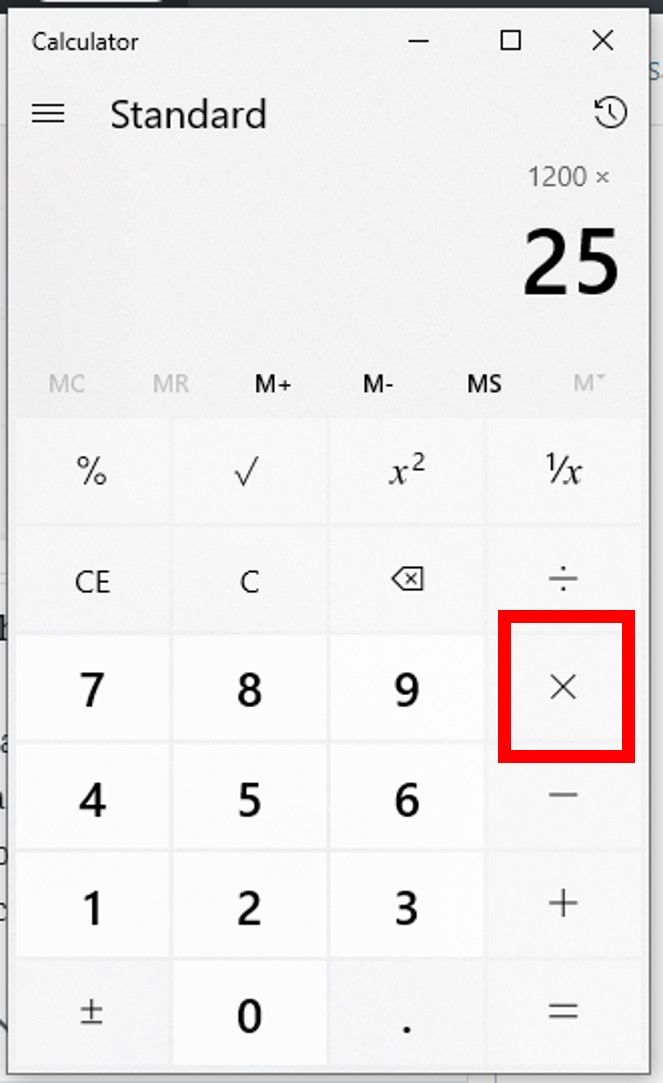
Example: What percent is 50 of 200?
50 ÷ 200 % = 25
Working with Advanced Percentage Operations
Beyond the basics, percentages are often chained in real-world scenarios, such as calculating successive discounts or understanding cumulative growth. For example, if a software license costs $100, then has a 10% discount, and then a 5% tax is applied to the discounted price.
Example: Chained Operations
-
Original price: $100
-
10% discount:
100 - 10 % = 90(The price is now $90) -
5% tax on the discounted price:
90 + 5 % = 94.5(The final price is $94.50)
Understanding the order of operations and how your calculator’s ‘%’ key interacts with previous results is crucial here. Some calculators might calculate 5% of the original 100 if you’re not careful, instead of 5% of 90. Always perform operations step-by-step or use parentheses if available on a scientific calculator for clarity.
Leveraging Digital Calculators and Software for Percentage Functions
While physical calculators are reliable, the digital age offers a plethora of software-based tools that extend functionality and convenience, especially for complex or batch percentage calculations. These integrated solutions often come with added benefits like calculation history, enhanced interface, and direct integration with other digital workflows.
Smartphone Calculator Apps: Features and Hidden Functions
Every smartphone comes equipped with a default calculator app, which is often surprisingly powerful. Beyond the basic arithmetic, these apps typically feature a ‘%’ key that operates similarly to physical calculators. Many also offer a “scientific mode” (often accessible by rotating the phone to landscape orientation) which unlocks more advanced functions, including parentheses for complex percentage expressions. Some third-party calculator apps provide even more specialized features, such as currency conversion, unit conversion, and dedicated percentage calculators for tips, taxes, or discounts, making them highly versatile tools for on-the-go calculations. Familiarizing yourself with these hidden functions can significantly speed up your daily tech-related calculations, from determining storage remaining after installing a new app to figuring out the percentage of users experiencing a certain bug based on raw counts.
Desktop Operating System Calculators: Windows, macOS, Linux
Desktop operating systems provide their own built-in calculator applications, which are often more robust than their mobile counterparts.
-
Windows Calculator: Offers “Standard,” “Scientific,” “Programmer,” and “Date Calculation” modes. The “Standard” mode includes the ‘%’ button, working much like a physical calculator. The “Scientific” mode allows for more complex formulas using parentheses, which is invaluable for multi-step percentage calculations where order of operations is critical (e.g.,
100 * (1 + 0.05)^3for compound growth). It also maintains a history of calculations, a feature often overlooked but incredibly useful for reviewing steps. -
macOS Calculator: Provides similar “Basic,” “Scientific,” and “Programmer” views. The ‘%’ key is present, and like Windows, the Scientific mode provides powerful algebraic input for intricate percentage problems.
-
Linux Calculators (e.g., GNOME Calculator, KCalc): These vary by distribution but generally offer standard and scientific modes with percentage functionality. Many are open-source and highly customizable.
These desktop tools are excellent for when you’re working on a larger screen and need to integrate calculations into other tasks, such as data entry or report generation.
Web-Based Calculators and Dedicated Online Tools
The internet provides an expansive array of calculators. A simple Google search query like “15% of 200” directly brings up a calculator widget with the answer. Numerous websites host dedicated percentage calculators that simplify specific tasks:
-
Online percentage calculators: These often feature intuitive interfaces where you input numbers into fields like “What is X% of Y?” or “X is what percent of Y?” eliminating the need to remember button sequences.
-
Specialized tools: Websites exist for calculating compound interest, loan payments, VAT (Value Added Tax), or even data transfer rates, all of which heavily rely on percentage calculations. These tools often abstract away the complex formulas, presenting a user-friendly form for quick results. They are particularly useful for specific business or personal finance scenarios that extend beyond basic tech applications but often arise within a tech professional’s broader needs.
Spreadsheet Software: The Power of Formulas for Batch Calculations
For calculations involving large datasets, or when you need to perform the same percentage calculation repeatedly across many items, spreadsheet software like Microsoft Excel, Google Sheets, or LibreOffice Calc is unparalleled. Instead of manually entering numbers into a calculator one by one, you can write formulas once and apply them to thousands of cells.
Examples of Percentage Formulas in Spreadsheets:
-
Finding a percentage of a number:
=B2*C2(if B2 contains the base number and C2 contains the percentage as a decimal, e.g., 0.15 for 15%) or=B2*(C2/100)(if C2 contains 15 for 15%). -
Percentage increase:
=B2*(1+C2)or=B2*(1+(C2/100)) -
Percentage decrease:
=B2*(1-C2)or=B2*(1-(C2/100)) -
What percent is A of B?:
=A2/B2(this will give a decimal, which you then format as a percentage) or=(A2/B2)*100for a direct percentage number.
Spreadsheets automate calculations, reduce human error, and allow for dynamic updates if the source data changes. This makes them indispensable for tech professionals dealing with resource allocation, budget analysis, performance tracking, or any scenario involving large-scale data manipulation and percentage-based reporting.
Tips and Best Practices for Accurate Percentage Calculations
Accuracy in percentage calculations is paramount, especially when dealing with critical technical data, financial projections, or performance metrics. Even subtle errors can lead to significant misinterpretations or flawed decisions. Adhering to certain best practices can help ensure your results are consistently reliable.
Understanding Calculator Modes (Standard vs. Scientific)
Most calculators, particularly digital ones, offer different modes. A standard calculator is usually sufficient for basic operations. However, a scientific mode provides access to parentheses, which are crucial for complex expressions. For example, to calculate a series of operations like 100 * (1 + 0.10) * (1 - 0.05), using parentheses ensures the calculator follows the correct order of operations. Always be aware of the mode your calculator is in and switch to scientific mode if your calculation requires complex nesting or explicit order control. Some calculators also have a “business” or “financial” mode, which might have specialized percentage functions for tax or interest.
The Importance of Order of Operations and Parentheses
The acronym PEMDAS/BODMAS (Parentheses/Brackets, Exponents/Orders, Multiplication and Division, Addition and Subtraction) governs the sequence in which mathematical operations are performed. When chaining percentage calculations, especially those involving increases and decreases, incorrect order of operations is a common source of error.
Example: Calculating a 10% increase followed by a 5% decrease on an initial value of 100.
-
Correct:
(100 * 1.10) * 0.95 = 104.5 -
Incorrect (if operations are not grouped):
100 + 10% - 5%could be interpreted as(100 + 10) - 5 = 105on some calculators or even lead to unexpected results if the ‘%’ key operates differently.
Using parentheses (100 + (100 * 0.10)) - ((100 + (100 * 0.10)) * 0.05) or simply (100 * 1.10) * 0.95 explicitly dictates the order, ensuring accuracy.
Dealing with Decimals and Rounding
Percentages are essentially fractions out of 100. When performing calculations manually or on a calculator without a ‘%’ key, you convert percentages to decimals (e.g., 15% becomes 0.15).
-
Precision: In technical fields, precision matters. Avoid rounding intermediate steps in a calculation. Perform all operations, and only round the final result to the necessary number of decimal places.
-
Rounding Rules: Be familiar with standard rounding rules (e.g., round 0.5 up). In some contexts, specific rounding conventions (like rounding to the nearest even number) might be required.
-
Calculator’s Internal Precision: Most digital calculators maintain a high degree of internal precision, which is generally good. However, when displaying results, they will round. Be mindful of this display rounding versus the actual computed value.
Common Pitfalls and How to Avoid Them
-
Confusing “Percent of” with “Percent Increase/Decrease”: Ensure you understand whether the problem asks for a percentage of a number, or an increase/decrease by a certain percentage.
-
Incorrect Use of the ‘%’ Button: The behavior of the ‘%’ button can vary slightly between calculator models. Always test it with a simple example (e.g.,
100 + 10 %) to understand how your specific calculator interprets it. Does100 * 10 %give 10 or 1000? Does100 + 10 %add 10 or 0.1? -
Percentage Point vs. Percentage Change: A common error is confusing a change in “percentage points” with a “percentage change.” If a value goes from 20% to 25%, that’s a 5 percentage point increase, but a 25% percentage change (calculated as
((25-20)/20) * 100).

Integrating Percentage Skills into Technical Problem Solving
Mastering calculator percentage functions isn’t just about getting the right number; it’s about integrating this skill into broader technical problem-solving. Whether you’re troubleshooting a server with CPU utilization spikes, optimizing code for memory efficiency, or analyzing user engagement for a new app feature, the ability to quickly and accurately calculate percentages using your available tools is a cornerstone of effective decision-making in the tech landscape. It empowers you to quantify problems, measure progress, and communicate insights with clarity and precision.
Mastering how to find percentages on a calculator, in its various forms, is an indispensable skill in the modern technical landscape. From the simple act of checking your phone’s battery life to the complex analysis of system performance metrics, percentages provide a universal and intuitive means of understanding proportions, changes, and distributions. By understanding the core operations, leveraging the diverse capabilities of physical and digital calculators, and adhering to best practices for accuracy, you can confidently navigate the numerical demands of our tech-driven world. This foundational skill not only enhances your personal digital literacy but also empowers you to make more informed, data-backed decisions in any professional or personal tech endeavor.
aViewFromTheCave is a participant in the Amazon Services LLC Associates Program, an affiliate advertising program designed to provide a means for sites to earn advertising fees by advertising and linking to Amazon.com. Amazon, the Amazon logo, AmazonSupply, and the AmazonSupply logo are trademarks of Amazon.com, Inc. or its affiliates. As an Amazon Associate we earn affiliate commissions from qualifying purchases.