
The mere mention of “taxes” can send shivers down many spines. For years, the complexities and perceived difficulty of tax preparation have driven countless individuals to pay for professional assistance or, worse, delay filing altogether. However, in an era where information is readily accessible and intuitive financial tools are abundant, filing your own taxes has never been more achievable. Taking control of your tax preparation not only empowers you with a deeper understanding of your financial landscape but can also save you significant money in professional fees. It might seem daunting at first, but with a structured approach and a clear understanding of the process, you can confidently navigate the world of DIY tax filing. This comprehensive guide will demystify the process, providing you with the knowledge and steps to successfully file your taxes on your own.
Understanding the Basics Before You Begin
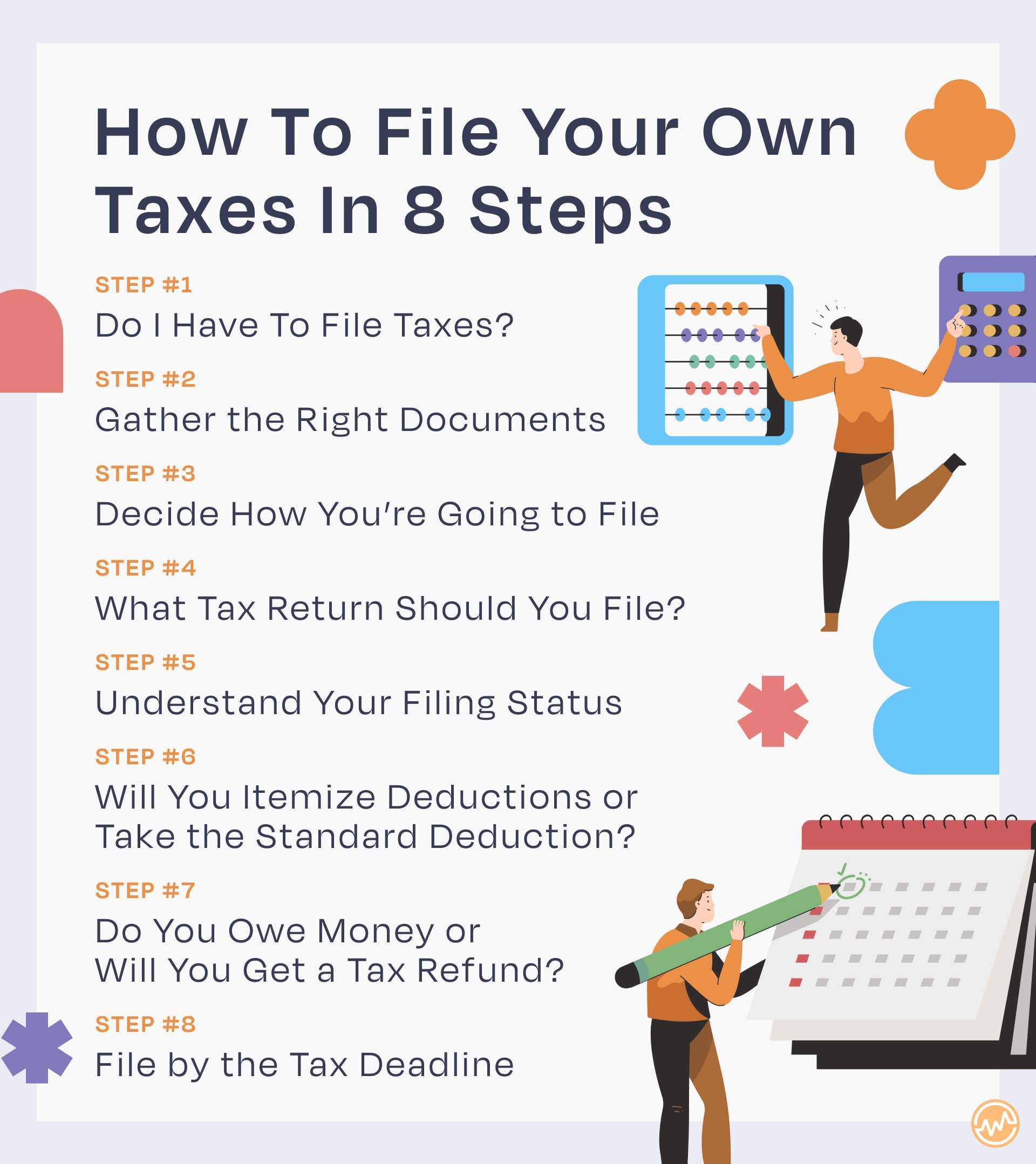
Before you dive into gathering documents and crunching numbers, it’s crucial to lay a foundational understanding of who needs to file, what key forms you’ll encounter, and the important deadlines that govern the tax year. This preliminary knowledge will act as your roadmap, preventing common pitfalls and ensuring a smoother filing experience.
Who Needs to File?
The primary determinant for whether you need to file a federal income tax return is your gross income, which is the total of all income you receive from all sources that is not exempt from tax. The IRS sets annual filing thresholds based on your filing status (e.g., single, married filing jointly, head of household) and age. If your gross income meets or exceeds these thresholds, you are generally required to file.
Beyond income thresholds, certain situations always necessitate filing, regardless of your income. For instance, if you are self-employed and your net earnings from self-employment were $400 or more, you must file. Similarly, if you claimed advance payments of the premium tax credit or owe special taxes (like alternative minimum tax), filing is mandatory. Even if you don’t meet the income threshold, it’s often beneficial to file, especially if you had taxes withheld from your paychecks or qualify for refundable tax credits like the Earned Income Tax Credit or the Child Tax Credit. Filing in these scenarios is the only way to receive your refund.
Key Tax Forms Explained
Navigating tax season means becoming familiar with a handful of essential forms that report your income and other financial activities. Understanding what each form represents will simplify the data entry process significantly.
- Form W-2, Wage and Tax Statement: This is perhaps the most common tax form. If you are an employee, your employer will send you a W-2 by January 31st each year. It reports your annual wages and the amount of federal, state, and local taxes withheld from your pay.
- Form 1099 Series: This extensive family of forms reports various types of non-employment income.
- Form 1099-NEC (Nonemployee Compensation): If you worked as an independent contractor or freelancer and earned $600 or more from a single client, they should send you this form.
- Form 1099-MISC (Miscellaneous Information): Reports other types of income like rent payments, prizes, awards, or other income not covered by 1099-NEC.
- Form 1099-INT (Interest Income): Received from banks or financial institutions if you earned $10 or more in interest.
- Form 1099-DIV (Dividends and Distributions): Reports dividends and capital gain distributions from stocks, mutual funds, and other investments.
- Form 1099-B (Proceeds From Broker and Barter Exchange Transactions): Reports proceeds from the sale of stocks, bonds, and other securities.
- Form 1098 Series: These forms report interest you’ve paid.
- Form 1098 (Mortgage Interest Statement): Sent by your mortgage lender, reporting the interest you paid on your home loan.
- Form 1098-E (Student Loan Interest Statement): Reports the interest you paid on qualified student loans.
- Form 1098-T (Tuition Statement): Reports tuition and related expenses paid to eligible educational institutions, crucial for education credits.
- Form 1095-A (Health Insurance Marketplace Statement): If you purchased health insurance through a state or federal marketplace, this form details your coverage and any advance payments of the premium tax credit you received.
Important Deadlines to Remember
Adhering to tax deadlines is paramount to avoid penalties and interest charges.
- April 15th: This is the standard deadline for filing federal income tax returns and paying any taxes due for most individuals. If April 15th falls on a weekend or holiday, the deadline shifts to the next business day.
- October 15th: If you can’t file by April 15th, you can request an extension using Form 4868, which typically grants you an additional six months to file. However, remember that an extension to file is not an extension to pay. If you owe taxes, you must still pay an estimate of what you owe by April 15th to avoid penalties.
- Quarterly Estimated Tax Deadlines: For self-employed individuals, freelancers, and others who don’t have taxes withheld from their income, estimated taxes are typically due on April 15th, June 15th, September 15th, and January 15th of the following year. Missing these can result in underpayment penalties.
Gathering Your Financial Documents: The Preparation Phase
The cornerstone of accurate tax filing is meticulous organization. Before you even think about entering data into software or filling out forms, you must compile all your relevant financial documents. This preparatory step is where many people get overwhelmed, but breaking it down into categories makes it manageable.
Income Documentation
This category includes all forms that report money you earned throughout the year. As discussed earlier, these are primarily your W-2s and various 1099 forms. Make sure you have received all relevant documents from your employers, clients, banks, and investment firms. If you haven’t received a form by early February that you expect, contact the issuer directly. Also, don’t forget records of cash income, tips, or any other income not formally reported on a W-2 or 1099. For those with investments, keep statements detailing interest, dividends, and any capital gains or losses from stock sales.
Deduction and Credit Documentation
This is where you can potentially reduce your taxable income or your tax liability. Deductions reduce the amount of income subject to tax, while credits directly reduce the amount of tax you owe. Having proper documentation is essential to claim these.
- Mortgage Interest: Your Form 1098 from your lender.
- Student Loan Interest: Your Form 1098-E from your loan servicer.
- Medical Expenses: Receipts for doctor visits, prescriptions, hospital stays, insurance premiums (if paid post-tax), and mileage driven for medical appointments.
- Charitable Contributions: Receipts for cash donations, acknowledgments from charities for donations over $250, and records of non-cash donations.
- Childcare Expenses: Records of payments to daycare providers or nannies, including their Taxpayer Identification Number (TIN).
- Education Expenses: Form 1098-T from your educational institution, along with receipts for textbooks and other required course materials.
- IRA Contributions: Statements from your IRA custodian.
- Business Expenses (for self-employed): Detailed records of all ordinary and necessary expenses related to your business, such as home office expenses, supplies, travel, advertising, and professional development.
Organize these documents neatly, perhaps in a dedicated folder or digital file, ensuring easy access when you start the filing process.
Personal Information and Prior Year Returns
Beyond income and expense documents, you’ll need specific personal information for yourself and any dependents you plan to claim. This includes full names, dates of birth, and Social Security Numbers (SSNs) or Individual Taxpayer Identification Numbers (ITINs). For direct deposit of any refund, you’ll need your bank account and routing numbers.
Crucially, if you are e-filing, you will likely need your Adjusted Gross Income (AGI) from your prior year’s tax return to verify your identity. Keep a copy of your previous year’s return readily available, as it also serves as a valuable reference for recurring income sources or deductions.
Choosing Your Filing Method: Tools and Resources
Once your documents are in order, the next step is to decide how you will actually prepare and submit your return. You have several options, ranging from free government-sponsored programs to commercial software, each with its own advantages and considerations.
Free Tax Filing Options
For many taxpayers, filing taxes can be completely free, saving both time and money.
- IRS Free File Program: This program, available through the IRS website, allows taxpayers with an Adjusted Gross Income (AGI) below a certain threshold (which changes annually, often around $79,000 for tax year 2023) to use guided tax preparation software from various commercial providers (e.g., TurboTax, H&R Block, TaxAct) at no cost. These are full-featured versions of the software, just like the paid ones, but are free if you meet the income requirements.
- IRS Free File Fillable Forms: For those with higher incomes or who prefer to do the calculations themselves, this option provides electronic versions of federal tax forms that you can fill out and e-file directly through the IRS website. It offers no guidance, so it’s best for experienced filers comfortable with tax law.
- Volunteer Income Tax Assistance (VITA) and Tax Counseling for the Elderly (TCE): These programs offer free tax help to qualified individuals, including those who make $64,000 or less, persons with disabilities, and limited English-speaking taxpayers (VITA), and all taxpayers age 60 and over (TCE). IRS-certified volunteers provide in-person tax preparation services at various community sites.
Commercial Tax Software
If your income exceeds the Free File program’s threshold, or you prefer a more robust, guided experience than free fillable forms, commercial tax software is an excellent choice.
- Popular Options: Market leaders include TurboTax, H&R Block, TaxAct, and TaxSlayer. Each offers different versions, from basic packages for simple returns to premium versions designed for self-employed individuals, investors, or those with complex deductions.
- Benefits: These programs offer step-by-step guidance, translating complex tax jargon into understandable questions. They perform automatic calculations, check for errors, and actively look for deductions and credits you might be eligible for. Most offer direct e-filing with federal and state returns. Many also provide audit support or guarantees for accuracy.
- Considerations: The cost varies based on the complexity of your return and the version of software you choose. While they aim to simplify the process, you still need to accurately input your information. Some charge extra for state tax filings or additional features. Read reviews and compare features to find the best fit for your specific needs.
Manual Filing (Paper Forms)

While increasingly less common due to the efficiency and accuracy of e-filing, you still have the option to print out IRS forms, fill them out manually, and mail them in.
- Pros: You have complete control over every entry and don’t need to purchase software.
- Cons: This method carries a higher risk of mathematical errors, takes longer for the IRS to process (meaning delayed refunds), and offers no guidance or error-checking. It’s generally not recommended for beginners or anyone seeking a quick refund. You can download all official forms and instructions directly from the IRS website (IRS.gov).
The Step-by-Step Filing Process
With your documents organized and a filing method chosen, you’re ready to embark on the actual tax preparation journey. This process generally follows a logical flow, whether you’re using software or filling out forms manually.
Setting Up Your Account and Entering Personal Information
If using tax software, your first step will be to create an account or log in. The software will guide you through entering your personal information: your full name, Social Security Number, date of birth, and filing status. If you have dependents, you’ll input their details here as well. This is also where you’ll typically be asked for your prior year’s AGI, which the IRS uses to verify your identity for e-filing. Accuracy here is paramount, as even a single incorrect digit in an SSN can lead to significant delays or rejections.
Reporting Income
This is where your income documents come into play. The software will prompt you to enter information from your W-2s, 1099s, and any other income statements. It often categorizes these by source (e.g., wages, interest, dividends, self-employment income). For W-2s, you’ll usually enter the box numbers exactly as they appear on the form. For self-employment income, you’ll typically input your total income and then move to a separate section to detail your business expenses. Be methodical and double-check each entry against your physical documents.
Claiming Deductions and Credits
After reporting your income, the software will guide you through potential deductions and credits. This is often the most rewarding part of filing on your own, as you actively seek ways to reduce your tax burden.
- Standard vs. Itemized Deductions: The software will calculate both and advise which option provides you with the larger tax savings. The standard deduction is a fixed dollar amount based on your filing status, while itemized deductions allow you to subtract specific expenses (like mortgage interest, state and local taxes, charitable contributions, and medical expenses exceeding a certain percentage of your AGI).
- Tax Credits: These are particularly valuable as they directly reduce your tax liability dollar-for-dollar. Common credits include the Child Tax Credit, Earned Income Tax Credit (for low-to-moderate income individuals and families), education credits (like the American Opportunity Tax Credit and Lifetime Learning Credit), and credits for dependent care expenses. Tax software is excellent at identifying credits you might qualify for based on your inputs.
Ensure you have all supporting documentation for any deduction or credit you claim, in case the IRS has questions later.
Reviewing Your Return
This is a critical, often overlooked, step. Before you hit “submit,” dedicate time to thoroughly review your entire return. Most tax software includes a comprehensive review feature that flags potential errors, missing information, or inconsistencies.
- Check for Accuracy: Verify all names, SSNs, and addresses. Confirm that all income forms (W-2s, 1099s) have been entered correctly and that no income sources were missed. Review all claimed deductions and credits, ensuring you have the necessary documentation.
- Mathematical Accuracy: While software usually handles this, a quick mental check of major figures (e.g., total income, tax owed/refund) can sometimes catch obvious input errors.
- State Return Review: If you’re also filing a state return, review it with the same diligence, as state tax laws and requirements can differ from federal ones.
Submitting Your Return and Payment (or Refund)
Once you are confident in your review, it’s time to submit.
- E-filing: The most common and recommended method. Electronic filing is faster, more accurate, and allows for quicker processing of refunds. You’ll typically receive an email confirmation from the IRS (and your state, if applicable) once your return has been accepted.
- Mailing: If you choose to paper-file, print out all necessary forms, sign them, and mail them to the correct IRS address. Keep copies of everything you send.
- Payment Options: If you owe taxes, you typically have several ways to pay: direct debit from your bank account (most common with e-filing), credit card (often with a processing fee), or by mailing a check or money order with Form 1040-V, Payment Voucher.
- Refund Options: If you’re due a refund, direct deposit is the fastest way to receive it. You can also opt for a paper check.
Always save a digital and/or physical copy of your submitted tax return for your records.
Post-Filing Best Practices and What Comes Next
Filing your taxes isn’t just about the submission; it’s also about what you do afterward to safeguard your financial well-being and prepare for future tax seasons. Proactive record-keeping and understanding potential post-filing scenarios are crucial aspects of DIY tax management.
Keeping Meticulous Records
The IRS generally recommends keeping tax records for at least three years from the date you filed your original return or two years from the date you paid the tax, whichever is later. However, for certain situations, like reporting worthless securities or bad debt deductions, the period extends to seven years. Documents related to property you own should be kept until you sell the property, plus three years.
Create an organized system for your tax documents. This could be a dedicated physical folder, a digital folder on your computer, or cloud storage. Scan all physical documents and save digital copies. Label them clearly by tax year. This meticulous record-keeping will be invaluable if you ever need to amend a return or face an audit.
What If You Make a Mistake?
It happens. Even with careful review, sometimes an error is discovered after a return has been filed. The good news is you can correct it.
- Amending a Return: Use Form 1040-X, Amended U.S. Individual Income Tax Return, to make corrections. You’ll typically indicate the tax year you’re amending, explain the changes, and show the original and corrected amounts.
- When to Amend: Amend if the mistake affects your tax liability (e.g., changes your refund or amount owed). Small mathematical errors often don’t require an amendment; the IRS might correct these on their own.
- How to File an Amendment: Form 1040-X cannot be e-filed; it must be mailed. Ensure you attach copies of any forms or schedules that changed due to the amendment. The IRS advises waiting until your original return has been fully processed before filing an amendment.
Understanding Tax Audits
The word “audit” can instill fear, but for most people, it’s a rare occurrence. An audit is simply a review of your accounts and financial information to ensure information is reported correctly and in accordance with tax laws.
- What Triggers an Audit? While random selection occurs, common triggers include reporting income or deductions that don’t match IRS records (e.g., a W-2 that wasn’t entered), claiming unusually high deductions for your income level, or running a cash-intensive business. Filing Schedule C (Profit or Loss From Business) also increases the likelihood, but it doesn’t mean you’re doing anything wrong.
- How to Respond: If you receive an audit notice, don’t panic. The letter will explain why you’re being audited and what documentation you need to provide. Respond promptly and provide only the requested information. Having your organized records ready will make this process much smoother. Most audits are conducted by mail (correspondence audits).
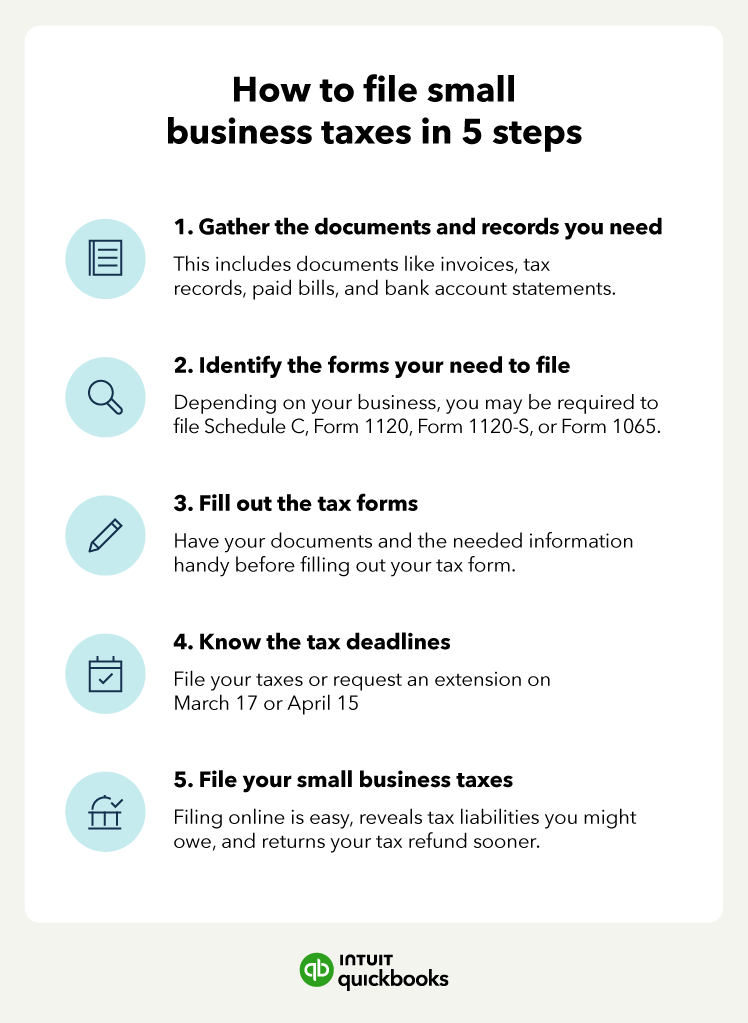
Planning for Next Year
Tax planning isn’t just for businesses; it’s a vital part of personal finance.
- Adjusting W-4 (Employees): If you received a large refund or owed a substantial amount, consider adjusting your W-4 form with your employer to optimize your tax withholding. A large refund means you effectively gave the government an interest-free loan, while owing a lot might lead to penalties.
- Estimated Taxes (Self-Employed): If you’re self-employed, accurately estimating your income and expenses throughout the year and making timely quarterly estimated tax payments (Form 1040-ES) is crucial to avoid underpayment penalties.
- Saving for Taxes: It’s wise to set aside money for potential tax liabilities, especially if you have significant non-wage income.
- Starting Documentation Collection Early: Don’t wait until January to gather documents. As expenses occur throughout the year, log them or keep receipts in your designated tax folder. This “rolling” organization makes the next tax season significantly less stressful.
Filing your taxes on your own is a powerful step towards greater financial literacy and control. While it requires attention to detail and a commitment to organization, the process is far from insurmountable. By understanding the basics, meticulously preparing your documents, choosing the right tools, and following a clear step-by-step approach, you can navigate tax season with confidence and achieve a profound sense of empowerment over your personal finances. Remember, if your situation becomes exceptionally complex, or you encounter genuinely perplexing scenarios, seeking advice from a qualified tax professional is always a wise decision. However, for most individuals, the journey of DIY tax preparation is an accessible and rewarding one.
aViewFromTheCave is a participant in the Amazon Services LLC Associates Program, an affiliate advertising program designed to provide a means for sites to earn advertising fees by advertising and linking to Amazon.com. Amazon, the Amazon logo, AmazonSupply, and the AmazonSupply logo are trademarks of Amazon.com, Inc. or its affiliates. As an Amazon Associate we earn affiliate commissions from qualifying purchases.