
In the modern e-commerce landscape, the ability to navigate digital marketplaces safely is a cornerstone of sound personal finance. Amazon, as the world’s largest online retailer, processes billions of transactions annually. While the vast majority of these transactions are seamless, the sheer volume of trade inevitably leads to disputes, shipping errors, and product discrepancies. For the savvy consumer, understanding how to effectively file a claim—specifically the Amazon A-to-z Guarantee claim—is more than just a customer service hurdle; it is a vital skill for protecting one’s disposable income and ensuring financial accountability from third-party vendors.

The A-to-z Guarantee is designed to provide a financial safety net for customers purchasing from third-party sellers. Unlike items sold and shipped directly by Amazon, which fall under the company’s standard return policies, third-party transactions involve an additional layer of complexity. This guide explores the strategic approach to filing a claim, ensuring that your capital is protected and your consumer rights are upheld.
Understanding the Amazon A-to-z Guarantee: Your Financial Safeguard
The Amazon A-to-z Guarantee is a robust consumer protection policy that covers both the timely delivery and the condition of items sold by third-party sellers. For those looking to manage their personal finances with precision, this guarantee acts as a form of transaction insurance. It ensures that if a seller fails to fulfill their end of the bargain, the consumer is not left out of pocket.
What is Covered Under the Guarantee?
To maximize your chances of a successful claim, you must first understand the specific financial triggers that qualify for reimbursement. The guarantee typically applies in several distinct scenarios:
-
Non-Delivery: The item has not arrived within three days of the maximum estimated delivery date or the tracking shows a delivery confirmation but you have not received the package.
-
Substantial Discrepancy: The item received is different in a significant way from the seller’s description (e.g., a different version, a different color, or a completely different product).
-
Damage or Defect: The item arrived in a damaged or defective state.
-
Return Policy Violations: You returned an item in accordance with the seller’s return policy, but the seller has not issued a refund.
-
Unauthorized Charges: You were charged more than the amount authorized at checkout.
Financial Limits and Timelines
From a personal finance perspective, timing is everything. Amazon imposes strict windows for filing claims. Generally, you must wait until three calendar days after the maximum estimated delivery date or 30 days from the order date, whichever is sooner. The window for filing a claim closes 90 days after the maximum estimated delivery date. Understanding these constraints is essential for maintaining a clear ledger of your household expenses and ensuring that no “lost” funds are left unrecovered due to procrastination.
Preparing for the Claim: Essential Financial Documentation
Filing a claim is an evidence-based process. Before initiating the claim through the digital portal, you must treat the situation with the same rigor you would apply to a tax audit or a bank dispute. Proper documentation is the foundation of a successful recovery of funds.
The Contact Seller Phase: A Mandatory Prerequisite
Amazon requires that you first attempt to resolve the issue directly with the seller. This is not just a courtesy; it is a procedural requirement. You must message the seller through the Amazon Buyer-Seller Messaging Service and allow them 48 hours to provide a resolution.
When communicating, remain professional and objective. Clearly state the problem: “The item was expected on the 15th, it is now the 18th, and it has not arrived.” Or, “The product received is a 2021 model, but the listing advertised the 2023 version.” This digital paper trail serves as your primary evidence if the case is escalated to Amazon’s investigators.
Gathering Your Evidence
Before clicking the “File a Claim” button, compile the following data points:
-
Order ID: Your unique transaction identifier.
-
Tracking Numbers: Evidence of the package’s movement (or lack thereof).
-
Photographic Proof: If the item is damaged or “not as described,” clear, high-resolution photos are indispensable. Compare what you received with the original listing images.
-
Correspondence Logs: Keep copies of all messages sent to and received from the seller.
-
Receipts and Estimates: If the claim involves a defect that requires a quote for repair, having that financial estimate ready can strengthen your case for a full or partial refund.
Step-by-Step Instructions: Navigating the Financial Recovery Process
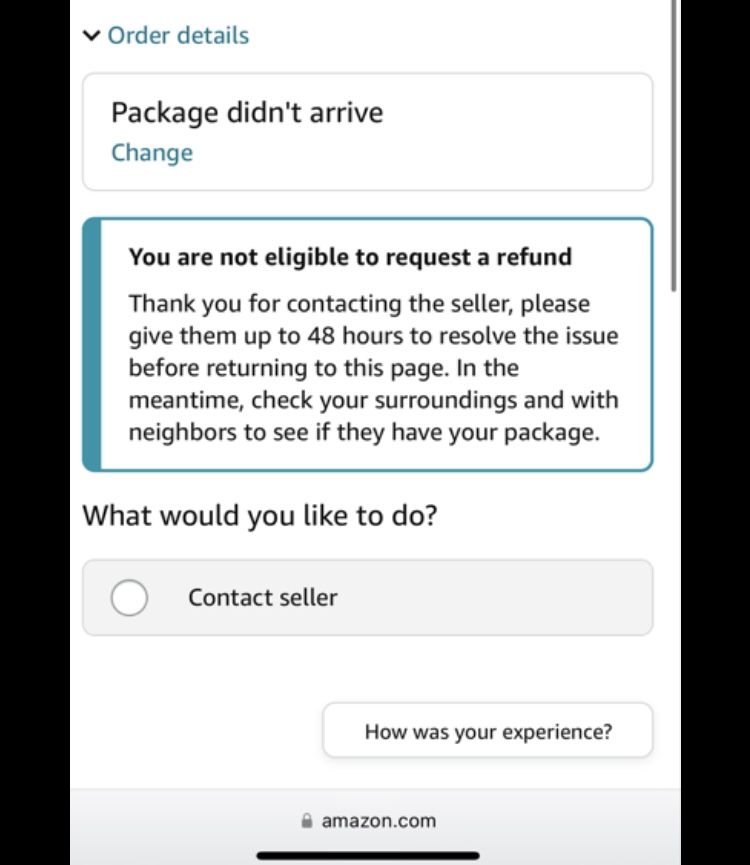
Once the 48-hour window for a seller response has passed without a satisfactory resolution, you are eligible to escalate the matter to Amazon. The process is handled entirely through the Amazon interface, designed to streamline the flow of information between the buyer, the seller, and the adjudicator.
Initiating the Claim via the Desktop Portal
For most users, the desktop interface provides the clearest view of the necessary fields and documentation uploads.
-
Access Your Account: Log in and navigate to “Your Orders.”
-
Locate the Transaction: Find the specific order that is the subject of the dispute.
-
Select the Problem: Click on “Problem with Order.”
-
Choose the Claim Type: Select the reason that best describes your situation from the dropdown menu (e.g., “Item not received” or “Item not as described”).
-
Submit for Review: Enter the details of your interaction with the seller and your desired outcome (usually a full refund). Click “Request refund through the A-to-z Guarantee.”
Managing Claims through the Amazon Mobile Interface
In an age of mobile banking and on-the-go financial management, many users prefer the Amazon app. The process is similar:
-
Open the Amazon App and tap the user icon to access “Your Orders.”
-
Select the order in question.
-
Tap “Order Details” and then “Get help with order.”
-
Follow the prompts to describe the issue and request the A-to-z refund.
Amazon typically investigates these claims within one to two weeks. During this period, Amazon may contact you for additional information. Responding promptly to these requests is vital to prevent the claim from being closed due to inactivity.
Strategic Tips for a Successful Resolution
Successfully recovering your funds requires more than just filling out a form; it requires a strategic mindset. You are essentially presenting a case to a third-party mediator who must decide between your account of events and the seller’s.
Crafting a Compelling Evidence Statement
When writing your claim description, avoid emotional language. Instead, focus on the financial and logistical facts. Use a chronological format: “Order placed on [Date]. Maximum delivery date was [Date]. Contacted seller on [Date] regarding non-delivery. Seller responded on [Date] stating the item was out of stock but did not issue a refund.” This clarity makes it easier for the Amazon investigator to rule in your favor.
Monitoring Your Refund Status
Once a claim is approved, the refund is typically issued to the original payment method. This is where your personal finance tracking comes back into play. Depending on your financial institution, it may take 3 to 10 business days for the credit to appear on your statement. If you paid with a gift card or Amazon balance, the credit is usually instantaneous. Always verify the transaction in your banking app to ensure the loop is closed and your balance is restored.
Beyond the Refund: Managing Personal Finance in the E-commerce Era
Filing a claim with Amazon is a tactical move, but it should be part of a broader strategy for digital financial security. Understanding the hierarchy of protection helps you choose the right tools for your purchases.
Credit Card Chargebacks vs. Amazon Claims
A common question in personal finance circles is whether one should file a claim through Amazon or initiate a chargeback through their credit card provider. Generally, the Amazon A-to-z Guarantee should be your first line of defense.
Chargebacks are often considered the “nuclear option.” While effective, they can lead to your Amazon account being blacklisted or suspended, as they bypass Amazon’s internal dispute resolution system. Furthermore, credit card companies often require you to attempt a resolution with the merchant first. By using the A-to-z Guarantee, you preserve your relationship with the platform while still exercising your right to financial recovery.

Scaling Financial Security for Online Shopping
To minimize the need for claims in the future, consider the following financial habits:
-
Vet Third-Party Sellers: Before purchasing, click on the seller’s name to view their feedback rating. A seller with a high volume of transactions and a rating above 90% is statistically less likely to cause a dispute.
-
Use Protected Payment Methods: Always use a credit card or Amazon’s internal payment systems. Avoid any seller who asks for payment via wire transfer, cash, or external apps like Venmo, as these transactions fall outside the A-to-z Guarantee.
-
Review Your Monthly Statements: Regularly audit your credit card statements for “ghost” subscriptions or small unauthorized charges that can often originate from third-party marketplace interactions.
Filing a claim with Amazon is a powerful tool in the consumer’s arsenal. By understanding the mechanics of the A-to-z Guarantee, maintaining meticulous records, and approaching the process with a professional, data-driven mindset, you can navigate the complexities of online retail without compromising your financial stability. In the digital economy, being an informed consumer is the best way to ensure that your money is always working for you, and never being lost to the friction of the marketplace.
aViewFromTheCave is a participant in the Amazon Services LLC Associates Program, an affiliate advertising program designed to provide a means for sites to earn advertising fees by advertising and linking to Amazon.com. Amazon, the Amazon logo, AmazonSupply, and the AmazonSupply logo are trademarks of Amazon.com, Inc. or its affiliates. As an Amazon Associate we earn affiliate commissions from qualifying purchases.