
Understanding Form 941: The Employer’s Quarterly Federal Tax Return
For any business that pays wages subject to federal income tax withholding, Social Security, or Medicare tax, Form 941 is a cornerstone of quarterly financial compliance. This critical document, officially known as the “Employer’s Quarterly Federal Tax Return,” serves as a declaration of your payroll tax liabilities and payments made to the Internal Revenue Service (IRS). Failing to file accurately and on time can lead to significant penalties, underscoring its importance in robust financial management.
What is Form 941?
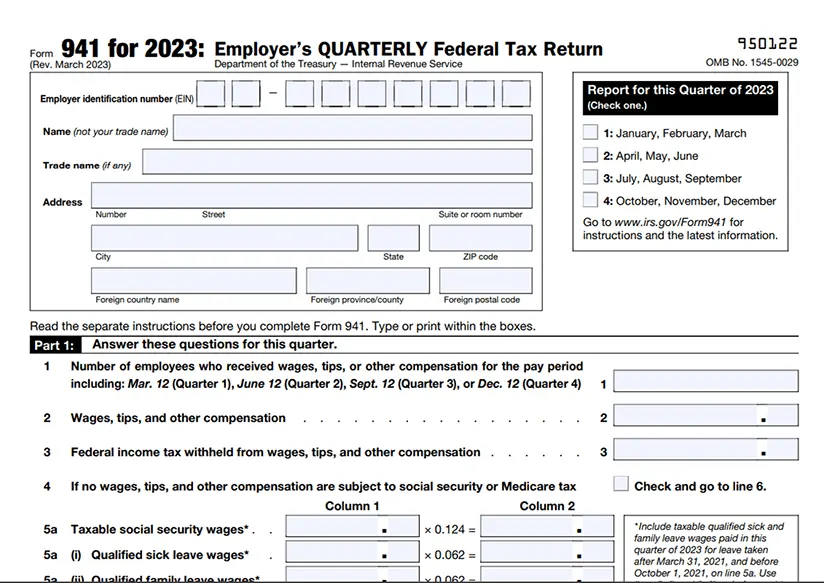
Form 941 is essentially a summary of your payroll tax activities for a given quarter. It details the wages you’ve paid to employees, tips they’ve reported, the federal income tax you’ve withheld from their paychecks, and both the employee and employer shares of Social Security and Medicare taxes (collectively known as FICA taxes). This form is how the IRS tracks and collects these crucial funds that support federal programs. It’s important to distinguish Form 941 from other payroll tax forms, such as Form 940 for annual federal unemployment tax (FUTA) or Form 944 for small employers with very low annual tax liabilities.

Who Must File?
Generally, if you are an employer who pays wages, tips, or other compensation subject to federal income tax withholding or Social Security and Medicare taxes, you must file Form 941 quarterly. This applies even if you have only one employee. There are a few exceptions: household employers (who file Schedule H, Form 1040), agricultural employers (who file Form 943), and those who are eligible to file Form 944 (annual return for small employers). Most businesses, regardless of size, fall under the Form 941 requirement, making it a ubiquitous piece of business finance.
Key Information Reported
The information reported on Form 941 is comprehensive and requires meticulous record-keeping. It includes:
- Number of employees who received wages, tips, or other compensation.
- Total wages, tips, and other compensation subject to income tax withholding.
- Federal income tax withheld from employee paychecks.
- Taxable Social Security wages and tips, and the corresponding Social Security tax.
- Taxable Medicare wages and tips, and the corresponding Medicare tax.
- Adjustments for sick pay, tips, and group-term life insurance.
- Total tax liability for the quarter, reflecting both employer and employee portions of FICA taxes, and income tax withheld.
- Total deposits made for the quarter.
- Balance due or overpayment.
Accurate reporting is paramount, as discrepancies can trigger IRS inquiries or audits, diverting valuable time and resources away from core business operations.
The Imperative of Online Filing: Efficiency and Compliance
In today’s digital landscape, filing Form 941 online is not just a convenience; it’s a strategic move towards enhanced efficiency, accuracy, and compliance. The IRS actively encourages electronic filing, and for good reason. It streamlines the entire process, minimizing manual errors and providing immediate confirmation of submission, a critical component of responsible financial management.
Advantages of E-filing
The benefits of e-filing Form 941 are substantial for any business owner or financial manager:
- Speed and Convenience: File anytime, anywhere, as long as you have an internet connection. The submission is instant, eliminating mail delays.
- Accuracy through Error Checks: Most IRS-authorized e-file providers incorporate built-in validation checks that flag common errors before submission, significantly reducing the likelihood of mistakes that could lead to penalties or processing delays.
- Immediate Confirmation: Upon successful submission, you receive an instant confirmation from the IRS, providing irrefutable proof of timely filing. This digital receipt is invaluable for record-keeping and audit preparedness.
- Enhanced Security: Electronic filing services use encryption and secure servers to protect sensitive financial data, often providing a more secure alternative to traditional paper filing where documents can be lost or intercepted.
- Streamlined Record-Keeping: Digital copies of filed forms and confirmation receipts are easily stored, organized, and retrieved, simplifying future reference and audit responses.
- Integration with Payroll Systems: Many e-file solutions seamlessly integrate with existing payroll software, automating data transfer and reducing manual entry.
Preparing for Online Submission
Before you can confidently file Form 941 online, a few prerequisites must be met to ensure a smooth process:
- Employer Identification Number (EIN): This nine-digit number is your unique federal tax ID. You cannot file federal tax forms without it.
- Accurate Payroll Records: All wage, tip, and tax withholding data for the quarter must be meticulously compiled and verified.
- Previous Quarter’s Data: Having access to prior Form 941 filings can be helpful for consistency and cross-referencing, especially if you need to carry forward any adjustments.
- Authorized E-file Provider Selection: The IRS does not allow direct e-filing of Form 941 through its website for most businesses. You must use an IRS-authorized e-file provider or tax professional.
Choosing an IRS-Authorized E-file Provider
Selecting the right e-file provider is a critical decision. Factors to consider include:
- IRS Authorization: Ensure the provider is listed on the IRS website as an authorized e-file provider for Form 941.
- Features and Functionality: Look for features like intuitive data entry, robust error checking, integration capabilities with your existing payroll or accounting software, and options for electronic payment (EFTPS integration).
- Security Measures: Verify the provider’s security protocols, including data encryption and compliance with industry standards.
- Customer Support: Accessible and knowledgeable customer support can be invaluable, especially if you encounter technical issues or have questions about the filing process.
- Pricing Structure: Understand the fee structure, whether it’s a per-filing cost, a subscription service, or part of a larger payroll package.
- Reputation and Reviews: Research user reviews and testimonials to gauge the provider’s reliability and user experience.
Many payroll software providers (e.g., Gusto, QuickBooks Payroll, ADP, Paychex) include Form 941 e-filing as part of their comprehensive services, offering a consolidated approach to payroll and tax compliance.
A Step-by-Step Guide to E-filing Form 941
Filing Form 941 online, while requiring attention to detail, follows a logical sequence. Adhering to these steps will help ensure accuracy and compliance, keeping your business in good standing with the IRS.
Step 1: Gather Your Financial Data
Before logging into your chosen e-file provider’s platform, have all necessary financial documentation at hand. This includes:
- Detailed payroll reports for the entire quarter, summarizing gross wages, taxable wages, and all federal tax withholdings.
- Records of all federal tax deposits made during the quarter, typically through the Electronic Federal Tax Payment System (EFTPS). Verify that these deposits match your internal records.
- Any applicable adjustments, such as those for sick pay, uncollected Social Security and Medicare taxes on tips, or the taxable cost of group-term life insurance. The software will guide you on where to input these.
Step 2: Input Data into Your Chosen Software
Access your selected IRS-authorized e-file provider’s portal. The interface will generally mirror the paper Form 941, guiding you through each line item.
- Select the correct tax year and quarter. This is a common point of error.
- Enter your EIN and business information.
- Input the number of employees from your payroll records.
- Populate the sections for total wages, tips, and other compensation, followed by federal income tax withheld.
- Enter taxable Social Security and Medicare wages/tips and the calculated tax amounts.
- Account for any adjustments as identified in your gathered data.
- Input your total tax liability for the quarter, which is the sum of all federal income tax, Social Security, and Medicare taxes.
- Detail your tax deposit schedule (monthly or semi-weekly) and the actual amounts deposited via EFTPS for each month or pay period in the quarter. The software will use this to determine if you have a balance due or an overpayment.
Step 3: Review and Validate
This is arguably the most critical step. Leverage the e-file provider’s built-in error checking mechanisms.
- Carefully review every field against your source documents (payroll reports, EFTPS records).
- Ensure that calculated amounts for Social Security and Medicare taxes are correct based on current tax rates and wage bases.
- Verify that total tax liabilities match total deposits, or that any discrepancy (balance due or overpayment) is correctly calculated and understood.
- Pay particular attention to the deposit schedule information, as errors here can lead to late deposit penalties even if the overall tax liability is correct.
Step 4: Authorize and Submit
Once you are confident in the accuracy of your Form 941:
- Provide electronic authorization. This typically involves an electronic signature or a designated PIN. Some providers may require you to sign Form 8453-EMP, which authorizes the e-file provider to submit on your behalf.
- Click the “Submit” or “File” button. The software will transmit the data to the IRS.
- Wait for confirmation. Your provider will relay a confirmation from the IRS, often within minutes or hours, indicating whether the filing was accepted or rejected. If rejected, the notification will usually specify the reason, allowing you to correct and re-submit.
Step 5: Make Your Payment Electronically
If your Form 941 indicates a balance due, you must pay it electronically, usually through EFTPS.
- If already enrolled in EFTPS: You can schedule your payment directly through the EFTPS website or phone system, ensuring the payment is for the correct tax period and received by the due date.
- If your e-file provider offers direct debit: Some software solutions allow you to authorize a direct debit from your business bank account for the amount due. Ensure this feature is properly configured and the correct bank details are provided.
- Never mail a payment if you are an employer with combined federal tax liabilities (including Form 941, 944, 943, and CT-1) of $2,500 or more. You are generally required to use EFTPS.
Step 6: Maintain Diligent Records
Upon successful filing and payment, immediately save and organize all relevant documentation:
- IRS confirmation receipt from your e-file provider.
- A copy of the filed Form 941 (often provided as a PDF by your software).
- Proof of payment from EFTPS or your bank statement.
- Original payroll reports and any supporting documentation used for the filing.
These records are vital for future reference, financial analysis, and potential IRS audits.
Navigating Common Pitfalls and Ensuring Accuracy
Even with robust online tools, the complexities of payroll tax can present challenges. Proactive measures and an understanding of common pitfalls are essential for flawless financial compliance.
Avoiding Costly Errors
Several recurring errors can lead to penalties or necessitate amendments:
- Mismatched Data: Discrepancies between your internal payroll records and the amounts reported on Form 941. Ensure your payroll system is correctly calculating and recording all liabilities.
- Incorrect Deposit Schedules: Misunderstanding whether you are a monthly or semi-weekly depositor can lead to late deposit penalties, even if the total tax is paid by the Form 941 due date. The IRS determines your deposit schedule based on your tax liability from a lookback period.
- Misclassification of Workers: Incorrectly classifying employees as independent contractors can result in significant back taxes, penalties, and interest, as different tax rules apply.
- Miscalculation of Tax Liabilities: Mistakes in computing Social Security, Medicare, or income tax withholding can arise from incorrect wage bases, rates, or exemptions.
Understanding Deposit Schedules
Your deposit schedule is crucial. Employers are either monthly or semi-weekly depositors.
- Monthly depositors generally pay by the 15th of the following month for the previous month’s liabilities.
- Semi-weekly depositors deposit taxes on Wednesday for payments made on Wednesday, Thursday, or Friday, and on Friday for payments made on Saturday, Sunday, Monday, or Tuesday.
- If your accumulated tax liability on any given day reaches $100,000 or more, you become a semi-weekly depositor on the next day and must deposit the tax by the next business day.
Properly determining and adhering to your deposit schedule prevents penalties and ensures funds reach the IRS promptly.
Amending a Filed 941
Should you discover an error after filing Form 941, you can correct it using Form 941-X, Adjusted Employer’s Quarterly Federal Tax Return or Claim for Refund. Do not simply file another Form 941 for the same quarter. Form 941-X allows you to make corrections to previously reported employment taxes for wages, tips, and other compensation and claim a refund or abatement of overpaid taxes, or pay underpaid taxes. Filing Form 941-X online through authorized software is also often an option, mirroring the e-filing benefits of the original form.
The Importance of Payroll Management Systems
Modern payroll management systems are invaluable financial tools that significantly mitigate the risk of errors. They automate calculations, track deductions, manage tax deposits, and often include integrated Form 941 e-filing capabilities. By centralizing payroll data and compliance functions, these systems free up time, enhance accuracy, and ensure your business remains compliant with ever-evolving tax regulations.
Strategic Financial Compliance: Beyond Just Filing
While accurately filing Form 941 online is a critical compliance task, viewing it within a broader framework of strategic financial management unlocks greater value for your business. It’s not just about meeting obligations; it’s about optimizing processes and ensuring long-term financial health.
Integrating Payroll and Tax Management
For many businesses, payroll and tax management are distinct, often siloed, functions. However, integrating these processes yields significant benefits. A unified system, whether through comprehensive software or a professional payroll service, ensures consistency of data, reduces manual reconciliation efforts, and minimizes errors. This integration leads to more efficient financial operations, better cash flow forecasting, and a clearer picture of your employment costs. It transforms a periodic chore into a well-managed continuous process.
Leveraging Professional Advice
While online filing tools empower businesses to handle many tax tasks internally, there are instances where professional advice is indispensable. Complex scenarios—such as significant adjustments, mergers and acquisitions, or changes in business structure—might warrant consultation with a Certified Public Accountant (CPA) or a specialized tax attorney. These professionals can provide expert guidance, interpret complex IRS regulations, and ensure your financial strategies align with tax law, mitigating risks and identifying potential savings. For smaller businesses, a reputable payroll service can offload much of the compliance burden, ensuring timely and accurate filings.
Future-Proofing Your Business
The financial landscape is dynamic, with tax laws and technological solutions constantly evolving. To future-proof your business, it’s essential to:
- Stay Updated: Regularly review IRS publications, circulars, and announcements related to employment taxes. Subscribing to updates from your e-file provider or tax professional can help you stay informed.
- Adapt to Technology: Embrace new financial tools and software that offer enhanced automation, security, and integration capabilities. The shift towards online filing is just one example; cloud-based accounting and payroll solutions continue to advance rapidly.
- Educate Your Team: Ensure that individuals responsible for payroll and tax functions are well-trained and aware of their responsibilities and the implications of non-compliance. Continuous learning in financial management is a valuable investment.

The Long-Term Value of Accurate Financial Reporting
Accurate and timely filing of Form 941, and indeed all financial reporting, is more than just avoiding penalties. It builds a foundation of trust and transparency for your business.
- Audit Readiness: Meticulous record-keeping and consistent, accurate filings simplify any potential IRS audit process, minimizing disruption and demonstrating financial integrity.
- Business Health Assessment: Reliable financial data provides insights into your operational costs, payroll efficiency, and overall financial health, informing strategic decision-making.
- Access to Capital: Lenders and investors often scrutinize a business’s financial compliance. A clean record demonstrates responsible management, enhancing your credibility when seeking financing or pursuing growth opportunities.
By mastering the online filing of Form 941 and embedding it within a broader strategy of diligent financial management, businesses can ensure compliance, optimize operations, and secure a stable financial future.
aViewFromTheCave is a participant in the Amazon Services LLC Associates Program, an affiliate advertising program designed to provide a means for sites to earn advertising fees by advertising and linking to Amazon.com. Amazon, the Amazon logo, AmazonSupply, and the AmazonSupply logo are trademarks of Amazon.com, Inc. or its affiliates. As an Amazon Associate we earn affiliate commissions from qualifying purchases.