
In the intricate landscape of business finance, tax compliance stands as a critical pillar. Among the many obligations businesses face, the Employer’s Quarterly Federal Tax Return, commonly known as Form 941, is one of the most fundamental. This form is essential for nearly every employer in the United States, reporting income taxes, Social Security tax, or Medicare tax withheld from employees’ paychecks, as well as the employer’s share of Social Security and Medicare taxes. Historically, businesses would complete and mail this form, but the digital age has ushered in a more efficient, secure, and accurate method: online filing. Embracing digital solutions for tax compliance is not merely a convenience; it’s a strategic move that enhances accuracy, saves time, and significantly reduces the risk of costly penalties. This guide delves into the nuances of filing Form 941 online, framing it within the broader context of sound business financial management.
Understanding Form 941: Your Employer’s Quarterly Federal Tax Return
Before diving into the mechanics of online filing, it’s crucial to grasp the fundamental purpose and scope of Form 941. This document is far more than just a bureaucratic requirement; it’s a quarterly snapshot of your payroll tax obligations and payments, a testament to your commitment to fulfilling your responsibilities as an employer.
What is Form 941 and Why is it Essential?
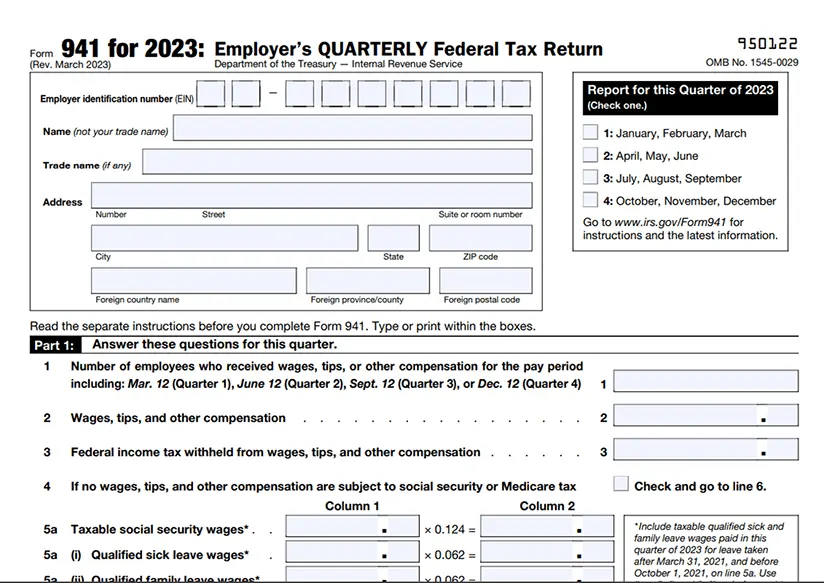
Form 941, “Employer’s Quarterly Federal Tax Return,” is used by employers to report income tax, Social Security tax, or Medicare tax withheld from employee paychecks. It also reports the employer’s share of Social Security and Medicare taxes. The IRS mandates that most employers file this form quarterly, with specific exceptions for household employers, agricultural employers, and those who report annually on Form 944. Its primary purpose is to ensure that the federal government receives its due share of employment taxes in a timely manner, which ultimately funds crucial programs like Social Security and Medicare. For businesses, accurately and punctually filing Form 941 is non-negotiable, as it directly impacts cash flow, financial reporting, and overall compliance standing. Failure to file or pay on time can lead to substantial penalties and interest charges, eroding profits and potentially jeopardizing a business’s good standing with the IRS.
Key Information Reported on Form 941
The form itself is structured to capture several key pieces of financial data related to your payroll:
- Wages, Tips, and Other Compensation: The total taxable wages paid to employees during the quarter.
- Income Tax Withheld: The amount of federal income tax you withheld from employee wages.
- Social Security and Medicare Taxes: Both the employee and employer shares of these taxes. This includes the taxable Social Security and Medicare wages.
- Adjustments: Any adjustments for fractions of cents, sick pay, tips, and the qualified small business payroll tax credit for increasing research activities.
- Total Tax Liability and Deposits: The sum of all taxes due for the quarter, offset by any payments you’ve already made (deposits) through the Electronic Federal Tax Payment System (EFTPS) or other authorized methods.
Understanding each line item and ensuring its accuracy is paramount. This requires diligent record-keeping of payroll data, including gross wages, tax withholdings, and deposit dates. Any discrepancy between your payroll records and the figures reported on Form 941 can trigger IRS scrutiny and potential audits, adding complexity and cost to your financial operations.
Quarterly Deadlines and Penalties for Non-Compliance
The IRS sets strict deadlines for filing Form 941, typically the last day of the month following the end of each quarter:
- Q1 (January 1 – March 31): April 30
- Q2 (April 1 – June 30): July 31
- Q3 (July 1 – September 30): October 31
- Q4 (October 1 – December 31): January 31 (of the following year)
These deadlines are crucial for financial planning and cash flow management. Employers who make deposits on time and in full generally have an additional 10 calendar days to file their return. However, falling behind on either filing or payment can incur significant penalties. The penalty for failing to file on time is 5% of the unpaid tax for each month or part of a month that a return is late, capped at 25%. Separate penalties apply for late payment, incorrect deposits, and failure to make deposits electronically. These penalties underscore the financial imperative of timely and accurate filing, making the efficiency of online submission all the more attractive.
The Evolution of Filing: Why Online is the Preferred Method
The shift from paper-based tax filing to electronic submission represents a monumental leap forward in financial administration. For businesses, particularly when dealing with recurring obligations like Form 941, online filing is not just a modern convenience but a strategic tool for enhancing efficiency and financial integrity.
Benefits of Electronic Filing
The advantages of filing Form 941 online are manifold, each contributing to a more robust and streamlined financial operation:
- Accuracy: E-filing software often includes built-in error checks and validation processes, reducing the likelihood of mathematical errors or omissions that plague manual data entry. This significantly lowers the risk of IRS notices and potential audits.
- Speed: Returns are transmitted instantly, eliminating postal delays and ensuring your filing meets deadlines, even if submitted close to the cut-off. Confirmation of submission is also received quickly, providing peace of mind.
- Security: IRS-approved e-file providers employ advanced encryption and security protocols to protect sensitive financial data during transmission, often surpassing the security of traditional mail.
- Record-keeping: Most online filing platforms provide digital copies of your submitted forms and payment confirmations, making it easier to maintain organized records, access past filings, and support audit inquiries. This digital trail is invaluable for financial reconciliation and historical analysis.
- Integration: Many e-file solutions integrate seamlessly with payroll software, allowing for direct data import and reducing manual input, further enhancing efficiency and accuracy. This financial integration reduces the burden on accounting staff and frees up resources for more strategic financial tasks.
Traditional vs. Online: A Comparison
While paper filing via mail remains an option for some, its drawbacks are becoming increasingly pronounced in today’s fast-paced business environment.
- Mail Filing: Involves printing, signing, stuffing envelopes, and physically mailing documents. It’s prone to human error, postal delays, and offers no immediate confirmation of receipt. The process is time-consuming and inefficient, diverting valuable resources from core business activities.
- Online Filing: Utilizes specialized software or web portals to prepare and transmit forms electronically. It’s faster, more accurate, provides instant confirmation, and integrates better with modern financial systems. For businesses of almost any size, the financial benefits of reduced errors, faster processing, and improved record-keeping far outweigh any perceived complexity of adopting a new system.
IRS Requirements for E-Filing
The IRS encourages electronic filing for most employers. While small businesses may still have the option to mail a paper return, those with 10 or more information returns (such as W-2s) or 10 or more partnership returns are generally required to file electronically. For Form 941, most employers are encouraged to e-file. To do so, businesses must use an IRS-approved e-file provider. These providers offer software or web applications that meet IRS specifications for data format and security. Additionally, the IRS requires a valid Electronic Signature (e-signature) to authenticate the submitted return, often through a Personal Identification Number (PIN) or an authorized third-party signature solution. Ensuring compliance with these requirements is part of choosing the right financial tool for your business.
Step-by-Step Guide to Filing Form 941 Online
Navigating the online filing process for Form 941 can seem daunting initially, but by breaking it down into manageable steps, businesses can ensure a smooth and compliant submission. This process leverages financial technology to simplify a complex regulatory requirement.
Choosing an IRS-Approved E-File Provider
The first critical step is selecting a reputable and IRS-approved e-file provider. Not all tax software supports Form 941, so it’s essential to verify compatibility. Criteria for selection should include:
- IRS Approval: Confirm the provider is listed on the IRS website as an authorized e-file partner for Form 941.
- Features: Look for features like payroll integration, error checking, audit trails, and secure data storage. Some providers offer comprehensive payroll services that include Form 941 filing.
- Cost: Compare pricing models, which can range from per-form fees to subscription services, aligning with your business’s budget.
- Customer Support: Accessible and knowledgeable support is invaluable, especially during initial filings or when encountering technical issues.
- Security: Ensure the provider has robust data encryption and privacy policies.
Examples of categories include dedicated payroll software (e.g., ADP, Gusto, QuickBooks Payroll), general tax preparation software with business capabilities (e.g., TurboTax Business, H&R Block Business), or specialized e-file services.
Data Gathering and Preparation

Before you even log into your chosen software, thorough data preparation is key to a hassle-free filing experience. This aligns with fundamental principles of sound financial record-keeping:
- Payroll Records: Compile all payroll records for the quarter, including total wages paid, federal income tax withheld, Social Security and Medicare taxes (both employee and employer shares).
- EIN: Have your Employer Identification Number (EIN) readily available.
- Deposit Information: Gather details of all federal tax deposits made during the quarter, including dates and amounts. These are usually made through EFTPS.
- Prior Quarter Data: If applicable, have details on any adjustments carried over from previous quarters.
- Authorized Signatory Information: The name and contact details of the person authorized to sign the return.
Accuracy in this preparatory phase directly translates to accuracy on the form, minimizing financial risk.
Navigating the E-Filing Software
Once you have your data, the process within the e-file software is generally intuitive:
- Log In and Select Form 941: Access your account and initiate a new Form 941 filing for the relevant quarter.
- Enter Business Information: Input your EIN, business name, and address.
- Input Payroll Data: Carefully transfer the gathered data into the corresponding fields on the digital Form 941. The software will often mimic the IRS paper form, making it familiar. This step requires meticulous attention to detail to avoid financial errors.
- Review and Verify: The software will typically summarize your entries and perform calculations. Take the time to meticulously review every line item against your source documents. Many platforms highlight potential errors or inconsistencies.
- Address Adjustments: If any adjustments are needed (e.g., for fractions of cents, sick pay), ensure they are correctly applied and documented.
Authorizing Payment and Submission
After verifying your data, the final steps involve authorizing payment and submitting the form:
- Payment Authorization: If you owe additional taxes (i.e., your deposits were less than your liability), the software will guide you through authorizing payment. Most online systems allow you to schedule a direct debit from your business bank account. You can also pay via EFTPS separately, ensuring the payment date is accurately recorded. Remember, filing the form and paying the taxes are two distinct actions, though often facilitated by the same software.
- E-Signature: Provide your electronic signature, typically an IRS-issued PIN or by confirming your identity through a designated process.
- Final Submission: Once payment is authorized and the form is signed, click “submit.” The software will transmit your return directly to the IRS.
Confirmation and Record Keeping
Upon successful submission, the e-file provider will issue a confirmation number or an acceptance notice from the IRS.
- Save Confirmation: Immediately save or print this confirmation. It serves as your official proof of timely filing, an essential financial document for your records.
- Digital Archives: Most software will archive your submitted form within your account. Additionally, download and save a copy of the completed Form 941 and all supporting documentation (payroll reports, deposit receipts) in a secure, accessible digital folder. This comprehensive record-keeping is critical for future reference, financial audits, or any IRS inquiries.
Common Pitfalls and Best Practices for Seamless Online Filing
Even with the advantages of online filing, businesses can still encounter issues that lead to delays or penalties. Adopting best practices and being aware of common pitfalls can ensure a consistently smooth process and contribute positively to your overall financial management.
Avoiding Common Errors
Mistakes in Form 941 filing can have direct financial consequences. Common errors include:
- Data Entry Mistakes: Simple typos in wage amounts or tax withholdings can lead to miscalculations. Double-check all figures.
- Miscalculations: While software automates calculations, ensure the underlying data is correct. Incorrectly classifying wages or misapplying tax rules can throw off the entire form.
- Late Filing or Payment: Forgetting deadlines or failing to process payments on time are among the most frequent and costly errors, resulting in penalties.
- Inaccurate Deposit Schedule: Incorrectly determining if your business is a monthly or semi-weekly depositor can lead to underpayment and penalties.
- Not Reconciling Data: Failing to compare your internal payroll records and bank statements with the data entered into Form 941.
The Importance of Reconciliation
Reconciliation is a cornerstone of robust financial control. Before and after filing Form 941, perform a thorough reconciliation:
- Pre-Filing Reconciliation: Compare total wages, taxes withheld, and employer contributions in your payroll system against the data you plan to enter into Form 941. Ensure all figures match.
- Post-Filing Reconciliation: After filing, compare the submitted Form 941 with your general ledger accounts and bank statements for the quarter. This helps identify any discrepancies between what was reported and what was actually paid or withheld. This process not only ensures accuracy but also provides an early warning system for potential internal errors or discrepancies that could affect other financial statements.
Staying Current with IRS Regulations
Tax laws are not static. The IRS frequently updates forms, regulations, and tax rates. Businesses must proactively stay informed to avoid non-compliance.
- Subscribe to IRS Updates: Sign up for IRS email alerts and newsletters specific to employers.
- Consult E-File Provider Updates: Reputable e-file software providers often update their platforms to reflect the latest IRS changes and inform users.
- Regularly Review IRS Publications: Periodically check IRS publications (e.g., Publication 15, Circular E, Employer’s Tax Guide) for any changes relevant to Form 941. Being proactive in this area is a critical aspect of financial risk management.
Leveraging Technology for Efficiency
Beyond simply filing online, businesses should fully embrace technology to optimize their Form 941 process:
- Payroll Software Integration: Use payroll software that automates tax calculations, tracks deposits, and can directly generate or integrate with Form 941 filing. This significantly reduces manual effort and error.
- Automated Reminders: Set up calendar reminders or use software features that alert you to upcoming filing and payment deadlines.
- Cloud-Based Solutions: Utilize cloud-based payroll and accounting software for anytime, anywhere access to financial data, facilitating collaboration and off-site work.
Beyond Form 941: Integrating Online Filing into Your Financial Strategy
The shift to online filing for Form 941 is more than a procedural change; it’s an opportunity to integrate compliance more effectively into your broader financial strategy, contributing to overall business health and stability.
How Online Filing Contributes to Overall Financial Health
Efficient online filing of Form 941 positively impacts several facets of your business’s financial health:
- Improved Cash Flow Management: Timely and accurate filing prevents penalties, safeguarding cash reserves. Knowing your exact liabilities quarterly allows for better financial forecasting and allocation of funds.
- Enhanced Audit Readiness: Digital records and audit trails generated by online filing provide robust documentation, making it easier to respond to IRS inquiries or audits, potentially saving significant time and legal fees.
- Reduced Administrative Costs: Automating the filing process through technology frees up valuable staff time, allowing them to focus on more strategic financial analysis or growth initiatives rather than manual data entry and paperwork.
- Credibility and Compliance: Consistent, accurate online filing demonstrates a commitment to financial compliance, which can be beneficial when seeking loans, attracting investors, or dealing with other financial stakeholders.
Scalability and Growth: Preparing for Future Reporting Needs
As a business grows, its payroll complexity and reporting obligations increase. Online filing solutions are inherently scalable:
- Accommodating Larger Payrolls: Most e-file providers can easily handle an expanding number of employees and increasingly complex payroll scenarios without requiring a complete overhaul of your tax compliance process.
- Integration with Enterprise Systems: Advanced online solutions can integrate with larger ERP or accounting systems, providing a unified view of your financial data as your business matures.
- Adapting to New Regulations: As regulations evolve, online platforms are typically updated by the provider, ensuring your business remains compliant without needing extensive manual research or system reconfigurations. This foresight in financial tools is crucial for long-term growth.
The Role of Professional Assistance
While online filing simplifies the process, it doesn’t always eliminate the need for expert financial advice.
- Accountants and Payroll Services: For complex payroll scenarios, significant employee turnover, or multi-state operations, engaging a qualified accountant or payroll service can be invaluable. These professionals can ensure accuracy, navigate intricate regulations, and oversee the online filing process, providing an additional layer of financial assurance.
- Tax Planning: Beyond just filing, financial professionals can offer strategic tax planning advice, helping businesses optimize their payroll and tax strategies in conjunction with Form 941 requirements. They can assist in interpreting new IRS guidelines, ensuring your online filing strategy is not just compliant but also financially advantageous.
In conclusion, mastering the art of filing Form 941 online is a testament to a business’s commitment to financial responsibility and operational efficiency. By leveraging the power of technology, businesses can transform a recurring compliance obligation into a streamlined, secure, and strategic component of their overall financial health, paving the way for sustainable growth and peace of mind.
aViewFromTheCave is a participant in the Amazon Services LLC Associates Program, an affiliate advertising program designed to provide a means for sites to earn advertising fees by advertising and linking to Amazon.com. Amazon, the Amazon logo, AmazonSupply, and the AmazonSupply logo are trademarks of Amazon.com, Inc. or its affiliates. As an Amazon Associate we earn affiliate commissions from qualifying purchases.