
Depositing physical cash into your digital Cash App account is a common need for users who prefer or receive cash transactions but want the convenience and security of managing their funds electronically. While Cash App is primarily known for peer-to-peer digital transfers, it offers several straightforward methods to get your greenbacks into your virtual wallet. This guide will walk you through the process, covering the various options available, their associated fees, and important considerations to ensure a smooth transaction.
Understanding the Cash Deposit Process
Cash App, developed by Square, Inc., has revolutionized how many people manage their finances, offering a seamless way to send, receive, and spend money. While its core functionality revolves around digital transactions, the platform recognizes that many individuals still interact with physical currency. To bridge this gap, Cash App has partnered with a network of retail locations to facilitate cash deposits. This integration makes it easier for users to convert their cash into usable funds within the app, whether for paying bills, sending money to friends, or investing in Bitcoin and stocks through the app’s features.

The fundamental principle behind depositing cash into Cash App involves using a barcode. When you initiate a cash deposit through the app, Cash App generates a unique barcode. You then take this barcode, along with your cash, to a participating retail store. The cashier at the store scans the barcode, processes your cash, and the funds are credited to your Cash App balance, usually within minutes. The speed and accessibility of this method make it a valuable tool for a wide range of users.
The Role of Retail Partners
Cash App’s ability to accept cash deposits relies heavily on its partnerships with major retail chains. These partnerships transform everyday stores into convenient financial hubs. Locations like Walmart, Walgreens, Dollar General, and many others serve as deposit points, allowing users to convert cash into digital funds without needing a traditional bank account or ATM. This extensive network significantly increases the accessibility of Cash App for individuals who might not have easy access to banking services.
The selection of these retail partners is strategic. They are typically located in areas with high foot traffic and are accessible to a broad demographic. This ensures that most users can find a convenient location within a reasonable distance, making the process less of a hassle. The barcode system is designed to integrate smoothly with the point-of-sale (POS) systems in these stores, allowing for quick and accurate transactions.
Fees and Limits Associated with Cash Deposits
While the convenience of depositing cash is undeniable, it’s important to be aware of the associated costs and limitations. Cash App charges a fee for cash deposits, which is typically a flat rate per deposit. This fee helps cover the operational costs of processing physical cash at retail locations. The exact fee can vary slightly but is generally around $4 to $5 per deposit. It is crucial to check the current fee structure within the Cash App itself before initiating a deposit, as these figures can be updated by the company.
In addition to fees, there are also limits on how much cash you can deposit at once and over a certain period. These limits are in place for security and operational reasons. For example, you might be limited to depositing a certain amount per transaction, per day, or per week. These limits are clearly displayed within the Cash App when you are setting up a deposit, so you will be informed of any restrictions before you proceed. Understanding these limits is vital to avoid any surprises or disruptions to your financial transactions.
Step-by-Step Guide to Depositing Cash
The process of depositing cash into your Cash App is designed to be user-friendly. It involves a few straightforward steps that can be completed directly from your smartphone.
Initiating a Cash Deposit in the App
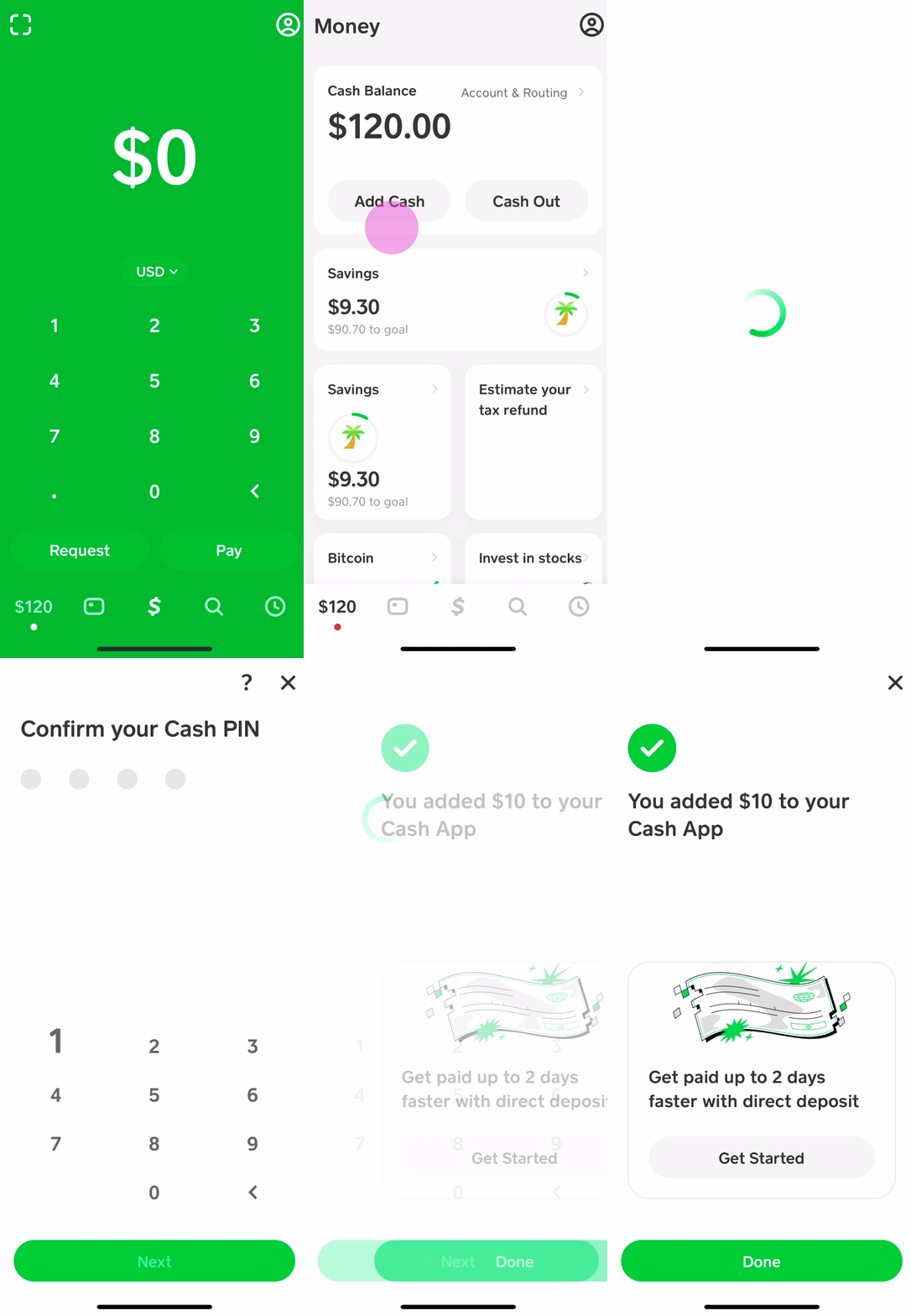
The first step is to open your Cash App and navigate to the section where you can add funds.
- Open Cash App: Launch the Cash App on your smartphone.
- Tap on your Cash Balance: On the main screen, you’ll see your Cash balance. Tap on this to access your account details.
- Select “Add Cash”: You will see an option to “Add Cash.” Tap this.
- Choose “Cash”: Cash App will then present you with options for how you want to add funds. Select the “Cash” option.
- Enter the Deposit Amount: You will be prompted to enter the amount of cash you intend to deposit. This amount should match the physical cash you have on hand.
- Generate Your Barcode: Once you confirm the amount, Cash App will generate a unique barcode on your screen. This barcode is what the cashier at the retail store will scan. You can choose to have this barcode sent to your email or displayed on your screen. It’s recommended to have it readily accessible on your phone’s screen.
Finding a Participating Retail Location
With your barcode in hand, the next step is to find a retail location where you can complete the transaction.
- Use the In-App Locator: Cash App provides a built-in locator tool to help you find participating stores near you. This feature can usually be accessed directly after generating your barcode or through the “Add Cash” section.
- Browse the Map: The locator will display a map showing nearby retail partners. You can often filter by store type or see specific store names.
- Confirm Location and Hours: Before heading out, it’s a good idea to confirm the store’s operating hours and ensure it’s a convenient option for you. While most locations are open during standard business hours, it’s always best to be sure.
Completing the Transaction at the Store
Once you’ve arrived at the chosen retail location with your cash and your barcode:
- Approach the Cashier: Head to the checkout counter or customer service desk, depending on the store’s setup for Cash App deposits.
- Present Your Barcode: Show the cashier the barcode displayed on your Cash App. They will scan it using their POS system.
- Hand Over Your Cash: After the barcode is scanned, hand the cashier the exact amount of cash you entered in the app. For instance, if you entered $100, give them $100.
- Receive Your Receipt: The cashier will process the transaction, and you should receive a receipt confirming the deposit. It’s always wise to keep this receipt for your records until the funds appear in your Cash App.
- Confirmation in Cash App: The funds should appear in your Cash App balance within a few minutes to an hour, depending on the store and network processing times. You will typically receive a notification from Cash App confirming the deposit.
Best Practices and Troubleshooting
To ensure a smooth and efficient cash deposit experience, adhering to certain best practices and knowing how to address potential issues is crucial.
Verifying Funds and Receipts
After completing your cash deposit, it’s essential to confirm that the funds have been successfully added to your Cash App account.
- Check Your Cash App Balance: The most direct way to verify is to open your Cash App and check your available balance. The deposited amount should be reflected there shortly after your transaction.
- Review Transaction History: You can also find a record of the deposit in your Cash App transaction history. This provides a clear audit trail.
- Secure Your Receipt: Always keep the physical receipt provided by the retail store. This receipt serves as proof of your transaction in case of any discrepancies or if the funds don’t appear in your app as expected. It’s a valuable backup document.
Potential Issues and How to Resolve Them
While cash deposits are generally reliable, occasional issues can arise. Understanding common problems and their solutions can save you time and frustration.
- Barcode Not Scanning: If the cashier has trouble scanning your barcode, ensure the screen brightness on your phone is high and that the barcode is not damaged or obscured. Sometimes, trying a different cashier or a different store location can resolve this.
- Funds Not Appearing: If the deposited funds do not appear in your Cash App balance within a reasonable timeframe (usually within an hour), double-check your transaction history and your physical receipt. If everything appears correct, the next step is to contact Cash App support. They can investigate the transaction using the details from your receipt and your app activity.
- Incorrect Amount Deposited: If you realize you deposited the wrong amount, or the store processed the incorrect amount, you will need to contact Cash App support immediately. They will guide you through the process of rectifying the error, which may involve providing details from your receipt and potentially the store’s transaction records.
- Store Refusal: In rare cases, a store employee might be unfamiliar with the Cash App deposit process or unable to complete it. Politely explain that you are depositing cash using a Cash App barcode. If they are still unable to assist, it’s best to visit a different participating retail location.

Maximizing Your Cash App Experience
To make the most of your Cash App, consider these additional tips related to managing your funds, including cash deposits.
- Link Your Bank Account: While cash deposits are useful, linking a bank account to your Cash App provides additional flexibility. You can transfer money from your bank to Cash App and vice versa without fees, offering a broader range of financial management options.
- Direct Deposit: If you receive regular income, setting up direct deposit into your Cash App is a convenient alternative to cash deposits. Your paycheck will be directly deposited into your Cash App balance, often faster than traditional methods, and without fees.
- Stay Updated on Fees and Limits: Cash App occasionally updates its fee structure and deposit limits. Regularly check the app or the Cash App website for the most current information to avoid any surprises.
- Security: Treat your Cash App barcode with the same care you would treat cash. Do not share your barcode with anyone you do not intend to make a deposit for. Always ensure you are in a safe and public place when completing cash transactions.
By understanding the straightforward process, adhering to best practices, and knowing how to troubleshoot common issues, you can effectively leverage Cash App’s cash deposit feature to seamlessly manage your physical currency in the digital realm.
aViewFromTheCave is a participant in the Amazon Services LLC Associates Program, an affiliate advertising program designed to provide a means for sites to earn advertising fees by advertising and linking to Amazon.com. Amazon, the Amazon logo, AmazonSupply, and the AmazonSupply logo are trademarks of Amazon.com, Inc. or its affiliates. As an Amazon Associate we earn affiliate commissions from qualifying purchases.