
The Financial Advantage of Mobile Check Deposits
In an increasingly digital financial landscape, the ability to deposit a check online has transformed personal banking, offering unparalleled convenience and efficiency. For Bank of America customers, utilizing the mobile app for check deposits is a prime example of how financial technology streamlines money management, saving time and simplifying what was once a multi-step chore. This digital shift isn’t just about convenience; it’s a strategic financial move that enhances security and provides quicker access to funds.
Shifting Paradigms in Personal Banking
Gone are the days when a check deposit invariably meant a trip to a physical bank branch or an ATM. Traditional methods often involved navigating traffic, adhering to bank operating hours, or even mailing a check, each presenting its own set of time-consuming challenges and potential risks. For individuals managing busy schedules, these requirements could lead to significant delays in accessing funds, impacting cash flow and financial planning.
The advent of mobile check deposit capabilities, pioneered by institutions like Bank of America, represents a significant paradigm shift. It empowers individuals to manage their finances from virtually anywhere, at any time, using just a smartphone or tablet. This accessibility democratizes banking, making it easier for everyone to stay on top of their financial obligations and opportunities without geographical or temporal constraints. This technological leap transforms a mundane task into an efficient financial operation, directly contributing to better personal finance management.
Immediate Access and Efficiency
While “immediate” access to funds from a mobile deposit is subject to bank policies (often next business day availability), the process itself is undeniably faster. The time saved by avoiding travel and queues translates directly into financial efficiency. This quicker processing can be particularly beneficial for small businesses or individuals who rely on prompt access to funds for daily operations or bill payments, preventing late fees or missed opportunities.
Furthermore, mobile deposits significantly reduce the inherent risks associated with traditional check handling. Mailing checks carries the risk of loss or theft, potentially leading to identity fraud or delays in payment. Physically carrying checks to a bank branch or ATM also presents security vulnerabilities. By executing deposits digitally, the check’s journey is curtailed, minimizing exposure and leveraging encrypted digital pathways, thus enhancing the overall security posture of the financial transaction. This digital security offers peace of mind, a valuable commodity in financial management.
Environmental and Economic Benefits
Beyond individual convenience and security, the widespread adoption of mobile check deposits yields broader environmental and economic advantages. Environmentally, the reduction in paper checks and deposit slips contributes to a decrease in paper consumption and waste. While a physical check is still initially issued, its handling is drastically reduced, lessening the carbon footprint associated with its journey through traditional banking systems.
Economically, the shift to digital platforms reduces operational costs for financial institutions. Fewer physical transactions mean less demand for tellers dedicated solely to check processing, reduced paper handling, and lower overheads for branch maintenance. These efficiencies, while often indirect, can contribute to more competitive banking services, potentially leading to better interest rates, lower fees, or enhanced digital tools for consumers – all favorable outcomes for personal financial health.
Essential Preparations for a Seamless Digital Deposit
Before initiating your first online check deposit with Bank of America, a few crucial preparatory steps will ensure a smooth, successful transaction. Adhering to these guidelines not only prevents delays but also safeguards the accuracy and security of your financial dealings.
The Right Tools: Your Smartphone and the Bank of America App
The cornerstone of a successful mobile deposit is a compatible smartphone or tablet equipped with the official Bank of America mobile banking application. Ensure your device’s operating system is up-to-date and that you have downloaded the latest version of the Bank of America app from a trusted source (e.g., Apple App Store or Google Play Store). Regular app updates often include critical security enhancements and performance improvements, which are vital for protecting your financial data.
The Bank of America app itself incorporates robust security features, such as biometric login (fingerprint or facial recognition) and multi-factor authentication, to protect your account. Familiarize yourself with these features and enable them for an added layer of financial security. Accessing your financial accounts through a secure, updated app on a trusted device is a fundamental practice in modern personal finance.
Proper Check Endorsement: A Crucial Step
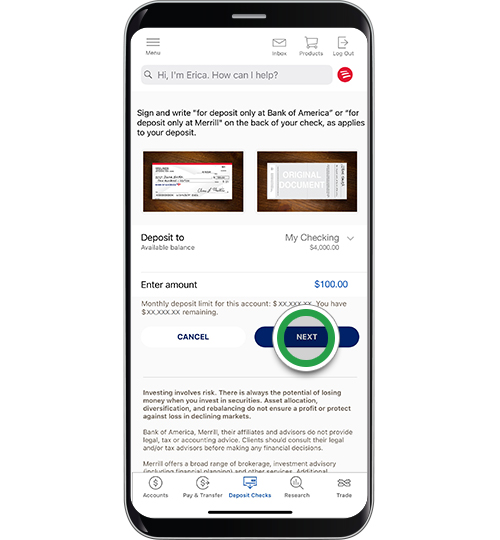
Perhaps the most critical step in preparing your check for an online deposit is proper endorsement. Without it, your deposit will likely be rejected, causing frustrating delays in accessing your funds. For Bank of America mobile deposits, you must endorse the back of the check within the designated endorsement area.
The standard endorsement for mobile deposits typically includes:
- Your Signature: Sign your name exactly as it appears on the payee line of the check.
- “For Mobile Deposit Only at Bank of America”: This specific phrase is crucial. Writing “For Deposit Only” or simply signing your name may not be sufficient for the automated processing systems. This unique endorsement helps prevent the check from being deposited a second time, a vital anti-fraud measure.
Improper endorsement can lead to delays as the bank’s processing system flags the check for manual review or outright rejection. This can mean having to re-deposit the check, losing valuable time and potentially incurring late fees if the funds were needed urgently for a financial obligation. Always double-check your endorsement before proceeding.
Setting the Stage: Lighting and Background
Believe it or not, the physical environment where you photograph your check plays a significant role in the success of your mobile deposit. The automated systems that read check images require clear, legible pictures to accurately capture all relevant information, including the account number, routing number, check number, and amount.
Here are some tips for optimal image capture:
- Good Lighting: Use natural, even lighting. Avoid direct sunlight which can cause glare, and steer clear of dim areas that lead to blurry images. Overly bright or dark areas can obscure details.
- Plain, Dark Background: Place the check on a plain, dark, non-reflective surface. This creates contrast, helping the app’s camera identify the check’s edges clearly. Avoid busy backgrounds that might confuse the image recognition software.
- Flat Surface: Ensure the check is perfectly flat and not folded or creased. Wrinkles can distort characters and lead to misreads.
Poor quality images are a common reason for deposit rejections. Taking a moment to set up your environment correctly ensures that the financial data on your check is accurately captured, preventing processing errors and ensuring your funds become available without unnecessary delays.
Step-by-Step: Depositing Your Check via the Bank of America Mobile App
Once your check is properly endorsed and you’re ready to capture its image, the actual process within the Bank of America mobile app is straightforward and designed for user-friendliness. Follow these steps to successfully deposit your check online.
Navigating to the Deposit Feature
- Log In Securely: Open the Bank of America mobile app and log in using your credentials. If enabled, utilize biometric authentication (fingerprint or face ID) for a quick and secure entry.
- Locate Deposit Checks: Once logged in, navigate to the main menu or dashboard. Look for an option labeled “Deposit Checks” or similar. It’s often prominently displayed or found within a “Transfers & Zelle” or “Manage Accounts” section.
Selecting the Account and Entering the Amount
- Choose Deposit Account: The app will prompt you to select the account into which you wish to deposit the funds (e.g., checking, savings). Carefully choose the correct account to ensure your money lands in the desired place. This is a critical financial decision, as incorrect placement can complicate your budgeting and fund access.
- Enter Check Amount: Accurately type in the exact dollar amount of the check. Double-check this figure. Any discrepancy between the entered amount and the amount recognized by the app from the check image will lead to a review or rejection. Precision here is paramount for financial accuracy.
Capturing Clear Images of Your Check
This is the most interactive part of the process, and clarity is key.
- Front of the Check:
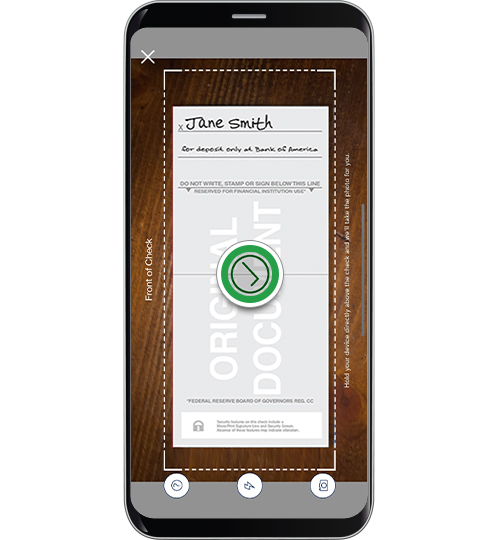
- Position your phone camera directly above the check, ensuring it’s within the on-screen guidelines provided by the app.
- Hold steady. The app often has an auto-capture feature that takes the picture once it detects a clear, well-framed image.
- Verify that all four corners of the check are visible and that the full routing and account numbers at the bottom are legible.
- Back of the Check:
- Flip the check over to the back side, ensuring your proper endorsement is clearly visible.
- Again, position your phone directly above the check, within the guidelines.
- Allow the app to capture the image.
Always review the captured images before proceeding. If they appear blurry, cut off, or have glare, retake them. The app typically provides an option to retake photos if you’re not satisfied. Clear images are essential for the bank’s automated systems to process the financial transaction correctly and prevent potential fraud.
Review and Confirmation
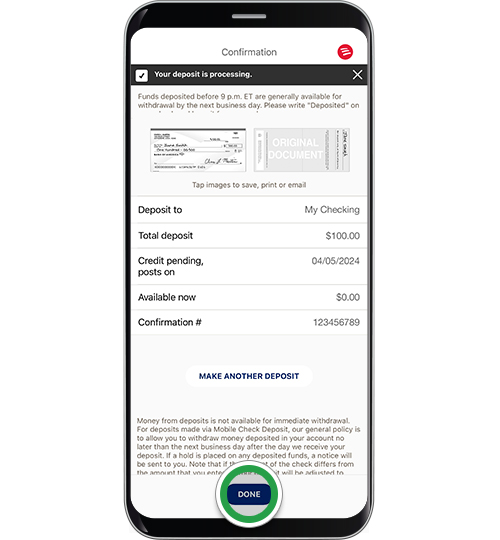
- Review Deposit Details: Before final submission, the app will display a summary of your deposit, including the account selected, the amount entered, and the captured images. Take a moment to thoroughly review all details. This is your last chance to catch any errors.
- Confirm Deposit: If everything looks correct, tap the “Deposit” or “Submit” button. The app will then process your request and usually provide a confirmation screen with a reference number. This confirmation is your digital receipt and crucial proof of your deposit. Make a note of the confirmation number or screenshot the screen for your financial records.
Upon successful submission, you will typically receive an email confirmation from Bank of America, further documenting your transaction. This systematic approach ensures that your funds are processed efficiently and securely, contributing to sound financial management.
Understanding Funds Availability, Limits, and Best Practices
While depositing a check online offers remarkable convenience, understanding the financial nuances of funds availability, deposit limits, and post-deposit best practices is crucial for effective money management and security.
Bank of America’s Funds Availability Policy
It’s important to distinguish between when a check is “deposited” and when the funds are “available” for withdrawal or use. Bank of America, like other financial institutions, operates under specific funds availability policies designed to mitigate risk.
For most standard consumer checks deposited online, Bank of America’s policy typically makes the first $225 of a deposit available on the first business day after the day of deposit. The remaining amount is usually available on the second business day. However, these timeframes can vary based on several factors:
- Deposit Time: Deposits made after a certain cutoff time (e.g., 8:00 PM ET) or on weekends/holidays are generally processed on the next business day, extending the availability timeline.
- Check Amount: Larger check amounts may be subject to extended hold periods as a security measure.
- Account History: Newer accounts or accounts with a history of overdrafts or returned checks might experience longer hold times.
- Type of Check: Government checks, cashier’s checks, and certified checks often have faster availability than personal checks.
Always review Bank of America’s official Funds Availability Policy disclosure, available on their website or within the app, for the most precise information relevant to your account. Understanding this policy is essential for planning your spending and avoiding potential overdrafts.
Deposit Limits: What You Need to Know
Bank of America imposes daily and monthly limits on mobile check deposits. These limits are primarily in place to protect both the bank and its customers from potential fraud and excessive risk.
- Daily Limits: There will be a maximum dollar amount you can deposit via the mobile app in a single day.
- Monthly Limits: Similarly, there’s an aggregate maximum you can deposit over a 30-day rolling period.
These limits can vary depending on individual account history, the type of account (personal vs. business), and the length of your relationship with Bank of America. You can typically find your specific deposit limits within the mobile app by navigating to the “Deposit Checks” section or by contacting Bank of America customer service directly. If you need to deposit a check exceeding these limits, you will need to use an alternative method, such as depositing at a branch or ATM. Being aware of these limits is crucial for managing large financial transactions and ensuring your liquidity.
Post-Deposit Actions and Security
After you’ve successfully deposited your check online and received confirmation, there are a few best practices to follow to maintain financial security and robust record-keeping:
- Monitor Your Account: Keep an eye on your Bank of America account through the app or online banking to confirm that the deposit has posted and the funds are available. This proactive monitoring helps catch any processing issues early.
- Safely Store the Physical Check: Do not immediately destroy the physical check. It’s recommended to securely store the check for a short period (e.g., 7-14 days) after the funds have fully cleared and posted to your account. This precaution allows you to retrieve the check if there’s any issue with the deposit. After this period, shred the check to prevent unauthorized use of your account information.
- Keep Digital Records: The confirmation email or screenshot of the deposit confirmation serves as a vital record. Retain these digital receipts in an organized manner for your personal financial records, which can be invaluable for budgeting, tax purposes, or dispute resolution.
- Security Measures: Always ensure your Bank of America app is updated to the latest version and that your mobile device is protected with a strong password or biometric security. Avoid making financial transactions over unsecured public Wi-Fi networks, which can expose your data to cyber threats.
By understanding and adhering to Bank of America’s policies and following these best practices, you can fully leverage the convenience and security of mobile check deposits, making it a powerful tool in your personal finance arsenal.
aViewFromTheCave is a participant in the Amazon Services LLC Associates Program, an affiliate advertising program designed to provide a means for sites to earn advertising fees by advertising and linking to Amazon.com. Amazon, the Amazon logo, AmazonSupply, and the AmazonSupply logo are trademarks of Amazon.com, Inc. or its affiliates. As an Amazon Associate we earn affiliate commissions from qualifying purchases.