
In an era defined by instantaneous digital transactions and on-demand services, the traditional trip to a bank branch for a simple check deposit can feel anachronistic. For those managing their personal finances, time is often a precious commodity, and convenience is king. Chase Bank, recognizing this shift, has embraced mobile banking solutions that empower customers to handle essential financial tasks, including check deposits, directly from their smartphones or tablets. This comprehensive guide delves into the seamless process of depositing a check online with Chase, offering insights that transcend mere instructions to provide a robust understanding of this crucial financial tool.
The Evolution of Banking: Convenience in Personal Finance
The landscape of personal finance has undergone a profound transformation, moving from brick-and-mortar interactions to a predominantly digital experience. Mobile check deposit is a prime example of how technology has converged with financial services to offer unparalleled convenience, efficiency, and accessibility, profoundly impacting how individuals manage their money.
Embracing Digital Financial Tools for Modern Living
The shift towards digital banking isn’t merely about novelty; it’s a strategic evolution designed to meet the demands of contemporary life. For personal finance, this means breaking free from banking hours and geographical limitations. Whether you’re a busy professional, a remote worker, or someone juggling multiple responsibilities, the ability to deposit a check from your home, office, or even while traveling is an invaluable asset. This convenience translates directly into better personal financial management, as it reduces the likelihood of delayed deposits, improves cash flow, and frees up time that would otherwise be spent commuting or waiting in line. It’s about integrating financial tasks effortlessly into daily routines, making money management less of a chore and more of an intuitive process.
Beyond the Branch: Benefits for Your Wallet and Schedule
Mobile check deposit offers tangible benefits that directly impact your personal finances and daily schedule. Firstly, it eliminates the need for physical travel to a bank branch or ATM, saving time, fuel costs, and potential parking fees. For those who frequently receive checks, these savings can accumulate significantly over time. Secondly, it provides immediate access to your deposited funds, often quicker than mailing a check or waiting for a physical deposit to clear through an ATM, depending on Chase’s processing times and your account history. This can be crucial for managing immediate expenses or avoiding overdrafts. Thirdly, the process is inherently secure; rather than carrying physical checks, which can be lost or stolen, you simply process them digitally and then securely shred the original. Lastly, it offers enhanced record-keeping, as digital confirmations and images of deposited checks are easily accessible within your online banking portal, simplifying reconciliation and budgeting. For savvy personal finance managers, these benefits streamline operations and contribute to a more organized and efficient financial life.
Getting Started: Your First Chase Mobile Check Deposit
Initiating your first mobile check deposit with Chase Bank is a straightforward process designed for user-friendliness. However, understanding the foundational steps and requirements is key to a smooth and successful transaction.
Eligibility and Essential Preparations
Before you can leverage the convenience of Chase’s mobile check deposit, ensure you meet the basic eligibility criteria. Generally, you need to be an active Chase customer with an eligible checking, savings, or money market account, and have the Chase Mobile® app installed on a compatible smartphone or tablet. The app is available for free download from the Apple App Store or Google Play Store. Once installed, log in with your Chase Online username and password.
Preparing your check correctly is a critical step that often determines the success of your deposit. First and foremost, endorse the back of the check. This typically involves signing your name. More importantly, for mobile deposits, Chase requires a specific endorsement: “For Chase Mobile Deposit Only” (or a similar phrase designated by the bank, which might be pre-printed on some checks). This crucial instruction prevents the check from being deposited again physically and ensures it is processed correctly through the digital channel. Failing to properly endorse the check is one of the most common reasons for deposit rejections. Ensure all payee details match your Chase account information, and that the check is dated and signed by the issuer. Finally, make sure the check is not folded, torn, or otherwise damaged, as this can impede the image capture process.
Step-by-Step Guide to Digital Deposit
Once your check is prepared and you’re logged into the Chase Mobile® app, follow these simple steps to complete your deposit:
-
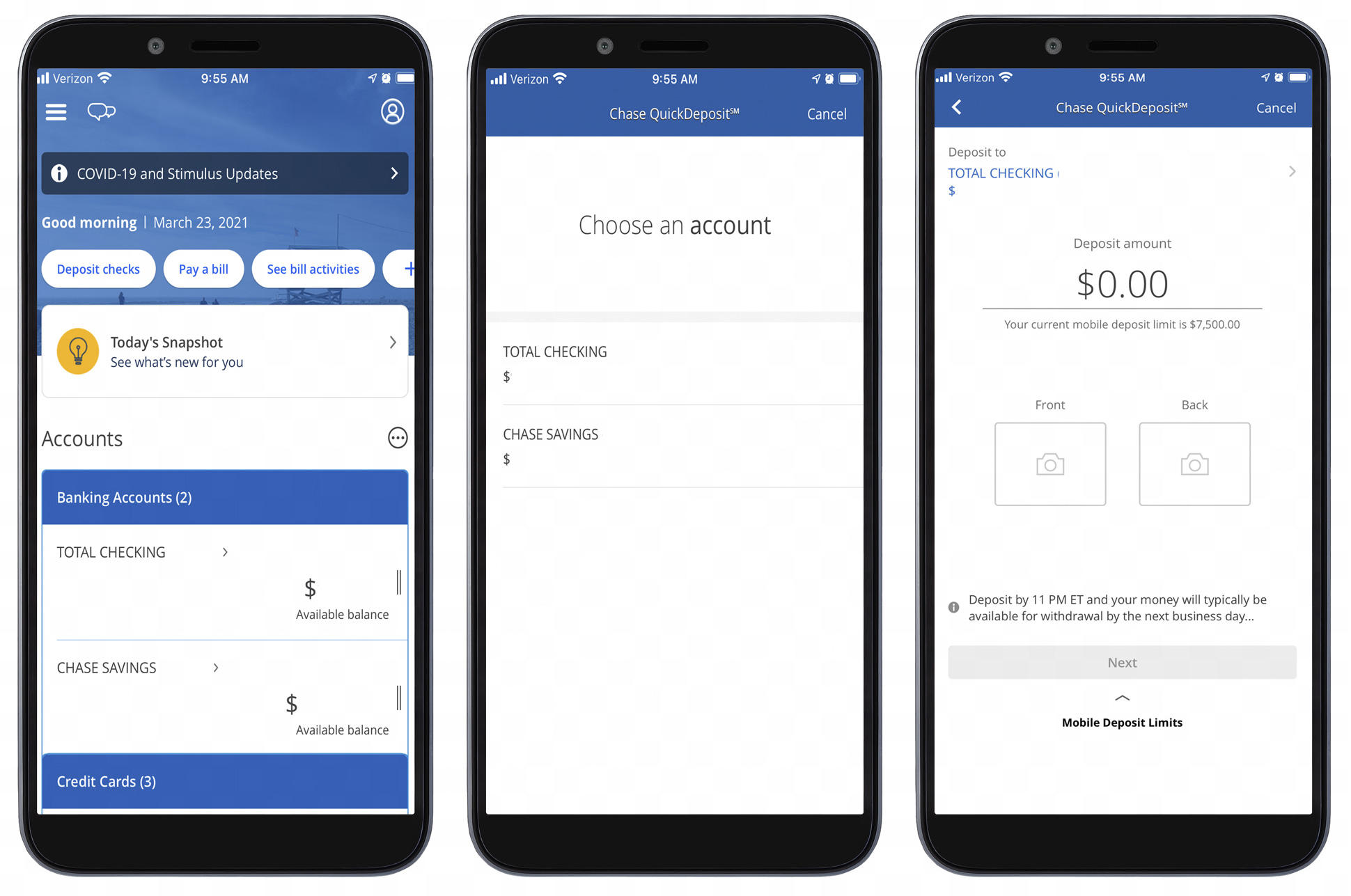
Select “Deposit Checks”: From the main menu or dashboard of the Chase Mobile® app, locate and tap the “Deposit Checks” option.
-
Choose Account and Enter Amount: Select the Chase account into which you wish to deposit the check (e.g., checking, savings). Then, accurately enter the exact dollar amount of the check. Double-check this figure to avoid discrepancies.
-
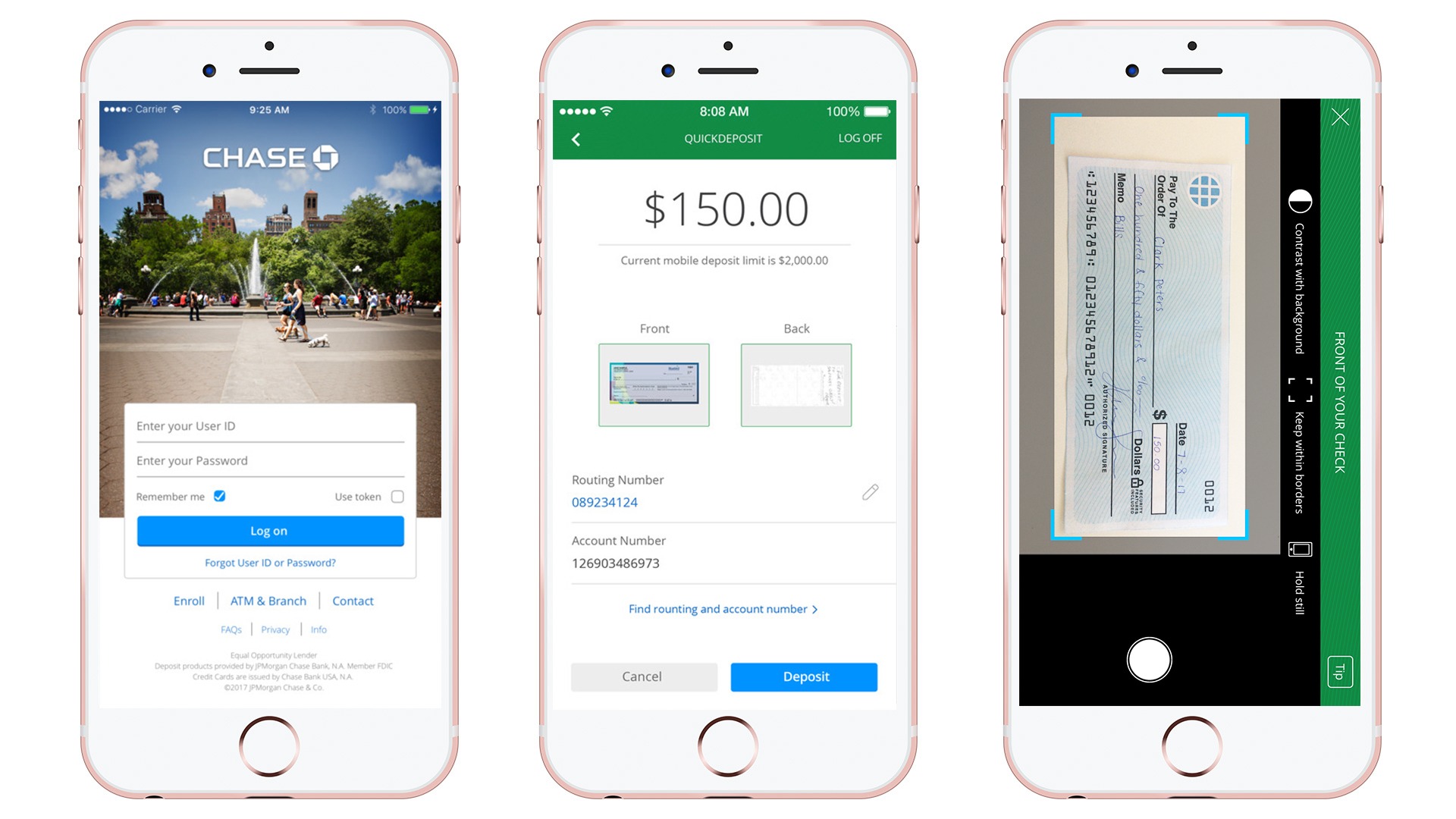
Capture Images: The app will prompt you to take pictures of the front and back of your endorsed check.
-
Front Image: Lay the check on a dark, well-lit, flat surface. Position your device’s camera directly over the check, ensuring all four corners are within the frame. The app often provides a guide box. Take a clear, in-focus picture. Avoid shadows, glare, or blurry images.
-
Back Image: Flip the check over, ensuring the endorsement is visible. Repeat the process for capturing a clear image of the back.
-
-
Review and Confirm: After capturing both images, the app will display a summary of your deposit, including the account, amount, and images. Carefully review all details for accuracy.
-
Submit Deposit: If everything looks correct, tap the “Deposit” or “Submit” button to finalize the transaction. You will typically receive an on-screen confirmation and often an email confirmation as well.
It is advisable to keep the physical check in a secure place for a few days (typically 5-7 business days) after the deposit, until you confirm the funds have fully cleared and are available in your account. After this period, you can securely shred the check.
Maximizing Your Mobile Deposit Experience
While mobile check deposit is designed for simplicity, there are several best practices that can enhance your experience, ensuring swift processing and safeguarding your financial interests. These tips are crucial for maintaining efficiency and security in your personal finance management.
Ensuring Clear Images and Correct Endorsement
The clarity of the check images is paramount for successful processing. A blurry, poorly lit, or incomplete image can cause delays or even rejection of your deposit, disrupting your financial planning. Always take photos in a well-lit area, preferably with natural light, and against a dark, contrasting background to help the camera focus. Ensure the entire check, especially all four corners and the MICR line (the numbers at the bottom), is visible within the frame. Avoid shadows cast by your phone or hand. If the app flags an image as unclear, retake it until it meets the necessary standards.
Equally important is the correct endorsement. As mentioned, “For Chase Mobile Deposit Only” (or the exact phrase specified by Chase, often found directly within the app’s deposit instructions) should accompany your signature on the back of the check. This specific endorsement is not merely a formality; it’s a security measure. It signals to the bank that the check is being processed digitally and prevents it from being cashed or deposited again physically by accident or fraud. Without it, your deposit may be rejected, delaying access to your funds and potentially causing financial inconvenience.

Security Best Practices for Digital Transactions
While mobile deposit offers unparalleled convenience, it’s crucial to adopt robust security practices to protect your financial information.
-
Secure Device: Always use a trusted device to make deposits. Ensure your smartphone or tablet is password-protected or uses biometric security (fingerprint, facial recognition). Keep your device’s operating system and the Chase Mobile® app updated to the latest versions, as these updates often include critical security patches.
-
Strong Passwords & Two-Factor Authentication: Use strong, unique passwords for your Chase Online account. Enable two-factor authentication (2FA) if available, which adds an extra layer of security by requiring a code from your phone in addition to your password.
-
Wi-Fi Security: Only make deposits over a secure, private Wi-Fi network or your mobile data. Avoid public Wi-Fi networks for banking transactions, as they are often less secure and susceptible to eavesdropping.
-
Post-Deposit Handling: After successfully depositing the check and confirming funds availability, securely destroy the physical check. Shredding is ideal to prevent sensitive information from falling into the wrong hands. Do not simply throw it in the trash.
-
Monitor Accounts: Regularly review your Chase account statements and transaction history for any unauthorized activity. Early detection of fraudulent transactions is key to mitigating potential financial loss.
Adhering to these security measures is not just about protecting your deposit; it’s about safeguarding your entire financial identity and maintaining peace of mind in your digital banking activities.
Understanding Deposit Limits and Funds Availability
Successfully depositing a check online is only one part of the equation; understanding when those funds become available and any limitations imposed by the bank is crucial for effective personal financial management, budgeting, and avoiding financial pitfalls.
Daily, Weekly, and Monthly Deposit Limitations
Banks, including Chase, implement deposit limits for mobile check deposits. These limits are primarily in place for security reasons, to mitigate risks associated with potential fraud or insufficient funds from the check’s issuing bank. While specific limits can vary based on your account history, customer relationship with Chase, and account type, there are typically:
-
Per Check Limit: A maximum amount for a single check.
-
Daily Limit: The total amount you can deposit via mobile check deposit within a 24-hour period.
-
Monthly Limit: The cumulative amount you can deposit over a 30-day rolling period.
These limits are often lower than those for in-person deposits, especially for newer accounts or those with limited transaction history. It’s essential to be aware of your specific limits, which you can usually find within the Chase Mobile® app during the deposit process or by contacting Chase customer service. Exceeding these limits will result in the deposit being rejected, necessitating an alternative deposit method and potentially delaying access to your funds. For managing significant income through checks, understanding and planning around these limits is a key aspect of prudent financial planning.
Funds Availability and Hold Times
Once you’ve submitted your mobile check deposit, the funds are not always immediately available for withdrawal or spending. Banks operate under specific funds availability policies, often guided by federal regulations (Regulation CC).
-
Immediate Availability (Partial or Full): For many mobile deposits, a portion of the funds (e.g., the first $225, as of recent regulations) might be made available on the same business day of the deposit, allowing you to access a small amount immediately. The remaining balance will then be subject to a hold.
-
Standard Hold Times: The remaining funds typically become available within 1-2 business days for most consumer checks. However, factors like the amount of the check, the type of check (e.g., government checks, cashier’s checks, local vs. out-of-state checks), your account history, and the time of deposit can influence the hold period. Deposits made after a certain cut-off time (e.g., 8 PM ET) or on weekends/holidays are generally considered deposited on the next business day.
-
Extended Holds: In some cases, such as for very large checks, new accounts, or checks that raise suspicion (e.g., from an unfamiliar source or exhibiting unusual characteristics), Chase may place an extended hold on the funds, which can last up to 5-7 business days or even longer. If an extended hold is placed, the bank is usually required to notify you of the reason and the expected availability date.
Understanding these availability schedules is crucial for cash flow management. If you have upcoming bills or expenses that depend on a check deposit, it’s wise to deposit it well in advance to ensure the funds are cleared and accessible when needed. Always check the estimated availability date provided by the Chase app or confirmation email to plan your finances accordingly. Misjudging funds availability can lead to returned payments or overdraft fees, directly impacting your financial health.
Beyond the Deposit: Managing Your Chase Account Online
The ability to deposit checks online with Chase is just one facet of a comprehensive digital banking experience designed to empower you with greater control over your personal finances. Leveraging the full suite of online tools can significantly enhance your financial organization and efficiency.
Holistic Financial Management with Chase Online
Chase’s online platform and mobile app offer a robust ecosystem for holistic financial management, extending far beyond simple check deposits. This integrated approach allows you to view all your Chase accounts (checking, savings, credit cards, investments, mortgages, auto loans) in one centralized location. From a personal finance perspective, this provides an invaluable bird’s-eye view of your entire financial landscape, simplifying budgeting, tracking spending, and monitoring overall financial health.
You can easily set up alerts for low balances, large transactions, or payment due dates, helping you stay on top of your financial commitments and avoid late fees or overdrafts. The platform also offers tools for managing beneficiaries, updating personal information, and securely communicating with Chase customer service, all contributing to a more streamlined and responsive banking experience.
Leveraging Digital Tools for Budgeting and Payments
For proactive personal finance management, Chase provides several digital tools to help you budget and manage your payments effectively:
-
Online Bill Pay: This feature allows you to set up one-time or recurring payments to virtually any payee, from utilities and rent to credit card bills. You can schedule payments in advance, ensuring they are always paid on time, thus avoiding late fees and protecting your credit score. The ability to track payment history directly within the app simplifies record-keeping and financial reconciliation.
-
Budgeting and Spending Tools: While Chase may not offer the most advanced third-party budgeting features, its platform provides valuable insights into your spending habits. You can categorize transactions, view spending trends over time, and visualize where your money is going. This data is fundamental for creating and sticking to a budget, identifying areas for cost-cutting, and saving for specific financial goals.
-
Zelle®: Integrated within the Chase app, Zelle® allows you to send and receive money quickly and easily with friends, family, and other trusted individuals, often within minutes, using just an email address or U.S. mobile number. This is incredibly useful for splitting bills, paying back friends, or making quick payments without the need for cash or checks, further streamlining everyday financial interactions.
-
External Account Linking: Chase often allows you to link external bank accounts, providing a consolidated view of your finances across different institutions. This enhances your overall financial awareness and facilitates transfers between accounts, supporting a comprehensive approach to wealth management.
By fully embracing these digital tools, Chase customers can transform their banking experience from a transactional necessity into a powerful platform for informed decision-making and proactive financial health. The convenience of online check deposit is merely an entry point into a world of sophisticated financial management capabilities designed to empower you on your journey towards financial well-being.
aViewFromTheCave is a participant in the Amazon Services LLC Associates Program, an affiliate advertising program designed to provide a means for sites to earn advertising fees by advertising and linking to Amazon.com. Amazon, the Amazon logo, AmazonSupply, and the AmazonSupply logo are trademarks of Amazon.com, Inc. or its affiliates. As an Amazon Associate we earn affiliate commissions from qualifying purchases.