
In an increasingly digital world, managing personal finances has evolved dramatically. The days of making a special trip to a bank branch or an ATM just to deposit a check are, for many, a relic of the past. Thanks to advancements in mobile banking technology, services like Bank of America’s online check deposit feature have transformed how individuals handle their funds, offering unparalleled convenience and efficiency. This guide delves into the practical aspects of utilizing this powerful financial tool, emphasizing its role in modern personal finance management, security considerations, and best practices to ensure a smooth, secure experience. For anyone looking to streamline their financial routine and take full advantage of their banking services, understanding online check deposits is a crucial step toward achieving greater financial autonomy and efficiency.
The Evolution of Check Deposits: Embracing Digital Financial Tools
The shift from physical transactions to digital interactions has been one of the most significant developments in the financial sector over the last two decades. For consumers, this has translated into a suite of tools designed to simplify and accelerate everyday banking tasks. Mobile check deposit stands out as a prime example, democratizing access to banking services and empowering users to manage their money from virtually anywhere.
The Shift from Traditional Banking to Digital Convenience
Historically, depositing a check was a structured process involving either a visit to a bank teller during business hours or finding an ATM that accepted check deposits. This necessitated physical proximity to a banking institution and adherence to their operational schedules. For individuals with demanding work schedules, limited mobility, or those residing in areas far from a bank branch, this presented a significant hurdle to timely fund management. The introduction of mobile check deposit, facilitated by smartphone cameras and secure banking apps, dismantled these barriers. It ushered in an era where the act of depositing funds became an on-demand service, available 24/7, directly from one’s personal device. This paradigm shift not only saved time and effort but also redefined expectations for what personal banking should entail, moving towards a model centered around the customer’s convenience and digital lifestyle. This convenience is not just about saving time; it’s about better cash flow management, ensuring funds hit your account sooner, and allowing for more agile financial decision-making.
Key Benefits for Modern Money Management
The advantages of online check deposits extend far beyond mere convenience, impacting several critical aspects of personal finance management:
- Time Efficiency: Perhaps the most immediate benefit is the elimination of travel time and waiting in lines. This reclaimed time can be redirected towards other productive activities or personal pursuits, directly contributing to a better work-life balance. For individuals managing multiple income streams or frequently receiving checks, this cumulative time saving is substantial.
- Accessibility: Mobile deposit capabilities ensure that banking services are accessible to a wider demographic. Whether you’re traveling, live in a rural area, or have physical limitations that make branch visits difficult, your bank is always just a tap away. This inclusivity helps ensure consistent financial engagement regardless of external circumstances.
- Expedited Funds Availability: While processing times can vary, depositing checks digitally often means that funds are recognized and begin processing sooner than if mailed or deposited physically days later. This can be crucial for managing immediate expenses, avoiding overdrafts, and ensuring that your money is working for you without unnecessary delays. Understanding your bank’s specific funds availability policy is key for accurate financial planning.
- Enhanced Record Keeping: Most mobile banking apps provide instant confirmation of your deposit, complete with image captures of the check and a digital receipt. This digital trail can be invaluable for budgeting, tax preparation, and resolving any potential discrepancies, offering a level of traceability that sometimes surpasses paper receipts.
- Reduced Physical Handling of Cash/Checks: Minimizing the need to carry physical checks or visit public places reduces the risk of loss, theft, or exposure to health risks, contributing to a safer and more secure financial routine.
These benefits collectively empower individuals to manage their finances with greater agility, precision, and peace of mind, making mobile check deposit an indispensable tool in the modern financial toolkit.
Preparing for a Seamless Online Deposit: Prerequisites and Best Practices
To ensure a smooth and successful online check deposit with Bank of America, a few essential prerequisites must be met, and certain best practices should be observed. Adhering to these guidelines will minimize potential issues and optimize your experience.
Essential Requirements: Account, App, and Endorsement
Before you even think about capturing an image of your check, ensure you have the foundational elements in place:
- An Eligible Bank of America Account: You must have an active checking, savings, or money market account with Bank of America that is eligible for mobile deposits. Most personal accounts qualify, but it’s always wise to confirm if you have any doubts.
- The Bank of America Mobile Banking App: The entire process hinges on using the official Bank of America mobile app, available for both iOS and Android devices. Ensure it’s downloaded and updated to the latest version for optimal functionality and security. You’ll need to log in with your online banking credentials.
- Proper Check Endorsement: This is a critical step that often causes delays if done incorrectly. Before taking any photos, you must endorse the back of the check. This typically involves:
- Your Signature: Sign your name exactly as it appears on the payee line of the check.
- “For Mobile Deposit Only at Bank of America”: This phrase clearly designates the check for digital deposit, preventing it from being cashed or deposited again. Bank of America specifically recommends this endorsement. Without it, your deposit may be rejected.
Optimizing Your Environment for Successful Mobile Capture
Beyond the prerequisites, creating an optimal environment for capturing the check images is paramount to avoiding rejections and ensuring prompt processing.
- Good Lighting: Natural, even lighting is ideal. Avoid shadows, glare, or overly dim conditions, which can obscure details on the check. A well-lit room or an outdoor shaded area works best.
- Flat, Dark Surface: Place the check on a flat, non-reflective surface that contrasts with the color of the check. A dark tabletop or a plain dark sheet of paper can help the app’s camera identify the check’s edges more easily. Avoid patterned or reflective surfaces.
- Steady Hand and Clear Focus: Hold your smartphone steady directly above the check, ensuring the entire check is visible within the camera frame. The app will often guide you with an outline. Tap on the screen to focus if needed. Blurry images are a leading cause of rejected deposits.
- Clean and Unfolded Check: Ensure the check is flat, unfolded, and free from any obstructions (e.g., paper clips, staples) that might interfere with the camera’s ability to capture all details clearly.
- Remove Obstructions: Make sure there are no objects or fingers covering any part of the check, especially the account number, routing number, check number, and amount.
By diligently following these preparation steps, you lay the groundwork for a quick, efficient, and successful online check deposit, contributing to seamless management of your personal finances.
A Step-by-Step Guide to Depositing Your Check Digitally
Once you’ve prepared your check and environment, the actual process of depositing it through the Bank of America mobile app is straightforward. Following these steps carefully will ensure your funds are on their way to your account without hitches.
Navigating the Bank of America Mobile App
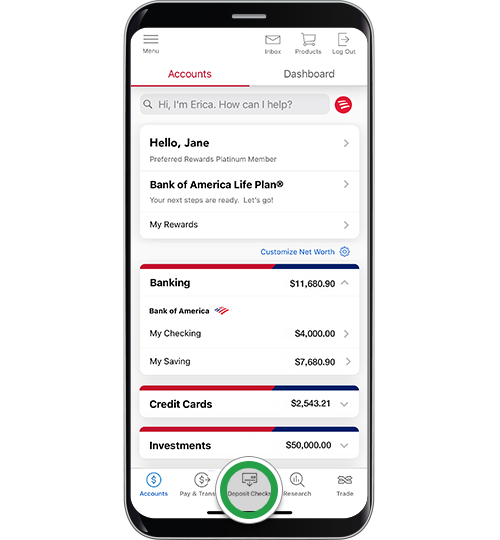
- Log In: Open the Bank of America mobile app on your smartphone or tablet and securely log in using your user ID and passcode, or biometric authentication (fingerprint/Face ID) if enabled.
- Access the Deposit Feature: From the main dashboard or menu, look for an option like “Deposit” or “Deposit Checks.” This is usually prominently displayed for easy access.
- Select Account: Choose the Bank of America checking, savings, or money market account where you wish to deposit the funds. Double-check that you’ve selected the correct account to avoid misdirection of funds.
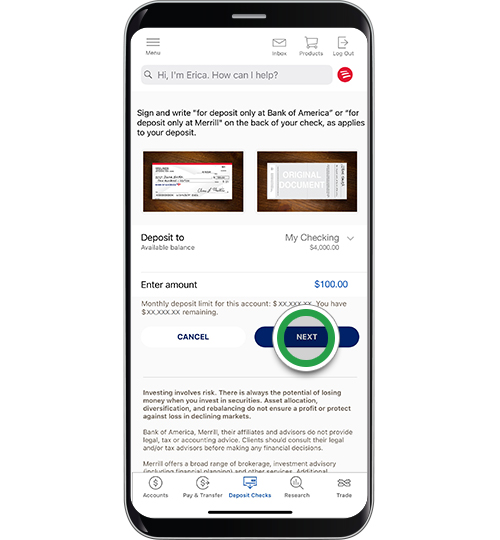
- Enter Amount: Carefully enter the exact dollar amount of the check. This is a crucial step; any discrepancy between the entered amount and the amount on the check can lead to processing delays or rejection. Review this figure thoroughly before proceeding.
The Critical Role of Accurate Information and Clear Imaging
This stage is where your preparatory work with the check and environment comes into play.
- Endorse the Check: As emphasized, ensure the back of the check is signed and includes “For Mobile Deposit Only at Bank of America.” This is non-negotiable for successful processing.
- Capture Front of Check: The app will prompt you to take a photo of the front of the check. Position your phone directly over the check, ensuring all four corners are within the frame. The app often has an auto-capture feature that takes the photo once it detects the check clearly. If not, manually tap the capture button. Review the image for clarity, readability, and completeness.
- Capture Back of Check: Next, flip the check over and repeat the photo capture process for the back, ensuring your endorsement is clearly visible and legible. Again, review the image for quality.
- Review Deposit Details: Before final submission, the app will present a summary of your deposit, including the account selected, the amount entered, and the captured images. This is your last chance to verify all information is accurate. Confirm that the amount you entered matches the written and numeric amount on the check, and that both images are clear.
Confirmation and Record-Keeping for Financial Integrity
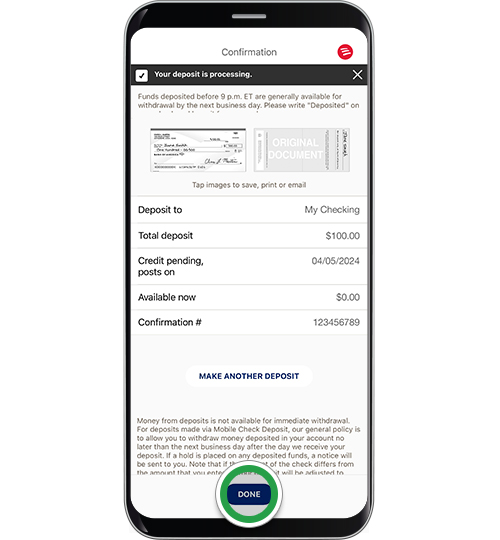
- Submit Deposit: Once you’ve confirmed all details are correct, tap the “Submit” or “Deposit” button to finalize the process.
- Receive Confirmation: You should receive an instant on-screen confirmation from Bank of America, often accompanied by a confirmation email or message within the app’s notification center. This confirmation typically includes a deposit reference number and an estimated funds availability date. Keep this information for your records.
- Retain Physical Check: Do not immediately discard the physical check. Bank of America, like many financial institutions, advises customers to hold onto the original check for a specific period (typically 5-14 days) after the deposit has posted to your account, or until you are certain the funds are fully available. This precaution allows for re-submission if there’s an issue with the digital image and protects against potential fraud. After the recommended retention period, you should shred the check to protect your financial information.
By meticulously following these steps, you leverage Bank of America’s mobile deposit feature efficiently, integrating it seamlessly into your personal financial management routine.
Understanding Financial Implications: Limits, Holds, and Security
While online check deposits offer undeniable convenience, a comprehensive understanding of their underlying financial implications—including deposit limits, funds availability, and robust security protocols—is crucial for effective personal finance management and safeguarding your assets.
Deposit Limits and Funds Availability: Impact on Cash Flow
Banks impose limits on mobile deposits for various reasons, primarily to mitigate fraud and manage risk. These limits can be daily, weekly, or monthly, varying by bank and even by customer based on account history and relationship. For Bank of America, these limits are generally transparent and can often be found within the app or by contacting customer service.
- Daily/Weekly/Monthly Limits: Be aware of these caps, especially if you regularly deposit large checks or multiple checks. Exceeding a limit will result in a rejected deposit, requiring alternative methods or waiting until the next cycle. This impacts your cash flow and ability to access funds quickly, necessitating foresight in your financial planning.
- Funds Availability (Holds): Even after a check is deposited, the funds may not be immediately available for withdrawal or use. Banks typically place a hold on deposited checks to ensure the check clears the issuing bank. While a portion (e.g., $200) might be available the next business day, the full amount could take several business days (e.g., 2-5 business days, sometimes longer for large amounts or new accounts) to become “fully available.”
- Impact on Budgeting: Understanding these hold periods is vital for budgeting and avoiding overdrafts. If you anticipate needing funds urgently, plan your deposits accordingly. Relying on “pending” funds for immediate expenses without confirming availability can lead to financial strain or fees.
- Strategic Planning: For significant deposits, it might be prudent to contact Bank of America to inquire about specific hold times or to explore alternative deposit methods if immediate access is critical.
Safeguarding Your Finances: Security Measures in Mobile Banking
Bank of America employs multi-layered security measures to protect your financial information during mobile deposits:
- Encryption: All data transmitted through the app, including check images and personal details, is encrypted, making it unreadable to unauthorized parties.
- Secure Log-in: Features like multi-factor authentication, strong passwords, and biometric access (fingerprint/Face ID) add extra layers of protection against unauthorized account access.
- Fraud Detection Systems: Bank of America utilizes sophisticated systems to detect and prevent fraudulent activities, monitoring transactions for unusual patterns.
- Image Validation: The app has built-in features to validate check images, ensuring they meet specific quality and security standards before processing.
- Protection against Duplicates: The system is designed to detect and reject attempts to deposit the same check multiple times, whether digitally or physically.
Post-Deposit Protocols: Managing Physical Checks and Records
Beyond the technical security, your actions post-deposit play a critical role in maintaining financial security and order:
- Retain the Physical Check (Temporary): As advised, do not discard the original check immediately. Bank of America recommends keeping it in a secure place for a set period (e.g., 5-14 days) after the funds are reflected in your available balance. This allows for re-submission if the initial digital deposit encounters an unforeseen issue.
- Shred for Security: Once the recommended retention period passes and you are confident the funds are fully available and posted, shred the physical check. Do not simply tear or throw it away. Shredding prevents critical financial information (account numbers, routing numbers, signature) from falling into the wrong hands, protecting you from identity theft and fraud.
- Monitor Your Account: Regularly review your transaction history within the Bank of America app or online banking portal to confirm the deposit has successfully posted and that the correct amount has been credited. Promptly report any discrepancies or issues.
- Digital Record Keeping: Leverage the digital confirmations provided by the app. These can serve as excellent records for budgeting, tax purposes, and future reference, contributing to a well-organized financial life.
By understanding and adhering to these financial implications and security best practices, you can confidently and securely integrate online check deposits into your personal finance strategy, enhancing both convenience and peace of mind.
Maximizing Your Online Banking Experience for Holistic Financial Health
Leveraging mobile check deposit is just one facet of a broader strategy for optimizing your personal finance management through online banking. When integrated thoughtfully, it contributes significantly to a more organized, secure, and proactive approach to your financial health.
Integrating Mobile Deposits into Your Financial Routine
Think of mobile check deposit not as an isolated task, but as a component of your overall financial ecosystem.
- Scheduled Reviews: Incorporate regular checks of your Bank of America mobile app into your financial routine. This allows you to monitor incoming funds from mobile deposits, track expenses, and review account balances, providing a real-time snapshot of your financial standing.
- Budgeting Software Integration: Many personal finance management tools and budgeting apps can link directly to your Bank of America account. Mobile deposits update your account balance quickly, feeding accurate data into your budgeting software, enabling more precise tracking of income and better expense planning.
- Automated Savings: Once a check is deposited, consider setting up automated transfers within the Bank of America app to move a portion of those funds into a savings account, investment account, or to pay down debt. This “pay yourself first” strategy is more easily executed when funds are accessible and visible through the app.
- Alerts and Notifications: Customize Bank of America alerts for deposit confirmations, low balance warnings, or large transaction notifications. These alerts act as an early warning system, keeping you informed about your account activity and helping you react swiftly to any unexpected changes or potential issues.
Troubleshooting Common Issues and Finding Support
Even with careful preparation, occasional issues can arise. Knowing how to troubleshoot and where to find support is vital for minimizing financial stress.
- Common Issues:
- Rejected Deposit: Often due to poor image quality, incorrect amount entered, or improper endorsement. Review the rejection reason provided by the bank, correct the issue, and attempt to re-deposit or use an alternative method.
- Delayed Funds Availability: Larger checks or deposits from new accounts may experience longer holds. Check your app for estimated availability dates or contact customer service for clarification.
- Technical Glitches: Ensure your app is updated, your device has a stable internet connection, and try restarting the app or your phone.
- Finding Support:
- Bank of America’s Help Center: The mobile app and Bank of America’s website have extensive FAQs and help articles specifically covering mobile deposits.
- Customer Service: For persistent issues or specific inquiries, contact Bank of America’s customer service directly via phone or secure message within the app. Be prepared to provide your account details and the deposit reference number.
- Branch Visit (Last Resort): If all else fails and you have a critical issue, visiting a physical Bank of America branch might be necessary, especially for complex cases or if the check cannot be successfully deposited digitally.
The Future of Digital Financial Transactions
Mobile check deposit is but one example of how digital tools are continuously reshaping personal finance. As technology advances, we can anticipate even more seamless and integrated financial experiences. From AI-powered budgeting insights to instant peer-to-peer payments and advanced fraud prevention, the trajectory is clear: financial management will become increasingly intuitive, personalized, and accessible. Embracing tools like Bank of America’s mobile deposit positions you to readily adapt to these future innovations, ensuring your financial practices remain modern, efficient, and aligned with the cutting edge of personal finance. By actively engaging with these digital solutions, you not only simplify current tasks but also cultivate financial literacy and adaptability essential for long-term financial health in an ever-evolving digital economy.
aViewFromTheCave is a participant in the Amazon Services LLC Associates Program, an affiliate advertising program designed to provide a means for sites to earn advertising fees by advertising and linking to Amazon.com. Amazon, the Amazon logo, AmazonSupply, and the AmazonSupply logo are trademarks of Amazon.com, Inc. or its affiliates. As an Amazon Associate we earn affiliate commissions from qualifying purchases.