
The Digital Shift in Personal Finance: Why Online Deposits Matter
The landscape of personal finance has undergone a significant transformation, with digital tools now central to managing one’s money. Gone are the days when a trip to a physical bank branch was the sole means to conduct essential transactions. For busy individuals and families, the ability to deposit checks from virtually anywhere represents more than just a convenience; it’s a fundamental shift towards more efficient, accessible, and integrated financial management. Embracing online check deposit through platforms like Bank of America’s mobile app allows account holders to reclaim valuable time, reduce logistical hurdles, and maintain a proactive stance on their financial affairs. This digital evolution aligns perfectly with a modern lifestyle, ensuring that your funds are accessible and managed without unnecessary delays or disruptions to your schedule.
Convenience Meets Efficiency for Your Money Management
The primary appeal of depositing a check online lies in its unparalleled convenience and the resulting efficiency it brings to personal money management. Instead of factoring in travel time, waiting in line, or adjusting your schedule to branch hours, you can complete a deposit in minutes using your smartphone. This immediate access to banking services means quicker processing of funds, which can be critical for maintaining cash flow, avoiding overdrafts, or funding urgent payments. From a financial planning perspective, this efficiency enables better real-time tracking of your account balances, allowing for more agile budgeting and spending decisions. For individuals balancing multiple responsibilities, from work commitments to family obligations, the power to manage banking tasks remotely is not just a luxury but a necessity for optimal financial health.
The Security and Reliability of Digital Financial Transactions
While convenience is a major draw, the security and reliability of online financial transactions are paramount, especially when dealing with your hard-earned money. Reputable financial institutions like Bank of America employ robust encryption, multi-factor authentication, and sophisticated fraud detection systems to protect your data and funds during mobile deposits. Each transaction is typically confirmed with a digital receipt, providing a clear audit trail. Furthermore, the risk of a physical check being lost, stolen, or damaged after endorsement is significantly reduced when it is promptly deposited digitally. This digital safeguarding ensures that your financial information remains private and your funds are securely transmitted to your account, offering peace of mind that complements the efficiency of the service. Understanding these security measures reinforces the trustworthiness of online banking platforms as a reliable channel for managing your finances.
Preparing for Your Bank of America Mobile Deposit
Successful mobile check deposit at Bank of America begins with adequate preparation. A few simple steps taken beforehand can significantly streamline the process, preventing potential delays or rejections. Ensuring you have the right tools and that your check is properly prepared are crucial elements for a smooth financial transaction. This proactive approach not only saves time but also guarantees that your funds are credited to your account without unnecessary complications, contributing to seamless money management.
Gathering Your Essentials: The BoA App and a Properly Endorsed Check
To initiate an online check deposit with Bank of America, two primary essentials are required: your smartphone equipped with the official Bank of America Mobile Banking app and the physical check itself. First, ensure you have the latest version of the Bank of America app installed on your device, as updates often include security enhancements and improved functionality. Your check must be properly endorsed for mobile deposit. This typically means signing the back of the check within the endorsement area and, crucially, writing “For Deposit Only at Bank of America” or “For Mobile Deposit Only” underneath your signature. Some checks may even have a specific box to check for mobile deposit. This specific endorsement helps prevent fraud and ensures the check is correctly processed by the bank’s digital systems, a critical step in maintaining the integrity of your financial transactions. Failing to endorse correctly is a common reason for deposit rejection, which can delay access to your funds.
Setting the Scene for a Successful Scan
The quality of the check images captured by your smartphone camera directly impacts the success of your mobile deposit. To achieve optimal results, consider the environment in which you are taking the photos. Lay the check on a dark, non-reflective surface to create a strong contrast with the check’s light color, helping the app’s scanner clearly distinguish its edges and details. Ensure there is ample, even lighting, avoiding direct sunlight or harsh shadows that can obscure information or create glare. Overhead lighting is often ideal. Hold your smartphone steady and directly above the check, aiming to capture all four corners of the check within the frame, without any obstructions or background clutter. A clear, focused image where all numbers, routing, and account details are legible is vital for the automated systems to read and process your financial instrument accurately.
A Step-by-Step Guide to Depositing with the BoA App
Once you’ve prepared your check and optimized your scanning environment, the actual process of depositing through the Bank of America app is straightforward. Adhering to each step ensures your funds are processed efficiently and securely, enabling quick access to your money. This user-friendly process is designed to integrate seamlessly into your daily financial routine, enhancing your ability to manage your personal finances with minimal effort.
Navigating the Mobile Deposit Feature
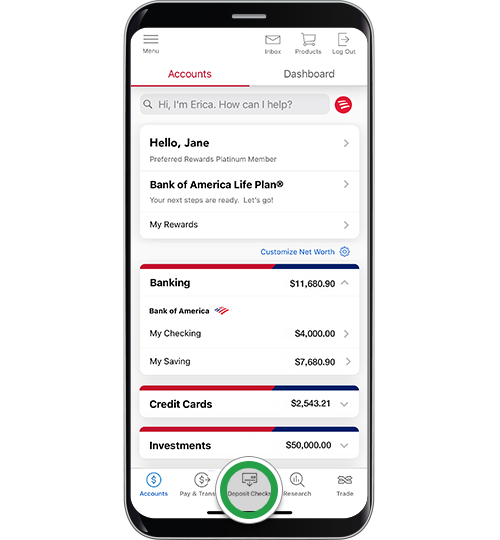
Open the Bank of America Mobile Banking app on your smartphone and log in using your credentials. After logging in, you’ll typically find a “Deposit” or “Deposit Checks” option prominently displayed, often within the main menu or as a quick-access button on the home screen. Tapping this option will guide you to the mobile deposit interface. The app is designed with intuitive navigation, making it easy to locate and initiate the deposit process. This initial step is your gateway to leveraging the app’s powerful financial tools for managing your incoming funds without needing to visit a physical branch, underscoring the shift towards convenient digital banking.
Capturing Your Check Images with Precision
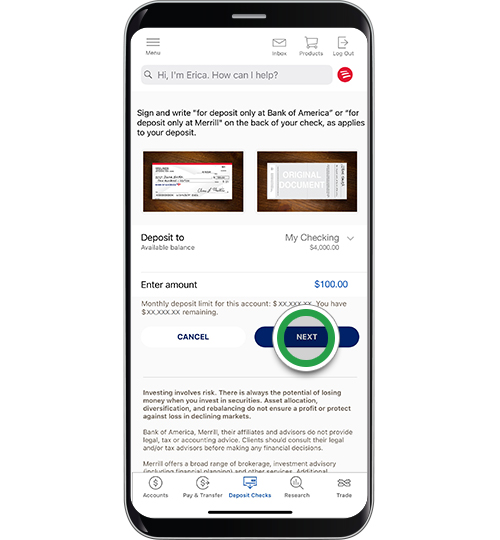
Within the deposit feature, the app will prompt you to photograph the front and back of your endorsed check. Carefully position your phone over the check as previously prepared, ensuring all four corners are visible and the image is sharp and well-lit. The app often provides an outline or guide to help you properly frame the check. Take a photo of the front, then flip the check over and take a photo of the back, making sure your endorsement is clearly visible. The app’s built-in image processing technology will attempt to read the check details. It is crucial that the images are clear, unblurred, and free from shadows or glare, as illegible images are the most common reason for deposit rejection. Take your time with this step to avoid retakes and ensure a smooth transaction.
Reviewing, Confirming, and Understanding Funds Availability
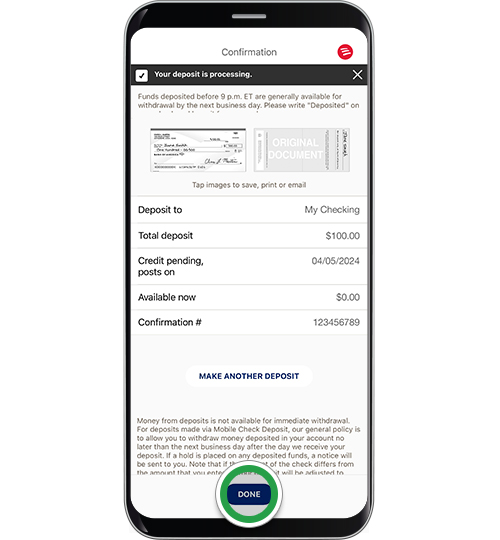
After capturing both images, the app will typically display the recognized amount from the check and prompt you to enter or confirm the amount manually. Double-check this figure to ensure accuracy. Next, select the Bank of America account into which you wish to deposit the funds (e.g., checking or savings). The app will then present a summary of your deposit for final review, including the amount, the selected account, and often an estimated funds availability date. It’s important to understand that while the deposit is immediate, access to the funds may be subject to the bank’s availability policy, which can vary based on the check type, amount, and your account history. Confirm the transaction only after verifying all details are correct. You’ll receive a digital confirmation, often with a reference number, which serves as your official record of the deposit.
Best Practices and Troubleshooting for a Seamless Experience
To fully leverage the convenience of online check deposits and minimize any potential issues, adopting a few best practices and knowing how to troubleshoot common challenges is invaluable. These guidelines help ensure not just the success of individual transactions but also contribute to a generally smoother and more secure overall personal finance management experience.
Understanding Deposit Limits and Retention Policies
Every bank, including Bank of America, imposes daily and/or monthly limits on the amount and number of checks that can be deposited via mobile. These limits are typically displayed within the app’s mobile deposit section or can be found on the bank’s website. Being aware of these limits prevents unexpected rejections, particularly for larger checks. Additionally, while you’ve digitally deposited your check, it’s wise to retain the physical check for a short period—typically 14 days—before shredding it. This allows time for the deposit to fully clear and for you to retrieve the check should there be any processing issues. After this period, securely destroy the physical check to prevent any fraudulent use of your account information.
Safeguarding Your Financial Information Post-Deposit
After a successful mobile deposit, your financial security remains paramount. Never share your banking app login credentials or confirmation details with anyone. Ensure your smartphone is protected with a strong passcode or biometric security. When you are finished with your banking session, always log out of the Bank of America app. Promptly shredding the physical check after the recommended retention period adds an extra layer of security, eliminating any possibility of the check falling into the wrong hands and being used to access your financial information or make fraudulent transactions. Vigilance in protecting your personal financial data is a cornerstone of effective money management in the digital age.
Addressing Common Mobile Deposit Challenges
Occasionally, you might encounter issues during a mobile deposit. If the app fails to capture clear images, try adjusting your lighting, surface, or phone angle. Ensure the check is perfectly flat and within the camera’s frame. If the app rejects the deposit, double-check your endorsement for completeness and accuracy, as this is a frequent culprit. Sometimes, a poor internet connection can also interfere; try moving to an area with stronger Wi-Fi or cellular signal. For persistent issues, contacting Bank of America customer service or visiting a local branch might be necessary. Keeping a record of any error messages can assist customer service in resolving the problem more efficiently, minimizing any disruption to your personal finances.
Integrating Digital Banking into Your Financial Strategy
Depositing checks online with Bank of America is more than just a convenient feature; it’s a vital component of a comprehensive digital banking strategy. By embracing these tools, individuals can gain greater control, insight, and efficiency in managing their personal finances, leading to improved financial health and a more streamlined approach to money management.
The Broader Benefits of Mobile Banking
Beyond check deposits, Bank of America’s mobile app offers a full suite of financial management tools that, when utilized together, amplify the benefits of digital banking. From real-time account monitoring and balance checks to setting up payment alerts, transferring funds between accounts, paying bills, and even managing investments, the app serves as a powerful hub for all your financial activities. This integrated approach saves time, reduces paperwork, and provides instant access to critical financial information, empowering users to make informed decisions about their money at any given moment. Embracing these broader mobile banking capabilities fosters a proactive stance on financial well-being.
Budgeting and Tracking with Digital Tools
The immediate access to your account balances and transaction history provided by online check deposits and other mobile banking features is a tremendous asset for personal budgeting and financial tracking. When funds are deposited quickly, you have a more accurate picture of your available balance, which aids in making spending decisions and sticking to your budget. Many banking apps, including Bank of America’s, offer tools or integrations that allow you to categorize transactions, track spending patterns, and even set financial goals. This real-time visibility and analytical capability are invaluable for identifying areas where you can save, understanding your cash flow, and ultimately taking greater command of your financial future.
A Future of Simplified Personal Finance
The continuous evolution of digital banking points towards an even simpler and more integrated future for personal finance. As technology advances, mobile platforms will likely offer even more sophisticated tools for financial planning, automated savings, and personalized advice. By becoming comfortable with features like online check deposit today, you are not just simplifying a single transaction; you are building the foundation for a fully digital financial lifestyle. This shift empowers individuals to manage their money with unprecedented ease and insight, reducing stress and freeing up time to focus on other priorities, ultimately contributing to a more secure and prosperous financial journey.
aViewFromTheCave is a participant in the Amazon Services LLC Associates Program, an affiliate advertising program designed to provide a means for sites to earn advertising fees by advertising and linking to Amazon.com. Amazon, the Amazon logo, AmazonSupply, and the AmazonSupply logo are trademarks of Amazon.com, Inc. or its affiliates. As an Amazon Associate we earn affiliate commissions from qualifying purchases.