
In the ever-evolving landscape of digital content, managing your online presence effectively is paramount. For creators, businesses, and individuals alike, YouTube serves as a powerful platform for sharing video content. However, there often comes a time when specific videos need to be removed. Whether due to outdated information, privacy concerns, or a strategic shift, understanding the precise technical steps and implications of deleting a YouTube video is crucial. This guide provides an in-depth, step-by-step tutorial, along with insights into the broader technological considerations surrounding content removal on one of the world’s largest video-sharing platforms.

Understanding the Digital Rationale: Why Content Deletion Matters
Before diving into the mechanics, it’s insightful to consider the underlying technological and operational reasons that necessitate video deletion. This isn’t just about a simple click; it’s about active digital asset management within a complex ecosystem.
Outdated or Irrelevant Information
Technology evolves rapidly, and so does information. A tutorial demonstrating software from five years ago might now be completely inaccurate due to interface changes or feature deprecation. Similarly, news updates, product reviews, or even personal vlogs can lose their relevance over time. Maintaining a library of current and accurate content is vital for a channel’s credibility and user experience. Outdated content can mislead viewers, generate negative comments, and dilute the value of a channel’s otherwise current offerings. Deleting such videos ensures that your channel remains a reliable source of information, reflecting your commitment to quality and accuracy in the digital realm.
Privacy Concerns and Digital Security
Personal privacy and digital security are increasingly significant concerns in our connected world. A video initially uploaded with good intentions might later reveal sensitive personal information – addresses, identifiable faces without consent, or details that could compromise security. Technological advancements in facial recognition and data aggregation mean that even seemingly innocuous details can contribute to a larger digital footprint. Deleting such content is a proactive measure to safeguard personal data, protect the privacy of individuals featured, and mitigate potential risks associated with digital exposure, aligning with best practices for digital security management.
Copyright Infringement or Platform Policy Violations
YouTube, like all major digital platforms, operates under strict terms of service and copyright laws. Accidentally or unknowingly uploading content that infringes on someone else’s copyright can lead to strikes against your channel, potential legal repercussions, and ultimately, content removal by YouTube. Similarly, videos that violate community guidelines—whether related to hate speech, harassment, spam, or misleading metadata—will be flagged. Proactively deleting such videos, either before or after notification, is a critical step in maintaining channel health, preventing further policy violations, and preserving your ability to operate on the platform. It demonstrates responsible digital citizenship and an understanding of platform governance.
Reputational Management and Content Alignment
For brands, businesses, or public figures, every piece of content contributes to their digital identity. A video that once aligned with your message might no longer reflect current values, brand strategy, or professional standards. Perhaps a company has rebranded, or an individual’s personal views have evolved. Deleting videos that are inconsistent with your current public image is a key component of digital reputational management. It ensures that your channel consistently projects your desired persona or brand identity, preventing misrepresentation and maintaining a cohesive narrative across your digital properties. This is about curating your digital legacy in a structured and intentional manner.
The Technical Steps: How to Permanently Delete Your YouTube Video
The process of deleting a YouTube video is straightforward once you know where to look. It’s handled through YouTube Studio, the dedicated content management interface for creators.
Accessing YouTube Studio
Your journey begins with YouTube Studio, the central hub for managing your channel.
- Log In to YouTube: Go to youtube.com and ensure you are logged into the Google account associated with your YouTube channel.
- Navigate to YouTube Studio:
- Click on your profile picture in the top right corner of the YouTube homepage.
- From the dropdown menu, select “YouTube Studio.” This will take you to your channel dashboard.
Navigating to Your Videos
Once inside YouTube Studio, you need to locate the video(s) you wish to delete.
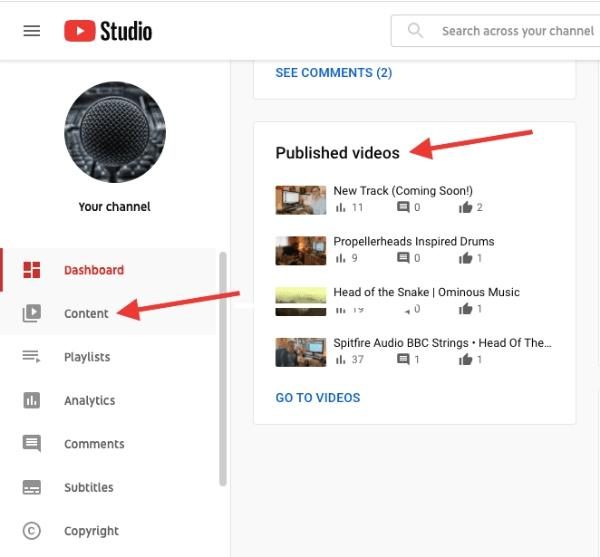
- Select “Content”: In the left-hand menu of the YouTube Studio dashboard, click on “Content.” This will display a list of all your uploaded videos, live streams, and posts.
- Filter and Sort (Optional): If you have a large number of videos, you can use the search bar or filters at the top of the “Content” page to quickly locate the specific video you’re looking for by title, description, or visibility status.
Deleting a Single Video
This is the most common scenario for content removal.
- Hover and Select Options: On the “Content” page, hover over the video you want to delete. A series of icons will appear.
- Click the Three Dots (Options Menu): Click the three vertical dots (kebab menu icon) that appear when you hover over the video. This opens a context menu with various actions.
- Choose “Delete Forever”: From the options, select “Delete forever.”
- Acknowledge Warning: A confirmation dialog box will appear, informing you that deletion is permanent and irreversible. You’ll need to check the box that states, “I understand that deleting forever is permanent and can’t be undone.”
- Confirm Deletion: Click the “DELETE FOREVER” button to finalize the process. Your video will be removed from YouTube.
Deleting Multiple Videos Simultaneously
If you need to remove several videos at once, YouTube Studio offers a batch deletion feature.
- Select Videos: On the “Content” page, use the checkboxes next to each video thumbnail to select all the videos you wish to delete. A blue bar will appear at the top, indicating the number of selected videos.
- Access More Actions: In the blue bar that appears, click on “More actions.”
- Choose “Delete forever”: From the dropdown menu, select “Delete forever.”
- Acknowledge Warning and Confirm: Similar to single video deletion, a confirmation dialog will appear. Check the box to confirm you understand the permanence of the action, then click “DELETE FOREVER.”
Beyond Deletion: Understanding Unlisting and Privatizing Content
Deletion is absolute, but YouTube also offers alternative methods for content management that don’t involve permanent removal. Understanding these technical distinctions is vital for creators seeking flexible control over their content visibility.
Unlisting Your Video
An unlisted video is not publicly searchable or visible on your channel page.
- Access: You can change a video’s visibility status in YouTube Studio. On the “Content” page, click the visibility dropdown for any video (Public, Private, Unlisted).
- Functionality: Only people with the direct link to the video can view it. It won’t appear in search results, subscriber feeds, or your public video list.
- Use Cases: Ideal for sharing content with a specific group of people without making it public, testing content internally, or providing supplementary material for courses or private communities. It serves as a semi-private distribution method, leveraging YouTube’s hosting capabilities without public exposure.
Setting Video to Private
A private video is the most restricted visibility setting.
- Access: Similar to unlisting, this option is available via the visibility dropdown in YouTube Studio.
- Functionality: Only you and specific Google accounts you invite can view the video. It remains entirely hidden from public view, search results, and even those with a direct link unless they are explicitly granted access.
- Use Cases: Perfect for storing personal videos, sensitive internal company communications, or drafts that are not yet ready for broader consumption. It’s essentially a secure, cloud-based video storage solution with sharing controls.
When to Unlist or Private vs. Delete
The choice between deleting, unlisting, or privatizing hinges on your objectives:
- Delete: Choose deletion when the content is permanently obsolete, legally problematic, highly sensitive, or no longer serves any purpose whatsoever. Once deleted, it’s gone for good, freeing up potential storage space (though YouTube’s storage is usually not a concern for individual creators) and removing any digital trace from your channel.
- Unlist: Opt for unlisting when you want to retain the video and its analytics data but control who can access it. This is a temporary or semi-permanent solution for content that has niche appeal or is part of a larger, controlled distribution strategy.
- Private: Use the private setting for content that needs to be extremely secure, or for personal archival purposes. It offers the highest level of control over who can view your content while still retaining it on the platform.
The Digital Aftermath: What Happens Post-Deletion?
Deleting a video from YouTube isn’t just about removing it from your channel list; it triggers a series of technical and data-related consequences that creators should be aware of.
Irreversibility of Deletion
The most critical aspect of deletion is its permanence. Once you confirm “Delete forever,” the video file itself, along with its associated metadata (title, description, tags), comments, and metrics (views, likes, watch time), are irrevocably removed from YouTube’s servers. There is no “undo” button, no trash bin from which to recover it. This highlights the importance of careful consideration and, if necessary, backing up the original video file before proceeding with deletion. From a data management perspective, this action is a hard delete, not a soft delete.
Impact on Watch History and Analytics
For users who watched the deleted video, it will typically disappear from their watch history. On your end, all associated analytics data for that specific video (e.g., watch time, audience retention, traffic sources) will be lost from YouTube Studio. This means if you were tracking the performance of that video, that data will no longer be accessible for analysis. While aggregated channel-level data might absorb some of the previous watch time, granular data for the specific video is gone. Creators relying on historical data for performance reviews or content strategy should consider archiving relevant reports before deletion.
Search Engine Indexing and Residual Traces
Even after a video is deleted from YouTube, its URL might persist in search engine indexes (like Google Search) for a period. When users click on these old links, they will be directed to a standard YouTube “Video unavailable” page, not your channel. Over time, search engines typically de-index these broken links. However, the initial persistence means that residual traces of the video’s existence can remain visible in search results for some duration, particularly if the video was popular or widely shared. This is a characteristic of distributed data systems and the time it takes for indexers to update.
Considerations for Embedded Videos
If you or others embedded your YouTube video on websites, blogs, or social media platforms, those embedded players will display an “unavailable” message once the original video is deleted. They will not automatically revert to a new video or provide an alternative. This requires manual updating of all external embeds if you wish to replace the content, adding another layer of complexity to content management when videos are widely distributed beyond the YouTube platform itself.
Best Practices for Digital Content Management on YouTube
Effective management of your YouTube content goes beyond simply uploading and deleting; it involves a strategic approach to your digital assets.
Regular Content Audits
Periodically review your entire video library. A systematic audit helps identify outdated content, videos that no longer align with your channel’s direction, or those that might raise privacy concerns. Tools within YouTube Studio, such as sorting by oldest videos or lowest performing, can aid in this process. Establishing a cadence for these audits (e.g., quarterly, annually) ensures your channel remains fresh, relevant, and free of liabilities. This proactive approach minimizes the need for reactive, urgent deletions.
Archiving Important Data Before Deletion
Before deleting any video, especially one that has accumulated significant views or engagement, consider downloading its analytics data and comments if they hold value for future analysis or record-keeping. While the video file itself can be stored locally, the rich engagement data provided by YouTube is unique. This foresight ensures that even if the content is gone, the insights derived from its performance are preserved.
Understanding YouTube’s Terms of Service and Community Guidelines
Ignorance of the rules is not an excuse. Regularly familiarizing yourself with YouTube’s Terms of Service and Community Guidelines is paramount. These documents outline what content is permissible, how copyright is managed, and the responsibilities of creators. Staying informed helps prevent policy violations that could lead to forced deletion by YouTube, strikes against your channel, or even channel termination. It’s a fundamental aspect of operating responsibly within a large digital ecosystem.

Leveraging Analytics for Informed Decisions
YouTube Studio’s analytics are powerful tools. Use them to understand which content performs well, which receives negative feedback, or which has dwindling relevance. High bounce rates, low watch times, or a surge in negative comments on older videos can signal that content may be a candidate for deletion, unlisting, or updating. Data-driven decisions ensure that content management actions are strategic and contribute positively to your channel’s overall health and growth.
Deleting a YouTube video is a simple technical task, but the decision behind it and its implications are far-reaching. By understanding the “why” and the “how,” and by adopting best practices for digital content management, creators can maintain a professional, relevant, and secure online presence on the YouTube platform.
aViewFromTheCave is a participant in the Amazon Services LLC Associates Program, an affiliate advertising program designed to provide a means for sites to earn advertising fees by advertising and linking to Amazon.com. Amazon, the Amazon logo, AmazonSupply, and the AmazonSupply logo are trademarks of Amazon.com, Inc. or its affiliates. As an Amazon Associate we earn affiliate commissions from qualifying purchases.