
In an increasingly digital world, platforms like Facebook (now Meta) serve as central hubs for communication, commerce, and community. With billions of users, the sheer scale of the platform means that issues, questions, and technical glitches are inevitable. However, directly contacting Facebook support can often feel like searching for a needle in a digital haystack. This comprehensive guide will demystify the process, outlining the most effective channels available for both individual users and businesses, and providing insights into Facebook’s unique approach to customer service. Understanding how to navigate their support ecosystem is crucial for resolving problems efficiently and maintaining a smooth online experience.
Understanding Facebook’s Support Philosophy
Before diving into specific contact methods, it’s essential to grasp the underlying philosophy that shapes Facebook’s support structure. Unlike traditional customer service models that might offer readily available phone lines or direct email support for every query, a platform of Facebook’s magnitude operates under different constraints and priorities.
The Scale Challenge
Imagine the logistical nightmare of providing individualized, real-time support to over three billion monthly active users. Such an endeavor would require a workforce larger than many small nations. This immense scale necessitates a strategic approach, where automation, self-service, and community-driven solutions are prioritized over direct human interaction for most common issues. Facebook’s support system is designed to triage problems, directing users to resources that can solve their issues independently, thereby reserving human agent intervention for complex, specific, or sensitive cases.
Prioritizing Self-Service Resources
Facebook heavily invests in robust self-service options. Their rationale is simple: empower users to find answers quickly and efficiently on their own. This includes an extensive Help Center, detailed FAQs, troubleshooting guides, and interactive tools. For many common problems—like password resets, privacy setting adjustments, or basic feature inquiries—the solution is often readily available within these self-service repositories. The expectation is that users will explore these resources thoroughly before attempting to escalate to a more direct form of contact. This approach not only manages the support load but also educates users on how to better manage their own accounts and navigate the platform.
Official Channels for User Support
For individual users encountering problems, Facebook provides several official avenues, each designed to address different types of issues. Knowing which channel to use for a specific problem is key to a faster resolution.
The Facebook Help Center: Your First Stop
The Facebook Help Center is the cornerstone of their user support. Accessible directly from Facebook’s website or app, it’s a vast repository of articles, guides, and FAQs covering almost every conceivable topic. From account management and privacy settings to reporting content and troubleshooting technical issues, the Help Center is meticulously organized and searchable.
- How to Access: You can usually find a “Help & Support” or “Help Center” link in the dropdown menu on the desktop version or within the settings menu on the mobile app. Alternatively, navigate directly to
facebook.com/help. - What it Offers: Detailed step-by-step instructions, video tutorials, and explanations for common problems. It’s often updated with information on new features and policy changes.
- Best Use: For general questions, “how-to” guides, understanding platform features, and initial troubleshooting of minor issues. Before trying any other method, always check the Help Center.
In-App Reporting Tools for Specific Issues
For issues related to content, privacy violations, or account security, Facebook offers integrated reporting tools directly within the platform. These tools are often the most direct and effective way to flag specific problems to Facebook’s review teams.
- Reporting Inappropriate Content: If you encounter posts, photos, videos, or profiles that violate Facebook’s Community Standards (e.g., hate speech, harassment, nudity, misinformation), you can report them directly. Look for a “…” or “Report” option next to the offending content. This sends the content to a team for review.
- Account Compromise or Hacked Accounts: If your account has been hacked or you suspect unauthorized activity, Facebook provides a dedicated
facebook.com/hackedpage. This portal guides you through steps to secure your account, remove malicious content, and regain control. It’s a critical tool for digital security incidents. - Privacy Violations: If someone is sharing your private information without consent, reporting through the in-app tools (often found within the “Report” menu) is the designated path.
- Best Use: For flagging specific violations of Community Standards, reporting stolen accounts, or addressing privacy breaches. These reports go directly to specialized teams.
Community Forums and Peer Support
While not a direct line to Facebook staff, community forums and groups can be incredibly valuable for troubleshooting and advice. Other users, often experienced power-users or community managers, might have encountered and solved similar problems.
- How it Works: Facebook hosts various “Help Communities” or “Support Groups” where users can post questions and receive answers from peers. Search within Facebook for “Facebook Help Community” or similar terms.
- Benefits: You can get quick answers, discover workarounds, and gain insights from others who understand the platform intimately. Sometimes, community managers might escalate persistent issues they observe.
- Limitations: Solutions aren’t guaranteed, and advice isn’t official. It’s not suitable for sensitive account-specific issues requiring private information.
- Best Use: For general troubleshooting, understanding subtle platform behaviors, or seeking advice on best practices from experienced users.
Data and Privacy Inquiries
For requests related to your personal data, data portability, or specific privacy concerns under regulations like GDPR or CCPA, Facebook provides dedicated portals.
- Accessing Your Information: Users can download a copy of their Facebook data (
facebook.com/dyi). - Data Portability: Tools allow you to transfer photos and videos to other services.
- Privacy Inquiries: For more complex privacy questions or to exercise specific data rights, direct links and forms are often available within the “Settings & Privacy” section of your account, or linked from the Help Center.
- Best Use: For exercising your data rights, understanding what data Facebook holds, or formal inquiries related to data privacy.
Dedicated Support for Businesses and Advertisers
Businesses and advertisers have specific needs that go beyond the scope of general user support. Facebook recognizes this with a more robust and, at times, more direct support infrastructure for those investing in the platform.
Meta Business Help Center
Similar to the main Help Center, the Meta Business Help Center (facebook.com/business/help) is tailored specifically for businesses, advertisers, and developers. It covers topics like setting up business pages, running ads, managing ad accounts, troubleshooting payment issues, and using various Meta Business Suite tools.
- What it Offers: Extensive guides on advertising policies, campaign optimization, ad account security, pixel implementation, and API documentation.
- Best Use: For any question related to using Facebook for business purposes, advertising, or developer issues.

Business Support Chat and Email
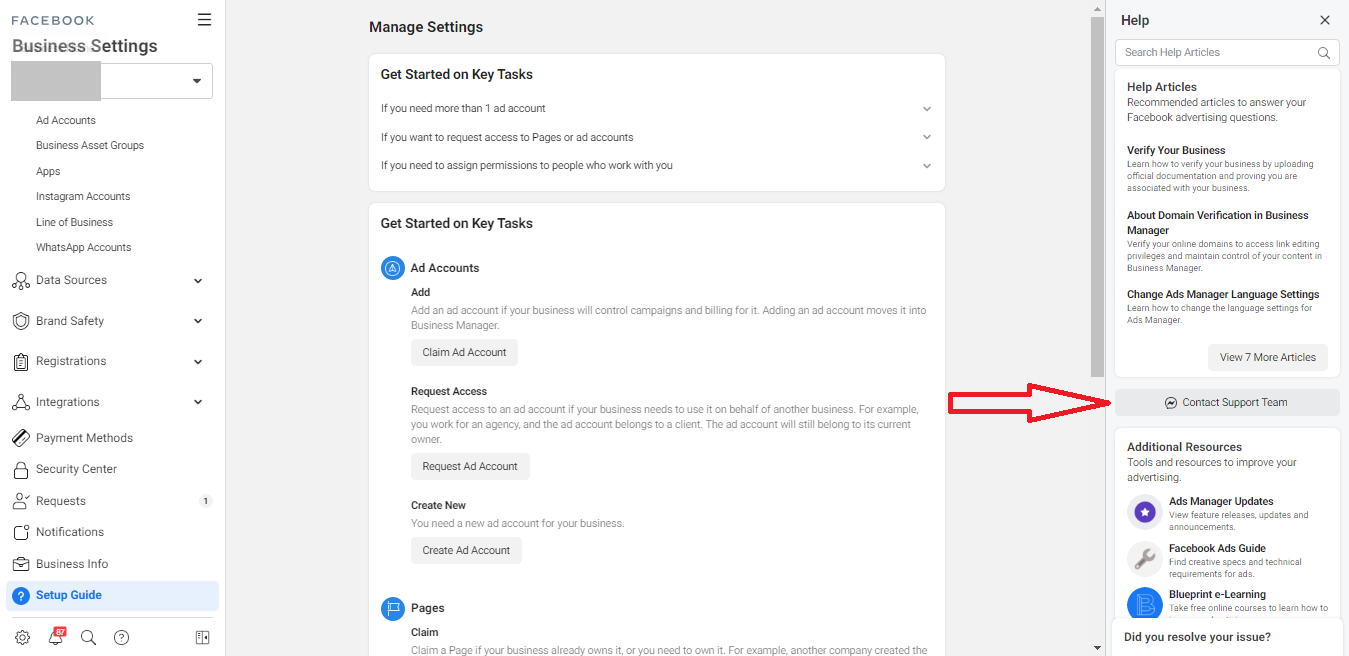
This is where businesses often get a more direct line to support. For eligible business accounts (typically those spending on ads or managing larger presences), Facebook offers live chat support and dedicated email channels.
- How to Access: These options usually become visible within the Meta Business Suite or Ad Manager interface once certain criteria are met. Look for a “Help” or “Support” button that leads to chat or a contact form.
- Benefits: Real-time assistance for urgent ad campaign issues, payment problems, ad rejections, or complex technical issues related to business tools. Email support provides a written record and can be good for issues that don’t require immediate resolution but need detailed explanation.
- Eligibility: Access is often tiered, with higher ad spenders or larger managed accounts receiving priority or more extensive options.
- Best Use: For time-sensitive business-critical issues, ad account problems, or billing inquiries.
Agency and Partner Programs
Large advertising agencies and marketing partners working with Facebook often have dedicated account managers or access to specialized support teams. These relationships are typically established through formal partnership programs and offer a higher tier of personalized support.
- Benefits: Direct contact with Facebook representatives, strategic insights, early access to features, and expedited problem resolution for their clients.
- Best Use: Exclusively for large agencies and managed partners with direct contacts at Meta.
When Direct Contact is Elusive: Alternative Approaches
Despite the official channels, there are times when users feel stuck or unable to get a satisfactory response. While not always guaranteed, some alternative approaches can sometimes yield results.
Leveraging Social Media for Public Queries (with caveats)
Some users attempt to contact Facebook publicly via other social media platforms like Twitter. While Facebook’s official support accounts (e.g., @MetaforBusiness) might monitor mentions for widespread issues or PR concerns, they are generally not equipped to handle individual account-specific support requests through these channels due to privacy and security reasons.
- How it Works: Tweet at official Facebook/Meta accounts, or post on their public pages.
- Benefits: Can draw public attention to a widespread issue, potentially prompting a broader response.
- Limitations: Unlikely to resolve personal account issues. High risk of attracting scammers pretending to be support.
- Best Use: Only for highlighting public-facing issues or expressing general feedback, never for sharing private account details or expecting direct support.
Legal and Press Inquiries
For strictly legal matters (e.g., subpoenas, data requests from law enforcement, intellectual property disputes) or press inquiries, Facebook has specific, formal channels. These are not for general user support.
- Legal: Dedicated legal request portals are available for authorities (
facebook.com/records). - Press: Media outlets have specific contact points, usually listed on Meta’s newsroom site (
about.fb.com/news/). - Best Use: Exclusively for their intended purposes; using these for general support will likely lead to no response.
What to Do When All Else Fails
If you’ve exhausted all official channels and your issue remains unresolved, especially if it’s critical (e.g., a locked account with no recovery options, persistent policy violations impacting your business), consider:
- Persistent Follow-up: If you have an existing support ticket, follow up politely and persistently.
- Document Everything: Keep detailed records of dates, times, screenshots, error messages, and any communication with support. This documentation is vital if you need to escalate further.
- Seek Third-Party Advocacy (Last Resort): For truly dire and seemingly unresolvable issues, some users have found success by reaching out to consumer advocacy groups, local media, or even regulatory bodies if the issue involves legal or consumer rights violations. This is an extreme measure and should be considered only after all internal channels have been exhausted.
Best Practices for Effective Communication
Regardless of the channel you use, adopting best practices for communication can significantly improve your chances of a successful resolution.
Be Specific and Provide Evidence
When reporting an issue, clarity is paramount. Don’t just say “Facebook isn’t working.” Instead:
- Describe the Problem: “I cannot log in to my account. When I enter my password, I receive an error message ‘Incorrect password’ even though I know it’s correct. I have tried resetting it multiple times, but the email never arrives.”
- Include Screenshots/Videos: Visual evidence of error messages, the problematic content, or the steps you’re taking is incredibly helpful.
- Provide Relevant Information: Account name, associated email, date and time of the incident, device used, browser/app version, and any troubleshooting steps you’ve already attempted.
Be Patient and Persistent
Given Facebook’s scale, response times can vary wildly. Some issues might be resolved automatically in minutes, while complex cases requiring human review could take days or even weeks. Follow up periodically, but avoid spamming. Understand that agents are dealing with a high volume of requests.

Understand Scope and Limitations
Recognize that Facebook support agents have limitations. They cannot always overturn policy decisions, grant special exceptions, or provide instant solutions to complex technical glitches. Frame your expectations realistically, and focus on providing them with the information they need to assist you within their capabilities.
In conclusion, contacting Facebook effectively requires understanding its multi-tiered support ecosystem. By starting with self-service resources, utilizing in-app tools for specific problems, and leveraging dedicated business channels when appropriate, users and businesses can significantly increase their chances of resolving issues. While direct human interaction can sometimes be elusive, a strategic and well-documented approach will always be your most powerful tool in navigating the complexities of one of the world’s largest digital platforms.
aViewFromTheCave is a participant in the Amazon Services LLC Associates Program, an affiliate advertising program designed to provide a means for sites to earn advertising fees by advertising and linking to Amazon.com. Amazon, the Amazon logo, AmazonSupply, and the AmazonSupply logo are trademarks of Amazon.com, Inc. or its affiliates. As an Amazon Associate we earn affiliate commissions from qualifying purchases.