
In an increasingly digital world, managing your online presence extends beyond social media to encompass the financial applications that facilitate our daily transactions. Venmo, a ubiquitous peer-to-peer payment platform, has become an indispensable tool for many, enabling quick and easy money transfers. However, circumstances often arise where users may find themselves needing to disconnect from certain services, whether due to a shift in financial habits, concerns over digital privacy, or simply a desire to streamline their app ecosystem. Correctly closing a Venmo account is a critical step in digital offboarding, ensuring your financial data is handled responsibly and your digital footprint is managed with precision.
This guide will walk you through the entire process of deactivating your Venmo account, from the crucial preparatory steps to understanding the implications of closure, all within the framework of effective tech management and digital security.
Why Consider Closing Your Venmo Account?
While Venmo offers unparalleled convenience, there are various tech-centric reasons why a user might choose to close their account. Understanding these motivations highlights the importance of thoughtful digital stewardship.
Data Privacy and Security Concerns
In an era of rampant data breaches and heightened awareness around personal information, users are increasingly scrutinizing how their data is collected, stored, and used by digital platforms. An inactive Venmo account, even if not actively used, still holds sensitive financial and personal data. Closing it is a proactive measure to minimize your digital exposure. It’s a move towards a leaner digital footprint, reducing potential vulnerabilities associated with maintaining accounts you no longer actively monitor or need. For many tech-savvy individuals, controlling data flow and ensuring digital security isn’t just a recommendation—it’s a necessity.
Consolidating Digital Financial Tools
The digital finance landscape is dynamic, with new apps and services emerging constantly. Users may switch to alternative payment platforms that offer different features, lower fees, or better integration with their existing financial tools. Perhaps a new banking app has incorporated robust P2P payment features, or a specialized budgeting app has become their primary financial hub. In such scenarios, maintaining multiple redundant payment apps like Venmo can lead to digital clutter and complicate personal financial management. Consolidating to a preferred platform often involves systematically deactivating accounts on older or less frequently used services.
Infrequent Use and Account Management
Simply put, if you’re not using an app, it contributes to digital bloat. An unused Venmo account doesn’t just sit there; it may still send notifications, require occasional updates, and, more importantly, represents a lingering piece of your digital identity that needs management. Good digital hygiene dictates that you periodically review and prune your app subscriptions and accounts. Closing an unused Venmo account is part of this broader practice of decluttering your digital life, improving overall device performance, and reducing the mental load of managing too many active online profiles. It’s about optimizing your personal tech stack to only include what truly serves your current needs.
Essential Pre-Closure Steps: Preparing Your Venmo Account for Deactivation
Before you initiate the account closure process, several critical steps must be completed to ensure a smooth transition and prevent future complications. These steps are integral to responsible digital offboarding, protecting your funds and personal information.
Transferring Your Balance
This is arguably the most crucial step. You cannot close your Venmo account if it holds any outstanding balance. All funds must be transferred out. Venmo allows you to transfer your balance to a linked bank account.
- Linking a Bank Account: If you haven’t already, ensure a valid bank account is linked to your Venmo profile. This usually involves micro-deposits for verification, so plan accordingly for a day or two’s delay.
- Initiating the Transfer: From the Venmo app or website, navigate to the “Manage Balance” or “Transfer to Bank” option. You’ll typically have two options:
- Standard Transfer: Usually free, taking 1-3 business days to reach your bank account.
- Instant Transfer: Incurs a small fee (e.g., 1.75%, with a minimum fee), but the funds are typically available in your bank account within minutes.
Ensure your balance is zero before proceeding to the next steps. Any remaining cents may require contacting Venmo support.
Resolving Pending Transactions and Disputes
All financial activity on your account must be finalized before closure.
- Pending Payments: Confirm that all payments you’ve sent have been received and all payments sent to you have been claimed. If any payments are pending, they must be resolved.
- Disputes: If you are involved in any payment disputes or chargebacks, these must be fully resolved by Venmo’s support team before your account can be closed. Attempting to close an account with open disputes could complicate the resolution process and potentially leave you liable. It’s always best to have a clean slate.
Downloading Transaction History
For personal record-keeping, budgeting, or potential tax purposes, it’s wise to download your complete transaction history. Venmo typically provides a way to export this data.
- Accessing History: On the Venmo website (this feature is often more robust on the web than in the mobile app), navigate to your transaction feed or statements section.
- Exporting Data: Look for an option to “Export” or “Download” your transaction history, often available as a CSV or PDF file. Download a history that covers your entire usage period. Store this file securely on your computer or cloud storage. This digital record serves as your archive, ensuring you have access to past financial activities even after the app is gone.
Unlinking Connected Accounts and Cards
For robust digital security, it’s a good practice to unlink all financial instruments from your Venmo account prior to closure.
- Bank Accounts: Even if you’ve used a bank account for transfers, manually remove it from your linked accounts list.
- Debit and Credit Cards: Remove all associated debit and credit cards. This prevents any inadvertent charges or lingering connections between your financial institutions and the Venmo platform after deactivation. It’s a final step in severing those digital ties, ensuring no residual data links remain active.
The Step-by-Step Process to Deactivate Your Venmo Account
Once your account is prepared, the actual deactivation process is relatively straightforward, primarily involving navigation within the Venmo application or website.
Accessing Account Settings
The first step is to locate the account settings where closure options typically reside.
- Mobile App:
- Open the Venmo app on your smartphone.
- Tap on the three horizontal lines (or your profile icon) in the top-left or top-right corner to open the main menu.
- Scroll down and tap on “Settings.”
- Website:
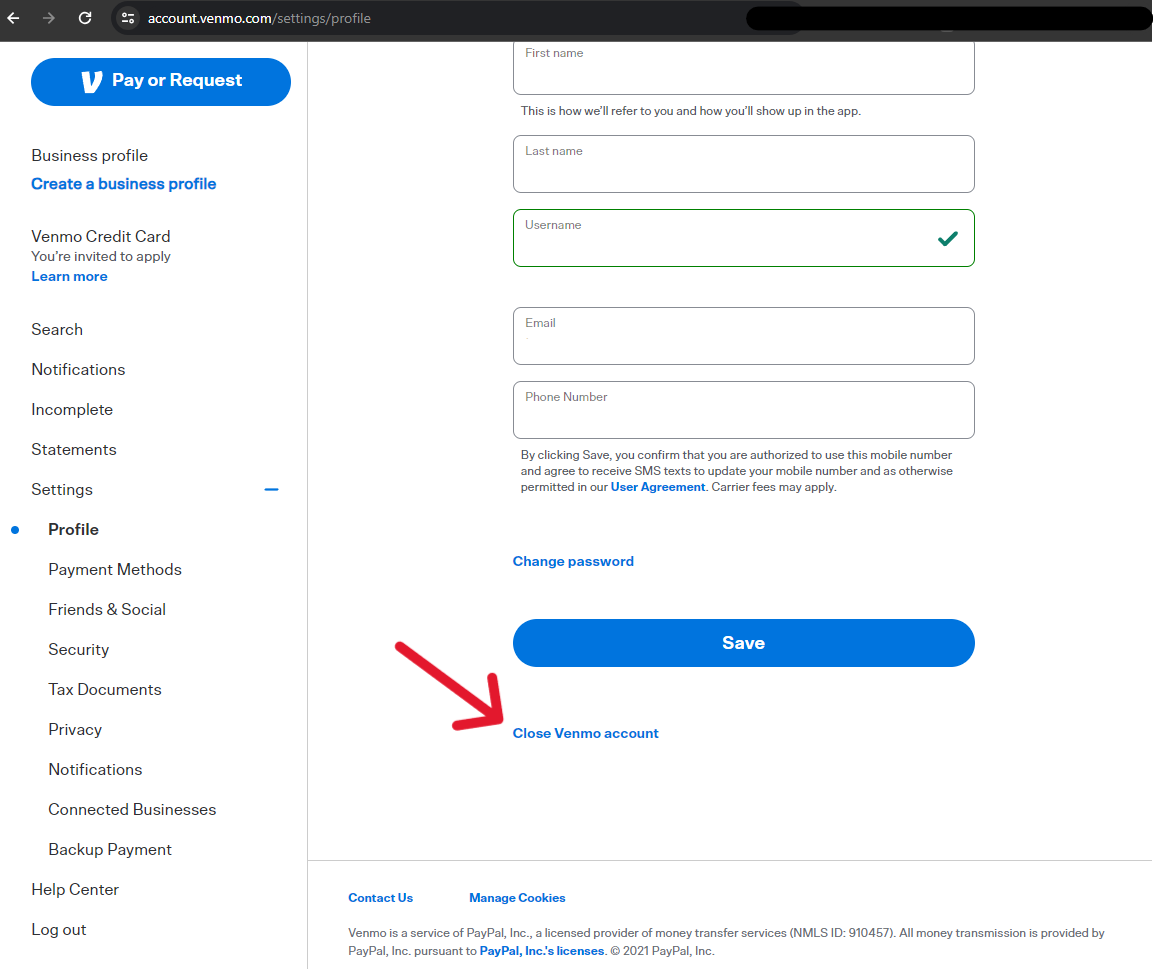
- Go to venmo.com and log in with your credentials.
- Click on “Settings” in the top-right corner of the page (often under your profile name).
Locating the “Close Account” Option
Within the settings menu, you’ll need to find the specific option for account closure. This might be labelled slightly differently depending on Venmo’s UI updates, but generally, it’s under privacy or account management.
- In Settings: Look for sections like “Account,” “Privacy,” or “Security.”
- Specific Link: You might find a direct link like “Close my Venmo account,” “Deactivate account,” or “Delete account” within one of these sections. Venmo often places this option towards the bottom of the page or within a “Help” or “Support” subsection.
Confirmation and Verification
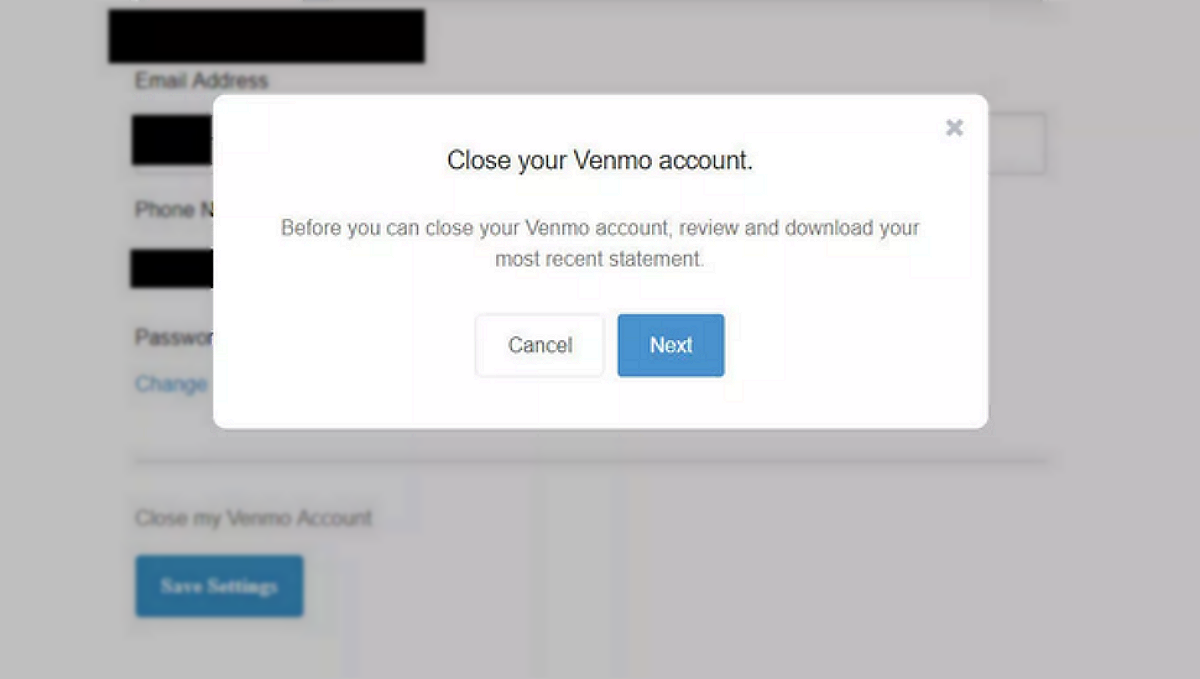
Once you click the “Close Account” option, Venmo will typically prompt you for confirmation and may require additional verification to ensure it’s truly you initiating the closure.
- Warnings and Prompts: Venmo will display warnings about what happens when you close your account (e.g., loss of transaction history, inability to use the service). Read these carefully.
- Password/PIN/SMS Verification: You may be asked to re-enter your password, confirm a PIN, or verify your identity via a code sent to your registered phone number or email address. This is a crucial digital security step to prevent unauthorized account closure.
- Final Confirmation: After verification, you’ll usually be asked for a final confirmation, possibly with a reason for closure (which is often optional data collection for Venmo).
Dealing with Support (If Necessary)
In some cases, you might encounter issues preventing self-service closure.
- Account Holds/Flags: If your account has any holds, flags, or ongoing issues, the self-service option might not be available.
- Small Residual Balance: If you have a few cents remaining that you can’t transfer, Venmo’s system might block closure.
- Technical Glitches: Occasionally, technical issues can impede the process.
In these scenarios, it’s essential to contact Venmo Customer Support. Be prepared to provide your account details and explain the issue clearly. They can often manually resolve the problem or guide you through an alternative closure process. Accessing support is usually done via the “Help” or “Contact Us” section within the app or on the website.
What Happens After You Close Your Venmo Account?
Understanding the aftermath of closing your Venmo account is crucial for managing your digital footprint and expectations. The process isn’t just about clicking a button; it has lasting implications.
Immediate Effects
The moment your Venmo account is successfully closed, several immediate changes occur:
- Loss of Access: You will immediately lose access to your Venmo account. You will no longer be able to log in, send or receive money, or view your past transactions through the app or website.
- Deactivation of Payment Profile: Your Venmo payment profile will be deactivated, making it impossible for others to send you money via your Venmo username, phone number, or email associated with that account.
- Severed Connections: All linked bank accounts and cards, even if not manually unlinked prior, should be disconnected by Venmo as part of the closure process. However, performing this step manually beforehand offers an extra layer of digital security assurance.
Data Retention and Legal Obligations
While your account is closed, it doesn’t necessarily mean all your data is instantly erased from Venmo’s servers. This is a critical aspect of digital privacy and data retention policies common across tech platforms.
- Regulatory Compliance: Venmo, as a financial service provider, is subject to various legal and regulatory requirements (e.g., anti-money laundering, fraud prevention, tax reporting). These laws often mandate that companies retain certain customer data for a specified period, even after an account is closed.
- Fraud Prevention: Retaining some data helps Venmo identify and prevent fraud if someone attempts to open a new account using previously associated details or to investigate past fraudulent activities.
- Data Anonymization/Pseudonymization: While some data is retained, it might be anonymized or pseudonymized where possible to protect your identity while still serving regulatory or analytical purposes.
- Privacy Policies: It’s always advisable to review Venmo’s current Privacy Policy, which outlines their data retention practices in detail. This transparency is a key element of responsible tech governance.

Reopening an Account (If Possible)
The ability to reopen a closed Venmo account can vary.
- Reactivation: In some cases, if an account was only recently closed, Venmo might allow you to reactivate it by contacting customer support. This usually involves identity verification.
- New Account Creation: If reactivation isn’t an option, or if a significant amount of time has passed, you might need to create an entirely new Venmo account. However, using the same email address, phone number, or bank accounts might trigger internal flags due to the previous account’s closure. Venmo’s systems are designed to detect potential fraud or policy violations. You might be asked to provide additional documentation or use different details for a new account. Be prepared for potential friction if you plan to rejoin the platform using previously registered information.
Closing your Venmo account is a deliberate act of digital self-management. It’s more than just deleting an app; it’s a systematic process to manage your financial data, reduce your digital footprint, and ensure a clean break from a service you no longer need. By following these tech-centric guidelines, you can navigate the offboarding process with confidence, securing your information and maintaining control over your digital life. Responsible digital citizenship demands vigilance, and knowing how to properly disconnect from online services is a fundamental skill in today’s interconnected world.
aViewFromTheCave is a participant in the Amazon Services LLC Associates Program, an affiliate advertising program designed to provide a means for sites to earn advertising fees by advertising and linking to Amazon.com. Amazon, the Amazon logo, AmazonSupply, and the AmazonSupply logo are trademarks of Amazon.com, Inc. or its affiliates. As an Amazon Associate we earn affiliate commissions from qualifying purchases.