
In the modern digital landscape, the management of one’s “digital footprint” has become as critical as physical security. PayPal, as one of the pioneers of the fintech revolution, has facilitated trillions of dollars in transactions over the decades. However, as users migrate toward decentralized finance (DeFi), alternative payment gateways, or more integrated banking apps, the need to decommission old accounts arises. Closing a PayPal account is not merely a matter of clicking a button; it is a technical process that involves data management, security protocols, and the termination of digital API permissions.
This guide provides a comprehensive technical walkthrough on how to properly close a PayPal account while ensuring your digital security and data integrity remain intact.
1. Pre-Closure Technical Audit: Securing Your Data
Before initiating the deletion protocol, it is essential to perform a thorough audit of the account. Because PayPal functions as a centralized hub for many third-party integrations, simply closing the account without preparation can lead to “broken” digital workflows or lost financial records.
Exporting Transactional Metadata
From a technical standpoint, your transaction history is a vital dataset. Once an account is closed, PayPal’s interface is no longer accessible, and retrieving history via customer support can be a bureaucratic challenge.
- The CSV/Quicken Method: Navigate to the ‘Activity’ tab and use the ‘Download’ tool. It is recommended to export at least three years of data in .CSV or .TAB formats. This ensures that you have a portable, machine-readable record of your financial digital footprint for tax or auditing purposes.
Revoking API Permissions and Third-Party Integrations
One of the most overlooked aspects of PayPal is its role as a “login” or “payment” middleware. Many apps (like Spotify, Uber, or various SaaS tools) use PayPal’s Billing Agreements or Reference Transactions.
- Automatic Payments: You must manually navigate to ‘Settings’ > ‘Payments’ > ‘Manage Automatic Payments.’ If you close the account while these are active, the third-party software may trigger a “failed payment” status, potentially locking you out of those services or negatively impacting your service tier.
- Permissions Gallery: Check the ‘Security’ tab for ‘Permissions you’ve given.’ This lists apps that have access to your PayPal data via OAuth tokens. Revoking these before closure ensures that no “ghost” requests are sent to a defunct account.
Clearing the Ledger
PayPal’s system will reject a closure request if there is a non-zero balance.
- Residual Balances: Even a balance of $0.01 will halt the process. Technically, this requires a final “sweep” to a linked bank account.
- Pending Requests: Ensure all “Authorization Holds” or pending transfers have been cleared. In the fintech backend, a pending transaction creates a temporary lock on the account database entry, making it impossible to flag the account for deletion.
2. The Step-by-Step Deletion Protocol
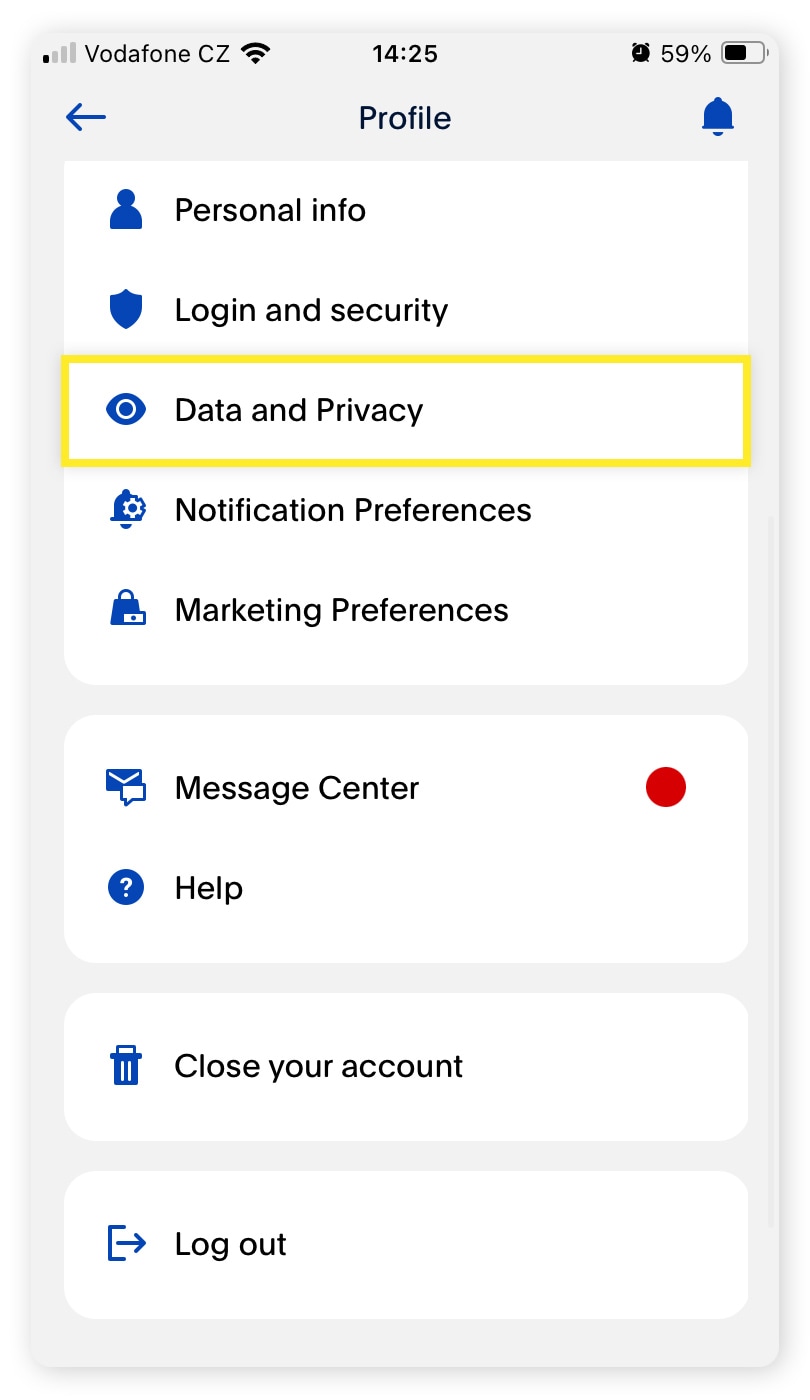
The actual process of closing the account varies slightly between the web interface and the mobile application, though the web interface is recommended for a more stable technical execution.
Navigating the User Interface (UI)
- Authentication: Log in via a secure, non-public network. Ensure your Multi-Factor Authentication (MFA) is active, as PayPal may require a final identity verification before allowing the deletion of the security profile.
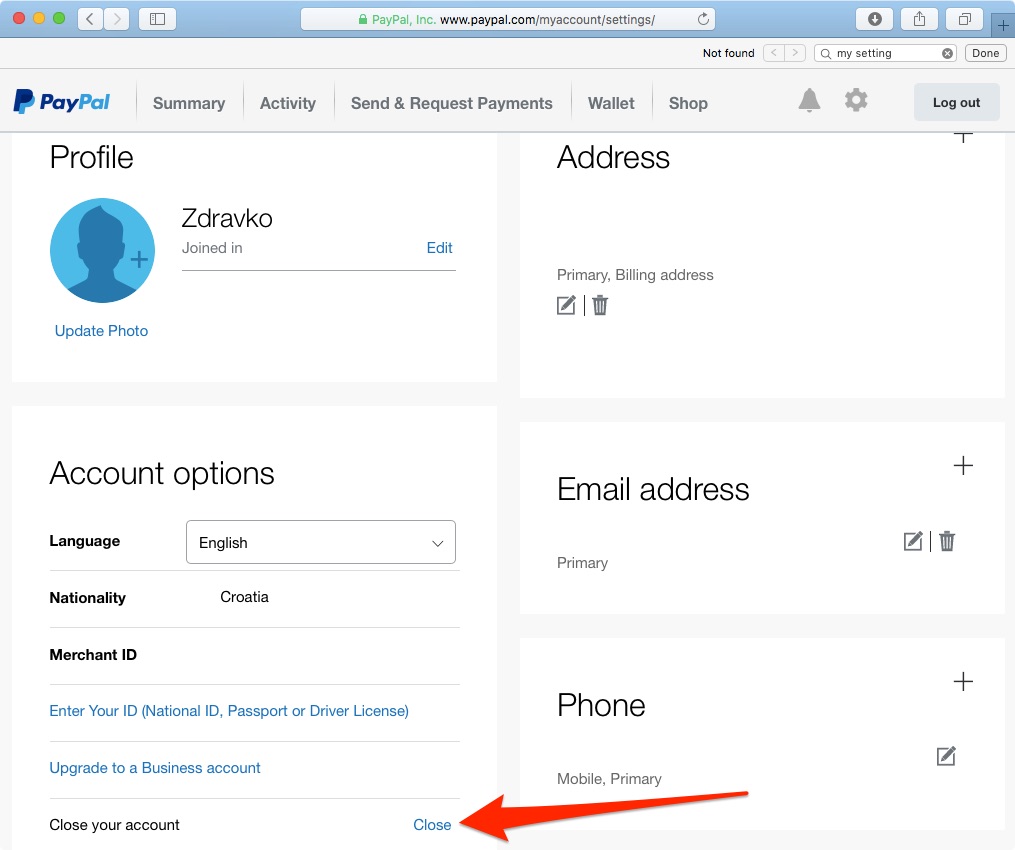
- Account Settings: Click the ‘Settings’ (gear icon) in the top right.
- Account Options: Under the ‘Account’ tab, scroll to the bottom of the “Account Options” section.
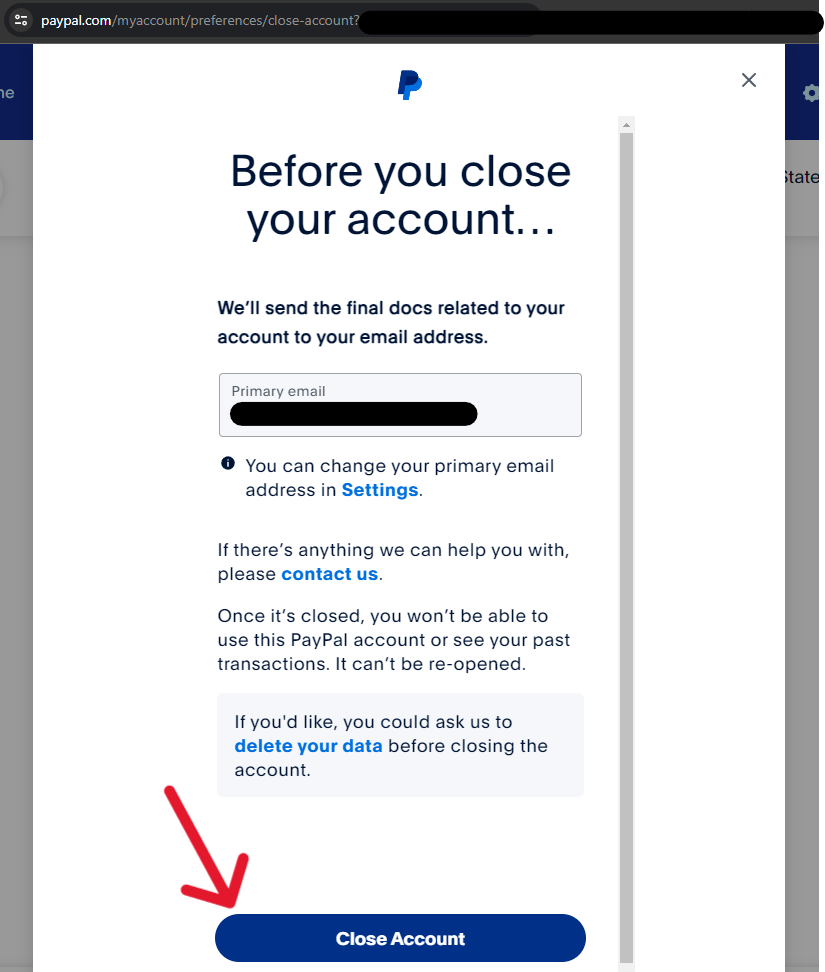
- The “Close Your Account” Command: Click the ‘Close your account’ link.
Mobile vs. Desktop Technical Nuances
While the PayPal app is robust, certain legacy account types or business profiles may find the ‘Close Account’ option hidden or redirected to a browser view. The desktop version provides a more comprehensive view of the “Terms of Service” and the final confirmation dialogues that are sometimes truncated in mobile UI/UX designs.
Handling “Limited” or “Flagged” Accounts
From a software architecture perspective, an account with a “Limitation” status is effectively “Read-Only.” If PayPal’s security algorithms have flagged your account for suspicious activity or unverified documentation, the ‘Close Account’ button will often be greyed out or return an error code. To resolve this, you must first satisfy the technical requirements of the ‘Resolution Center,’ providing the necessary KYC (Know Your Customer) data to return the account to a “Normal” state before closure is permitted.
3. Digital Security and Data Retention Policies
When you click “Close Account,” what actually happens to your data? Understanding the backend implications of this action is crucial for those concerned with digital privacy.
The “Right to be Forgotten” vs. Financial Regulations
In many jurisdictions, the GDPR (General Data Protection Regulation) or CCPA (California Consumer Rights Act) provides users the right to have their data deleted. However, PayPal is a regulated financial institution.
- Data Archiving: Legally, PayPal is required to retain certain transactional data for 7 to 10 years to comply with Anti-Money Laundering (AML) and Counter-Terrorist Financing (CTF) laws.
- What is Deleted: Your active login credentials, your ability to receive payments, and your public-facing profile (PayPal.me) are purged from the active directory. Your encrypted “vaulted” credit card numbers are also typically de-indexed.
Preventing Identity Spoofing
Closing an account is a security best practice if the account is no longer in use. An idle account is a prime target for “credential stuffing” attacks. By closing the account, you remove a potential entry point into your financial ecosystem. It is technically safer to have no account than an unmonitored one with linked bank accounts and legacy passwords.
The Problem of Re-registration
From a technical standpoint, once an account is closed, the email address associated with it may remain “burned” in PayPal’s system for a cooling-off period. If you attempt to open a new account using the same email immediately, the system’s deduplication logic might flag it. If you plan to restart your digital payment journey, consider using a unique email alias to avoid conflict with archived records.
4. Troubleshooting Technical Roadblocks
Many users encounter errors when trying to finalize their account closure. These are rarely random glitches; they are usually the result of unresolved logic loops in the account’s state.
Unresolved Disputes and Chargebacks
If you have an open dispute in the Resolution Center—either as a buyer or a seller—the database record for your account is “locked” to prevent the loss of evidence. Technically, a closure during a dispute would break the chain of custody for the financial data required to settle the claim. You must wait for the “Dispute Closed” status before the account deletion script can execute successfully.
Business Account Complexity
For those using PayPal for Business, the closure process is more rigorous.
- Secondary Users: If you have granted “Multi-User Access” to employees or developers via API keys, these sub-accounts must be managed. The “Root” account cannot be closed while “Child” permissions are active in certain legacy configurations.
- PayPal Zettle and Shipping: Ensure all technical hardware integrations (like Zettle Point-of-Sale) are de-linked and any pending shipping labels are processed.
Clearing Browser Cache and Cookies
Sometimes, the “Close Account” button appears to do nothing. This is often a front-end cache issue. PayPal’s site uses heavy Javascript and session tokens; if a token is stale, the final POST request to close the account will fail.
- Technical Fix: Clear your browser’s cache, or perform the action in an “Incognito” or “Private” window to ensure a clean session state.
5. Post-Deletion: Managing the Aftermath
Once the account is successfully closed, there is a final phase of digital “cleanup” to ensure your software ecosystem remains optimized.
Removing the PayPal “Artifacts”
- Browser Auto-fill: Modern browsers (Chrome, Safari, Firefox) often save PayPal login details. Manually delete these from your password manager to prevent “Ghost Logins” where the browser attempts to authenticate with a non-existent account.
- App Deletion: Delete the PayPal app from all mobile devices. This clears the local “sandbox” data and cache that the app stored on your hardware.
Transitioning to New Financial Tech
After offboarding from PayPal, you might look toward more modern tech stacks. Whether you are moving to Apple Pay’s integrated biometric ecosystem, or using hardware wallets for cryptocurrency, the goal remains the same: minimizing the number of third-party platforms that hold your sensitive financial metadata.
In conclusion, closing a PayPal account is a sophisticated technical exercise in digital hygiene. By methodically exporting data, revoking API permissions, and understanding the underlying data retention policies, you can ensure that your exit from the platform is secure, permanent, and leaves no loose ends in your digital life. Staying informed about how these platforms handle your data is the first step toward true digital sovereignty.
aViewFromTheCave is a participant in the Amazon Services LLC Associates Program, an affiliate advertising program designed to provide a means for sites to earn advertising fees by advertising and linking to Amazon.com. Amazon, the Amazon logo, AmazonSupply, and the AmazonSupply logo are trademarks of Amazon.com, Inc. or its affiliates. As an Amazon Associate we earn affiliate commissions from qualifying purchases.