
The Digital Frontier of Spirit Airlines Check-In: An Overview
In an increasingly digitized travel landscape, airlines like Spirit have streamlined their check-in processes by leveraging a suite of technological solutions designed for efficiency and passenger convenience. Gone are the days when airport counter check-in was the sole recourse; today, travelers are empowered with multiple digital avenues to secure their boarding passes and manage their travel details. Understanding these technology-driven options is crucial for a smooth and stress-free journey, particularly with an airline known for its focus on a lean, cost-effective model that often encourages self-service. The core objective is to minimize physical queues and enhance the speed of airport operations through robust online platforms, intuitive mobile applications, and advanced self-service kiosks.

Embracing Online Check-In: Convenience at Your Fingertips
Online check-in stands as the cornerstone of modern air travel preparation, offering passengers the flexibility to complete necessary procedures from virtually anywhere with an internet connection. Spirit Airlines’ online check-in system, accessible via their official website, is a testament to this digital transformation. This platform is meticulously engineered to guide users through the process of confirming their flight, verifying passenger details, adding ancillary services (like bags or seat assignments), and finally, generating a digital or printable boarding pass. The technology behind this system ensures real-time updates, secure data transmission, and integration with the airline’s reservation database. Its primary advantage lies in saving valuable time at the airport, allowing passengers to bypass lengthy counter queues, especially if they are traveling without checked luggage. The availability of online check-in typically opens 24 hours prior to the scheduled departure, extending up to 60 minutes before the flight, providing a generous window for passengers to manage their check-in responsibilities. This digital convenience is particularly beneficial for tech-savvy travelers who prefer to handle their pre-flight logistics independently.
The Power of the Spirit Airlines Mobile App
Complementing the web-based check-in is the Spirit Airlines mobile application, a powerful tool designed to bring the entire travel experience into the palm of the passenger’s hand. Available for both iOS and Android devices, this app exemplifies mobile-first design principles, offering a user-friendly interface optimized for smartphone and tablet screens. Beyond merely checking in, the app provides a comprehensive suite of functionalities: booking flights, managing existing reservations, tracking flight status, receiving real-time notifications, and accessing digital boarding passes. The check-in process within the app mirrors the website’s efficiency but adds the convenience of persistent login and seamless integration with device features, such as Apple Wallet or Google Pay for boarding pass storage. The app leverages push notification technology to alert passengers about check-in windows, gate changes, and flight delays, making it an invaluable digital companion for any Spirit traveler. Its ability to store travel documents and preferences securely also streamlines future interactions, building a personalized and efficient travel ecosystem for repeat users.
Step-by-Step Guide to Online and App Check-In
Navigating the digital check-in process for Spirit Airlines is designed to be intuitive, whether you prefer a desktop browser or a mobile device. Both methods leverage secure web technologies and user experience design principles to guide you through each necessary step, ensuring your readiness for departure.
Navigating the Spirit Airlines Website for Check-In
To initiate online check-in through the Spirit Airlines website, passengers should access www.spirit.com from a web browser. The process typically begins 24 hours before the flight’s scheduled departure and closes 60 minutes prior.
- Access the “Check-In” Section: On the homepage, locate the “Check-In” tab, usually prominent in the main navigation menu. Clicking this will direct you to the check-in portal.
- Enter Flight Information: You will be prompted to enter your Last Name and Confirmation Code (a six-character alphanumeric code provided at the time of booking). Alternatively, some systems allow check-in using the email address associated with the booking or by entering the origin and destination airports and flight number. The system validates this information against the reservation database.
- Verify Passenger Details: Once your reservation is retrieved, the system will display your flight details and passenger information. This is a critical step to ensure all names, dates, and flight segments are correct. You may be asked to confirm your identity or enter additional Secure Flight Passenger Data (SFPD) if not already provided.
- Add Ancillary Services (Optional): This stage presents an opportunity to add or modify extras such as checked bags, carry-on bags (Spirit charges for both unless specified otherwise by fare class), seat assignments, or even purchase priority boarding. The platform clearly displays pricing for each option, allowing for transparent decision-making. These selections are dynamically integrated into your booking.
- Acknowledge Hazardous Materials Declaration: All airlines require passengers to acknowledge a declaration regarding hazardous materials. This is usually a simple checkbox confirmation, vital for compliance with aviation safety regulations.
- Receive Boarding Pass: Upon successful completion of all steps, your boarding pass will be generated. You will typically have options to:
- Print: Generate a PDF version for printing at home.
- Email: Send the boarding pass to your email address for digital access.
- Mobile Pass: Send it to your phone via SMS or an airline-specific link for digital wallet integration.
This digital artifact contains a unique QR or barcode, your flight information, gate number, and boarding group, serving as your official permission to board the aircraft.
Seamless Check-In via the Spirit Mobile App
The Spirit Airlines mobile app offers an equally robust and often more streamlined check-in experience, especially for frequent travelers.
- Download and Open the App: Ensure you have the latest version of the Spirit Airlines app installed on your smartphone (available on Apple App Store and Google Play Store).
- Log In or Retrieve Reservation: If you have a Spirit account, log in. Otherwise, you can retrieve your reservation by entering your Last Name and Confirmation Code, similar to the website process. The app often retains your login details for future convenience.
- Select Your Flight: From your list of upcoming trips, select the flight for which you wish to check in. The app will indicate which flights are within the check-in window.
- Follow On-Screen Prompts: The app will guide you through the same sequence as the website: verifying passenger details, offering ancillary services (with dynamic pricing), and confirming the hazardous materials declaration. The interface is optimized for touch interaction, making selections quick and intuitive.
- Generate and Store Mobile Boarding Pass: Once check-in is complete, the app will generate a mobile boarding pass. A key feature here is the ability to save this pass directly to your device’s digital wallet (e.g., Apple Wallet, Google Pay). This allows for quick access at security checkpoints and boarding gates without needing an internet connection once saved. The app also allows for easy sharing of the boarding pass via email or messaging applications if needed.
The mobile app’s push notification functionality can also remind you when your check-in window opens, reducing the chance of missing the deadline.
Kiosk Check-In: A Blend of Digital and Physical
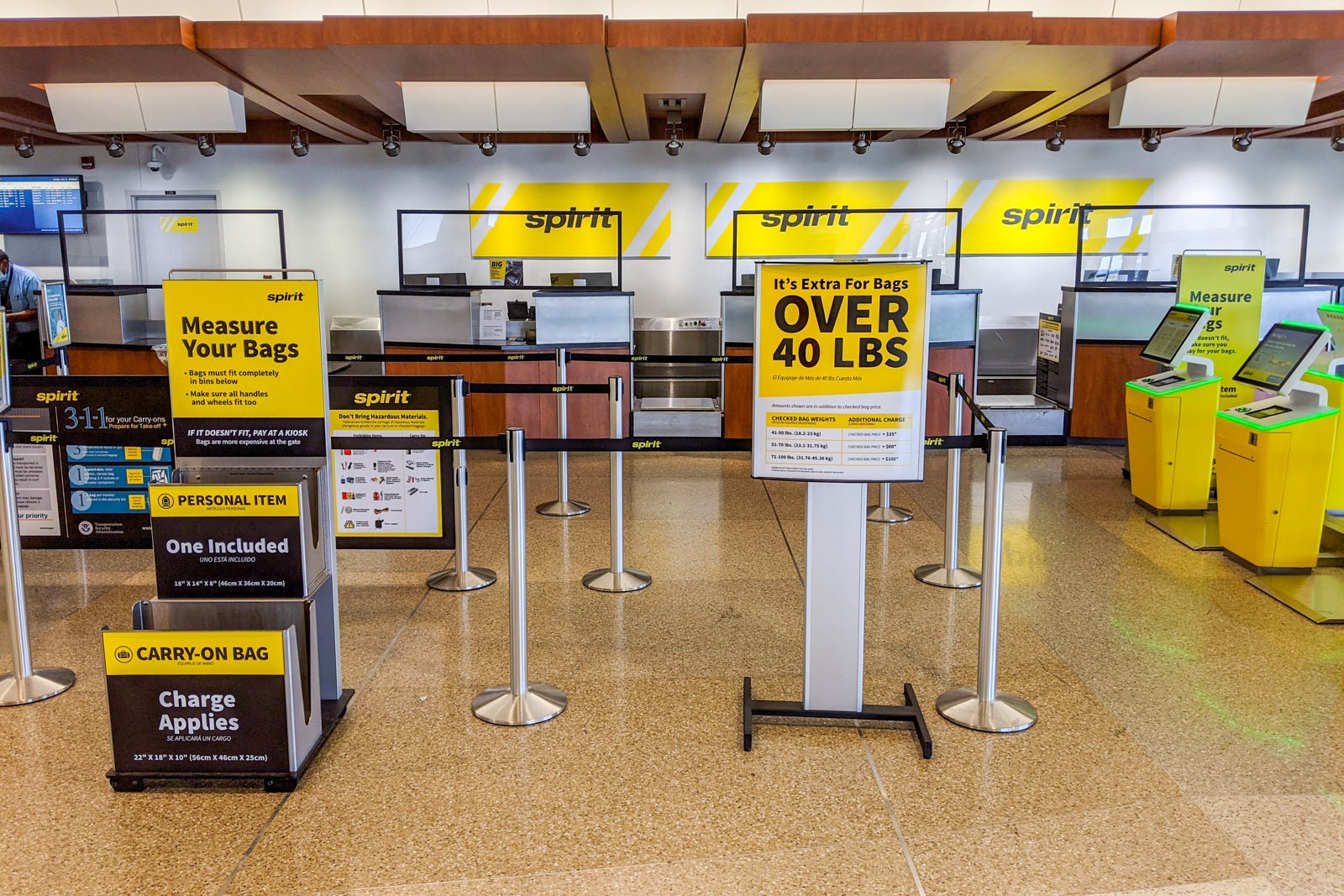
While online and mobile app check-in offer unparalleled convenience, sometimes circumstances necessitate a different approach, or travelers simply prefer a physical touchpoint. Spirit Airlines provides self-service kiosks at most airport locations, offering a hybrid digital-physical solution for passengers. These kiosks represent a sophisticated integration of hardware and software, designed to mimic the online check-in experience in a public, accessible format.
Understanding Self-Service Kiosks at the Airport
Spirit’s airport kiosks are interactive touch-screen terminals equipped with card readers, passport scanners, and boarding pass printers. They serve as a vital technological bridge for passengers who might not have completed online check-in, need to print a boarding pass, or require assistance with checked baggage.
- Locating a Kiosk: Upon arrival at the airport, head to the Spirit Airlines check-in area. You’ll find a bank of self-service kiosks typically located near the airline’s bag drop counters.
- Initiating Check-In: To begin, you can identify your reservation using several methods:
- Swipe a Credit Card: The system reads your name from the card to retrieve bookings associated with it. This is a common and quick method.
- Enter Confirmation Code: Manually type in your six-character alphanumeric confirmation code.
- Scan Passport or Driver’s License: Some advanced kiosks can scan identification documents to pull up your reservation.
- Enter Flight Number/Destination: Less common, but some systems allow identifying by flight specifics.
- Following On-Screen Instructions: The kiosk interface will guide you through a series of prompts, similar to the online and app processes. You will:
- Confirm flight details and passenger names.
- Declare hazardous materials.
- Add or pay for checked/carry-on bags. This is where kiosks are particularly useful, as they allow for payment on the spot and often print bag tags directly. Spirit Airlines strongly encourages passengers to print their own bag tags at kiosks to avoid higher fees at the counter.
- Select or change seats (if available and not already assigned).
- Printing Boarding Pass and Bag Tags: Once all steps are completed and payments (if any) are processed, the kiosk will print your boarding pass(es) and, if applicable, your bag tag(s). These tags must be affixed to your luggage before proceeding to the bag drop counter. The thermal printing technology ensures quick, legible output.
Kiosks are typically available from four hours to 60 minutes before departure for domestic flights, and up to two hours for international flights. They offer a robust alternative, particularly for those with checked luggage, blending the speed of self-service with the tangible output of a physical boarding pass and bag tag.
Essential Digital Tools and Security Considerations
Navigating the Spirit Airlines check-in process, whether online, via app, or at a kiosk, relies heavily on digital tools and an understanding of secure data handling. Adopting best practices in preparing your information and protecting your digital footprint is paramount for a seamless and secure travel experience.
Pre-Check-In Preparations: Data and Documents
Before embarking on any digital check-in process, adequate preparation of your digital and physical documents is key. The smooth operation of these tech systems is contingent on accurate and accessible data.
- Confirmation Code Accessibility: Ensure your six-character alphanumeric confirmation code is readily available. This is the primary key to accessing your reservation across all check-in platforms. Keeping it saved in a secure note on your phone, an email, or a printed itinerary is advisable.
- Personal Identification Verification: Have the exact spelling of your name (as it appears on your government-issued ID), date of birth, and any known traveler numbers (e.g., TSA PreCheck, Global Entry) accurately entered into your reservation. Discrepancies can flag security alerts and complicate check-in. Cross-reference your booking details with your passport or driver’s license well in advance.
- Payment Information: If you anticipate purchasing ancillary services (bags, seats) during check-in, have your credit/debit card details ready. For online and app transactions, secure internet connections are vital. If using a kiosk, ensure you have a physical card.
- Travel Itinerary Review: Double-check your flight dates, times, and destinations. Mistakes in these details can lead to significant issues during check-in, and online systems typically only allow modifications within certain parameters or incur change fees.
- Device Readiness: For app check-in, ensure your smartphone is charged and has a stable internet connection. For online check-in, use a reliable computer and browser. Regularly update the Spirit Airlines app to benefit from the latest features and security patches.

Digital Security Best Practices for Air Travel
Engaging with digital check-in tools involves transmitting personal and payment information over networks. Adhering to digital security best practices safeguards your data from potential threats.
- Use Secure Networks: When checking in online or via the app, always use a private, secure Wi-Fi network or your mobile data. Avoid public, unsecured Wi-Fi hotspots for sensitive transactions, as they are more susceptible to eavesdropping.
- Strong Passwords and Two-Factor Authentication (2FA): If you create an account with Spirit Airlines or any travel service, use a strong, unique password. Enable two-factor authentication (if available) for an added layer of security, which typically involves a code sent to your phone or email.
- Verify Website Authenticity: Always ensure you are on the official Spirit Airlines website (www.spirit.com) before entering any personal information. Phishing sites can mimic legitimate ones to steal data. Look for the “https://” prefix and a padlock icon in your browser’s address bar.
- Be Wary of Phishing Emails/SMS: Do not click on suspicious links in emails or text messages claiming to be from Spirit Airlines, especially if they ask for personal or payment information. Always go directly to the official website or app.
- Review Bank Statements: After purchasing ancillary services online, review your bank or credit card statements for any unauthorized charges. Report discrepancies immediately.
- Secure Your Mobile Device: Keep your smartphone password-protected and enable remote wipe features in case of loss or theft. Your mobile boarding pass often contains personal information that could be exploited.
- Print and Dispose Safely: If printing a physical boarding pass at home or a kiosk, ensure you dispose of it securely after your journey, as it contains your name, booking reference, and sometimes frequent flyer numbers, which could be used for social engineering attacks.
By understanding the technological underpinnings of Spirit’s check-in systems and adopting rigorous digital security habits, travelers can efficiently navigate the pre-flight process, ensuring a smooth transition from booking to boarding.