
In an era increasingly defined by digital convenience and efficiency, the process of air travel has undergone a profound transformation. Gone are the days when a mandatory trip to the airport counter was the sole gateway to your flight. Today, technology empowers travelers with the ability to manage virtually every aspect of their journey from the palm of their hand or the comfort of their home. American Airlines, like many industry leaders, has embraced this digital revolution, offering robust online check-in services designed to streamline the pre-flight experience. This guide delves into the technical intricacies and user experience of checking in online with American Airlines, positioning it not merely as a convenience, but as an essential digital skill for the modern traveler. From understanding the underlying software platforms to navigating user interfaces and leveraging integrated digital tools, mastering online check-in is key to unlocking a smoother, more controlled, and ultimately more enjoyable travel experience.
The Digital Gateway to Your Journey: Understanding Online Check-In
The concept of online check-in is fundamentally a technological solution to a traditional logistical challenge. It represents a paradigm shift from physical interaction to digital self-service, leveraging web-based platforms and mobile applications to empower passengers. For American Airlines, this means providing travelers with the software and infrastructure to confirm their presence on a flight, select seats, and receive a boarding pass, all without ever stepping foot inside the terminal building until security screening.
What is Online Check-In? (Beyond the Physical Counter)
At its core, online check-in is a web-based application or mobile app feature that allows passengers to register their boarding intention before arriving at the airport. Functionally, it replicates the initial stages of the airport counter experience digitally. Instead of a human agent verifying your identity and flight details, the American Airlines system performs these checks automatically through its backend database when you input your booking reference and last name. This digital verification then triggers the generation of a boarding pass, which can be presented electronically on a mobile device or printed. It’s a testament to the power of digital automation, reducing manual processes and decentralizing what was once a bottleneck at the airport.
Why Embrace Digital Check-In? (Efficiency, Paperless, Flexibility)
The advantages of embracing online check-in are deeply rooted in the efficiencies afforded by technology. Firstly, time savings are paramount. By completing the check-in process remotely, travelers bypass potentially long queues at the airport, dedicating more time to other pre-flight activities or simply arriving later at the terminal. Secondly, the paperless aspect is a significant environmental and practical benefit. Digital boarding passes stored on smartphones reduce reliance on printed documents, making travel more sustainable and reducing the risk of misplacing critical papers. Your smartphone becomes your single point of access for flight information, boarding passes, and even gate changes.
Furthermore, online check-in offers unparalleled flexibility. It allows passengers to make last-minute seat changes, update frequent flyer information, or add baggage details from any internet-connected device. This control over one’s journey, facilitated by accessible digital interfaces, significantly enhances the overall travel experience, granting peace of mind and reducing pre-flight stress. It also provides an early opportunity to confirm flight status and any potential disruptions, allowing for proactive planning.
Eligibility and Timing (When and Who Can Use It – Technical Limitations)
While widely available, online check-in isn’t universally applicable at all times or for all travelers, often due to specific technical or regulatory constraints. For American Airlines, online check-in typically opens 24 hours before the scheduled departure time and closes 45 minutes prior for domestic flights (or 90 minutes for international flights). This window is critical for the airline’s operational systems to finalize passenger manifests and baggage logistics.
Eligibility is usually straightforward for most domestic and international flights. However, certain scenarios might require a traditional airport check-in due to regulatory requirements or system limitations. These include:
- Passengers traveling with infants (especially those requiring a lap infant ticket).
- Unaccompanied minors.
- Passengers requiring special assistance that necessitates face-to-face verification (e.g., specific medical equipment, certain pet travel).
- Flights requiring visa checks at the airport for specific international destinations where automated systems cannot perform the necessary verification.
- Flights departing from airports that lack the necessary technological infrastructure for digital boarding pass scanning.
- Passengers whose booking includes specific complex itineraries or third-party codeshares that might not fully integrate with American Airlines’ online system.
Understanding these parameters, driven by a blend of governmental regulations and the limitations or complexities of integrated airline IT systems, is crucial for a seamless digital check-in experience.
Step-by-Step Digital Walkthrough: Checking In via American Airlines Platforms
The beauty of American Airlines’ online check-in system lies in its dual accessibility: a feature-rich website optimized for desktop use and a highly intuitive mobile application. Both platforms are designed with user experience in mind, ensuring a smooth digital journey from initial access to boarding pass acquisition.
Navigating the American Airlines Website (Desktop/Laptop Interface)
For many, the American Airlines website remains the go-to platform for flight management. The interface is robust and designed to be accessible across various web browsers.
- Locating the “Check-In” Section: Start by visiting
AA.com. On the homepage, prominently displayed, you’ll find a “Check-In” tab or button, typically near the top navigation or within a “My Trips” or “Manage Trip” section. - Entering Details (PNR, Name): Clicking “Check-In” will prompt you to enter your Record Locator (PNR – a 6-character alphanumeric code) and your last name. These are the primary digital keys to access your booking within the airline’s reservation system.
- Confirming Flight and Passenger Information: Once your booking is retrieved, the system will display your flight details. You’ll be asked to confirm the names of all passengers in your party. This is a crucial step for data integrity, ensuring the correct individuals are checked in.
- Selecting/Changing Seats: The system will then present a seat map. If you haven’t pre-selected seats, or wish to change them, this is your opportunity. Available seats will be displayed, sometimes with associated fees for preferred locations. The dynamic nature of the seat map allows for real-time updates as other passengers make selections.
- Adding Baggage Information (If Applicable): If you plan to check luggage, the system will often allow you to declare the number of bags and, in some cases, pre-pay baggage fees. This digital declaration helps streamline the bag drop process at the airport.
- Review and Finalize: A summary screen will appear, allowing you one last chance to review all details before finalizing.
- Obtaining Boarding Pass (Digital vs. Print): Upon successful check-in, you’ll be presented with your boarding pass. Options typically include:
- Emailing it to yourself: A PDF or link will be sent.
- Printing directly: If you have a printer connected.
- Sending it to your phone: As a mobile boarding pass link or direct integration into Apple Wallet/Google Pay.
The website’s architecture ensures a logical flow, guiding users through each step with clear prompts, making the process intuitive even for those less technologically inclined.
Utilizing the American Airlines Mobile App (Smartphone/Tablet Experience)
The American Airlines mobile app (available on iOS and Android) offers an even more integrated and convenient check-in experience, leveraging the unique capabilities of smartphones.
- App Download and Login: First, download the “American Airlines” app from your respective app store. Log in with your AAdvantage credentials or access your trip directly using your Record Locator.
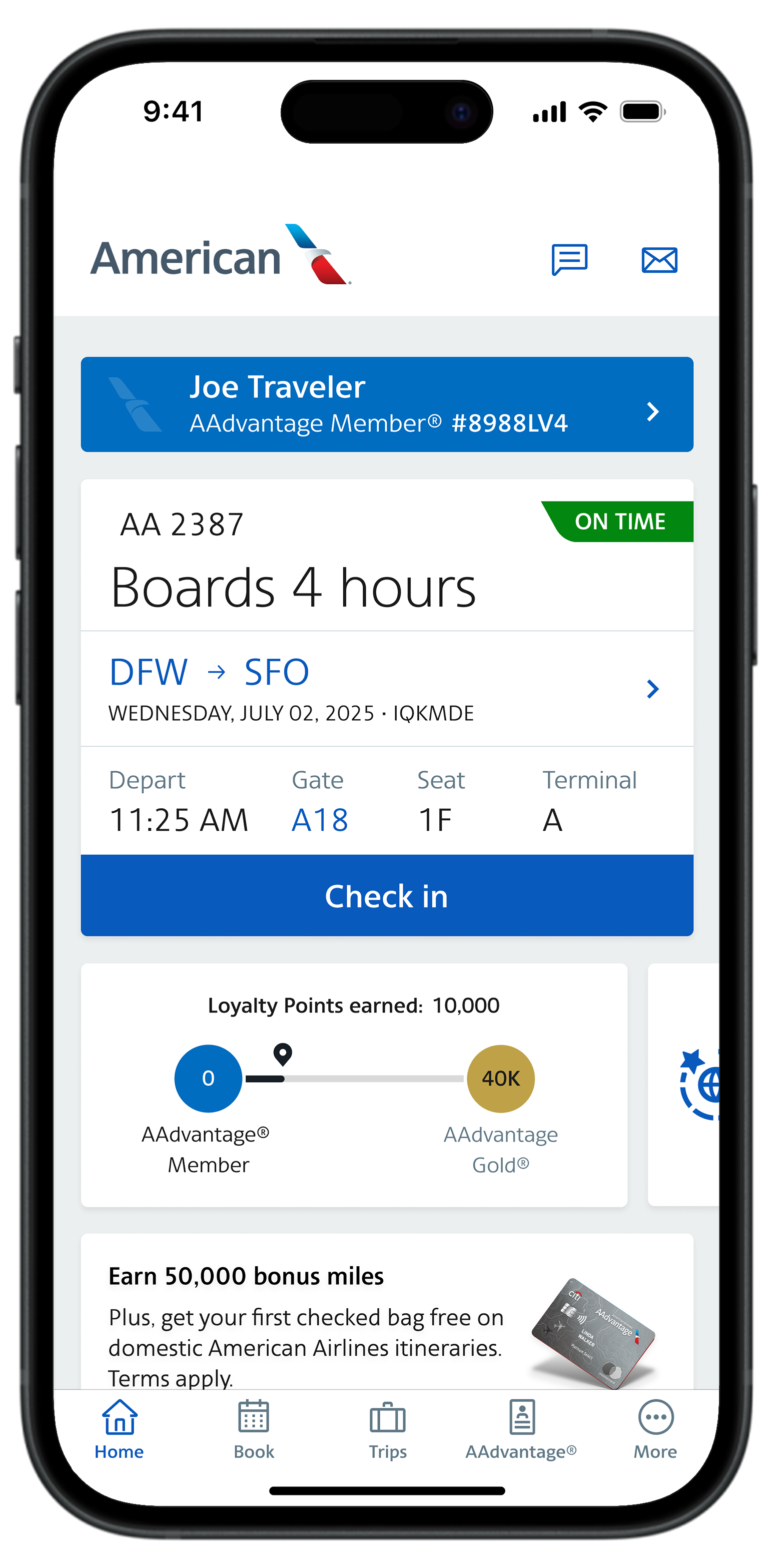
- Intuitive Interface for Check-In: The app’s home screen often prominently displays upcoming trips, with a clear “Check-In” button appearing within the 24-hour window. The interface is designed for touch interaction, making selection and confirmation quick and easy.
- Streamlined Process: The app generally mirrors the website’s check-in flow but often feels more fluid. Passenger details are pre-populated if you’re logged in, and seat selection is typically a visually engaging process on a smaller screen.
- Mobile Boarding Pass Features (Apple Wallet/Google Pay Integration): This is where the app truly shines. After checking in, your boarding pass is instantly available within the app. Crucially, you can usually add it directly to your phone’s native wallet application (Apple Wallet for iOS, Google Pay for Android). This creates a highly accessible and secure digital boarding pass that can be scanned at security and the gate, often without needing an internet connection once saved. The wallet integration also allows for real-time updates to gate information or flight changes directly on your boarding pass.
Alternative Digital Check-in Methods
While the website and mobile app are primary, American Airlines also offers other digitally-enabled check-in options:
- Email Links: Often, the airline will send a reminder email 24 hours before your flight with a direct link to initiate online check-in, bypassing the need to navigate the main website.
- Airport Kiosks: While physically located at the airport, these self-service kiosks are essentially specialized computers running American Airlines’ check-in software. They offer a touch-screen interface for passengers to check in, print boarding passes, and often print baggage tags, acting as a digital bridge for those who couldn’t or didn’t check in remotely.

These diverse options underscore American Airlines’ commitment to providing multiple digital touchpoints, catering to varying levels of tech comfort and access.
Optimizing Your Online Check-In Experience: Tech Tips for Smooth Departures
Beyond the basic steps, there are several technological nuances and best practices that can further enhance and optimize your online check-in experience, turning it from a simple task into a strategic advantage.
Pre-Check and Known Traveler Number Integration (Digital Profiles)
For eligible travelers, integrating security programs like TSA PreCheck or Global Entry significantly streamlines the airport security process. During online check-in, American Airlines’ system provides a field to enter your Known Traveler Number (KTN). Entering this correctly is paramount. The airline’s software transmits this KTN to the TSA, and if verified, your boarding pass will display the PreCheck indicator, granting access to expedited security lanes. This digital integration is a prime example of how different technological systems (airline reservations, government security databases) communicate to create a more efficient passenger journey, directly impacting your physical experience at the airport. Ensuring your KTN is accurately stored in your AAdvantage profile will automate this process for future flights.
Managing Baggage Digitally (Pre-paying, Tracking via App)
The digital management of baggage is another area of significant technological advancement. During online check-in, American Airlines allows you to declare and often pre-pay for checked bags. This isn’t just a convenience; it often comes with a slight cost saving compared to paying at the airport counter and crucially, speeds up the bag drop process. Once checked in, the American Airlines app often provides features to track your baggage from check-in to arrival, offering real-time updates on its location. This is powered by RFID technology and advanced baggage handling systems at airports, with the data then relayed to your mobile device via the airline’s app – a significant comfort feature that leverages IoT (Internet of Things) principles in travel.
Troubleshooting Common Digital Hurdles (Website Errors, App Glitches, Connectivity Issues)
Even the most robust technological systems can encounter occasional issues. Being prepared to troubleshoot common digital hurdles can save considerable stress:
- Website Errors: If you encounter a “server error” or the page won’t load, try clearing your browser’s cache and cookies, switching to a different web browser (e.g., from Chrome to Firefox), or trying again after a few minutes. Sometimes, high traffic volumes can temporarily strain servers.
- App Glitches: If the mobile app freezes or crashes, force-quit the app and restart it. If the problem persists, check for app updates in your app store or try reinstalling it. Ensure your device’s operating system is also up to date.
- Connectivity Issues: A stable internet connection is vital. If you’re using public Wi-Fi, ensure it’s secure. If your home internet is slow, consider using mobile data as an alternative. A weak or intermittent connection can interrupt the check-in process, leading to incomplete submissions.
- “Unable to Check In Online”: This often points to one of the eligibility criteria mentioned earlier. Double-check if your situation falls into any categories requiring airport check-in (e.g., specific international routes, special assistance). If unsure, contacting American Airlines customer service via phone or chat is the most reliable solution. They can access the backend system to diagnose the specific issue.
Understanding Digital Boarding Pass Features (Scanning, Offline Access)
Your digital boarding pass is more than just an image; it’s an interactive data point. It typically contains a QR code or barcode that is scanned at various checkpoints – security, lounge access, and the boarding gate. Modern scanners are highly efficient, but ensuring your phone screen brightness is high and free of cracks can aid quick scanning. For added security and convenience, once added to Apple Wallet or Google Pay, your boarding pass is usually accessible offline. This means you don’t need an active internet connection at the airport to retrieve it, a critical feature when navigating areas with patchy Wi-Fi or when conserving mobile data. Furthermore, these digital wallets often push real-time updates, making your boarding pass a dynamic information hub.
The Broader Tech Ecosystem: How Online Check-In Fits into Modern Air Travel
Online check-in is not an isolated feature but a critical component of a larger, interconnected technological ecosystem that defines contemporary air travel. Its integration with other digital services and its evolution reflect broader trends in travel technology.
Seamless Integration with Other Travel Tech (Flight Tracking, Gate Changes via App)
The true power of online check-in is amplified by its seamless integration with other travel technology tools. The American Airlines app, for instance, transforms into a comprehensive travel companion post-check-in. It provides real-time flight status updates, including delays and cancellations, often leveraging sophisticated data analytics. Crucially, it informs you of gate changes and even baggage carousel assignments directly on your device. This continuous stream of information, facilitated by interconnected systems, empowers travelers to react swiftly to dynamic airport environments. Beyond the airline’s own app, digital check-in data can sometimes feed into third-party flight tracking apps or travel management platforms, creating an even more integrated digital travel profile.
Future of Digital Check-In (Biometrics, AI-Driven Personalization)
The evolution of online check-in is far from over. The future promises even more advanced technological integrations:
- Biometric Check-In: Already being piloted in some airports, facial recognition technology could soon allow passengers to check in and even board simply by scanning their face, eliminating the need for physical documents entirely. This leverages advanced computer vision and secure database matching.
- AI-Driven Personalization: Artificial intelligence could analyze a passenger’s travel history, preferences, and real-time airport conditions to offer highly personalized check-in options, seat recommendations, or even proactive rebooking suggestions in case of disruptions. This moves beyond simple automation to predictive and adaptive digital services.
- Blockchain for Identity Management: Distributed ledger technology could offer more secure and verifiable digital identity management for travelers, further streamlining check-in and security processes across multiple airlines and borders.
These advancements underscore a continuous drive to make the digital check-in process not just convenient, but intelligent and truly seamless.

Digital Security and Privacy Considerations (Protecting Personal Data During Online Processes)
As with all online interactions, digital security and data privacy are paramount when checking in online. American Airlines, like all major carriers, employs robust encryption protocols (such as SSL/TLS) to protect data exchanged between your device and their servers. When you enter your PNR, name, or other personal details, this information is encrypted to prevent interception.
However, users also have a role to play:
- Use Strong Passwords: For your AAdvantage account, use unique and complex passwords.
- Secure Wi-Fi: Avoid checking in on unsecured public Wi-Fi networks if possible, as these can be vulnerable to eavesdropping.
- Beware of Phishing: Always verify that you are on the official
AA.comwebsite or using the official American Airlines app. Be suspicious of unsolicited emails requesting personal information or prompting you to click unfamiliar links. - Device Security: Ensure your smartphone or computer has up-to-date security software and operating system patches to protect against malware that could compromise your data.
Understanding and adhering to these digital security best practices ensures that the convenience of online check-in doesn’t come at the cost of your personal data’s integrity.
In conclusion, online check-in with American Airlines is a prime example of how technology has reshaped the travel landscape. It’s a sophisticated digital service that offers unparalleled convenience, control, and efficiency, transforming the pre-flight experience from a potential chore into a seamless, tech-enabled step in your journey. By understanding the platforms, processes, and underlying technological considerations, travelers can fully harness the power of digital tools to make their American Airlines experience smoother, more enjoyable, and truly modern.
aViewFromTheCave is a participant in the Amazon Services LLC Associates Program, an affiliate advertising program designed to provide a means for sites to earn advertising fees by advertising and linking to Amazon.com. Amazon, the Amazon logo, AmazonSupply, and the AmazonSupply logo are trademarks of Amazon.com, Inc. or its affiliates. As an Amazon Associate we earn affiliate commissions from qualifying purchases.