
In an era where digital convenience reigns supreme, airline mobile applications have become indispensable tools for travelers. Spirit Airlines, known for its ultra-low-cost model, offers a robust mobile app designed to streamline various aspects of your journey, with check-in being a primary feature. Utilizing the Spirit app for check-in not only saves precious time at the airport but also grants you control over your travel details right from your smartphone. This guide delves into the specifics of leveraging the Spirit app for a seamless check-in experience, ensuring you’re ready for departure with minimal fuss.
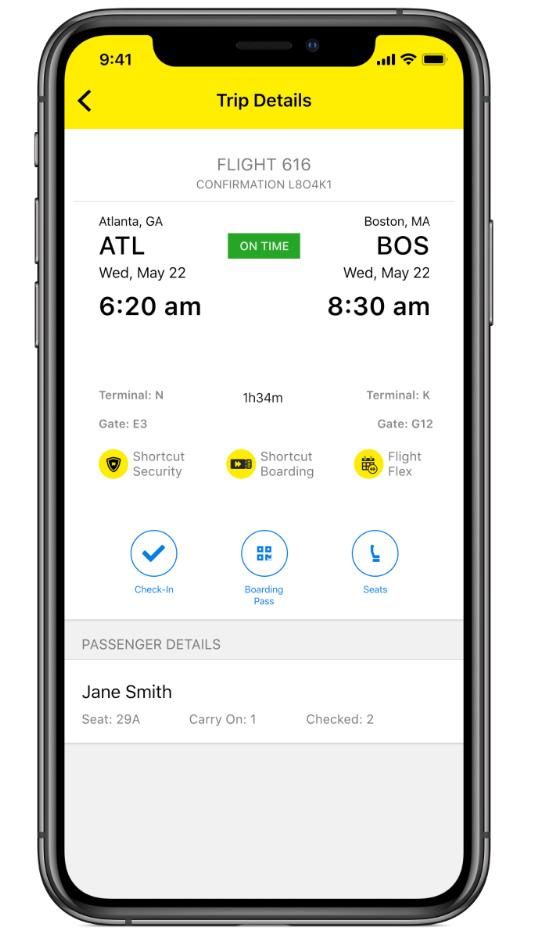
The Convenience of Mobile Check-in
The shift from traditional counter check-in to mobile alternatives reflects a broader trend towards self-service and efficiency in the travel industry. For Spirit passengers, the app provides a gateway to managing their flight details on the go, making travel less stressful and more autonomous.
Why Choose App Check-in?
Mobile app check-in offers a multitude of advantages over conventional methods. Foremost among these is time-saving. By completing the check-in process before arriving at the airport, you bypass potentially long queues at the check-in counters or kiosks, especially during peak travel times. This is particularly beneficial for Spirit passengers, who often travel with carry-on bags only, allowing them to proceed directly to security.
Another significant benefit is flexibility. The Spirit app typically allows check-in starting 24 hours before your scheduled departure, extending up to an hour before domestic flights and longer for international travel (though specific cut-off times may vary). This window provides ample opportunity to complete the necessary steps at your leisure, whether from the comfort of your home, office, or while en route.
Furthermore, app check-in often facilitates easier access to your boarding pass. Once checked in, your mobile boarding pass is readily available within the app, reducing the need for printing and minimizing the risk of misplacing a physical document. This digital format is widely accepted at security checkpoints and boarding gates. The app also serves as a central hub for managing other aspects of your reservation, such as adding baggage, selecting seats, or reviewing flight status updates, making it an all-enone travel companion.
Before You Begin: Essential Prerequisites
To ensure a smooth check-in experience via the Spirit app, a few prerequisites should be met. First, ensure you have a stable internet connection, whether Wi-Fi or cellular data, throughout the process. An intermittent connection can lead to errors or incomplete check-ins.
Second, have your flight details readily accessible. This typically includes your confirmation code (a six-character alphanumeric code), your last name, and sometimes your first name, as it appears on your reservation. These details are crucial for retrieving your booking.
Third, ensure your Spirit app is updated to the latest version. Developers frequently release updates to enhance functionality, improve user interface, and patch security vulnerabilities. Running an outdated version might lead to compatibility issues or missing features.
Lastly, be mindful of Spirit’s specific policies regarding check-in. While most passengers can utilize the app, certain situations may necessitate airport check-in. This includes passengers requiring special assistance, those traveling with specific types of unaccompanied minors, or individuals with complex international travel documents that require verification. Always review Spirit’s official guidelines if you fall into one of these categories.
A Step-by-Step Guide to App Check-in
Navigating the Spirit app for check-in is designed to be intuitive. Follow these steps to ensure a hassle-free process from start to finish.
Downloading and Logging In
If you haven’t already, download the official Spirit Airlines app from your device’s respective app store (App Store for iOS, Google Play Store for Android). Once installed, open the app.
While you don’t always need to log into a Spirit account to check in, having one and logging in can streamline the process, especially if your reservation is linked to your account. If you have an account, enter your credentials. If not, or if you prefer to proceed as a guest, you can usually find an option to “Find My Trip” or “Check-In” directly from the main screen.
Navigating to Your Reservation
Upon opening the app, look for a prominent section related to “My Trips,” “Check-In,” or “Manage Trip.” Tapping this option will typically prompt you to enter your reservation details.
You will usually need to input:
- Confirmation Code: This is the unique six-character code provided when you booked your flight.
- Last Name: Enter the last name of one of the passengers on the reservation, exactly as it appears on the booking.
After entering these details, tap “Find My Trip” or a similar button. The app will then retrieve your reservation details, displaying your flight information, including departure and arrival times, flight number, and passenger names.

The Check-in Process
Once your reservation is displayed, you’ll typically see a “Check-In” button or prompt. Tapping this will initiate the check-in flow.
The app will guide you through a series of screens:
- Passenger Verification: Confirm the names of the passengers checking in. You may be asked to select all passengers you wish to check in simultaneously.
- Baggage Declaration: Declare any checked bags. This is a crucial step, as Spirit charges for both carry-on and checked bags. You’ll typically have the option to add bags here. Be aware that prices are usually higher for bags added at the airport, so pre-purchasing through the app is often more cost-effective.
- Seat Selection (Optional): While Spirit assigns seats at random for free during check-in, you will likely be offered the option to select a specific seat for a fee. If you’d like a window, aisle, or exit row seat, this is where you can purchase it. Otherwise, you can proceed with the randomly assigned seat.
- Emergency Contact Information: For international flights or in certain situations, you may be required to provide emergency contact details.
- Hazardous Materials Declaration: You will need to confirm that you are not carrying any prohibited hazardous materials. Read this section carefully before confirming.
- Review and Confirm: The final step involves reviewing all the details you’ve entered and confirming your check-in. Once confirmed, the check-in process is complete.
Boarding Pass Retrieval and Options
After successfully checking in, your mobile boarding pass will be generated and made available within the app. You’ll usually find it under a “Boarding Pass” section associated with your trip.
From here, you have several options:
- View Mobile Boarding Pass: This displays the QR code or barcode that will be scanned at security and the boarding gate. You can often add this to your device’s digital wallet (e.g., Apple Wallet, Google Wallet) for quick access without opening the Spirit app.
- Email Boarding Pass: Send a copy of your boarding pass to your email address.
- Print Boarding Pass: While the goal is paperless, the app may offer an option to print a physical copy if needed, though this usually directs you to the Spirit website or requires an airport kiosk.
Ensure the mobile boarding pass is accessible and fully charged on your device before heading to the airport.
Maximizing Your Spirit App Experience
Beyond the fundamental check-in process, the Spirit app offers a range of functionalities that can enhance your overall travel experience, from pre-flight preparations to in-flight management.
Beyond Check-in: Managing Your Trip
The Spirit app is a comprehensive tool for managing almost every aspect of your reservation. Once your trip is loaded, you can:
- Modify Bags and Seats: Even after initial booking, you can return to the app to add checked bags, upgrade to a larger carry-on, or change your seat selection (for a fee). This flexibility is valuable if your travel plans or needs evolve.
- View Itinerary Details: Quickly access your flight numbers, departure and arrival times, terminal information, and gate assignments (which are typically updated closer to departure).
- Track Flight Status: Get real-time updates on delays, cancellations, and gate changes directly through the app’s flight status feature. This proactive notification can save you from unnecessary stress or waiting at the wrong gate.
- Add Extras: Spirit offers various add-ons such as “Shortcut Security,” “Shortcut Boarding,” or “Flight Flex” (which allows a one-time change to your flight without a change fee). These can often be purchased through the app to tailor your travel experience.
- Access Reservation Details: Review your booking summary, payment details, and any purchased ancillary services. This helps in budgeting and ensures all necessary items are covered.
Important Considerations and Tips
- Timeliness: Always check in within the allotted window (usually 24 hours to 1 hour before departure for domestic flights). Missing this window might force you to check in at the airport, potentially incurring a fee for a printed boarding pass at the counter.
- Identification: Even with a mobile boarding pass, always carry a valid government-issued photo ID that matches the name on your ticket. This is mandatory for security and boarding.
- International Travel: For international flights, some countries require physical verification of travel documents, even if you’ve checked in via the app. Always confirm with Spirit if you need to visit a counter for document checks before heading to security.
- Battery Life: Ensure your phone is sufficiently charged, especially when relying solely on your mobile boarding pass. A dead battery can lead to significant delays and inconvenience at security or the gate.
Troubleshooting Common Issues
While the app is generally reliable, you might occasionally encounter issues.
- “Reservation Not Found”: Double-check your confirmation code and last name for typos. Ensure you are using the exact name on the reservation. If the issue persists, try accessing your booking via the Spirit website.
- App Freezing/Crashing: Try force-quitting the app and reopening it. If the problem continues, restart your device or reinstall the app. Ensure your operating system is also up to date.
- Unable to Check-In: This could be due to being outside the check-in window, or your specific reservation requires airport assistance (e.g., special needs, specific international documentation). Consult Spirit’s customer service or the “Help” section of the app/website.
- Mobile Boarding Pass Not Displaying: After checking in, navigate back to your trip details and look for a “Boarding Pass” tab or button. Sometimes, there might be a slight delay in its generation. If it still doesn’t appear, try refreshing the app or re-logging in.
Security and Best Practices
Digital tools, while convenient, require attention to security and best practices to protect your personal and travel information.
Protecting Your Information
When using the Spirit app, be mindful of your digital security.
- Strong Passwords: If you create a Spirit account, use a strong, unique password.
- Public Wi-Fi: Exercise caution when accessing your account or checking in on unsecured public Wi-Fi networks. Consider using a Virtual Private Network (VPN) for an added layer of security.
- Device Security: Keep your mobile device secured with a passcode, PIN, fingerprint, or facial recognition to prevent unauthorized access to your travel documents.
- Phishing Scams: Be wary of suspicious emails or messages purporting to be from Spirit Airlines. Always verify the sender before clicking on links or providing personal information. The official Spirit app is the safest channel for managing your booking.

Staying Updated
Regularly update your Spirit app. These updates often include performance improvements, bug fixes, and critical security patches that protect your data and enhance the app’s functionality. Enable automatic updates for peace of mind, or manually check for updates in your device’s app store periodically.
By understanding these features and adhering to best practices, travelers can transform what used to be a tedious airport step into a quick, efficient process using the Spirit app. This digital convenience not only streamlines your journey but also empowers you with greater control over your travel experience, aligning perfectly with the modern, tech-savvy traveler’s expectations.
aViewFromTheCave is a participant in the Amazon Services LLC Associates Program, an affiliate advertising program designed to provide a means for sites to earn advertising fees by advertising and linking to Amazon.com. Amazon, the Amazon logo, AmazonSupply, and the AmazonSupply logo are trademarks of Amazon.com, Inc. or its affiliates. As an Amazon Associate we earn affiliate commissions from qualifying purchases.