
In an increasingly digital world, the experience of travel has been profoundly reshaped by technology. The days of solely relying on manual processes and paper tickets are largely behind us, replaced by a sophisticated ecosystem of online platforms, mobile applications, and smart kiosks. Checking in for a flight, once a potentially cumbersome procedure, has evolved into a streamlined, tech-driven process designed for convenience and efficiency. For travelers flying with United Airlines, understanding and leveraging these digital tools is key to a seamless start to their journey. This guide delves into the technological nuances of checking in for a United flight, exploring the various digital avenues available, offering step-by-step instructions, and addressing common tech-related challenges.

Leveraging Digital Platforms for a Seamless Check-in Experience
The cornerstone of modern airline check-in is the array of digital platforms available to passengers. United Airlines, like many major carriers, has invested heavily in technology to empower travelers to manage their flights from virtually anywhere. These platforms not only facilitate the check-in process but also provide a wealth of information and services designed to enhance the overall travel experience.
The United Airlines Website: Your Online Portal
The United Airlines website serves as the primary digital gateway for many travelers. It’s a robust, feature-rich platform accessible from any internet-connected device, offering comprehensive tools for booking, managing, and checking in for flights. The website’s interface is designed for clarity and ease of use, guiding passengers through each step of the check-in process. From inputting passenger details and selecting seats to confirming baggage information and receiving boarding passes, the website consolidates all necessary functions. It also provides access to essential flight information, such as real-time updates on departure gates, delays, and cancellations, allowing travelers to stay informed without needing to contact customer service directly. The security protocols embedded within the website ensure that personal and payment information remains protected, a critical aspect of any online transaction.
The United Airlines Mobile App: Convenience in Your Pocket
For the on-the-go traveler, the United Airlines mobile app is an indispensable tool. Available on both iOS and Android platforms, the app brings the full functionality of the website, and often more, directly to a smartphone or tablet. Its intuitive design and mobile-optimized features make it incredibly convenient for checking in from anywhere – whether at home, during a commute, or even from another airport. Beyond check-in, the app offers features like mobile boarding passes (often integrated with digital wallets like Apple Wallet or Google Pay), real-time push notifications for flight status changes, interactive airport maps, and the ability to track baggage. The app also allows for easy access to MileagePlus accounts, enabling members to manage their loyalty points and benefits directly from their device. Its ability to provide instant updates and immediate access to critical travel documents makes it a powerful example of how mobile technology streamlines the travel process.
Understanding Kiosk Check-in: When Digital Meets Physical
While online and mobile app check-in offer unparalleled convenience, airport kiosks represent a vital bridge between the digital and physical realms, particularly for passengers who prefer self-service at the airport or need to check bags. These self-service machines, typically located in the departure hall, allow passengers to check in, select or change seats, print boarding passes, and print bag tags with a few taps on a touchscreen. Kiosks are especially useful for those with last-minute changes or who arrive at the airport without having completed online check-in. They leverage a localized digital interface, often connected to the airline’s central reservation system, to process information quickly. The technology behind kiosks ensures a secure transaction, often requiring passport scans or credit card swipes for identity verification, showcasing how hardware and software integrate to provide a crucial airport service.
Step-by-Step Guide to Online and App Check-in
Mastering the digital check-in process can significantly reduce stress and save time on your travel day. While both the website and app follow similar logic, understanding the precise steps ensures a smooth experience.
Initiating Your Digital Check-in
The check-in window for United Airlines typically opens 24 hours before your scheduled departure time. This is the optimal period to initiate the process. To begin, navigate to the “Check-in” section on the United Airlines website or tap the “Check-in” button within the mobile app. You will generally be prompted to enter your confirmation number (a six-character code found on your booking confirmation), your MileagePlus number, or your e-ticket number, along with your last name. This initial data entry authenticates your identity and retrieves your flight details. Once your reservation is found, the system will display your flight information and guide you through a series of prompts. These prompts typically include confirming passenger details, acknowledging hazardous materials restrictions, and selecting or confirming your seat assignment. For international flights, additional information such as passport details and destination visa information might be required, which the digital platform will prompt you to enter securely.
Navigating Boarding Passes and Documentation
After successfully completing the check-in questions, the next critical step is obtaining your boarding pass. If you’ve checked in via the website, you’ll usually have several options: printing the boarding pass at home, emailing it to yourself, or sending it to your phone. If using the mobile app, your boarding pass will automatically appear within the app, often with a QR code or barcode that can be scanned at security checkpoints and boarding gates. Many modern digital boarding passes also include a “passbook” or “add to wallet” option, allowing you to save it to your smartphone’s native digital wallet (like Apple Wallet or Google Pay). This ensures your boarding pass is easily accessible even without an internet connection, a key technological convenience. For travelers checking bags, the digital check-in process often allows you to indicate the number of bags you’ll be checking. While the digital platform handles the preliminary tagging information, you will still need to proceed to a bag drop counter or a self-service kiosk at the airport to physically tag and deposit your luggage.
Essential Pre-Flight Information and Updates
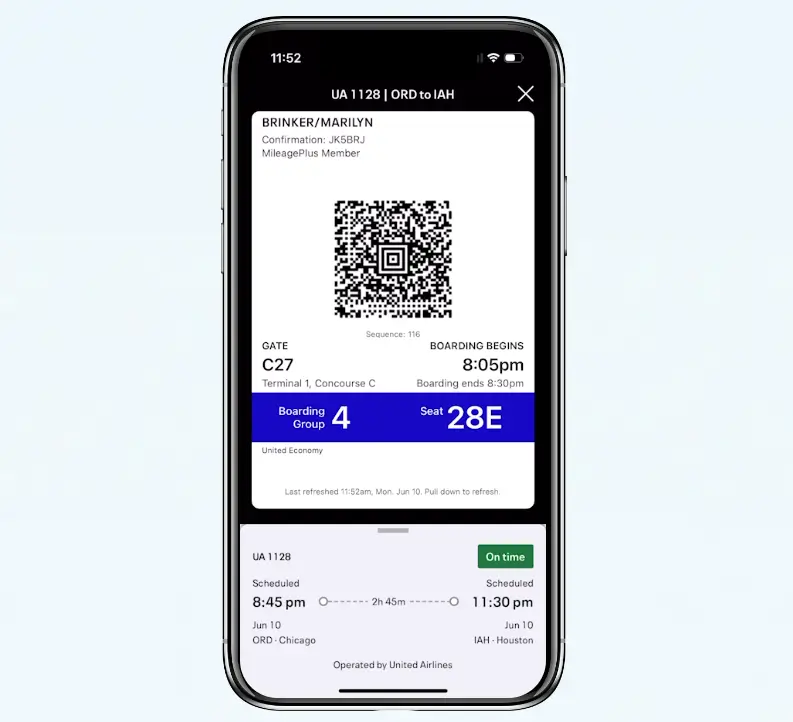
Beyond simply issuing a boarding pass, the digital check-in platforms serve as dynamic information hubs. During and after check-in, you’ll have access to crucial pre-flight information. This includes your gate number (which can change, so regular checks are advised), boarding time, and any special instructions related to your flight. The mobile app, in particular, excels at providing real-time updates through push notifications, alerting you to gate changes, delays, or even boarding announcements. This proactive use of technology ensures you’re always informed, minimizing the chances of missing critical flight details. Additionally, the platforms may offer options to upgrade your seat, purchase Wi-Fi access, or review in-flight entertainment options, further integrating various travel services into a single, accessible interface.
Troubleshooting Common Tech-Related Check-in Issues
Even with the most advanced systems, technical glitches can occasionally arise. Knowing how to troubleshoot common issues can prevent frustration and ensure you complete your check-in efficiently.
Addressing Connectivity and Browser Problems
A primary cause of online check-in difficulties is often related to internet connectivity or browser compatibility. Ensure you have a stable internet connection, whether via Wi-Fi or mobile data. If you’re experiencing issues, try refreshing the page, clearing your browser’s cache and cookies, or attempting the check-in process on a different browser (e.g., trying Chrome if you were using Firefox, or vice versa). Outdated browsers can sometimes struggle with modern web applications, so ensuring your browser is up-to-date is also a good practice. For mobile app users, a poor cellular signal can impede the process; switching to a reliable Wi-Fi network can often resolve this.
Resolving App Glitches and Update Requirements
Mobile apps, while convenient, can sometimes encounter their own set of issues. If the United app is crashing, freezing, or not displaying information correctly, the first step is usually to close and restart the app. If the problem persists, check your device’s app store for any pending updates for the United Airlines app; ensuring you’re running the latest version often resolves known bugs. If all else fails, uninstalling and then reinstalling the app can clear corrupted data and restore full functionality. It’s also worth checking your device’s operating system (iOS or Android) for updates, as app performance can sometimes be affected by OS compatibility.
Data Privacy and Security Considerations During Online Check-in
While the convenience of digital check-in is undeniable, it’s paramount to be mindful of data privacy and security. When entering personal details like passport numbers, dates of birth, and contact information, ensure you are on the official United Airlines website or app. Look for “https://” in the website URL and a padlock icon, indicating a secure connection. Be wary of phishing attempts via email or text messages that ask for personal information outside of the official platforms. When using public Wi-Fi networks for check-in, consider using a Virtual Private Network (VPN) for an added layer of encryption. After printing a boarding pass at home or a kiosk, always dispose of it securely, as it contains sensitive information that could be misused. United Airlines employs robust encryption and security measures, but user vigilance is also a critical component of digital security.
Optimizing Your Check-in Process with Smart Tech Habits
Beyond basic check-in, a range of technological features can further optimize your pre-flight experience, transforming a simple check-in into a truly integrated digital journey.
Setting Up Flight Notifications and Alerts
Modern travel apps excel at proactive communication. Configuring push notifications and SMS alerts within the United app or your MileagePlus account settings ensures you receive timely updates on gate changes, boarding times, and any potential delays or cancellations. This eliminates the need for constant manual checks and allows you to react quickly to unforeseen circumstances, a prime example of technology enhancing real-time responsiveness. These notifications leverage sophisticated backend systems that continuously monitor flight statuses and instantly disseminate critical information to passengers’ devices.
Utilizing Digital Wallets for Boarding Passes
Integrating your mobile boarding pass into a digital wallet app (like Apple Wallet for iOS or Google Pay for Android) is a small but significant technological convenience. Once added, your boarding pass is easily accessible with a quick tap or swipe, even when offline. These digital passes often update automatically with gate changes or boarding times, providing dynamic information. Furthermore, they reduce clutter and the risk of losing a paper boarding pass. The underlying technology ensures the barcode or QR code remains scannable, even on a screen, making airport security and boarding a breeze.

The Future of Check-in: Emerging Technologies
The evolution of check-in technology is ongoing, with new innovations constantly on the horizon. We are already seeing the early stages of biometric check-in, where facial recognition or fingerprint scanning could replace traditional boarding passes and IDs, speeding up airport processes even further. Wearable technology, such as smartwatches, is increasingly capable of displaying boarding passes and flight updates, offering another layer of convenience. Artificial intelligence (AI) and machine learning are being integrated into airline systems to provide more personalized check-in experiences, predict potential delays, and offer proactive solutions. As these technologies mature, checking in for a United Airlines flight will become even more seamless, secure, and integrated into our daily digital lives, reinforcing the central role of technology in modern air travel.
In conclusion, checking in for a United Airlines flight is no longer a mere transactional step but a technologically rich experience. By embracing the capabilities of the United website, mobile app, and airport kiosks, travelers can navigate their pre-flight journey with greater efficiency, information, and peace of mind. Understanding these digital tools, anticipating potential tech issues, and adopting smart digital habits are crucial for any modern traveler looking to make their United Airlines experience as smooth and enjoyable as possible.
aViewFromTheCave is a participant in the Amazon Services LLC Associates Program, an affiliate advertising program designed to provide a means for sites to earn advertising fees by advertising and linking to Amazon.com. Amazon, the Amazon logo, AmazonSupply, and the AmazonSupply logo are trademarks of Amazon.com, Inc. or its affiliates. As an Amazon Associate we earn affiliate commissions from qualifying purchases.