
The traditional image of air travel—long queues at mahogany counters and the frantic shuffling of paper tickets—has been systematically replaced by a sophisticated digital ecosystem. For a global carrier like American Airlines (AA), the check-in process is no longer just a bureaucratic requirement; it is a high-tech gateway powered by cloud computing, mobile software engineering, and biometric data. Understanding how to check in with American Airlines today requires an appreciation of the technological infrastructure that makes modern aviation possible.
This guide explores the technical nuances of the American Airlines check-in process, from mobile app optimization and digital wallet integration to the hardware-software synergy found at airport kiosks.
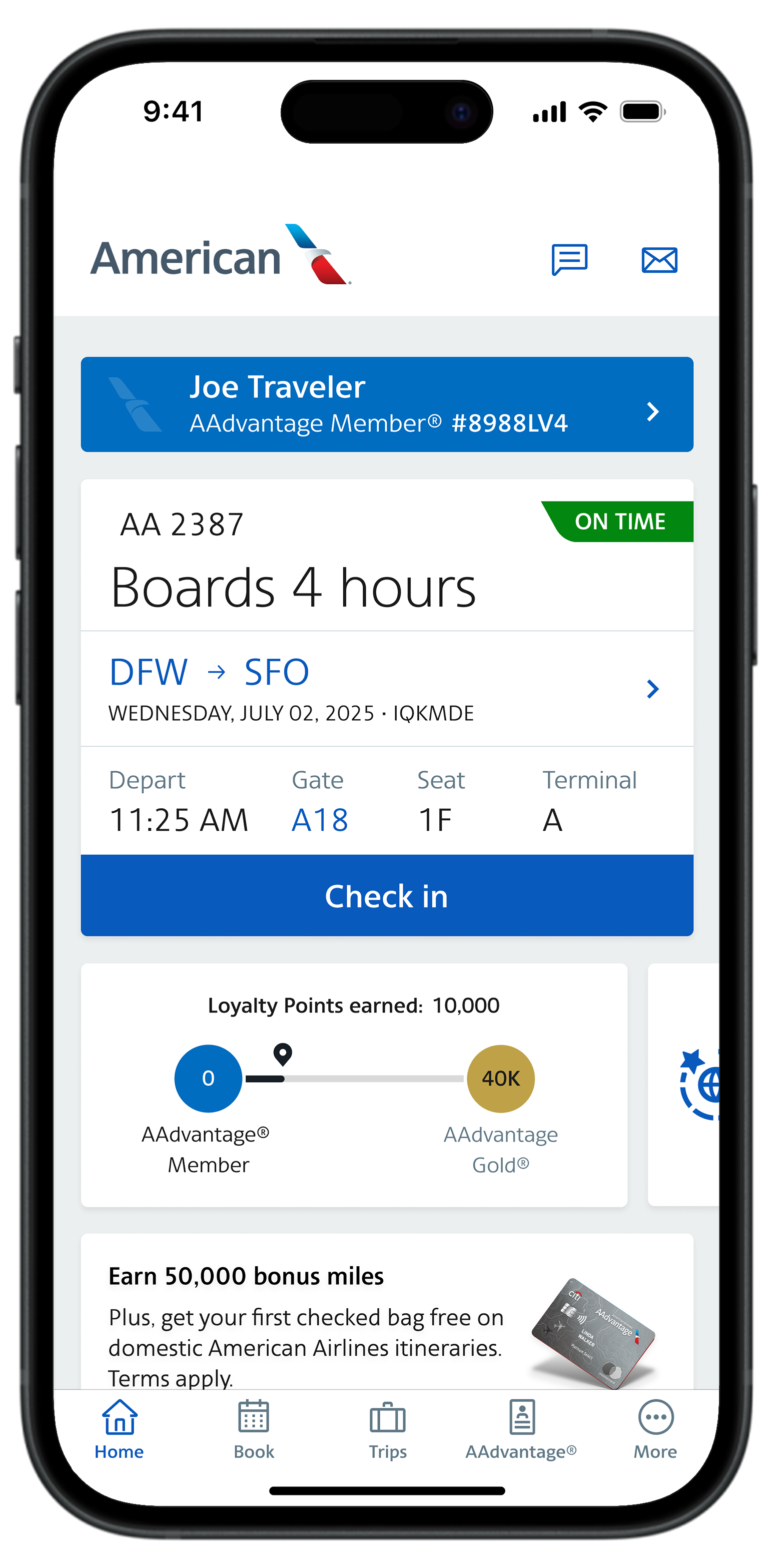
Leveraging the American Airlines Mobile Ecosystem
At the heart of the modern traveler’s toolkit is the American Airlines mobile application. Available on both iOS and Android, this app serves as a personalized command center, transforming a smartphone into a multifaceted travel assistant.
The App Interface: Navigating the User Experience (UX)
The American Airlines app is built on a framework designed for low latency and high reliability. The check-in module typically activates exactly 24 hours before departure, triggered by a server-side automated event. When a user opens the app to check in, the front-end interface communicates with American’s backend—largely powered by the Sabre Global Distribution System (GDS).
The UX is optimized for “thumb-friendly” navigation. By utilizing RESTful APIs, the app pulls real-time data regarding flight status, gate assignments, and seat availability. During the check-in flow, users are navigating a series of dynamic forms that validate passenger data against Secure Flight Passenger Data (SFPD) requirements in milliseconds.
Push Notifications and Real-Time Data Syncing
One of the most critical technological features of the AA check-in process is the implementation of Firebase Cloud Messaging (FCM) or Apple Push Notification service (APNs). Once checked in, the app creates a persistent connection with the server. If there is a gate change or a delay after you have received your digital boarding pass, the system pushes an update to your device. This real-time synchronization ensures that the metadata embedded in your digital pass—such as the boarding group and zone—remains accurate without requiring a manual refresh.
Biometric Authentication and Secure Login
To streamline the check-in process, the AA app utilizes device-level biometric encryption. By integrating with Apple’s FaceID or Android’s Biometric Prompt API, the app allows users to access their itineraries and sensitive personal information without re-entering complex passwords. This “Sovereign Identity” approach ensures that while your travel data is stored in the cloud, the access key remains hardware-encrypted on your local device.
Web-Based Check-In and Cloud Integration
While mobile apps dominate the landscape, the web-based check-in portal at aa.com remains a vital component of the airline’s digital strategy, particularly for power users and business travelers who manage logistics via desktop environments.
Browser Optimization and Responsive Design
The American Airlines check-in website is built using modern web frameworks (such as React or Angular) to ensure responsiveness across different screen resolutions. When checking in via a browser, the system performs a series of client-side checks to ensure the browser version supports the necessary encryption protocols (TLS 1.2 or higher) required to handle sensitive passport and credit card information.
The technical complexity of the web check-in lies in its ability to handle “session persistence.” If a user starts a check-in on their laptop but loses connectivity, the backend state-management system ensures that the progress is saved, allowing the user to complete the process on a mobile device without redundant data entry.
Digital Boarding Passes and Wallet Integration
The culmination of the digital check-in process is the generation of the boarding pass. This is not merely a PDF; it is a specialized file format—the .pkpass file for Apple Wallet or the Google Wallet equivalent. These files are built on JSON (JavaScript Object Notation) and contain signed cryptographic tokens.

When you “Add to Wallet,” the system generates a unique QR code. Unlike a standard image, these digital passes are “location-aware.” Utilizing GPS and iBeacon technology, your phone can automatically surface the boarding pass on your lock screen when the device’s telemetry data indicates you have arrived at the airport geofence.
Managing Connectivity: VPNs and Public Wi-Fi Security
From a technical security standpoint, checking in via public airport Wi-Fi introduces risks. Sophisticated travelers often use VPNs (Virtual Private Networks) to encrypt their check-in traffic. The American Airlines infrastructure is designed to handle requests through various IP masking services, though it uses advanced bot-detection algorithms to ensure that check-in requests are originating from legitimate users rather than automated scripts looking to “snag” premium seats the moment the 24-hour window opens.
The Hardware of Travel: Kiosks and Contactless Tech
For travelers who prefer or require a physical touchpoint, American Airlines has invested heavily in “Smart Kiosk” technology. These are not merely terminals; they are sophisticated Internet of Things (IoT) devices that bridge the gap between digital data and physical logistics.
QR Code Scanners and NFC Technology
The modern AA kiosk utilizes high-speed optical scanners designed to read dim, cracked, or high-brightness smartphone screens. When you present your mobile boarding pass (generated during your digital check-in) to the kiosk, the scanner decodes the Aztec code or PDF417 barcode. This instantly pulls your profile from the cloud, allowing for rapid printing of bag tags.
Furthermore, many newer terminals are equipped with Near Field Communication (NFC). This allows for “tap-to-check-in” functionality, where the kiosk communicates with the secure element in your smartphone to verify your identity without the need for a physical scan.
Automated Bag Tagging Systems
Once checked in, the technical challenge shifts to baggage. The AA “Touchless Check-In” system allows users to print bag tags via the kiosk after scanning their mobile device. These tags contain RFID (Radio Frequency Identification) chips in many major hubs. As the bag moves through the airport’s automated sorting system, scanners track the RFID tag in real-time. This data is then fed back into the AA app, allowing the passenger to “track” their bag’s journey through the aircraft’s cargo hold.
The Future: Facial Recognition and Biometric Gates
American Airlines is currently piloting and implementing biometric boarding gates. This technology uses Computer Vision and AI-driven facial matching. During the check-in process, your digital identity is cross-referenced with the Department of Homeland Security’s (DHS) Traveler Verification Service (TVS). When you reach the gate, a camera captures your biometric template, matches it against the gallery of passengers checked into that flight, and opens the gate—eliminating the need for a physical or even digital boarding pass.
Troubleshooting Digital Check-In Failures
Despite the robustness of the system, the intersection of complex software and global networking can lead to technical glitches. Understanding the “why” behind these failures is essential for the tech-savvy traveler.
Resolving App Synchronization Errors
One common issue occurs when the app’s local cache becomes desynchronized from the server. This often happens if a flight is rebooked or upgraded. The technical fix is usually a “force stop” of the application or clearing the cache, which forces the app to perform a fresh “GET” request to the AA servers, pulling the most recent JSON data regarding the passenger’s status.
API Latency and Server Downtime
During peak travel periods, such as holidays, the influx of check-in requests can lead to increased API latency. American Airlines utilizes Content Delivery Networks (CDNs) and load balancers to distribute this traffic, but occasionally, the handshake between the airline’s front-end and the GDS (Sabre) backend may timeout. In these instances, the “system error” message is usually a result of a 504 Gateway Timeout, and the best technical recourse is to attempt the check-in via a different digital pathway (switching from App to Web).
Digital Documentation and Health Passport Integration
In the post-pandemic era, checking in often requires the verification of health documents or visas. American Airlines integrates with third-party platforms like VeriFLY. This involves a complex “OAuth” style handshake where VeriFLY confirms to AA’s system that the user’s documents have been digitally verified. If the “Check-In” button is greyed out, it is often because the backend is awaiting a “Verified” flag from these external document-processing APIs.
Conclusion
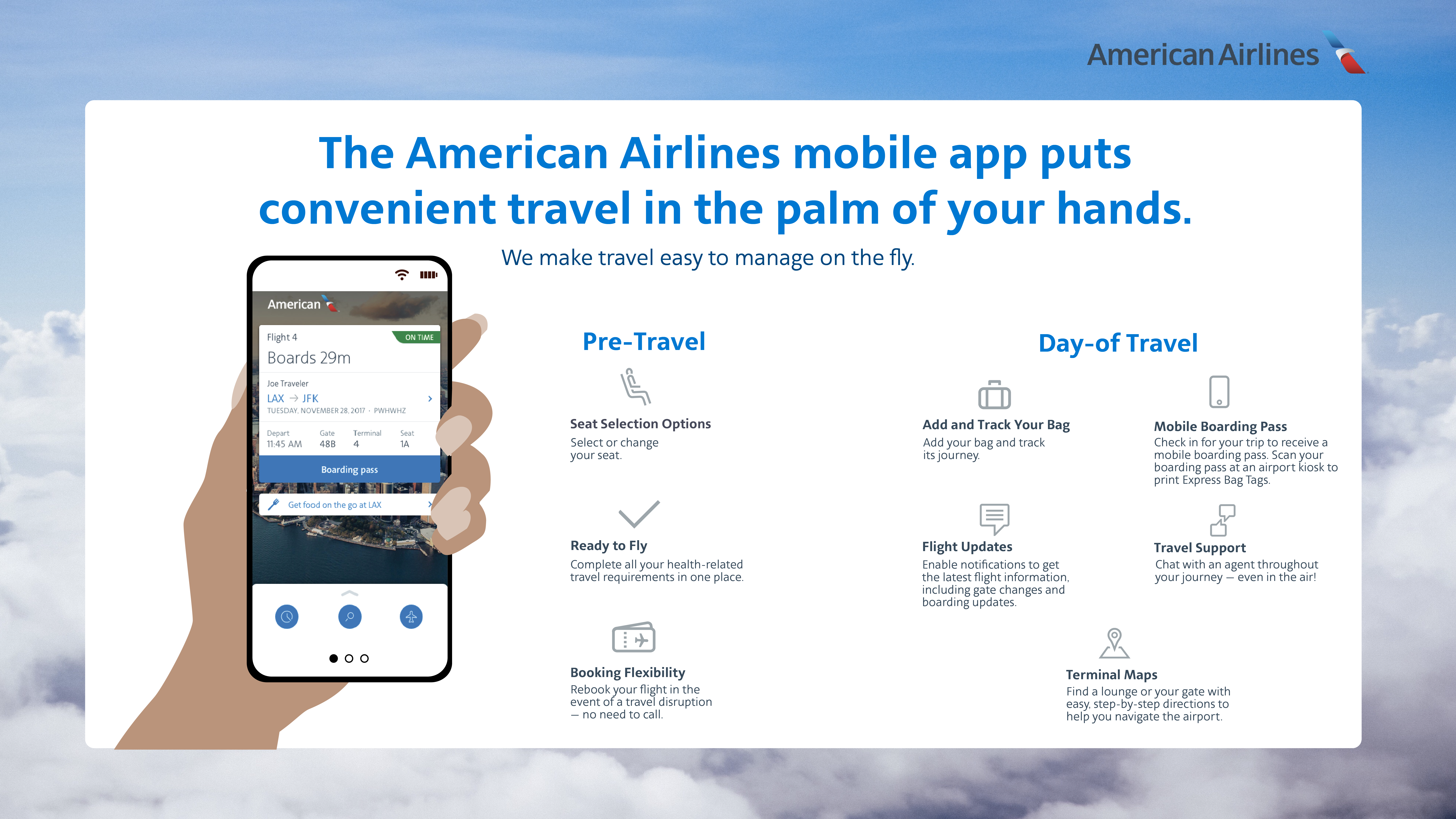
The act of checking in for an American Airlines flight is a masterclass in modern digital integration. It is a process that begins in the palms of our hands through highly optimized mobile code, travels through global high-speed networks to massive databases, and culminates in the seamless interaction between software and airport hardware. By understanding the technology behind the check-in—from biometric encryption to RFID tracking—travelers can navigate the complexities of modern air travel with greater efficiency and confidence. As we move toward a fully biometric and “invisible” check-in experience, the reliance on these sophisticated tech stacks will only continue to grow.
aViewFromTheCave is a participant in the Amazon Services LLC Associates Program, an affiliate advertising program designed to provide a means for sites to earn advertising fees by advertising and linking to Amazon.com. Amazon, the Amazon logo, AmazonSupply, and the AmazonSupply logo are trademarks of Amazon.com, Inc. or its affiliates. As an Amazon Associate we earn affiliate commissions from qualifying purchases.