
In an increasingly globalized world, travel planning has evolved beyond mere destination selection. For the modern traveler, navigating the intricacies of international pricing and currency exchange is a critical component of smart budgeting and efficient trip organization. Google Flights, a powerful and intuitive platform, stands as a cornerstone for millions seeking the best airfare deals. Yet, a common query often arises: how do you ensure the prices displayed reflect your preferred currency, providing clarity and preventing conversion surprises?
This guide delves deep into the mechanisms of Google Flights, offering a comprehensive tutorial on manipulating its currency settings. We’ll explore not just the “how-to,” but also the underlying technological significance, advanced tips for tech-savvy users, and a glimpse into the future of currency management in travel tech. Understanding these functionalities empowers you to take full control of your travel budgeting, making your planning process as seamless and transparent as possible.
Understanding the Importance of Currency Settings in Google Flights
At first glance, changing a currency setting might seem like a minor adjustment. However, for international travelers, digital nomads, or even those planning domestic trips with an eye on global trends, it’s a feature laden with significant implications for financial clarity and strategic decision-making. Google Flights, as a sophisticated web application, offers this capability to enhance user experience and provide localized relevance.
The Dynamic Nature of Global Pricing
Airline pricing is a complex ecosystem influenced by a myriad of factors, including demand, supply, geopolitical events, and even the origin of the search query. Different airlines and booking platforms may present fares in various currencies depending on their primary operational base or the perceived location of the user. While Google Flights strives for consistency, its ability to pull data from diverse sources means that the default currency displayed might not always align with your financial perspective. Manually setting your preferred currency ensures you’re always viewing prices through your specific economic lens, irrespective of where the flight originates or where the data was sourced. This feature leverages the underlying data architecture of Google Flights, which must process and normalize vast amounts of geographically diverse pricing information.
Enhanced Budgeting and Financial Clarity
One of the primary benefits of customizing your currency view is unparalleled budgeting clarity. When planning an international trip, expenses quickly add up—flights, accommodation, activities, and local transport. Seeing flight costs consistently in your home currency, or a currency you are actively managing, removes the mental arithmetic and the potential for costly miscalculations. This is particularly crucial for complex itineraries involving multiple legs or different booking classes. From a technological standpoint, this feature is about providing a personalized data visualization layer, allowing users to interact with complex financial data in a format that is immediately actionable and understandable to them. It’s a user interface (UI) design choice that significantly impacts user experience (UX) by reducing cognitive load.
Avoiding Conversion Surprises and Hidden Fees
While Google Flights typically displays competitive pricing, the actual cost can sometimes vary slightly due to real-time exchange rate fluctuations at the moment of booking with the airline or online travel agency (OTA). Moreover, some banks or credit card providers may apply their own conversion rates and foreign transaction fees. By ensuring Google Flights displays prices in your chosen currency, you get a much closer estimate of the final charge, minimizing “sticker shock” or unexpected charges on your bank statement. The technology behind this relies on integrating with up-to-date exchange rate APIs, although it’s important to remember that these are indicative and not necessarily the exact rate your bank will use. It’s a crucial tool for digital financial literacy within a travel context.
Personalizing Your Flight Search Experience
Beyond the financial aspects, customizing currency is part of a broader trend in personalization for digital services. Just as you might customize interface themes or notification settings, currency preferences allow you to tailor Google Flights to your specific needs and context. This level of control over the displayed data makes the platform more intuitive and efficient, reflecting a user-centric design philosophy common in leading tech applications. It’s about more than just numbers; it’s about making the entire search and comparison process feel natively tailored to your way of planning.
Step-by-Step Guide: Changing Your Display Currency
Google Flights has been designed with user-friendliness in mind, and changing the display currency is a straightforward process accessible from various touchpoints within the application. Whether you’re on a desktop browser or using a mobile device, the steps are intuitive and require minimal technical expertise.
Accessing Google Flights (Web & Mobile)
The first step is, naturally, to access Google Flights.
- On a Desktop Browser: Simply open your preferred web browser and navigate to
flights.google.com. - On Mobile: Google Flights is primarily a web-based service, optimized for mobile browsers. Open your mobile browser (e.g., Chrome, Safari) and go to
flights.google.com. While there isn’t a standalone “Google Flights app” in the traditional sense, the web experience is highly responsive and app-like.
Once on the homepage, you’ll be greeted by the familiar search interface where you can input your departure and arrival locations, dates, and number of passengers.
Locating the Currency Selector
The currency selector is typically found in a prominent, yet unobtrusive, location designed for quick access.
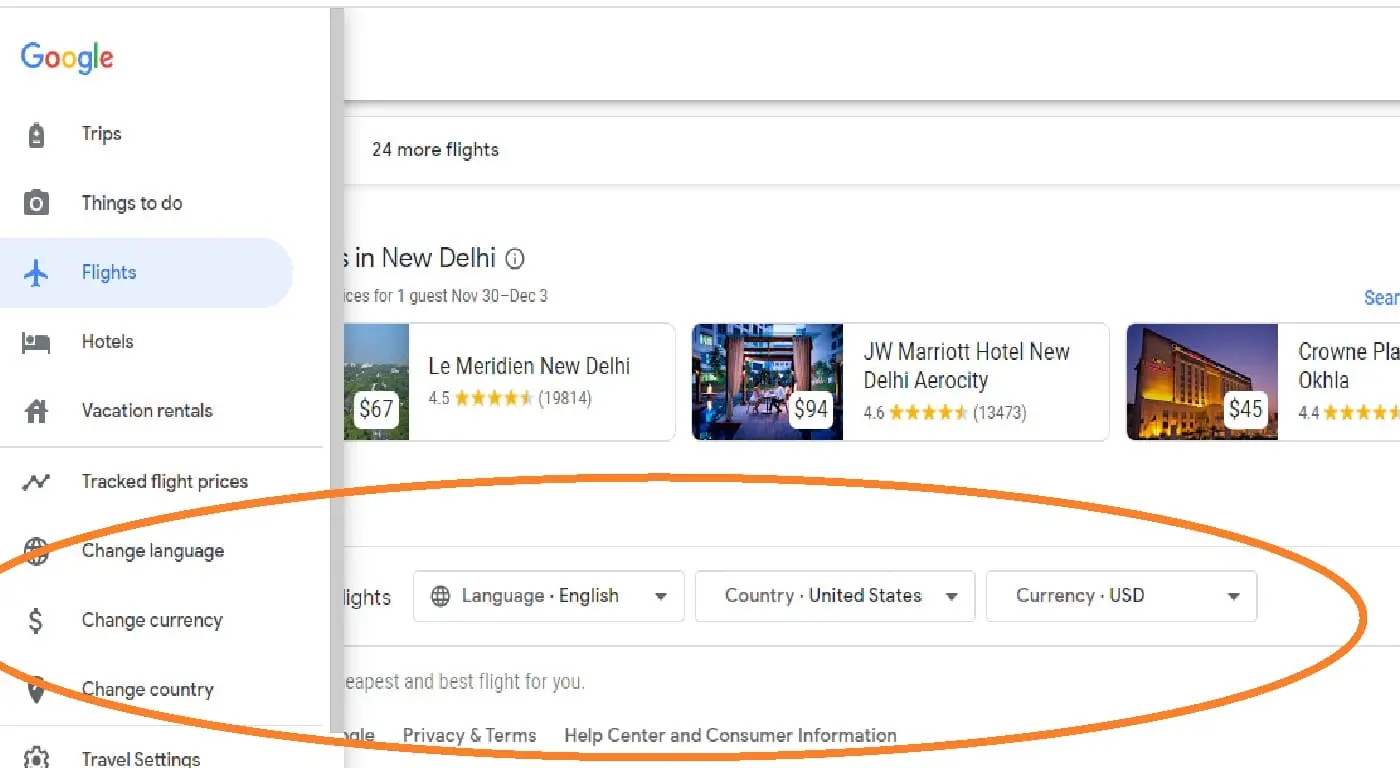
- On Desktop: Look towards the bottom-left corner of the page. You’ll usually see a small box or link displaying your current currency (e.g., “USD – United States Dollar” or “GBP – British Pound”). This area also often includes the language and country/region settings.
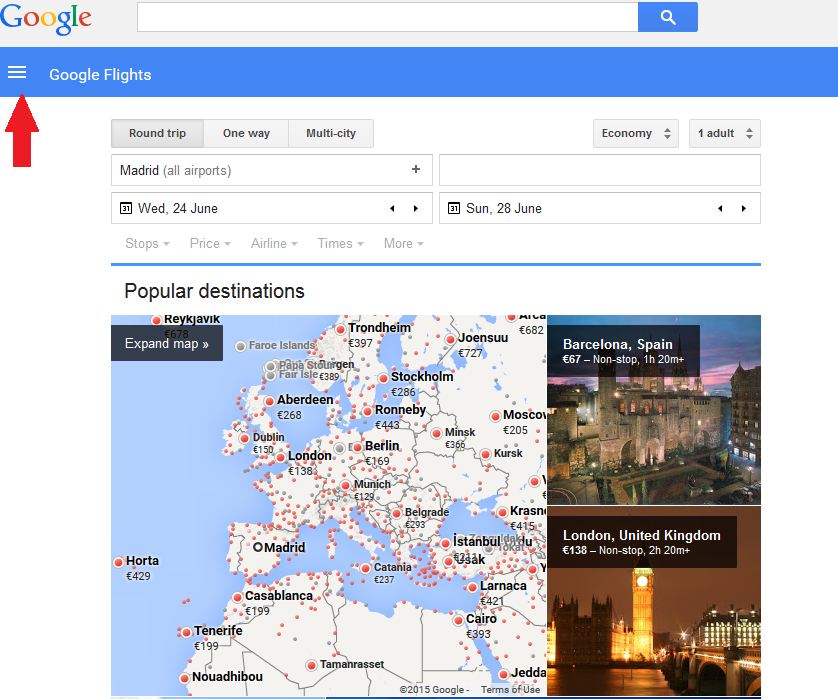
- On Mobile: The location can vary slightly depending on screen size and orientation, but it’s generally in the footer or accessible via a menu icon (often represented by three horizontal lines or dots). Look for the country/language/currency indicator at the bottom of the screen. Tapping on this will reveal a pop-up or a dedicated settings page.
Selecting Your Preferred Currency
Clicking or tapping on the current currency display will open a dialogue box or redirect you to a settings page where you can make your selection.
- Country/Region: Often, the currency is tied to a specific country or region setting. For instance, selecting “United States” might default to USD, while “United Kingdom” defaults to GBP. You might first need to select your desired country/region.
- Currency Dropdown: Within this settings interface, there will be a clear “Currency” dropdown menu. Click on this to reveal a comprehensive list of available currencies. The list is usually extensive, covering most major global currencies and many regional ones.
- Choose Your Currency: Scroll through the list or use a search function (if available) to find your desired currency (e.g., “EUR – Euro,” “CAD – Canadian Dollar,” “JPY – Japanese Yen”). Click or tap on your selection.
Verifying the Change and Persistence of Settings
After selecting your new currency, the page should automatically refresh, and all flight prices displayed will instantly update to reflect your chosen currency.
- Verification: Double-check a few flight listings to ensure the currency symbol and values have indeed changed as expected.
- Persistence: Google Flights typically remembers your currency preference, usually stored as a cookie in your browser or linked to your Google account if you’re signed in. This means you shouldn’t have to re-select it every time you visit, unless you clear your browser data or use a different device/incognito window. This behavior is a fundamental aspect of session management and user preference storage in web applications.
Beyond Basic Currency Conversion: Advanced Tips for Tech-Savvy Travelers
While simply changing the currency setting is effective, the tech-savvy traveler can leverage Google Flights and other digital tools to gain an even greater edge in managing international travel costs. These advanced strategies tap into deeper technological functionalities and cross-platform integrations.
Leveraging VPNs for Geographically-Specific Pricing
An intriguing, albeit less common, strategy involves using a Virtual Private Network (VPN). Some airlines and online travel agencies (OTAs) display different prices based on the geographic location (IP address) of the user, sometimes to offer regional deals or adjust for local market conditions. By connecting to a VPN server in a different country, you can effectively “spoof” your location, potentially revealing different pricing in a different currency. While Google Flights itself might not directly respond to VPN changes in its default currency display (as it often relies on your browser’s language/region settings or your Google account profile), it can influence the results it pulls from third-party sites. This tactic highlights the complex interplay between IP addresses, geoblocking, and dynamic pricing algorithms in e-commerce.
Understanding Google Flights’ Data Sources and Real-time Updates
Google Flights aggregates data from hundreds of airlines and OTAs. Its ability to update prices in real-time is a significant technological feat, relying on sophisticated data scraping, API integrations, and caching mechanisms. When you change your currency, the platform doesn’t just apply a static conversion rate; it often re-queries or re-processes the underlying data through its internal systems, factoring in the latest exchange rates. Understanding this allows you to appreciate the dynamism – a price seen at 10 AM might differ by 11 AM due to exchange rate shifts and airline fare adjustments. For critical purchases, checking multiple times over a period can be beneficial, always using your preferred currency for consistency.
Integrating with Other Financial Tracking Apps
For comprehensive financial planning, integrating your travel budget with dedicated financial tracking applications can be invaluable. Many personal finance apps allow you to manually input or even automatically import transactions, categorizing them by currency. While Google Flights doesn’t directly sync with these tools, the ability to view your flight costs in your home currency on Google Flights makes it much easier to accurately transfer that information into budgeting software like Mint, YNAB, or Expensify. This digital ecosystem approach ensures that your flight costs are seamlessly integrated into your broader financial picture, offering a holistic view of your spending.
Browser Extensions for Enhanced Currency Oversight
The browser extension ecosystem offers a plethora of tools that can further assist with currency management. Extensions like “Auto-Currency Converter” or “XE Currency Converter” can automatically detect prices on any webpage and display them in your preferred currency, often alongside the original. While Google Flights has its own converter, these extensions provide a universal solution across all travel sites you might visit, offering an additional layer of verification or a convenient way to compare prices outside of Google Flights’ direct interface. These tools leverage JavaScript injection to modify webpage content on the fly, demonstrating client-side customization power.
Troubleshooting Common Currency Display Issues
While Google Flights is generally robust, occasional technical glitches or user-side configurations can lead to unexpected currency displays. Knowing how to troubleshoot these common issues ensures a smooth and frustration-free planning experience.
Clearing Cache and Cookies
One of the most frequent culprits for persistent, incorrect currency displays is outdated browser cache or corrupted cookies. Websites, including Google Flights, store small pieces of data (cookies) on your device to remember preferences, and they cache (store temporary copies) parts of pages for faster loading. If these become corrupted or outdated, they might override your desired currency setting.
- Solution: Clear your browser’s cache and cookies. This usually involves going into your browser’s settings or history menu. After clearing, restart your browser and revisit Google Flights. This forces the browser to fetch fresh data and reset session information.
Checking Regional Settings and IP Address
Your IP address provides a general geographical location, and your operating system or browser’s regional settings (language, region) can sometimes influence Google Flights’ default currency.
- Solution: Ensure your device’s regional settings align with your intended currency. If you’re using a VPN, temporarily disable it to see if it’s interfering. Conversely, if you want to appear in a different region, ensure your VPN is active and connected to the desired location. Confirm your browser’s language settings are also consistent.
Browser Compatibility and Updates
Outdated browsers or compatibility issues can sometimes affect how web applications render and function.
- Solution: Ensure your web browser (Chrome, Firefox, Edge, Safari) is updated to its latest version. Try accessing Google Flights on a different browser to see if the issue persists. Incompatible extensions might also interfere; try disabling them one by one. Google Flights is designed to be cross-browser compatible, but sometimes specific browser versions or configurations can cause unique rendering problems.
When to Contact Google Support
If you’ve tried all the above troubleshooting steps and the currency display issue persists, it might be an isolated bug or a more complex problem requiring direct assistance.
- Solution: Look for a “Send Feedback” or “Help” option within Google Flights (usually in the bottom-left corner on desktop or via a menu on mobile). Clearly describe the issue, the steps you’ve taken to resolve it, and include screenshots if possible. Providing detailed information helps Google’s support team diagnose and address the problem effectively.
The Future of Currency Management in Travel Tech
The landscape of travel technology is ever-evolving, driven by advancements in artificial intelligence, blockchain, and increasingly sophisticated user interfaces. The simple act of changing a currency on Google Flights is but a stepping stone towards a future where financial transparency and seamless transactions are paramount.
AI-Powered Predictive Pricing and Currency Fluctuations
Imagine a future where Google Flights, armed with AI and machine learning, doesn’t just display prices but actively advises you on the optimal time to book based on predicted currency fluctuations and airline pricing trends. AI could analyze historical data, geopolitical indicators, and real-time market sentiment to recommend if it’s better to book now in USD or wait a week for a potential favorable shift in EUR. This predictive analytics would move beyond simple display to proactive financial guidance, transforming the planning process.
Blockchain and Decentralized Travel Payments
Blockchain technology holds the promise of revolutionizing international payments by offering decentralized, transparent, and potentially lower-cost transactions. In the future, travel platforms like Google Flights might integrate direct blockchain-based payment options, allowing travelers to pay in stablecoins or other cryptocurrencies with minimal conversion fees and instant settlement. This would fundamentally alter how currency is handled, moving from display and conversion to direct, native digital asset transactions, reducing reliance on traditional banking intermediates.
Seamless Multi-Currency Wallet Integration
As digital wallets become more sophisticated, the distinction between holding various national currencies might blur. Future travel tech could feature seamless integration with multi-currency digital wallets, allowing users to switch between currencies with a single tap, or even automatically paying in the most advantageous currency from their linked wallet. This would eliminate the need for manual currency selection, making the entire financial aspect of international travel virtually invisible and effortlessly optimized, representing the ultimate in technological convenience and financial streamlining.

Conclusion
Changing the currency on Google Flights is a fundamental, yet powerful, feature that significantly enhances the travel planning experience. It’s not just a technical tweak; it’s an essential tool for maintaining financial clarity, enabling precise budgeting, and preventing unexpected costs in the dynamic world of international travel. By mastering this simple step, and by understanding the broader technological context and future innovations, you position yourself as a savvy traveler ready to navigate the global skies with confidence and control. The continuous evolution of platforms like Google Flights underscores the industry’s commitment to user-centric design, making complex global logistics increasingly manageable for everyone.
aViewFromTheCave is a participant in the Amazon Services LLC Associates Program, an affiliate advertising program designed to provide a means for sites to earn advertising fees by advertising and linking to Amazon.com. Amazon, the Amazon logo, AmazonSupply, and the AmazonSupply logo are trademarks of Amazon.com, Inc. or its affiliates. As an Amazon Associate we earn affiliate commissions from qualifying purchases.