
Moving to a new home involves a mountain of logistics, from hiring movers to setting up utilities. However, one of the most critical—yet often overlooked—tasks is updating your residential and mailing address with your financial institutions. Chase, being one of the largest financial entities in the world, serves millions of customers across various products, including checking accounts, credit cards, mortgages, and investment portfolios. Keeping your information current with Chase is not just a matter of convenience; it is a fundamental step in maintaining your personal finance security and ensuring the uninterrupted flow of your financial life.

An outdated address can lead to missed statements, compromised sensitive information, and even declined transactions. In an era where identity theft is a constant threat, ensuring your financial data is sent to the correct location is a primary defensive measure. This guide provides an exhaustive look at how to change your Chase address through multiple channels and explores the broader financial implications of keeping your profile updated.
Step-by-Step Methods to Update Your Address with Chase
Chase offers several streamlined ways to update your contact information, catering to both the digitally savvy user and those who prefer traditional banking interactions. Regardless of the method you choose, the change typically takes effect immediately for digital communications and within one to two billing cycles for paper statements.
Using the Chase Mobile App
For most users, the Chase Mobile app is the most efficient tool for profile management. The interface is designed to allow quick updates without the need for a desktop computer.
-
Log In: Open the Chase Mobile app on your smartphone and authenticate using your username and password, or biometric data (FaceID/Fingerprint).
-
Access the Profile Icon: Tap on the person icon or your initials located in the top right corner of the home screen.
-
Navigate to Settings: From the menu, select “Personal details.”
-
Edit Address: You will see your current residential and mailing addresses. Tap the “Edit” button next to the address you wish to change.
-
Review and Save: Enter your new street address, apartment number, city, state, and zip code. The app may use a verification service to suggest the standardized USPS format. Review the changes and tap “Save” or “Done.”
Navigating the Chase Online Banking Portal
If you prefer using a desktop or laptop, the Chase online banking portal provides a comprehensive view of all your accounts and settings.
-
Sign In: Go to the official Chase website and sign in to your account.
-
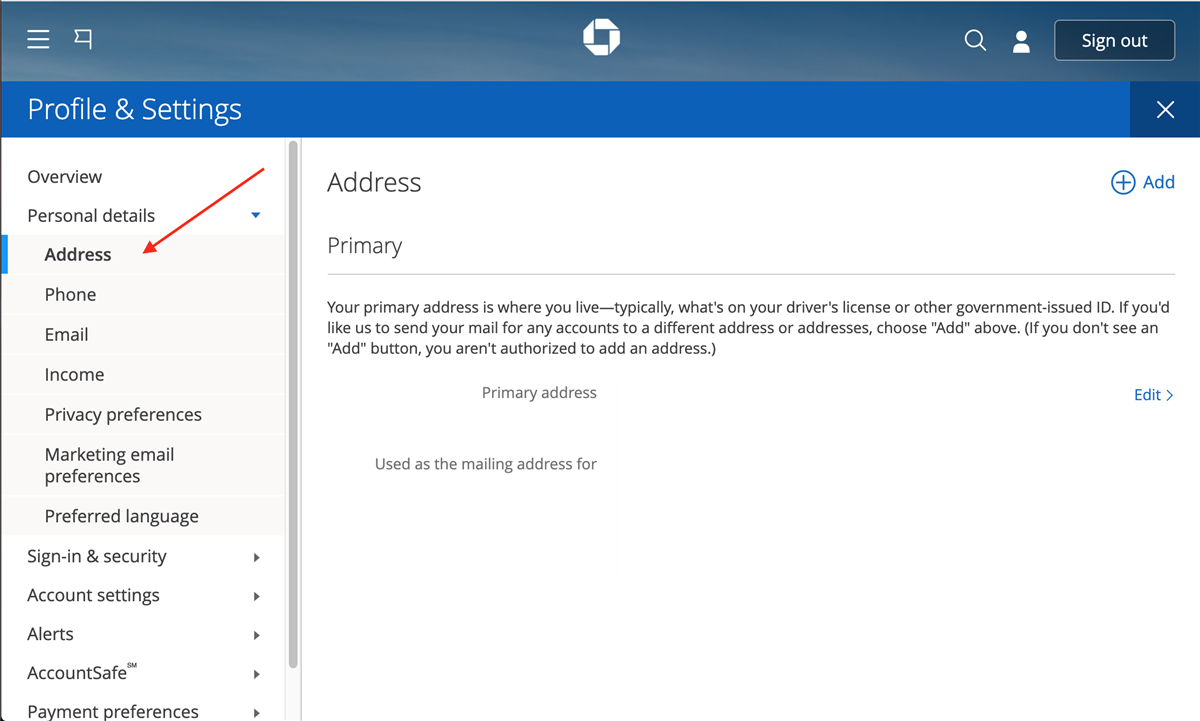
Open Profile & Settings: Click on the “Profile & Settings” icon (often represented by a gear or a silhouette) in the top right corner of the dashboard.
-
Select Profile & Settings: Within the dropdown or side menu, click on “Profile & settings” again to go to the main management page.
-
Manage Contact Information: Look for the “Contact information” section. Here, you will see options for phone numbers, emails, and addresses.
-
Update Address: Click “Edit” next to your address. You can choose to apply this change to all accounts or select specific accounts if you maintain different addresses for different services (e.g., a P.O. Box for a business credit card but a home address for a personal checking account).
-
Confirm Changes: After entering the new details, click “Save.” Chase may send a one-time passcode to your registered phone number or email to verify your identity before finalizing the change.
Phone and In-Person Options
For customers who encounter issues with the digital platforms or those who prefer human interaction, Chase offers traditional support.
-
Customer Service Hotline: You can call the number on the back of your Chase debit or credit card. Alternatively, the general customer service line for Chase is available 24/7. Be prepared to answer security questions to verify your identity before the representative updates your files.
-
Visiting a Branch: If you live near a Chase branch, you can speak with a personal banker. This is often the best route if you are also changing your legal name or if you have complex commercial accounts that require physical documentation. Bring a valid government-issued ID to facilitate the process.
Why Timely Address Updates Are Critical for Personal Finance Security
Updating your address is more than a clerical chore; it is a vital component of your “financial hygiene.” Failing to notify Chase of a move can have cascading effects on your security and credit health.
Preventing Identity Theft and Mail Fraud
Identity theft remains one of the most prevalent financial crimes. Your bank statements, tax forms (like 1099-INTs), and replacement credit cards contain a wealth of sensitive information, including partial account numbers, spending habits, and personal identifiers. If this mail is delivered to your old residence, it becomes a target for “dumpster diving” or theft by subsequent tenants.
By updating your address immediately, you ensure that this sensitive data remains in your control. Furthermore, Chase uses your address to verify your identity when you call for support or attempt to reset a password. If the address on file is incorrect, you may find yourself locked out of your own accounts.

Ensuring Regulatory Compliance and KYC Standards
Banks are required by federal law to follow “Know Your Customer” (KYC) regulations. These laws are designed to prevent money laundering and fraud. An accurate residential address is a key component of your KYC profile. If a bank detects a discrepancy between your reported address and your actual location—often identified through third-party data or geolocation—they may flag your account for suspicious activity, leading to temporary freezes or “soft” holds on your funds.
The Impact of Residency Changes on Your Credit and Loans
Your address is a primary data point used by credit bureaus and lenders to build your financial identity. A change in location affects how you interact with the credit ecosystem in several ways.
Credit Card Billing and Verification
Most online merchants utilize the Address Verification System (AVS) to process credit card transactions. AVS checks the billing address entered at checkout against the address on file with the issuing bank (Chase). If you move and forget to update your billing address, your online purchases may be declined because the zip codes do not match. This is a common source of frustration during a move, especially when trying to purchase new furniture or appliances for a new home.
Mortgage and Auto Loan Considerations
If you have a mortgage or an auto loan with Chase, your address update may have different implications. For a mortgage, your primary residence address is usually tied to the property itself. However, your mailing address for statements and escrow notifications can be different. Ensuring these notifications reach you is essential for tracking property tax payments and insurance premiums handled through your escrow account. For auto loans, your garaging address (where the car is actually kept) is a critical factor for insurance companies, which work closely with lenders to ensure the collateral is protected.
Tax Implications and Geographic Financial Management
Where you live significantly influences your tax obligations and the financial products available to you.
State Tax Residency and Interest Income
Chase is required to report interest earned on your accounts to the IRS and relevant state tax authorities. If you move from a state with no income tax (like Texas) to one with a high income tax (like California), your address update ensures that your 1099 forms are accurately coded for the correct state. An incorrect address on file could lead to tax complications, including being audited for “dual residency” or having your income incorrectly attributed to the wrong jurisdiction.
Insurance Premium Adjustments
If you have insurance products through Chase or its partners, your geographic location is one of the most significant variables in determining your premiums. Moving even a few miles can change your risk profile based on crime rates, weather patterns, or proximity to fire stations. Updating your address ensures your coverage remains valid and that you are paying an accurate rate based on your current location.
A Master Checklist for Relocating Your Financial Life
While updating your Chase address is a major step, it is part of a larger ecosystem of financial updates. To ensure a seamless transition, use the following checklist:
-
Update All Chase Accounts: Ensure the change is applied to checking, savings, credit cards, and investment accounts (J.P. Morgan Wealth Management).
-
Notify Other Financial Institutions: This includes other banks, credit unions, and brokerage firms.
-
Update the “Big Three” Credit Bureaus: While banks eventually report your new address to Equifax, Experian, and TransUnion, you can speed up the process by ensuring your creditors have the correct info.
-
Change Billing for Recurring Subscriptions: Prevent service interruptions by updating your address on streaming services, gym memberships, and utility portals.
-
Set Up USPS Mail Forwarding: This acts as a safety net for any mail that slipped through the cracks, giving you a 12-month window to catch any remaining outdated addresses.
-
Update Your Employer: Ensure your W-2s and paychecks are directed to the correct location and that your state withholding is updated if you have moved across state lines.
Conclusion
Managing your financial profile is an ongoing responsibility that requires diligence, especially during life transitions like moving. Changing your address with Chase is a straightforward process, whether handled through their mobile app, website, or in person. However, the importance of this task extends far beyond simply getting your mail at the right house. It is a fundamental act of security, a requirement for regulatory compliance, and a necessary step for the smooth operation of your credit and tax obligations. By taking the few minutes required to update your information, you protect your assets, secure your identity, and ensure that your financial journey continues without interruption in your new home.
aViewFromTheCave is a participant in the Amazon Services LLC Associates Program, an affiliate advertising program designed to provide a means for sites to earn advertising fees by advertising and linking to Amazon.com. Amazon, the Amazon logo, AmazonSupply, and the AmazonSupply logo are trademarks of Amazon.com, Inc. or its affiliates. As an Amazon Associate we earn affiliate commissions from qualifying purchases.