
In the interconnected world of e-commerce, Amazon stands as a monolithic infrastructure that bridges the gap between global manufacturers and the end consumer. However, the platform operates as a fragmented network of regional storefronts, each governed by local regulations, tax laws, and digital licensing agreements. For many users, accessing the United States storefront (Amazon.com) is not merely a preference but a necessity for accessing a broader selection of hardware, exclusive software releases, and advanced digital services that remain unavailable in other territories. Navigating this transition requires a deep dive into account configurations, geolocation protocols, and the technical nuances of digital rights management.

Changing your Amazon region to the United States involves more than just typing a different URL into your browser. It requires a systematic update of your account’s “Content and Devices” settings, an understanding of IP-based restrictions, and often, the strategic use of networking tools to maintain persistent access to US-exclusive features.
The Technical Architecture of Amazon’s Regional Fragmentation
To effectively switch your Amazon environment to the US, one must first understand how the platform identifies a user’s locale. Amazon utilizes a multi-layered approach to determine which version of the site to serve. This includes your IP address, your browser cookies, your default shipping address, and, most importantly, the country/region settings associated with your digital account.
Geolocation and IP Mapping
When you visit Amazon, the server performs a reverse IP lookup to identify your geographical location. If you are browsing from Berlin, the system will likely redirect you to Amazon.de. While this is convenient for localized shipping, it limits access to the US digital ecosystem, such as specific Kindle titles or Amazon Appstore software. Even if you manually navigate to Amazon.com, the platform may still restrict “Buy Now” options for digital goods based on your detected IP.
The “Content and Devices” Hierarchy
The true “brain” of your regional identity lies within the “Manage Your Content and Devices” section of your Amazon account settings. This is where your digital identity is tethered to a specific jurisdiction. Changing your primary address in your standard profile affects shipping, but changing your region in the “Preferences” tab of the Content and Devices section is what migrates your digital license permissions, such as your Kindle library, Alexa skills, and Prime Video availability, to the US servers.
Step-by-Step Configuration: Migrating Your Account to the US
Transitioning your account is a technical procedure that should be handled with care, as it can affect your existing subscriptions and digital content access. Follow these steps to reconfigure your account for the US marketplace.
Updating the Digital Region Settings
The most critical step is reassigning your account’s digital home.
-
Log in to your existing Amazon account on a desktop browser.
-
Navigate to “Account & Lists” and select “Manage Your Content and Devices.”
-
Click on the “Preferences” tab located at the top of the interface.
-
Locate the “Country/Region Settings” section and click “Change.”
-
Enter a valid US address. While this address is used for regional verification, it is primarily a placeholder for the system to recognize you as a US-based user for digital transactions.
-
Click “Update.” Amazon will process the request, which may involve migrating your existing cloud-based content to the US database.
Configuring the Mobile Application
If you primarily use the Amazon app on iOS or Android, the interface may still default to your previous region due to cached data.
-
Open the Amazon Shopping app.
-
Tap the three-line menu icon or the profile icon at the bottom.
-
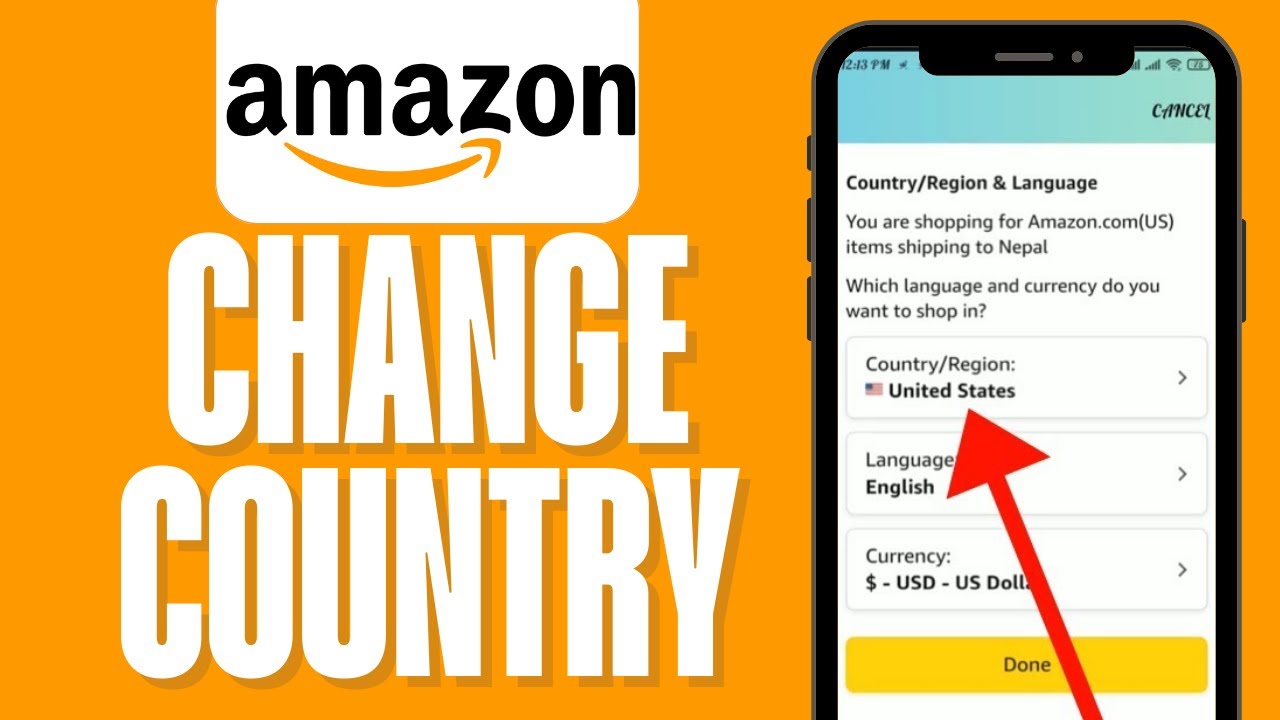
Scroll down to “Settings” and select “Country & Language.”
-
Change the “Country/Region” to United States. This will refresh the UI and provide access to US-specific categories and pricing.
-
Note that you may need to sign in again, as the session token must be re-validated for the Amazon.com domain.
Managing Payment Methods and Address Books
Amazon.com requires a valid payment method. While many international credit cards are accepted, some digital products (like certain MP3s or software) require a US-based billing address. For a seamless technical experience, it is advisable to add a US address to your “Your Addresses” section and set it as the “1-Click” default. This minimizes the friction during the checkout process for digital downloads that are strictly geofenced.
Overcoming Geo-Restrictions and Digital Security Layers
Even after updating your account settings, you may encounter technical hurdles when trying to access US-exclusive content from abroad. Amazon employs sophisticated detection mechanisms to enforce licensing agreements.
Utilizing Virtual Private Networks (VPNs)
A VPN is an essential tool for any tech-savvy user looking to maintain a US presence on Amazon. By routing your traffic through a US-based server, you mask your local IP address with a US IP.
-
Static vs. Dynamic IPs: High-end VPN services offer “Dedicated IPs.” This is technically superior for Amazon users because a static IP is less likely to be flagged as a VPN or proxy by Amazon’s security filters compared to shared, dynamic IPs used by thousands of people.
-
Protocol Selection: Using modern protocols like WireGuard or OpenVPN ensures that your connection is encrypted without significantly sacrificing the latency required for browsing large image-heavy catalogs.
Bypassing Browser Fingerprinting
Amazon uses browser fingerprinting to identify users who are attempting to circumvent regional locks. This includes checking your system’s time zone, language settings, and WebRTC leaks. To ensure your browser matches your “new” US identity:
-
Change your browser’s primary language to English (US).
-
Sync your operating system’s clock to a US time zone (e.g., EST or PST).
-
Disable WebRTC in your browser settings to prevent your real IP from leaking behind the VPN.
Security Implications of Region Switching
Frequent switching between regions can trigger Amazon’s fraud detection algorithms. From a technical standpoint, a sudden jump in geolocation (e.g., being in London and five minutes later in New York) is a red flag for account hijacking. To avoid account lockouts, ensure that Two-Factor Authentication (2FA) is enabled. If you use a VPN, try to connect to the same city consistently to simulate a stable residential location.
The Technical Benefits of the US Amazon Ecosystem
Why go through the effort of reconfiguring your digital identity? The technical advantages of the US Amazon storefront are substantial, particularly for power users and early adopters of technology.
Early Access to Alexa Features and Beta Software
The US is the primary testing ground for Amazon’s AI initiatives. Users with a US-configured account gain access to a significantly larger library of Alexa Skills and “Beta” features within the Alexa app. This includes advanced smart home integrations and experimental AI voice models that often take months or years to reach international markets.
The Amazon Appstore and Android Integration
For Android users, especially those using Fire Tablets or Windows 11 (which supports the Amazon Appstore via the Windows Subsystem for Android), the US store offers a vastly superior selection of applications. Many productivity tools and specialized software are published exclusively on the US storefront due to the simplified regulatory environment for software distribution in North America.
Digital Rights and Kindle Optimization
Kindle users often find that the US store provides better pricing and a much larger repository of technical documentation and niche publications. By migrating to the US region, your Kindle hardware will sync with the US cloud, allowing you to participate in programs like Kindle Unlimited US, which has a different catalog than its European or Asian counterparts.
Troubleshooting and Maintenance Post-Switch
Once you have successfully changed your region, there are several technical maintenance tasks to ensure your account remains in good standing and functional.
Handling Subscription Overlaps
One of the most complex technical challenges is managing Amazon Prime. Prime memberships are region-specific. If you have Prime in the UK and switch to the US, your Prime benefits will not follow you. You would technically need to subscribe to Prime US. From a data management perspective, ensure that you cancel any recurring subscriptions in your old region to avoid being double-billed in two different currencies.
Shipping and Logistics for Hardware
If you are purchasing physical hardware (like the latest Echo device or a Kindle) from the US store to be shipped internationally, be aware of the “Amazon Global” program. This system automatically calculates import duties and taxes (DDP – Delivered Duty Paid). Technically, this is handled through an automated clearing house that communicates with local customs APIs, providing a more streamlined experience than traditional international shipping.

Addressing Currency Conversion Issues
When shopping on the US store with a foreign bank account, Amazon offers a “Currency Converter” tool. While convenient, it often utilizes a proprietary exchange rate that includes a hidden spread. From a financial-tech perspective, it is more efficient to use a multi-currency digital wallet or a card with zero foreign transaction fees, allowing your bank to handle the conversion at the mid-market rate.
By understanding the underlying architecture of regional settings and employing the right technical tools, users can successfully unlock the full potential of the Amazon US ecosystem. Whether it is for accessing exclusive software, optimizing a Kindle library, or testing the latest AI features, the transition to Amazon.com is a powerful move for any global digital citizen.
aViewFromTheCave is a participant in the Amazon Services LLC Associates Program, an affiliate advertising program designed to provide a means for sites to earn advertising fees by advertising and linking to Amazon.com. Amazon, the Amazon logo, AmazonSupply, and the AmazonSupply logo are trademarks of Amazon.com, Inc. or its affiliates. As an Amazon Associate we earn affiliate commissions from qualifying purchases.