
In the modern digital economy, the “Software as a Service” (SaaS) and subscription-based models have become the standard for media consumption. SiriusXM, a pioneer in satellite radio that has successfully pivoted to a robust digital streaming platform, is a prime example of this evolution. However, while signing up for these services is often a frictionless, one-click experience, the process of offboarding—or canceling a subscription—is frequently designed with significantly more complexity.
Whether you are streamlining your digital footprint, switching to a competitor, or simply reducing your “subscription sprawl,” understanding the technical and procedural pathways to cancel SiriusXM is essential. This guide provides a deep dive into the technical methods of cancellation, the user experience (UX) hurdles you may encounter, and how to manage your digital subscriptions more effectively.
The Digital Landscape: Understanding SiriusXM’s Subscription Architecture
Before diving into the “how-to,” it is important to understand that SiriusXM operates across multiple technical environments. Depending on how you initially subscribed—whether through a direct web portal, an integrated vehicle system, or a third-party app store—the “kill switch” for your subscription will reside in different digital locations.
Direct vs. Third-Party Billing
The most critical technical distinction in canceling SiriusXM is identifying your billing entity. If you subscribed via the SiriusXM website, your data and billing permissions are managed directly by their proprietary CRM (Customer Relationship Management) system. Conversely, if you signed up via the Apple App Store or Google Play Store, SiriusXM does not actually have the technical authority to cancel your billing; that permission resides within the API of the respective mobile ecosystem.
The Role of Account Management Portals
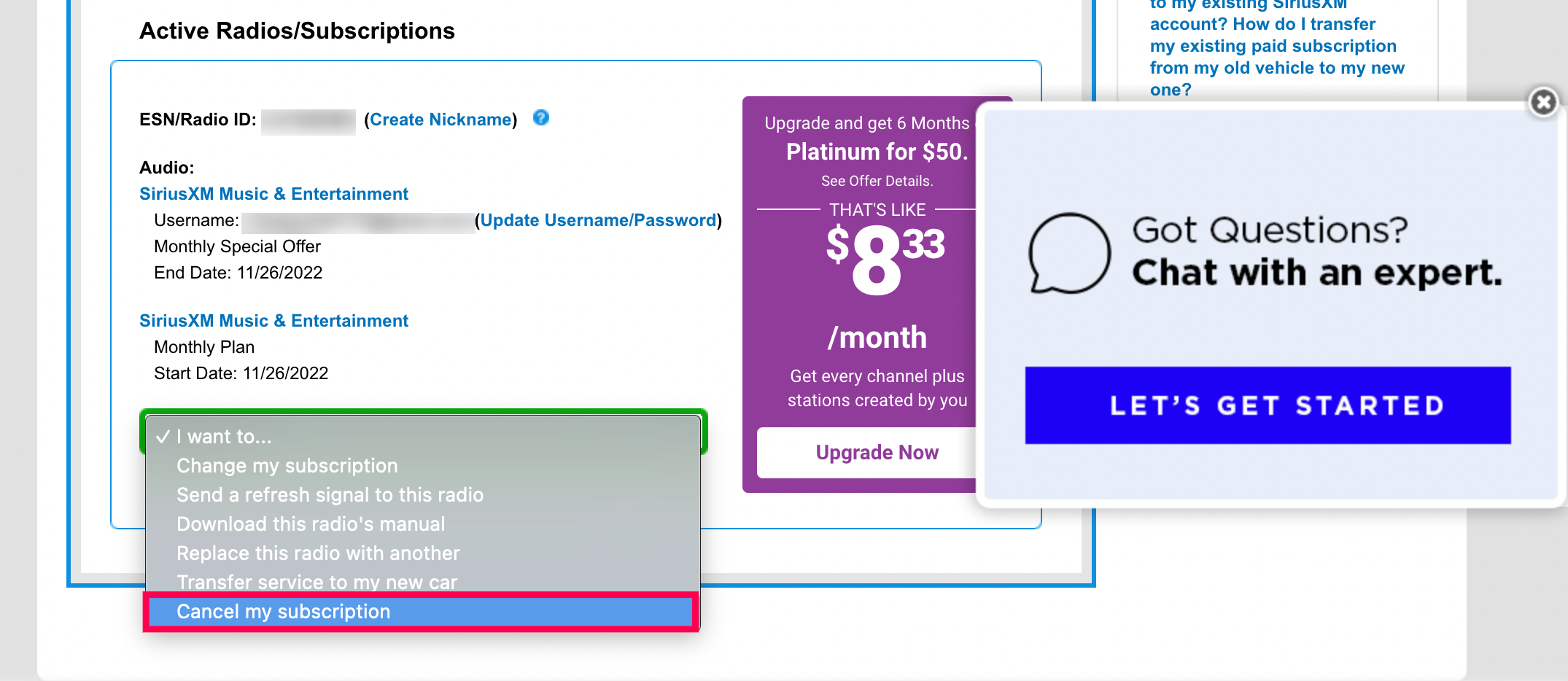
SiriusXM’s online account management portal is the primary hub for direct subscribers. This interface allows users to modify their packages, update payment methods, and view hardware IDs (ESN/RID). However, unlike modern SaaS platforms like Netflix or Spotify, which often provide a prominent “Cancel Membership” button, SiriusXM has historically utilized a more guarded approach to account termination, often requiring direct interaction with their digital support infrastructure.
Step-by-Step: Navigating the Cancellation Interfaces
For those billed directly by SiriusXM, there are two primary digital pathways: the Online Chat interface and the Customer Online Account Management (OAM) portal.
Utilizing the Online Chat and Digital Assistant
In recent years, SiriusXM has integrated an AI-driven digital assistant to handle Tier 1 support queries. To access this, you must log into your account and navigate to the “Contact Us” or “Manage Account” section.
- Authentication: You will be required to pass a multi-factor authentication (MFA) check or provide your account credentials.
- The Bot Interaction: Initially, you will interact with a chatbot. To bypass the automated “save” scripts, it is often most efficient to type “Cancel Subscription” or “Speak to a Representative.”
- The Digital Transition: Once connected to a live digital agent, the process involves a series of “retention offers.” Technically, the agent is following a CRM-driven script designed to offer discounts or hardware upgrades to prevent “churn” (the rate at which customers stop subscribing).
- Confirmation: Ensure you receive a digital transcript or a cancellation confirmation number. Without this data point, you lack the technical proof required to dispute any future erroneous charges.
Managing Subscriptions via the Web Portal
While SiriusXM frequently directs users toward a phone call or chat, certain jurisdictions (such as California) have enacted laws requiring digital cancellation options for any service that allows digital sign-up. If your account address is in a region with such consumer protection laws, you may see a more direct “Cancel” link within your “Subscription” tab.
- Log in to the Online Account Management portal.
- Select the specific radio or streaming plan you wish to terminate.
- Look for “Modify Subscription” or “Cancel Subscription.”
- Follow the prompts, being careful to decline the incremental “add-on” offers that may appear as modal windows during the process.
The Technical Barriers: Understanding “Dark Patterns” in UX Design

In the world of UI/UX design, “Dark Patterns” are interfaces crafted to trick or manipulate users into taking actions they might not intend—or to prevent them from taking actions they do intend, such as canceling a service. SiriusXM’s cancellation process is often cited by tech analysts as a study in “Roach Motel” design: easy to get into, difficult to get out of.
The Churn Reduction Algorithm
SiriusXM uses sophisticated data analytics to identify which users are most likely to cancel. When you enter the cancellation workflow, the system triggers a “retention logic.” This isn’t just a person on the other end; it is a software-driven decision engine that calculates the maximum discount it can offer you based on your listening history and tenure. Understanding that this is a technical process can help you remain firm in your decision to terminate the service.
The Friction points of the “Confirmation Loop”
One common technical hurdle is the “confirmation loop,” where a user thinks they have canceled, but because they didn’t click through a final, often obscured “Confirm Cancellation” button on the third or fourth page of a survey, the subscription remains active. From a technical standpoint, always ensure that your account status in the database changes from “Active” to “Pending Cancellation” or “Terminated” before closing your browser.
Managing SiriusXM via Third-Party Mobile Ecosystems
If you subscribed via an iPhone or Android device, the process is governed by Apple or Google’s subscription management APIs. This is generally considered a more user-friendly technical path, as it bypasses the need for live chat or retention scripts.
Canceling on iOS (Apple App Store)
For iOS users, SiriusXM is just one of many “active subscriptions” linked to your Apple ID.
- Open the Settings app on your iPhone.
- Tap your Name/Apple ID at the top.
- Navigate to Subscriptions.
- Find SiriusXM in the list and tap Cancel Subscription.
This action sends a signal to the SiriusXM servers that the recurring billing token has been revoked.
Canceling on Android (Google Play Store)
Similarly, Android users can manage their access through the Google Play interface.
- Open the Google Play Store app.
- Tap your profile icon in the top right.
- Select Payments & Subscriptions > Subscriptions.
- Locate SiriusXM and select Cancel Subscription.
The advantage here is that the “cancel” command is handled by Google’s backend, providing a clean break without the need for negotiation.
Technical Troubleshooting and Post-Cancellation Security
Once the cancellation request has been submitted, your technical oversight should not end. Ensuring that the “digital ghost” of a subscription does not continue to haunt your bank statement requires a few final steps.
Verification of Data Syncing
Sometimes, there is a latency period between the cancellation of a service and the update of the local app data. After canceling, it is a best practice to log out and log back into the SiriusXM app on all devices. If the cancellation was successful, the app’s API should return an “Unauthorized” or “Subscription Expired” error, confirming that your access has been revoked at the server level.
Clearing Cache and Removing Permissions
To maintain optimal digital hygiene, you should remove the SiriusXM app from your devices once the subscription is terminated. Furthermore, if you linked your SiriusXM account to smart home ecosystems like Amazon Alexa or Google Home, you should manually “unlink” the service within those apps. This prevents the third-party AI from attempting to ping the SiriusXM API, which can occasionally trigger automated “re-activation” emails or notifications.
Using Virtual Cards for Future Security
As a broader tech strategy for managing subscriptions, consider using virtual credit card services (like Privacy.com) or the built-in “Hide My Email” features of modern OSs. By using a virtual card for services like SiriusXM, you can technically “pause” the card at the merchant level. This provides a hard technical stop to any billing attempts, regardless of whether the company’s internal cancellation process is lagging.

Final Summary of the Digital Exit Strategy
Canceling a service like SiriusXM is a multi-layered technical task that involves navigating different billing ecosystems, bypassing retention-focused UX designs, and verifying the cessation of data pings. By identifying whether you are billed through a direct portal or a third-party app store, you can choose the path of least resistance.
In the age of digital subscriptions, the ability to manage, audit, and terminate services is a vital tech skill. Whether you are using a mobile OS interface to toggle off a renewal or navigating a complex web portal, the key is to ensure you receive a definitive confirmation and to monitor your digital permissions in the weeks following. As platforms continue to evolve, staying informed about the technical “exit doors” is just as important as knowing how to use the service itself.
aViewFromTheCave is a participant in the Amazon Services LLC Associates Program, an affiliate advertising program designed to provide a means for sites to earn advertising fees by advertising and linking to Amazon.com. Amazon, the Amazon logo, AmazonSupply, and the AmazonSupply logo are trademarks of Amazon.com, Inc. or its affiliates. As an Amazon Associate we earn affiliate commissions from qualifying purchases.