
In an era defined by digital subscriptions, managing your roster of services can often feel like navigating a complex labyrinth. From streaming videos to cloud storage, each platform comes with its own unique set of account management protocols. SiriusXM, a ubiquitous name in satellite radio, is no exception. While the service offers a vast array of audio content, there may come a time when you need to re-evaluate your subscriptions. This guide provides a detailed, tech-centric walkthrough on how to effectively cancel your SiriusXM radio subscription, ensuring a smooth digital exit and helping you maintain control over your digital service footprint.
For many users, the process of unsubscribing can be fraught with hidden menus, unclear instructions, and the occasional frustration. Our aim is to demystify this process, offering clear, actionable steps that leverage a deep understanding of digital interfaces and customer service systems. Whether you’re opting for an online self-service approach or require direct interaction with a customer support specialist, we’ll cover the most efficient pathways to cancellation, ensuring your digital account management remains as straightforward as possible.
Navigating the SiriusXM Digital Ecosystem: Understanding Your Account
Before initiating any cancellation, it’s crucial to understand the landscape of your SiriusXM account. Like many digital service providers, SiriusXM offers various ways to manage your subscription, primarily through its web portal and, to a lesser extent, its mobile application. Familiarizing yourself with these digital touchpoints and the information associated with your account will streamline the cancellation process significantly.
Identifying Your Account Details
The first step in any digital account management task is to gather your key account information. For SiriusXM, this typically includes your username and password for their website, your account number (if readily available), and the email address associated with your subscription. Having this information at hand will prevent delays and the need for password recovery processes, which can add unnecessary steps to your cancellation journey. If you’ve forgotten your login credentials, the SiriusXM website usually provides a “Forgot Username/Password” utility, a common feature in digital platforms designed to regain account access.
Understanding Your Subscription Type and Billing Cycle
SiriusXM offers various subscription packages (e.g., Music & Entertainment, Platinum, Streaming Platinum) and different billing frequencies (monthly, annually). Knowing your specific plan and when your next billing cycle is due is critical. This information helps you strategically time your cancellation to avoid being charged for an unwanted future period. While cancelling, most digital services allow you to continue using the service until the end of your current billing period. Understanding this nuance ensures you maximize your paid-for access while still securing your cancellation effectively. You can typically find this information within your account dashboard on the SiriusXM website under “My Account” or “Billing Information.”
Exploring Digital Self-Service Options
SiriusXM, like many modern service providers, increasingly encourages users to utilize its online self-service tools. The primary digital hub for managing your subscription is the official SiriusXM website. Here, you can update personal information, change payment methods, and, in some cases, initiate cancellation. While some services offer full cancellation through a few clicks, others may route you to a contact form or suggest a phone call for final confirmation. Understanding the extent of their online self-service capabilities for cancellation is key to choosing your most efficient path.
The Online Cancellation Process: A Step-by-Step Tech Tutorial
For many, the most convenient method to manage digital subscriptions is through a web browser. While SiriusXM’s online cancellation process can be somewhat less direct than simply clicking a “cancel” button, it is still possible to initiate or complete the process digitally. This section provides a meticulous tutorial for navigating their online platform.
Step 1: Accessing Your SiriusXM Online Account
Begin by opening your preferred web browser and navigating to the official SiriusXM website (www.siriusxm.com). Locate the “Login” or “My Account” button, usually found in the top right corner of the page. Enter your registered username and password. If you encounter issues logging in, utilize the password recovery tool immediately to regain access before proceeding. Ensuring secure access to your account is the foundational step for any digital account management.
Step 2: Navigating to the Subscription Management Section
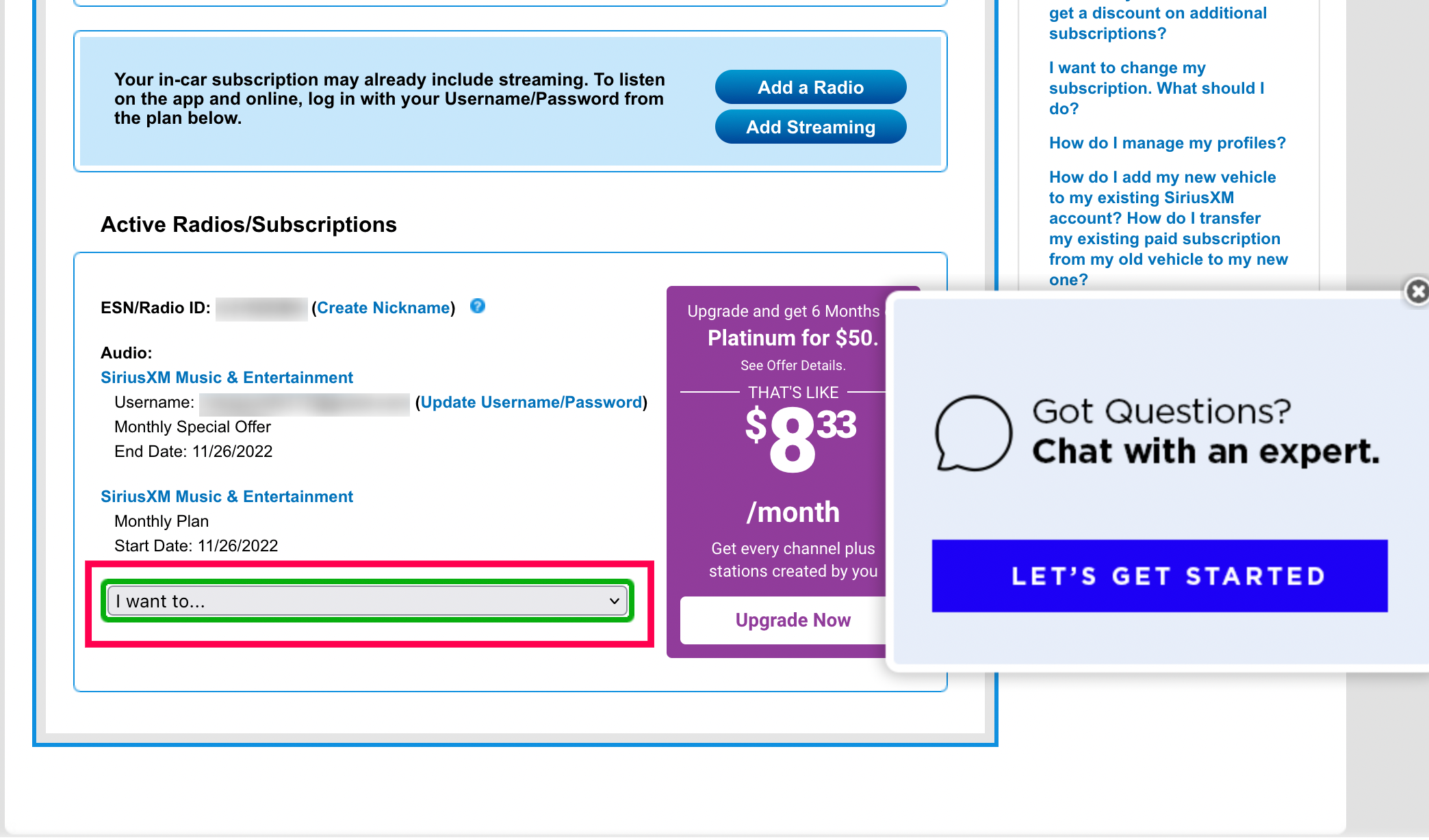
Once logged in, you’ll be directed to your account dashboard. Look for sections labeled “My Account,” “Subscriptions,” “Manage Subscription,” or “Billing & Subscriptions.” The exact terminology may vary slightly due to website updates, but the intent is to find the area dedicated to your active services and billing details. This is often an intuitive section designed for users to oversee their service agreements.
Step 3: Locating the Cancellation Option (or its Proxies)
This is often the trickiest part of the online process. Some digital services clearly present a “Cancel Subscription” button. Others might embed it within a series of prompts or require you to select “Change Plan” or “Modify Subscription” before revealing the cancellation option. Search for explicit cancellation links or any option that implies modifying or downgrading your current service. If an immediate “Cancel” button isn’t visible, look for FAQs or help sections related to “canceling my service.” Occasionally, a direct online cancellation option might not be immediately available, directing you instead to call customer service or use a chat function.
Step 4: Following Online Prompts and Confirmations
If an online cancellation pathway is available, follow the on-screen instructions carefully. You might be asked for a reason for cancellation (a common data-gathering technique for service providers), or presented with retention offers (e.g., discounted rates, temporary pauses) to entice you to stay. Be prepared to decline these if your decision to cancel is firm. The final step in the online process is usually a confirmation screen or email, which serves as your digital receipt and proof of cancellation. Always save or screenshot this confirmation for your records.
Beyond the Web: Alternative Digital and Analog Avenues for Cancellation
While online self-service is often preferred, not all digital services offer a full, one-click online cancellation. In some cases, a more direct interaction through phone or even mail might be necessary or preferred. These methods still interface with SiriusXM’s customer relationship management (CRM) systems, making them relevant in a broader tech context.

The Phone Call Method: Direct Customer Service Interaction
Calling SiriusXM’s customer service remains one of the most reliable ways to cancel your subscription, especially if the online portal proves difficult or incomplete.
- Finding the Right Number: Locate SiriusXM’s customer service number, typically found on their website under “Contact Us” or in your billing statements. It’s usually a toll-free number.
- Navigating the IVR System: Be prepared to navigate an Interactive Voice Response (IVR) system. Listen carefully to the options to direct your call to “billing,” “account management,” or “cancellation.” This requires understanding the system’s logic to reach the correct department efficiently.
- Speaking with a Representative: Once connected to a live agent, clearly state your intent to cancel. The representative will likely ask for your account information (account number, name, address, phone number for verification).
- Handling Retention Offers: Similar to the online process, be ready for retention offers. Customer service agents are trained to try and keep subscribers. Politely decline if you’re set on canceling.
- Obtaining Confirmation: Crucially, request a confirmation number or email for your cancellation. This is your tangible proof that the request has been processed. Note down the date, time, and the name of the representative you spoke with.
The Mail Method: A Less Common but Valid Approach
While less common in the digital age, canceling by mail is an option for those who prefer it or if other methods fail. This method requires a formal written request and interacts with SiriusXM’s physical customer records system.
- Drafting Your Letter: Write a clear and concise letter stating your intent to cancel. Include all pertinent account information: full name, address, phone number, email, and most importantly, your SiriusXM account number.
- Sending the Mail: Send your letter via certified mail with a return receipt requested. This provides you with proof that your letter was received by SiriusXM, which can be invaluable in case of disputes.
- Allowing Processing Time: Understand that mail cancellation will take longer to process than phone or online methods. Monitor your account and billing statements for confirmation of cancellation.
Troubleshooting Common Digital Hurdles and Ensuring a Smooth Exit
Even with clear instructions, the process of canceling a digital subscription can present unforeseen challenges. Being prepared for these common technical and procedural hurdles can make a significant difference.
Forgotten Login Credentials
This is perhaps the most frequent obstacle. If you can’t log into your SiriusXM account, use the “Forgot Username/Password” link on their login page. Follow the prompts to reset your password or retrieve your username. This typically involves email verification. Ensure you have access to the email address associated with your account.
Difficulty Locating Cancellation Options Online
Some websites employ “dark patterns” or simply have non-intuitive navigation. If you’re struggling to find the cancellation option on the SiriusXM website, try using the website’s internal search function for terms like “cancel,” “subscription,” or “account management.” If still unsuccessful, remember the phone method is always a reliable alternative.
Dealing with Persistent Retention Offers
During phone calls, customer service representatives might make multiple offers to keep you as a subscriber. While these can sometimes be beneficial if you’re wavering, if your decision to cancel is firm, be polite but resolute. Repeating “I would like to cancel my subscription, please” is often sufficient. They are ultimately obligated to process your request.
Verifying Cancellation and Preventing Future Charges
After initiating cancellation, whether online or by phone, it’s crucial to verify that the process has been completed.
- Check for Confirmation: Look for a confirmation email from SiriusXM. Keep this email.
- Review Account Status: Log back into your SiriusXM account after a few days to see if the subscription status has changed.
- Monitor Bank Statements: For the next one to two billing cycles, closely monitor your bank or credit card statements to ensure no further charges from SiriusXM occur. If you see an unexpected charge, immediately contact SiriusXM customer service with your cancellation confirmation details.
Post-Cancellation: Managing Your Digital Footprint and Future Choices
Canceling a subscription is not just about stopping payments; it’s also about managing your ongoing digital relationship with a service provider. Understanding the implications post-cancellation is part of responsible digital citizenship.
Data Retention and Account Status
When you cancel SiriusXM, your account isn’t typically deleted outright. Instead, it becomes inactive. SiriusXM, like many companies, will retain certain data associated with your account for a period, often for legal or operational reasons. This usually includes basic account information and billing history. You may still be able to log into your inactive account to view past details, though you won’t have access to the service.
Managing Email Communications
Even after cancellation, you might continue to receive marketing emails from SiriusXM. Most service providers have separate preferences for promotional communications. Log back into your account settings or use the “unsubscribe” link at the bottom of their emails to opt out of future marketing messages. This helps reduce digital clutter and ensures you’re not bothered by irrelevant promotions.
Considerations for Future Re-subscriptions
Should you decide to return to SiriusXM in the future, your inactive account often makes the re-subscription process smoother. Your old account information may be retrieved, potentially simplifying setup. Be aware that re-subscribing might involve new promotional offers that weren’t available at the time of your initial cancellation. SiriusXM, like other service providers, often uses these new customer incentives to win back former subscribers.

Leveraging the Knowledge for Other Digital Services
The experience gained from effectively canceling a SiriusXM subscription is transferable. The general principles of identifying account details, navigating digital portals, understanding billing cycles, and requesting confirmation apply broadly across the spectrum of digital services. This strengthens your overall capability in managing your digital life, making you a more informed and empowered consumer in the digital age.
By following these tech-centric guidelines, you can navigate the process of canceling your SiriusXM subscription with confidence and efficiency. Taking control of your digital subscriptions is a crucial aspect of modern personal technology management, and understanding “how to cancel” is just as important as knowing “how to subscribe.”
aViewFromTheCave is a participant in the Amazon Services LLC Associates Program, an affiliate advertising program designed to provide a means for sites to earn advertising fees by advertising and linking to Amazon.com. Amazon, the Amazon logo, AmazonSupply, and the AmazonSupply logo are trademarks of Amazon.com, Inc. or its affiliates. As an Amazon Associate we earn affiliate commissions from qualifying purchases.