
The landscape of sports broadcasting underwent a seismic shift recently as NFL Sunday Ticket transitioned from traditional satellite delivery via DirecTV to the cloud-native ecosystem of Google’s YouTube and YouTube TV. For the modern consumer, this move represents more than just a change in channel numbers; it reflects a broader evolution in how digital assets are managed, billed, and decommissioned. Understanding how to cancel NFL Sunday Ticket requires a dive into the user interface (UI) of Google’s subscription architecture and an awareness of the cross-platform complexities that define today’s “software as a service” (SaaS) entertainment model.
As we move toward an increasingly fragmented streaming environment, the ability to audit and manage digital subscriptions is a vital technical skill. Whether you are looking to avoid an unwanted auto-renewal for the next season or simply optimizing your digital footprint, this guide provides a comprehensive technical walkthrough for navigating the Google ecosystem to terminate your NFL Sunday Ticket subscription.
Navigating the Google and YouTube Ecosystem
The transition of NFL Sunday Ticket to Google’s infrastructure means that the service is no longer a standalone broadcast package but is instead integrated into one of two primary digital environments: YouTube TV or YouTube Primetime Channels. The cancellation process differs significantly depending on which “on-ramp” you used to purchase the service.
Terminating via the YouTube TV Interface
For users who integrated NFL Sunday Ticket into their YouTube TV base plan, the subscription is treated as an “Add-on.” To cancel this, one must navigate the multi-layered settings of the YouTube TV web app or mobile application.
- Authentication: Log in to the Google account associated with the subscription. In the tech world, “account fragmentation”—where users have multiple Gmail accounts—is the leading cause of “ghost subscriptions.”
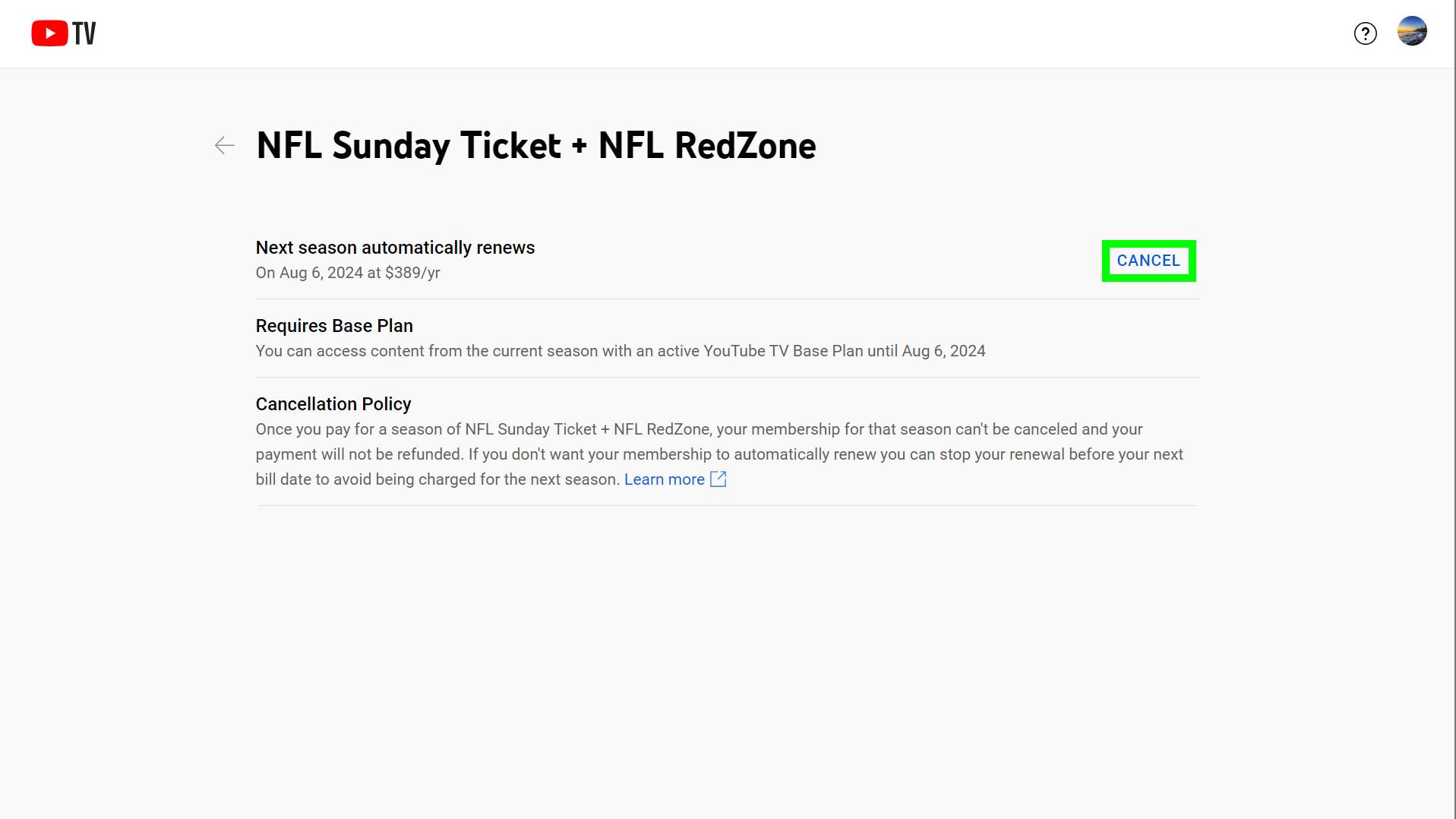
- Membership Settings: Click on your profile avatar and select “Settings,” then “Membership.”
- Tier Management: Locate the NFL Sunday Ticket line item. Unlike the base YouTube TV package, which can be “paused,” Sunday Ticket is a seasonal product. You must select “Manage” and then follow the prompts to “Cancel.”
Canceling through YouTube Primetime Channels
If you purchased the package via YouTube Primetime Channels (without a YouTube TV subscription), the technical path is slightly different. This version of the service lives within the standard YouTube app interface.
- Purchases and Memberships: Within the main YouTube app, navigate to the “You” tab or your profile icon and select “Purchases and Memberships.”
- Digital Asset Audit: This section lists all movies, premium channels, and specialized sports packages. Find NFL Sunday Ticket and select “Deactivate.”
- Verification: Ensure you receive an automated confirmation email. In the backend of Google’s billing API, the status must change from “Active” to “Expires on [Date]” to prevent the next billing cycle’s automated trigger.
Cross-Platform Technical Hurdles: Mobile vs. Desktop
One of the most common friction points in modern app design is the disparity between mobile application capabilities and web-based dashboards. When attempting to cancel a high-value subscription like NFL Sunday Ticket, the device you use can dictate the complexity of the task.
The “App Store Tax” and Billing Redirection
If you signed up for NFL Sunday Ticket via the YouTube app on an iOS device, you might find that the “Cancel” button is missing from the YouTube UI. This is a result of Apple’s App Store ecosystem, where third-party subscriptions are often routed through Apple’s proprietary billing system.
In this scenario, the cancellation must occur at the OS level. Users must go to Settings > Apple ID > Subscriptions on their iPhone or iPad. Technically, this means Apple acts as the merchant of record, and Google’s internal database simply waits for a “cancel” signal from Apple’s API. Failure to recognize this hierarchy is a primary reason why many users believe they have canceled a service when they have only deleted the app.

Browser-Based Management
From a technical standpoint, managing subscriptions via a desktop browser (Chrome, Firefox, or Safari) remains the most reliable method. Mobile apps often use “lite” versions of account management tools to save on package size and performance. By logging into the desktop version of YouTube, you gain access to the full suite of billing telemetry, including payment history, upcoming renewal dates, and the ability to remove saved payment methods—a “hard stop” technique used by many power users to ensure no further charges can be processed.
Understanding Auto-Renewal Logic and Digital Hygiene
The technical architecture of modern streaming services is built on the concept of “continuous service.” This means that by default, NFL Sunday Ticket is programmed to auto-renew for the following season at the then-current market rate. Understanding the logic behind these automated triggers is essential for maintaining digital hygiene.
The Lifecycle of a Seasonal Subscription
NFL Sunday Ticket is a unique digital product because it is seasonal rather than monthly. However, the billing logic often mirrors monthly SaaS products. When you “cancel” mid-season, you are technically not terminating the current access but rather “disabling the renewal trigger.”
From a data perspective, your account remains flagged as “Premium” until the final game of the scheduled season. After this date, the system checks the “Auto-Renew” boolean flag in the database. If it is set to “False,” the account is downgraded to “Free” status. It is a best practice to perform this cancellation immediately after purchase if you do not intend to keep the service long-term, as the “entitlement” to the content remains active for the duration of the paid term.
Troubleshooting Missing Cancellation Options
There are instances where the “Cancel” or “Deactivate” buttons do not appear. This is rarely a bug and usually a technical state issue:
- Pending Transactions: If a payment is currently being processed or has failed, the system may lock the subscription settings until the financial state is resolved.
- Third-Party Bundles: If your subscription was part of a hardware bundle (e.g., a free year with a new phone or internet service), the “master” account for that bundle (Verizon, Frontier, etc.) may be the only place where the service can be managed.
- Family Sharing Hooks: If you are part of a “Google Family Group,” only the family manager (the account holder who pays for the group) has the technical permissions to alter or cancel subscriptions.
The Future of Sports Streaming: From Satellite to Cloud
The shift of NFL Sunday Ticket to a streaming-first model under Google’s wing is a harbinger of the future of sports tech. This transition has significant implications for how we interact with, and eventually disconnect from, premium content.
Technical Advantages of the YouTube Integration
While the cancellation process can be a hurdle, the technical benefits of the move to YouTube are undeniable. Features like “Multiview,” which allows users to stream four games simultaneously, are powered by cloud-side compositing. Unlike traditional hardware that would require four separate tuners, Google’s servers handle the heavy lifting, sending a single compressed stream to the user’s device. This level of technical sophistication is what makes the subscription valuable, but it also creates a “walled garden” that makes users hesitant to leave.
Latency, Bitrate, and the User Experience
The decision to cancel is often driven by the technical performance of the stream. For many, the transition from satellite (low latency) to streaming (variable latency) was a hurdle. Streaming involves “chunking” video data, which can lead to a 20–60 second delay behind live action. For users in high-speed fiber areas, the 4K potential and high bitrate of YouTube’s infrastructure are a net positive. However, for those in areas with data caps or “buffer bloat,” the technical limitations of their ISP may make the $400+ price tag unjustifiable, leading to the need for cancellation.
Conclusion: Mastering the Digital Subscription Stack
Canceling NFL Sunday Ticket is more than just a choresome task; it is an exercise in navigating the modern tech stack. As major sports leagues move away from legacy cable and satellite providers toward tech giants like Google, Amazon, and Apple, the “User Account” becomes the most important piece of hardware you own.
To successfully manage these services, users must be disciplined in their digital hygiene: tracking which account holds the entitlement, understanding the billing relationship between mobile OS providers and content platforms, and recognizing the automated logic that governs seasonal renewals. By mastering these technical nuances, you can enjoy the cutting-edge features of modern sports streaming—like multiview and real-time stats—without falling into the trap of perpetual, unmonitored “subscription creep.” In the digital age, the “off-switch” is just as important as the “play” button.
aViewFromTheCave is a participant in the Amazon Services LLC Associates Program, an affiliate advertising program designed to provide a means for sites to earn advertising fees by advertising and linking to Amazon.com. Amazon, the Amazon logo, AmazonSupply, and the AmazonSupply logo are trademarks of Amazon.com, Inc. or its affiliates. As an Amazon Associate we earn affiliate commissions from qualifying purchases.