
In the rapidly evolving landscape of cloud gaming, services like NVIDIA’s GeForce NOW have revolutionized how gamers access high-performance titles, freeing them from the constraints of expensive hardware. By streaming games directly from powerful cloud servers, GeForce NOW allows users to play their favorite PC games on almost any device, from low-end laptops to smartphones. However, circumstances change. Whether you’ve upgraded your local gaming rig, found an alternative service, or simply need to re-evaluate your digital subscriptions, knowing how to manage and ultimately cancel your GeForce NOW membership is a practical skill for any tech-savvy consumer. This comprehensive guide will walk you through the process, ensuring a smooth and hassle-free cancellation, while also providing valuable insights into what to expect before and after you cut ties with NVIDIA’s cloud gaming platform.

Understanding Your GeForce NOW Membership
Before diving into the mechanics of cancellation, it’s beneficial to have a clear understanding of what your GeForce NOW membership entails. This context will help you make informed decisions and anticipate the implications of ending your subscription.
What is GeForce NOW?
GeForce NOW stands as a pioneering cloud gaming service developed by NVIDIA. Unlike traditional gaming where titles are installed and run locally on your hardware, GeForce NOW leverages remote, powerful NVIDIA GPUs in data centers to render games. These rendered game streams are then sent to your device, requiring only a stable internet connection and a compatible device to enjoy high-fidelity PC games. The service integrates with popular PC game stores like Steam, Epic Games Store, and GOG, allowing users to play games they already own, rather than requiring a separate library of titles. This innovative approach has made high-end PC gaming accessible to a broader audience, reducing the barrier to entry significantly.
Membership Tiers and Billing Cycles
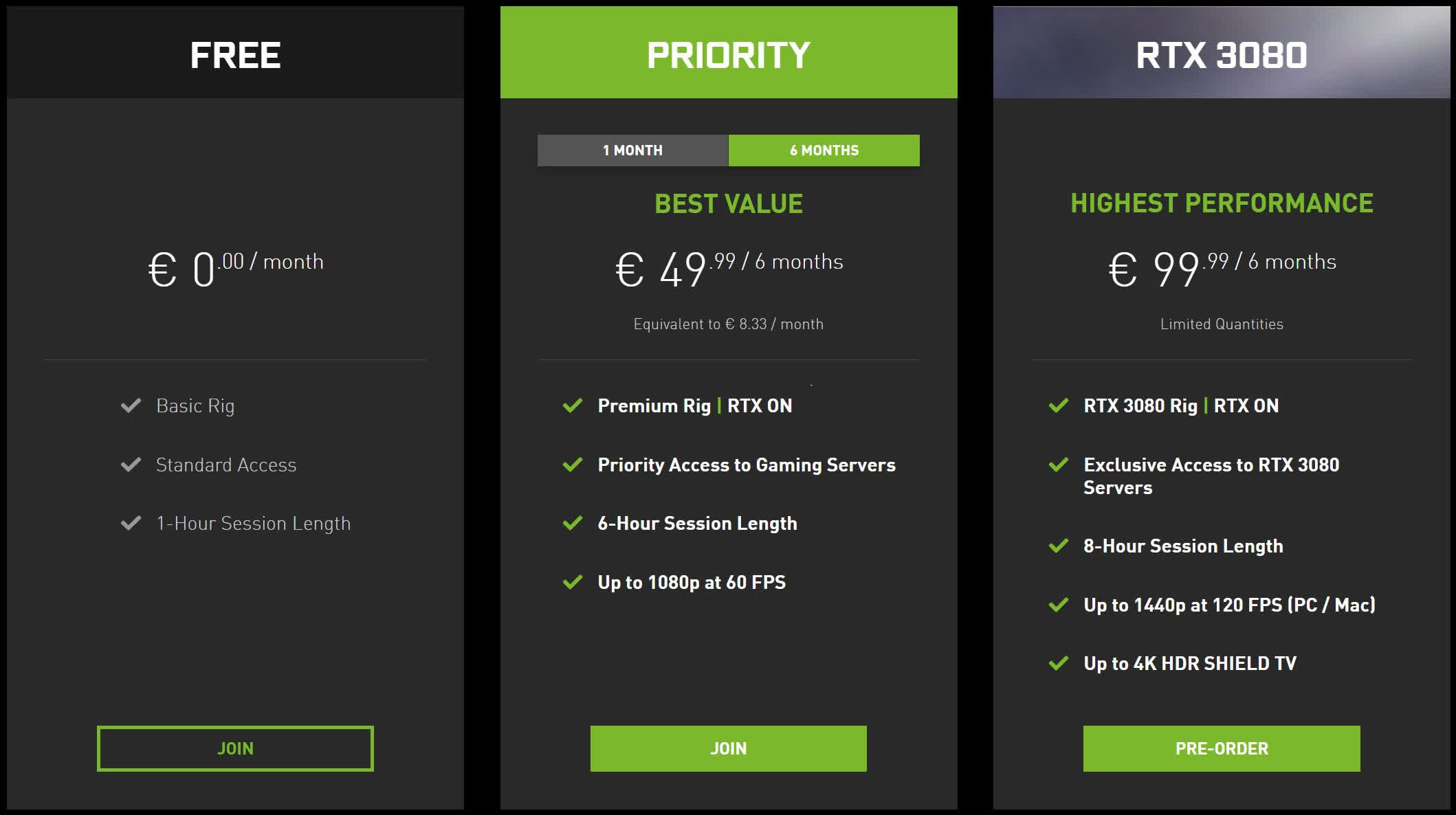
GeForce NOW typically offers a tiered membership structure designed to cater to different user needs and budgets. While the specifics can vary over time and by region, the common tiers include:
- Free Tier: This entry-level option provides basic access to the service, often with limited session lengths (e.g., one hour) and potential wait times to access a gaming rig. It’s a great way to test the service.
- Priority/Premium Tier: This paid subscription offers significant enhancements, such as priority access to servers (reducing or eliminating wait times), extended session lengths (e.g., up to six hours), and enhanced graphics performance with NVIDIA’s RTX capabilities.
- Ultimate Tier: The top-tier option provides the most premium experience, often with access to the highest-end GPUs (like RTX 4080-class performance), longer session lengths (e.g., eight hours), and support for higher resolutions and frame rates.
Paid memberships are typically billed on a recurring basis, either monthly or every six months, depending on the subscription plan chosen. Understanding your specific tier and billing cycle is crucial, as cancellations usually take effect at the end of your current billing period, allowing you to utilize the service for the remainder of the time you’ve already paid for.
Common Reasons for Cancellation
Users choose to cancel their GeForce NOW membership for a variety of reasons, often reflecting shifts in personal circumstances or technological preferences. Some common motivations include:
- Cost Management: While often more affordable than building a high-end PC, the recurring subscription fee can add up, especially if not utilized frequently.
- Upgraded Local Hardware: Many gamers eventually invest in a powerful local PC, reducing their reliance on cloud gaming services.
- Exploring Alternatives: The cloud gaming market is growing, with competitors like Xbox Cloud Gaming, PlayStation Plus Premium, and Amazon Luna offering different game libraries or service models.
- Performance Issues: Despite its strengths, network latency or internet speed limitations can sometimes lead to a less-than-ideal experience, prompting users to seek other solutions.
- Lack of Desired Games: While GeForce NOW supports a vast library, specific titles or new releases might not always be immediately available or supported.
- Reduced Gaming Time: Life changes can lead to less time for gaming, making a subscription service less cost-effective.
Regardless of your reason, the cancellation process is designed to be straightforward, putting you back in control of your digital entertainment budget and choices.
Step-by-Step Guide to Cancelling GeForce NOW
Cancelling your GeForce NOW membership is a relatively simple process that can be completed directly through your NVIDIA account management portal. Follow these detailed steps to ensure a smooth cancellation.
Before You Begin: Essential Checks
Before you initiate the cancellation process, take a moment to perform these preliminary checks:
- Verify Account Details: Ensure you have your NVIDIA account username and password readily available. If you’ve forgotten them, use the password recovery option on the NVIDIA website.
- Check Active Subscription Status: Log into your NVIDIA account to confirm which GeForce NOW subscription tier you are currently on and its billing cycle. This helps you understand when your access will officially end.
- Review Your Gaming Habits: Consider whether you have any outstanding gaming sessions or important progress saved within GeForce NOW. While game saves are usually handled by the underlying game store (Steam, Epic), it’s good practice to be aware.
Navigating to Your Account Settings
The cancellation process begins by accessing your NVIDIA account online:
- Open a Web Browser: Go to the official NVIDIA website. You can usually find the login portal by searching for “NVIDIA account login” or directly navigating to
account.nvidia.com. - Log In to Your NVIDIA Account: Enter your registered email address and password. If you use a third-party login (like Google), select that option.
- Access Your Membership Section: Once logged in, you should see your account dashboard. Look for a section related to “Membership,” “Subscriptions,” or “Services.” This is typically found in a sidebar menu or as a prominent tile on the main dashboard. Click on the option that specifically refers to “GeForce NOW Membership” or “Manage My Memberships.”
The Cancellation Process Explained
Within the GeForce NOW membership management section, you will find the options to modify or cancel your subscription:

- Locate Your Active Subscription: On the membership page, you will see a list of your active NVIDIA subscriptions. Identify your GeForce NOW membership.
- Select “Manage Membership” or “Cancel Subscription”: Next to your GeForce NOW entry, there should be a button or link labeled “Manage Membership,” “Change Plan,” or directly “Cancel Subscription.” Click on this option.
- Follow the On-Screen Prompts: NVIDIA will typically provide a series of prompts to guide you through the cancellation. These steps may include:
- Confirmation of Intent: You might be asked to confirm that you wish to cancel and acknowledge what this means for your service access.
- Reason for Cancellation (Optional): NVIDIA may ask for your reason for canceling. While optional, providing feedback can help them improve the service.
- Final Confirmation: You will usually be presented with a final confirmation screen detailing when your service will cease (e.g., “Your membership will remain active until [date] and will not renew.”).
- Confirm Your Cancellation: Click the final “Confirm Cancellation” or similar button to finalize the process.
Confirmation and What to Expect Next
Upon successful cancellation, you should receive immediate confirmation:
- On-Screen Message: An immediate message on the website confirming your cancellation.
- Email Confirmation: NVIDIA will send a confirmation email to the address associated with your account. This email is important for your records, so keep it. It will typically state that your subscription will not renew and confirm the date until which you can continue using the service.
- Continued Access: Your GeForce NOW paid membership benefits will remain active until the end of your current billing cycle. For example, if you pay monthly on the 15th and cancel on the 5th, you will still have priority access until the 14th of that month. After this date, your account will revert to the free tier, if available.
Post-Cancellation Considerations and Alternatives
Cancelling a subscription doesn’t always mean the end of your relationship with a service or even the underlying technology. Understanding what happens next and exploring alternative solutions can provide clarity and peace of mind.
What Happens After You Cancel?
Once your paid GeForce NOW membership officially ends (at the close of your billing cycle), several changes will occur:
- Loss of Priority Access: You will no longer have priority access to NVIDIA’s cloud gaming servers. This means you might experience wait times to launch games, especially during peak hours.
- Reduced Session Lengths: Your maximum game session length will revert to the limits of the free tier (typically one hour), after which you’ll need to re-queue.
- Feature Downgrade: If you were on a premium tier, you will lose access to enhanced features like RTX ON, higher resolutions, and higher frame rates that were exclusive to your paid subscription.
- Game Saves: Your game saves are generally stored by the respective game platform (Steam, Epic Games, etc.), not directly by GeForce NOW. This means your progress should be safe and accessible if you resubscribe or play those games on another platform or local PC.
- Account Retention: Your NVIDIA account itself will remain active, allowing you to manage other NVIDIA services or easily resubscribe to GeForce NOW in the future.
Rejoining GeForce NOW
Should your gaming needs or circumstances change, rejoining GeForce NOW is designed to be as straightforward as cancelling. You can simply log back into your NVIDIA account on the website, navigate to the GeForce NOW membership section, and select the desired paid tier to resubscribe. Your account history and preferences will likely be retained, making the transition seamless.
Exploring Other Cloud Gaming Platforms
The cloud gaming market is dynamic, with several strong contenders offering unique propositions. If you’re moving away from GeForce NOW, you might consider:
- Xbox Cloud Gaming (part of Xbox Game Pass Ultimate): Offers a robust library of first-party Xbox titles and many third-party games, playable on various devices. It integrates seamlessly for Xbox ecosystem users.
- PlayStation Plus Premium: Sony’s cloud streaming service, providing access to a catalog of PS4, PS3, and classic PlayStation games. Best for PlayStation console owners.
- Amazon Luna: A service that often bundles with Prime, offering various channels of games.
- Boosteroid: Another independent cloud gaming service that integrates with existing game libraries.
Each platform has its strengths regarding game libraries, performance, and supported devices. Researching these alternatives can help you find a service that better fits your current gaming needs.
Local Gaming Solutions
For those with the budget and inclination, the traditional method of building or buying a high-performance gaming PC remains a powerful alternative to cloud gaming. Upgrading your local hardware (GPU, CPU, RAM) can offer unparalleled performance, the lowest latency, and complete control over your gaming experience, albeit at a higher upfront cost and ongoing maintenance. For console gamers, the latest generation consoles (PlayStation 5, Xbox Series X/S) also provide excellent local gaming experiences.
Troubleshooting Common Cancellation Issues
While the cancellation process is usually smooth, occasional technical glitches or misunderstandings can arise. Here’s how to troubleshoot some common issues.
Forgotten Account Credentials
If you’ve forgotten your NVIDIA account username or password, don’t panic.
- Password Reset: On the NVIDIA login page, click the “Forgot Password” link. You’ll typically be prompted to enter your email address, and a password reset link will be sent to you.
- Account Recovery: If you forget your email or have other issues, look for an “Account Recovery” option or contact NVIDIA Support directly (see below).
Subscription Not Showing Up
If you log in but can’t find your GeForce NOW subscription under your memberships:
- Check Correct Account: Ensure you are logged into the exact NVIDIA account that holds the GeForce NOW subscription. Many users have multiple email addresses, and it’s easy to get them mixed up.
- Payment Method Check: Sometimes, if a payment failed, the subscription might be in a suspended state. Check your payment method’s history or NVIDIA’s billing history.
- Delayed Sync: Rarely, there might be a delay in the system. Try logging out and logging back in, or checking again after a few hours.
Billing Cycle Confusion
Understanding when your service truly ends can be tricky:
- Cancellation vs. Termination: Remember, cancelling typically means you are preventing future charges. Your service remains active until the end of the current billing period you’ve already paid for. The confirmation email will explicitly state this date.
- No Pro-Rata Refunds: NVIDIA, like most subscription services, generally does not offer pro-rata refunds for partial months of service if you cancel mid-cycle. You get to use the service until your next billing date.
Contacting NVIDIA Support
If you encounter persistent issues, cannot find the cancellation option, or have specific billing inquiries, contacting NVIDIA Support is the best course of action.
- NVIDIA Support Website: Visit the official NVIDIA support page (usually
www.nvidia.com/support/). - Contact Options: Look for options like “Live Chat,” “Email Support,” or a “Support Ticket” system. Be prepared to provide your NVIDIA account details and a clear description of your problem.
- Community Forums: NVIDIA also has active community forums where you might find solutions to common issues or get advice from other users.
Cancelling your GeForce NOW membership is a straightforward process designed to give users control over their digital subscriptions. By following these steps and understanding the implications, you can manage your cloud gaming commitments efficiently and explore new technological horizons with confidence.
aViewFromTheCave is a participant in the Amazon Services LLC Associates Program, an affiliate advertising program designed to provide a means for sites to earn advertising fees by advertising and linking to Amazon.com. Amazon, the Amazon logo, AmazonSupply, and the AmazonSupply logo are trademarks of Amazon.com, Inc. or its affiliates. As an Amazon Associate we earn affiliate commissions from qualifying purchases.