
The decision to decommission a digital service, especially one handling financial transactions, involves more than just hitting a delete button. For platforms like Cash App, understanding the technical process of account closure is paramount for ensuring data security, financial integrity, and a clean exit from the service. This guide delves into the methodical steps required to cancel your Cash App account, focusing on the technical implications and best practices for digital account management.
Understanding the Implications of Account Deactivation
Before initiating any cancellation procedures, it’s crucial to grasp the technical distinctions and consequences associated with deactivating a financial application account. This understanding helps prevent common pitfalls and ensures a secure transition.

Distinguishing Account Closure from App Deletion
A fundamental technical misunderstanding often arises between uninstalling an application from a device and permanently closing the associated user account. When you delete the Cash App icon from your smartphone, you are merely removing the software client from your local device’s operating system. The underlying Cash App user account, along with its associated data, financial links, and transaction history, remains active on Square’s (Cash App’s parent company) servers.
True account closure involves a request to Cash App’s backend systems to formally deactivate your user profile and sever its ties to your personal and financial data within their infrastructure. Failing to distinguish these actions can lead to security vulnerabilities, as an active, unmonitored account could theoretically be compromised, even if the app is no longer on your phone. Therefore, the goal is not merely app deletion but a comprehensive account deactivation.
Data Retention and Privacy Considerations
Upon account closure, Cash App, like most financial technology (FinTech) services, adheres to specific data retention policies driven by legal, regulatory, and operational requirements. While your account will be marked as closed and become inaccessible, certain data may persist on their servers for a defined period. This retention is typically for purposes such as:
- Compliance: Anti-money laundering (AML) and know-your-customer (KYC) regulations often mandate financial institutions to retain transaction records for several years.
- Fraud Prevention: Historical data helps in identifying and preventing future fraudulent activities across the platform.
- Customer Support: In case of future disputes or legal inquiries, access to past records might be necessary.
From a technical privacy standpoint, users should be aware that “deleting” an account does not always equate to the immediate and complete erasure of all associated data from every database. While the data becomes disassociated from an active, accessible profile, its raw form may reside in backup systems or archival storage for compliance reasons. Users concerned about data privacy should review Cash App’s privacy policy for detailed information on their data retention practices post-closure.
Irreversibility and Technical Barriers
Account closure with financial applications is often designed to be a permanent, irreversible action. Once your Cash App account is formally deactivated, the system typically prevents future logins under the same credentials, and the associated phone number or email may be barred from being used to create a new account for a certain period. The technical architecture is designed to prevent easy reactivation to maintain system integrity and security, particularly against potential fraud.
This permanence means you will lose direct access to all historical transaction data, linked payment methods, and any established relationships within the Cash App network (e.g., frequently sent contacts). While some data may be retained internally by Cash App, your ability to retrieve it post-closure is severely limited. This underscores the importance of proper data archival before initiating the closure process.
Essential Pre-Cancellation Technical Procedures
Before you submit a request to close your Cash App account, several critical technical steps must be completed to ensure all your funds are secured, data is archived, and potential issues are mitigated. Skipping these steps can lead to lost funds, inaccessible records, or prolonged support interactions.
Emptying Your Digital Wallet and Transferring Funds
The primary technical step is to ensure your Cash App balance is zero. Any funds remaining in your Cash App account at the time of closure will likely be forfeited or require a manual, often lengthy, process to recover.
- Initiate Transfers: Within the Cash App interface, navigate to your balance. Select the “Cash Out” option. You will be prompted to choose a linked bank account for the transfer.
- Verify Linked Accounts: Ensure the bank account linked for the transfer is active and accessible. If you’ve recently changed banks or account numbers, update this information before initiating the cash-out.
- Understand Transfer Limits and Speeds: Be aware of Cash App’s daily or weekly transfer limits. Standard transfers are free but can take 1-3 business days to process. Instant transfers incur a small fee but process almost immediately. Account closure should only proceed once these funds have successfully landed in your external bank account.
- Monitor Transfer Status: After initiating the “Cash Out,” periodically check the transaction status within the app until the funds are confirmed in your bank account. Technical delays can occur due to bank processing times or network issues.
Disconnecting Linked Financial Instruments
For digital security, all linked bank accounts, debit cards, and credit cards must be manually unlinked from your Cash App profile. This prevents any potential unauthorized activity or data leakage post-closure.
- Access Linked Banks/Cards: From your Cash App home screen, tap the profile icon. Scroll down to “Linked Banks” or “Linked Accounts.”
- Remove Each Instrument: For each linked debit card, credit card, and bank account, tap on it and select the option to “Remove Card” or “Remove Bank.” Confirm the action when prompted.
- Confirm Disconnection: Verify that no financial instruments remain listed under your linked accounts section. This ensures that your financial data is isolated from the Cash App system prior to deactivation.
Archiving Transaction History and Account Statements
Once your account is closed, your ability to access past transaction data through the app will be permanently revoked. It is crucial to download and securely store all your transaction history for tax purposes, personal record-keeping, or dispute resolution.
- Access Statements: From the Cash App home screen, tap the profile icon, then scroll down to “Documents” or “Statements.”
- Request and Download: You can often request monthly statements via email or download CSV files of your transaction history directly.
- Secure Local Storage: Download all available statements and transaction histories. Store these files securely on your local computer, an external hard drive, or a cloud storage service with robust encryption. Consider creating a backup of these files. This technical backup ensures you maintain an independent record of your financial activities even after the platform’s access is removed.

Resolving Pending Transactions and Disputes
Any active or pending transactions, including recurring payments or ongoing disputes, must be resolved before account closure. An unresolved issue can technically block the closure process or lead to complications later.
- Check for Pending Payments: Review your “Activity” tab for any payments that are still awaiting acceptance or are in a pending state. If any exist, contact the recipient to ensure they accept the payment, or cancel it if appropriate.
- Address Disputes: If you have an active dispute with another user or a merchant, ensure it is fully resolved. Contact Cash App support to ascertain the status and finality of any ongoing cases. Attempting to close an account with an active dispute can complicate the resolution process and might require reactivation or extensive support intervention.
Step-by-Step Technical Guide to Closing Your Cash App Account
The process of formally closing your Cash App account typically requires direct interaction with their support system, as a self-service “delete account” button is not prominently featured, especially for security reasons.
Navigating the Application Interface
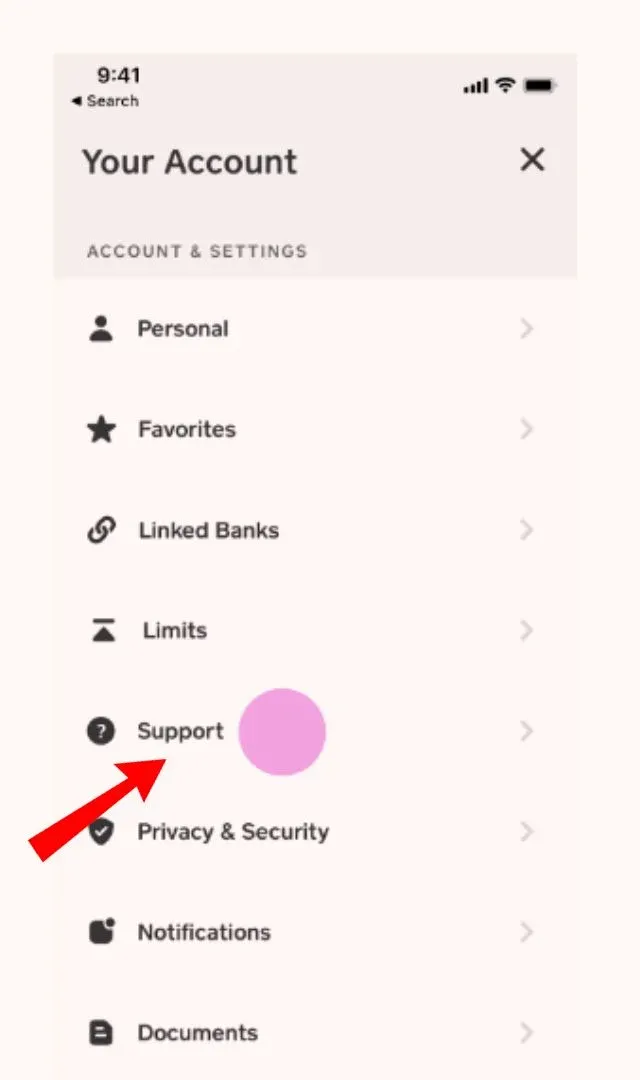
- Access Your Profile: Open the Cash App on your mobile device and tap on the profile icon (usually a circle with your picture or initials) in the top right or left corner of the screen.
- Navigate to Support: Scroll down through the profile settings until you find “Support” or “Cash Support” and tap on it.
- Initiate a Support Request: Within the support section, you may see options for common issues. Look for a way to contact support directly, which might be labeled “Something Else,” “Start a New Chat,” or “Contact Support.”
Submitting the Deactivation Request
When engaging with Cash App support, clearly state your intention to close your account. They will guide you through the necessary verification steps to confirm your identity, which is a critical security protocol for financial services.
- State Your Intent: In the support chat or email, explicitly state: “I would like to permanently close my Cash App account and deactivate my profile.”
- Provide Required Information: Be prepared to provide verification details. This often includes:
- Your full legal name.
- The phone number and email associated with the account.
- The last four digits of a linked payment card.
- Potentially, answers to security questions or details about recent transactions.
- Proof of identity documents (e.g., a photo ID) if there are significant security concerns or identity verification issues.
- Follow Instructions: The support agent will provide specific instructions for completing the closure process. Adhere to these instructions precisely. They may send a confirmation email or require an action within the app.
Confirmation and Verification Protocols
Cash App employs verification protocols to ensure that the person requesting account closure is the legitimate account holder, preventing unauthorized deactivation.
- Email Verification: You may receive an email to your registered email address with a link to confirm the closure request. Click this link promptly to validate your intent. This digital signature process ensures accountability.
- In-App Prompts: The support agent might initiate an in-app prompt requiring a final confirmation. This two-factor authentication-like step secures the process against external interference.
- Wait for Confirmation: After completing the verification steps, wait for an official confirmation from Cash App that your account has been successfully closed. This might come via email or an in-app notification. Do not assume the account is closed until you receive this explicit confirmation.
Post-Closure Considerations and Technical Support
Even after submitting a closure request, it’s wise to take a few final steps and understand how to troubleshoot potential issues, focusing on the technical validation of account status and continued support engagement.
Verifying Account Status
To confirm that your account is definitively closed and inaccessible, attempt a login a few days after receiving the closure confirmation.
- Attempt Login: Try to log in to the Cash App using your registered phone number or email and password.
- Observe System Response: A successful closure will typically result in a system message indicating that the account is deactivated, no longer exists, or that your credentials are not recognized for an active account. If you are still able to log in, it means the closure process was not completed, and you will need to re-engage support.
Troubleshooting Common Technical Roadblocks
Technical issues can sometimes impede a smooth account closure.
- Forgotten Password/Inability to Access App: If you cannot access your account to initiate the closure process, use Cash App’s password recovery tools (e.g., “Forgot my PIN” or “Having trouble signing in”) which typically involve email or phone verification. If these fail, direct support contact is necessary.
- Persistent Pending Transactions: If transactions remain pending, preventing closure, contact Cash App support specifically for assistance in resolving or force-canceling these items. Explain that you need to zero out your balance for account closure.
- Failed Identity Verification: If Cash App’s system or support agents cannot verify your identity, account closure will be stalled. Be prepared to provide official documentation (government ID) to clear these technical hurdles.
Engaging Cash App Support for Technical Assistance
Should any technical issue arise during the process, prompt and clear communication with Cash App support is crucial.
- Utilize Multiple Channels: Cash App typically offers in-app chat, email support, and sometimes phone support. For complex issues, a live chat or phone call can be more efficient than email.
- Provide Detailed Information: When contacting support, provide as much detail as possible about your issue, including screenshots if applicable, specific error messages, and the steps you’ve already taken.
- Reference Case Numbers: If you’ve previously contacted support about the closure, refer to any existing case or ticket numbers to streamline the communication and avoid repetition.
By meticulously following these technical guidelines, you can ensure a secure and complete cancellation of your Cash App account, safeguarding your financial data and digital footprint.