
Amazon Prime has evolved far beyond a simple expedited shipping service. Today, it stands as a comprehensive digital ecosystem, offering a myriad of benefits that intertwine with various technological facets of modern life, from entertainment streaming to secure cloud storage and digital reading. For many, navigating the initial purchase and subsequent management of an Amazon Prime membership is a straightforward process, yet understanding the underlying technology, exploring the full suite of digital services, and ensuring optimal setup can significantly enhance the user experience. This guide meticulously walks through the process of acquiring Amazon Prime, delving into its technological underpinnings and offering insights into leveraging its extensive digital features.

Understanding the Amazon Prime Ecosystem: A Digital Powerhouse
Before delving into the mechanics of purchase, it’s crucial to grasp what Amazon Prime truly represents from a technological standpoint. It’s not merely a transaction; it’s an gateway to an integrated suite of digital services designed to seamlessly connect users with content, convenience, and community within the Amazon infrastructure. The service is built upon a robust cloud-based architecture, allowing for scalable delivery of video, music, e-books, and photos across a multitude of devices.
Key Digital Services Included
At its core, Amazon Prime bundles several distinct digital services into a single subscription. These include:
- Prime Video: An extensive streaming library of movies, TV shows, and Amazon Originals, accessible on smart TVs, streaming devices (Fire TV, Roku, Apple TV), game consoles, computers, and mobile devices. Its technology allows for adaptive bitrate streaming, ensuring optimal video quality based on your internet connection, and supports features like X-Ray (powered by IMDb) for real-time actor and soundtrack information.
- Amazon Music Prime: Ad-free access to millions of songs and thousands of stations and playlists. While not as extensive as Amazon Music Unlimited, it provides a substantial music streaming experience, complete with offline playback capabilities on mobile devices, leveraging sophisticated algorithms for personalized recommendations.
- Prime Reading: A rotating selection of free e-books, magazines, and comics from the Kindle library. This service integrates directly with Kindle e-readers, the Kindle app on various devices, and Fire tablets, showcasing Amazon’s commitment to its digital publishing ecosystem.
- Amazon Photos: Unlimited full-resolution photo storage, plus 5 GB for video and other files. This cloud storage solution offers automatic backups from mobile devices, facial recognition for organization, and secure access from any web browser or dedicated app, making it a powerful tool for digital asset management.
- Twitch Prime (now Prime Gaming): Free games, in-game content, and a free monthly channel subscription on Twitch, Amazon’s live streaming platform. This demonstrates the cross-platform integration capabilities of Prime, appealing to the gaming community with exclusive digital goods.
- Early Access to Lightning Deals: While a shopping benefit, the digital infrastructure behind these deals involves rapid updates and secure transaction processing on Amazon’s e-commerce platform, ensuring members get priority access to limited-time offers.
Device Compatibility and Ecosystem Integration
One of Prime’s most significant tech advantages is its pervasive device compatibility. Whether you’re using an Android smartphone, an Apple iPad, a Windows PC, a Mac, or a range of smart home devices, Amazon Prime services are designed to be accessible. The Fire TV stick, Echo devices, and Kindle tablets are engineered to provide the most seamless Prime experience, showcasing Amazon’s commitment to creating a cohesive, interconnected digital ecosystem. This integration relies on robust APIs and cloud services that allow different Amazon products and third-party devices to communicate and deliver content efficiently.
Navigating the Amazon Platform: The Purchase Process
Acquiring an Amazon Prime membership is designed to be intuitive, leveraging Amazon’s mature e-commerce platform. The process can be initiated through various entry points, whether on the desktop website or via mobile applications, all streamlined for user convenience and secure transaction handling.
Step-by-Step Guide to Signing Up
The most common path to purchasing Amazon Prime involves visiting the official Amazon website or opening the Amazon Shopping app.
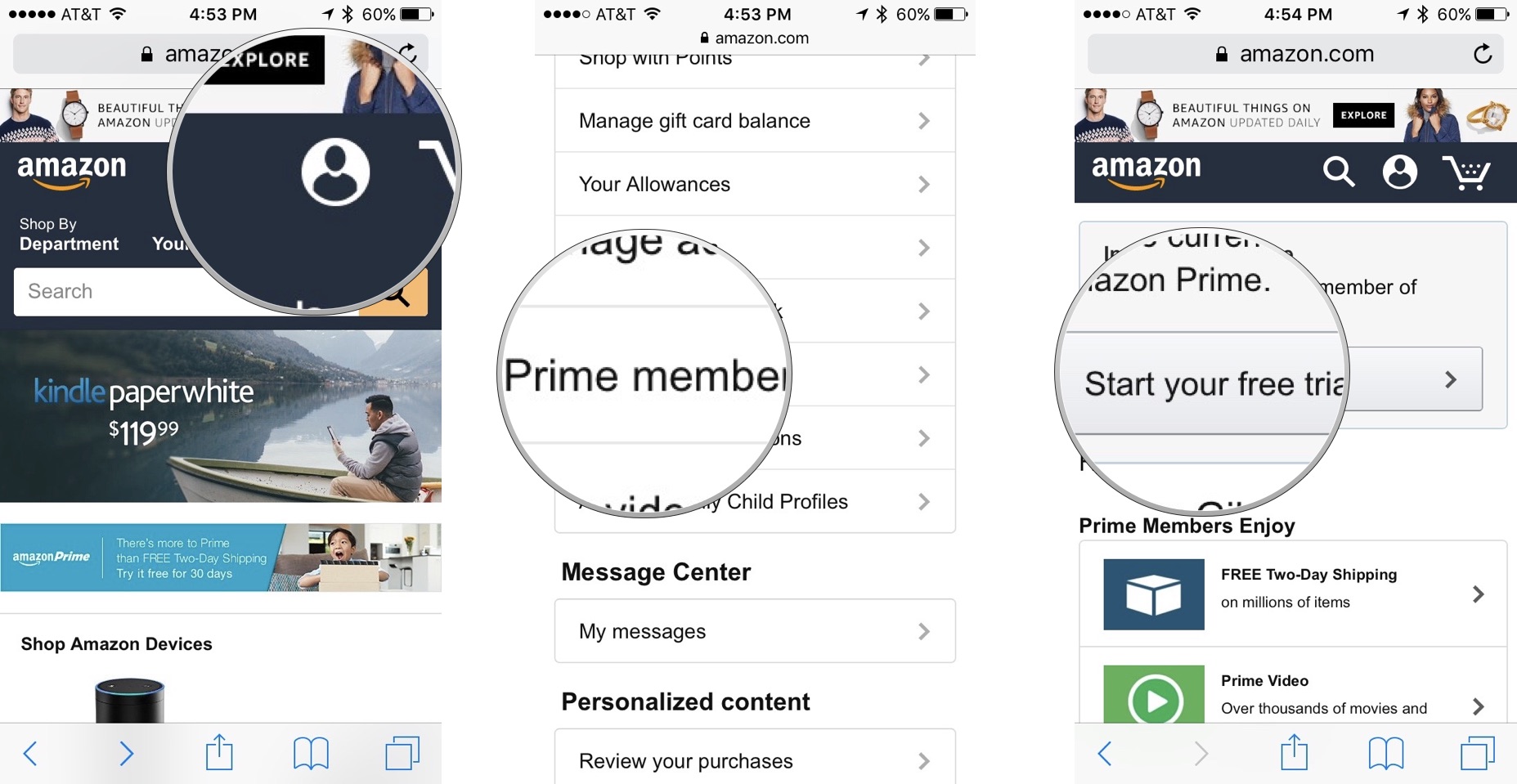
- Visit Amazon.com/prime or the Prime Section in the App: Look for the “Try Prime” or “Sign up for Prime” button, typically prominently displayed on the homepage or under the main menu.
- Choose Your Membership Type: You’ll be presented with options, often including a free trial. If eligible, selecting “Start your free 30-day trial” is recommended. Otherwise, you’ll see options for monthly or annual subscriptions.
- Sign In or Create an Amazon Account: If you already have an Amazon account, simply sign in. If not, you’ll be prompted to create one, which involves providing your name, email address, and a secure password. This account will serve as your digital identity across all Amazon services.
- Enter Payment Information: Amazon requires a valid credit or debit card for the trial and subsequent billing. The platform uses industry-standard encryption protocols (like SSL/TLS) to secure your payment details during transmission and storage. You can typically choose from existing payment methods saved to your account or add a new one.
- Confirm and Activate: Review your selections and confirm your membership. Once confirmed, your Prime benefits will activate almost instantly, allowing you to immediately access Prime Video, Music, and other digital services through their respective apps or the Amazon website.
Payment Methods and Digital Security Considerations
Amazon supports a wide array of payment methods, including major credit and debit cards (Visa, MasterCard, American Express, Discover), Amazon.com Store Card, and Gift Cards for certain purchases. For Prime subscriptions, a valid card is generally required. Amazon’s payment processing system is PCI DSS (Payment Card Industry Data Security Standard) compliant, employing advanced cryptographic techniques and secure servers to protect your financial data from unauthorized access. When entering payment details, always ensure you are on a secure connection (indicated by “https://” in the URL bar and a padlock icon). Enabling two-factor authentication (2FA) on your Amazon account adds an extra layer of security, requiring a code from your mobile device in addition to your password for login, thus protecting against unauthorized access to your Prime benefits and stored payment information.
Trial Memberships and Promotional Offers
Amazon frequently offers a 30-day free trial for new members, providing full access to all Prime benefits. This is an excellent way to experience the digital services before committing financially. Additionally, specific demographics may qualify for discounted rates:
- Prime Student: For college students with a valid .edu email address, offering an extended 6-month free trial followed by a significantly reduced monthly or annual fee. Verification relies on digital authentication of student status.
- EBT/Medicaid Members: Individuals receiving qualifying government assistance may also be eligible for a reduced monthly Prime membership. This involves a digital verification process to confirm eligibility.
These offers leverage specific digital verification mechanisms to ensure only eligible users can access the discounted pricing, making the process secure and equitable.
Exploring Membership Options and Benefits
Once you’ve successfully purchased or started your trial, understanding the nuances of Prime membership types and the depth of its digital offerings becomes paramount for maximizing its value.
Monthly vs. Annual Subscriptions
Amazon provides flexibility in how you pay for Prime:
- Monthly Subscription: Offers greater flexibility, allowing you to cancel anytime without long-term commitment. This can be ideal for those who only need Prime for specific periods or prefer to manage their finances on a shorter cycle. However, it generally incurs a higher total cost over a year compared to the annual plan.
- Annual Subscription: The more cost-effective option for long-term users. Paying for a full year upfront provides a discount over 12 monthly payments. The technological infrastructure supports both billing cycles seamlessly, with automatic renewal settings that can be managed through your Amazon account. Your chosen billing cycle can be easily viewed and adjusted in your membership settings.
Leveraging Digital Benefits Across Devices
The true power of Amazon Prime lies in its cross-device utility.
- Prime Video: Download movies and TV shows for offline viewing on mobile devices and Fire tablets, perfect for travel. Create up to six user profiles (one primary, five secondary) within Prime Video, each with personalized recommendations and watch histories, akin to other leading streaming services. The X-Ray feature, leveraging IMDb’s vast database, overlays contextual information on screen, a testament to sophisticated data integration.
- Amazon Music Prime: Download songs and playlists for offline listening on your mobile device. Create custom playlists, follow artists, and discover new music through algorithmic recommendations based on your listening habits.
- Prime Reading: Access the rotating library directly from your Kindle device, the Kindle app on iOS/Android, or Fire tablet. The Whispersync technology ensures your reading progress, bookmarks, and notes are synchronized across all your devices.
- Amazon Photos: Utilize the auto-save feature on your smartphone to automatically upload photos to your unlimited cloud storage. Organize photos into albums, share them with family and friends through secure links, and access them from any web browser.
- Prime Gaming: Link your Amazon Prime account to your Twitch account to activate monthly free channel subscriptions, exclusive in-game content, and free PC games, directly integrating the gaming and e-commerce platforms.
Managing Your Prime Membership: Post-Purchase Tech Aspects
Effective management of your Amazon Prime membership ensures you retain control over your subscription, optimize its features, and address any technical issues that may arise. This involves navigating your account settings, understanding renewal processes, and utilizing support resources.
Accessing Your Account Settings Online
All aspects of your Prime membership can be managed through the “Your Prime Membership” section on the Amazon website or within the Amazon app.
- Navigate to “Account & Lists” (desktop) or “Your Account” (app).
- Select “Prime Membership.”
Here, you’ll find information about your current plan, billing date, payment method, and options to change your subscription. The interface is designed for clarity, providing quick access to essential controls over your digital service.
Renewing or Cancelling Your Subscription Digitally
Amazon Prime memberships are set to automatically renew by default, ensuring uninterrupted access to benefits.
- Automatic Renewal: Your chosen payment method will be charged on your renewal date. You can view this date and the associated cost in your “Prime Membership” settings.
- Changing Renewal Settings: If you wish to prevent automatic renewal, you can turn off this feature.
- Cancelling Your Membership: You have the option to end your membership immediately or at the end of your current billing cycle. Amazon’s system will typically offer a prorated refund if you cancel mid-cycle, depending on how much you’ve used the benefits. The cancellation process is entirely digital, requiring a few clicks within your account settings, often with prompts to confirm your decision.
Troubleshooting Common Tech Issues
Despite Amazon’s robust infrastructure, users may occasionally encounter technical issues.
- Streaming Issues (Prime Video/Music): Check your internet connection, update your streaming app or browser, clear cache and cookies, or try restarting your device. Amazon’s help pages provide specific troubleshooting steps for various devices and error codes.
- Login Problems: Ensure you’re using the correct email and password. If you’ve forgotten your password, use the “Forgot your password?” link to reset it. If 2FA is enabled, ensure your authentication device is accessible.
- Device Syncing Issues: For Prime Reading or Photos, ensure all devices are connected to the internet and logged into the same Amazon account. Manually trigger a sync in the respective apps if necessary.
For more complex issues, Amazon’s customer service can be reached through their digital help center, offering chat, email, or phone support. Their support system is integrated to quickly pull up your account details and troubleshoot problems efficiently.

Family Sharing Features
Amazon Household allows two adults and up to four children to share Prime benefits. This digital feature allows linked accounts to share Prime Video, Prime Reading, and Amazon Photos access without sharing passwords. It’s managed through the “Manage Your Content and Devices” section of your Amazon account, requiring an invitation process and agreement to share payment methods, showcasing Amazon’s secure multi-user management capabilities for shared digital subscriptions.
In conclusion, buying Amazon Prime is a gateway to a sophisticated suite of digital services designed for convenience and entertainment. By understanding the technological underpinnings of each service, meticulously navigating the purchase and management processes, and leveraging the extensive device compatibility, users can unlock the full potential of their Prime membership, making it an indispensable part of their digital lifestyle.
aViewFromTheCave is a participant in the Amazon Services LLC Associates Program, an affiliate advertising program designed to provide a means for sites to earn advertising fees by advertising and linking to Amazon.com. Amazon, the Amazon logo, AmazonSupply, and the AmazonSupply logo are trademarks of Amazon.com, Inc. or its affiliates. As an Amazon Associate we earn affiliate commissions from qualifying purchases.