
In the rapidly evolving landscape of digital commerce, establishing a robust online presence is no longer a luxury but a necessity for businesses of all sizes. Shopify has emerged as a cornerstone platform, empowering entrepreneurs and enterprises alike to launch, manage, and scale their e-commerce operations with remarkable ease and efficiency. This comprehensive guide delves into the technical intricacies and best practices for building a Shopify website, offering an insightful tutorial that demystifies the process from initial setup to post-launch optimization, strictly within the technological domain. We will explore the platform’s core functionalities, app integrations, and technical considerations that underpin a successful online store.

Laying the Digital Foundation: Shopify Account Setup and Initial Configuration
The journey to building a Shopify website begins with establishing the fundamental technical infrastructure. This involves account creation, navigating the administrative interface, and making critical initial configurations that dictate the store’s appearance and foundational settings. Understanding these steps is paramount to leveraging Shopify’s powerful e-commerce toolkit effectively.
Navigating the Shopify Ecosystem: Account Creation and Admin Dashboard
The first step is to sign up for a Shopify account, typically starting with a free trial. This process requires basic business information and sets up your unique Shopify domain (e.g., yourstorename.myshopify.com). Once registered, you are granted access to the Shopify admin dashboard – the central control panel for your entire online operation. This intuitive interface is a masterclass in UX design, categorizing essential functions like orders, products, customers, analytics, and marketing.
From a technical perspective, the admin dashboard is where you will manage your store’s backend. Familiarization with its layout is crucial. The navigation menu on the left provides quick access to core features. The “Settings” section (a cog icon at the bottom left) is particularly important, housing all the technical configurations for your store, including general store details, payments, shipping, taxes, notifications, and legal policies. It’s here that you lay the groundwork for a compliant and functional e-commerce environment, setting up your time zone, store currency, and default unit systems, which are vital for accurate inventory management and customer experience.
Strategic Theme Selection: Crafting Your Store’s Digital Interface
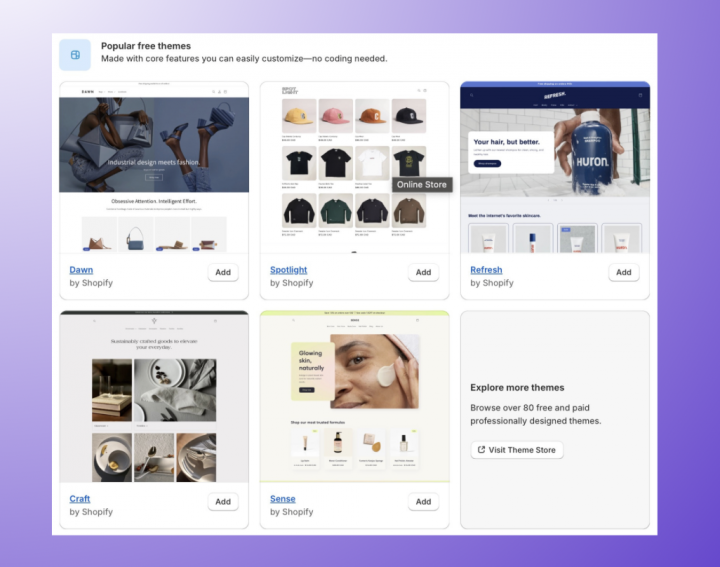
The visual identity and user experience of your Shopify store are primarily determined by its theme. Shopify offers a vast marketplace of themes, comprising both free and premium options, each designed with different industry niches and aesthetic preferences in mind. From a technical standpoint, a theme is a collection of templates, stylesheets, images, and JavaScript files that dictate how your store appears to visitors.
Choosing a theme involves more than just aesthetics; it’s a technical decision about functionality, responsiveness, and performance. When selecting, consider:
- Responsiveness: Ensure the theme is fully responsive, adapting seamlessly across various devices (desktops, tablets, smartphones). This is a critical factor for mobile commerce, which dominates online shopping.
- Features: Does the theme natively support features important for your products (e.g., quick view, product image zoom, variant selectors)? Relying on native theme features is generally more stable and performant than heavily customizing a basic theme or adding numerous third-party apps for core functionalities.
- Performance: A well-coded theme loads quickly, which is crucial for SEO and user retention. Test theme demos for speed and efficiency.
- Customization Options: While aiming for native functionality, assess the theme’s built-in customization capabilities via the theme editor. This allows you to modify colors, fonts, layout sections, and content without needing to delve into Liquid (Shopify’s templating language) or CSS, empowering non-developers to tailor their storefront.
Once a theme is chosen, you can customize it extensively using Shopify’s intuitive theme editor, a powerful tool that allows drag-and-drop section management, live previewing of changes, and fine-tuning of visual elements to align with your brand’s digital identity. This process involves configuring homepage sections, header and footer elements, and the appearance of product and collection pages, all without requiring advanced coding knowledge.
Essential Store Settings: Establishing Core Operational Parameters
Beyond visual customization, a series of essential technical configurations must be addressed in the Shopify admin’s “Settings” section. These configurations ensure the smooth operation of your store and compliance with various digital commerce standards.
- Payment Providers: This is perhaps one of the most critical technical setups. You’ll configure payment gateways, allowing customers to securely purchase products. Shopify Payments is the integrated solution, often preferred for its ease of use and competitive rates. Alternatively, you can integrate third-party providers like PayPal, Stripe, Authorize.net, or various local payment methods. Each integration involves a technical handshake between Shopify and the payment processor, ensuring secure transaction processing and data encryption.
- Shipping and Delivery: Defining your shipping strategy involves configuring shipping zones, rates, and methods. This includes setting up flat rates, calculated rates (often integrated with third-party shipping carriers via apps), and free shipping thresholds. The technical configuration ensures that customers are accurately charged for delivery based on their location and order specifics. Consider setting up fulfillment locations if you operate multiple warehouses or use dropshippers.
- Taxes: Shopify provides tools to automatically calculate sales taxes based on your store’s location, customer’s location, and product taxability. This involves configuring tax regions and ensuring that your product tax settings are correct. While Shopify handles much of the complexity, understanding the nuances of digital tax compliance is crucial.
- Legal Pages: Generating essential legal pages like “Refund Policy,” “Privacy Policy,” “Terms of Service,” and “Shipping Policy” is a technical step with significant legal implications. Shopify offers templates that can be customized. These pages protect both the merchant and the customer and are vital for building trust and compliance.
- Domains: Connecting a custom domain name (e.g.,
www.yourstore.com) to your Shopify store is a professional and technical necessity. Shopify provides clear instructions for connecting existing domains or purchasing new ones directly through the platform, involving DNS record configuration (A record and CNAME record) to point your domain to Shopify’s servers.
Populating Your Digital Storefront: Product Management and Content Integration
With the foundational technical settings in place, the next crucial step is to populate your store with products. This involves more than just adding items; it’s about structuring product data efficiently, optimizing visuals, and organizing content for superior user experience and search engine discoverability, focusing on the technical execution of content delivery.
Mastering Product Entry: Descriptions, Visuals, and Inventory Control
Adding products to your Shopify store is a meticulous process that significantly impacts search engine optimization (SEO), conversion rates, and inventory management. Each product entry demands attention to detail across multiple technical and content dimensions:
- Product Title and Description: Craft compelling, keyword-rich titles and detailed descriptions. From a technical SEO perspective, these fields are critical. Descriptions should not only sell but also inform, utilizing HTML formatting (bolding, lists) for readability and incorporating relevant keywords to improve search engine rankings.
- Images and Videos: High-quality visuals are paramount in e-commerce. Shopify allows you to upload multiple images per product, supporting various aspect ratios and resolutions. Optimizing image file sizes (while maintaining quality) is crucial for page load speed, a key SEO and user experience factor. Shopify automatically handles image resizing for different contexts (thumbnails, product page, collection page), but starting with high-resolution, appropriately sized source files is beneficial. Integrating product videos (either uploaded directly or embedded from YouTube/Vimeo) can significantly enhance engagement and provide a richer product experience.
- Pricing, Cost Per Item, and Inventory: Accurately setting product prices, comparing prices (for sales), and defining the cost per item (for profit analysis) are essential. Inventory management involves setting SKU (Stock Keeping Unit) numbers, barcodes (UPC, EAN, ISBN), and tracking quantities. Shopify’s inventory system allows for detailed tracking, adjusting stock levels, and setting low stock alerts, which is critical for efficient fulfillment and avoiding overselling.
- Variants: For products with multiple options (e.g., size, color, material), Shopify’s variant system allows you to create different combinations, each potentially having its own SKU, price, inventory level, and even image. This technical feature simplifies product management for complex items.
- Vendor and Product Type: Categorizing products by vendor and type aids internal organization and can be used for filtering on the storefront, improving navigation.
- Tags: Product tags are powerful technical tools for internal organization and storefront filtering. They allow you to add descriptive keywords to products, which customers can use to refine their searches.
Organizing for User Experience: Collections and Categories
Once products are entered, organizing them into logical collections (categories) is vital for user navigation and discoverability. Shopify’s collection system allows for both manual and automated collections:
- Manual Collections: You handpick the products that belong to a specific collection. This is useful for curated selections or seasonal promotions.
- Automated Collections: These are technically more sophisticated. You set conditions (e.g., “product title contains ‘dress’,” “product price is greater than $50,” “product tag is ‘clearance'”). Shopify then automatically adds any product that meets these conditions to the collection. This dynamic approach significantly reduces manual effort for large inventories and ensures collections are always up-to-date.
Effective collection structuring not only enhances the customer journey by making products easy to find but also creates valuable SEO landing pages for specific product categories.
Rich Media Integration: Leveraging Images and Video for Engagement
In the digital realm, product visuals and multimedia content are often the primary drivers of purchase decisions. Integrating rich media effectively is a technical art form that demands attention to detail:
- High-Resolution Images: Beyond basic uploads, consider implementing advanced image features if your theme supports them, such as 360-degree product views or interactive hotspots. Ensure all images have descriptive alt text for accessibility and SEO.
- Product Videos: Short, engaging videos demonstrating product features, usage, or lifestyle can significantly boost conversion rates. Shopify’s platform supports embedding videos seamlessly, ensuring they play correctly across devices without negatively impacting page load times if properly hosted (e.g., on YouTube or Vimeo).
- Image Optimization Tools: Utilize Shopify apps or external tools to compress images without losing quality. This technical step is critical for maintaining fast page load speeds, which Google prioritizes for search rankings and user satisfaction.
- Consistent Branding: Ensure all media aligns with your brand’s aesthetic guidelines (color palettes, photographic style) to create a cohesive and professional storefront.
Enabling Secure Transactions and Efficient Logistics: Payment and Shipping Gateways
The backbone of any e-commerce operation lies in its ability to securely process payments and efficiently deliver products. This section focuses on the technical setup of payment gateways, shipping configurations, and tax automation within Shopify, all of which are critical for smooth operational flow and customer trust.
Implementing Payment Solutions: Shopify Payments and Third-Party Integrations
Secure and reliable payment processing is non-negotiable for an online store. Shopify offers a robust suite of options:
- Shopify Payments: This is Shopify’s native payment gateway, designed for seamless integration and optimal performance within the platform. Activating Shopify Payments is straightforward and typically involves providing business and banking details for verification. Technically, it handles credit card processing directly, reducing the need for external gateways for major card types. It often comes with lower transaction fees compared to third-party providers and provides integrated reporting within your Shopify admin. This streamlined approach minimizes technical complexities for merchants.
- Third-Party Payment Providers: For businesses that require additional payment options (e.g., specific local payment methods, cryptocurrency gateways, or alternative credit card processors), Shopify supports integration with a wide array of third-party providers like PayPal, Stripe, Apple Pay, Google Pay, and many others. Each integration typically involves connecting your Shopify store to the external payment service via API keys or specific configuration steps provided by the respective payment gateway. This requires careful attention to the provider’s technical documentation to ensure proper setup and secure data transmission.
- PCI DSS Compliance: Shopify as a platform is PCI DSS compliant, meaning it adheres to the Payment Card Industry Data Security Standard. This is a critical security measure that protects cardholder data. By using Shopify’s secure checkout and integrated payment solutions, merchants inherently benefit from this high level of security without needing to manage the complex compliance requirements themselves.
Configuring Shipping Zones and Rates: Streamlining Order Fulfillment
Efficient and transparent shipping is crucial for customer satisfaction. Shopify’s shipping settings allow for highly granular control over how products are delivered:
- Shipping Zones: The first technical step is to define shipping zones based on geographical regions (countries, states, provinces). This allows you to offer different shipping rates and methods to different customer locations.
- Shipping Rates: Within each zone, you can configure various shipping rates:
- Flat Rates: A fixed cost for shipping, regardless of order size or weight.
- Price-Based Rates: Shipping cost varies based on the total value of the cart.
- Weight-Based Rates: Shipping cost varies based on the total weight of the products in the cart.
- Calculated Rates: Integrate with major carriers (e.g., UPS, FedEx, USPS, DHL) to fetch real-time shipping quotes at checkout. This often requires enabling Carrier-Calculated Shipping (available on higher Shopify plans or as an add-on) and configuring your carrier accounts within Shopify.
- Local Delivery/Pickup: For businesses serving a local market, Shopify offers options to configure local delivery (setting delivery zones and fees) and local pickup, providing customers with flexible fulfillment options.
- Fulfillment Services: If you use a dropshipping model or a third-party logistics (3PL) provider, Shopify supports integration with these services. This often involves connecting apps or configuring custom fulfillment settings that automatically send order information to your chosen fulfillment partner.
Tax Automation and Compliance: Technical Setup for Financial Accuracy
Navigating sales tax regulations can be complex, but Shopify provides tools to automate much of the process:
- Automatic Tax Calculation: Shopify can automatically calculate sales taxes based on your store’s location, the customer’s shipping address, and the product’s taxability status. This involves enabling automatic tax calculation in your store settings and ensuring your business address is correctly configured.
- Manual Tax Overrides: For specific products or regions that require unique tax treatments, Shopify allows for manual tax overrides. This technical flexibility ensures compliance even in unusual scenarios.
- Tax Exemptions: You can configure tax exemptions for certain customer groups (e.g., wholesale customers with resale certificates) by assigning specific tax exemption statuses.
- Tax Reports: Shopify generates detailed tax reports, which are invaluable for filing taxes and understanding your store’s financial obligations. These reports aggregate sales data, tax collected, and other relevant financial metrics.
Ensuring these tax settings are accurately configured is not just a financial imperative but a technical one, as incorrect settings can lead to legal complications and customer dissatisfaction.
Optimizing for Discoverability and Performance: Launch, SEO, and Beyond
Building the store is only the beginning. The subsequent phases involve ensuring its readiness for launch, optimizing its technical visibility, extending its capabilities, and continuously monitoring its performance to foster sustained growth. This final section focuses on these crucial post-development technical considerations.
Pre-Launch Technical Audit: Ensuring a Seamless User Experience
Before taking your Shopify store live, a meticulous technical audit is essential to guarantee a flawless user experience and prevent common pitfalls. This checklist ensures all technical components are functioning as intended:
- Complete Content Review: Beyond grammar and spelling, verify all product descriptions, images, and static pages (About Us, Contact, FAQs) are fully populated and accurate. Ensure all images are optimized for web (compressed) and have descriptive alt text for SEO and accessibility.
- Link Verification: Test all internal and external links, including navigation menus, product links, collection links, and social media links, to ensure no broken connections exist. This prevents frustration and improves SEO.
- Checkout Process Test: Perform multiple end-to-end test purchases using various payment methods, shipping addresses, and customer accounts. Verify that discounts apply correctly, shipping rates are accurate, and confirmation emails are received. This is a critical technical test for the core e-commerce functionality.
- Mobile Responsiveness: Crucially, test your entire store across different devices (smartphones, tablets) and browsers (Chrome, Firefox, Safari, Edge). Ensure layout, images, forms, and navigation are perfectly responsive and user-friendly on smaller screens. Google’s mobile-first indexing strategy makes this non-negotiable for SEO.
- Shopify Settings Finalization: Double-check all settings under “Settings” in your admin. Confirm legal policies are live, payment gateways are activated, shipping rates are correctly defined, and tax settings are accurate. Ensure your store currency and time zone are set correctly.
- Third-Party App Functionality: If you’ve integrated any Shopify apps, test each one thoroughly to ensure it performs its intended function without conflicts or errors.
Search Engine Optimization Fundamentals within Shopify
Shopify is built with SEO in mind, offering powerful tools to help your store rank higher in search results. Implementing these technical SEO strategies is vital for organic traffic:
- Meta Titles and Descriptions: For every product, collection, page, and blog post, customize the SEO title and meta description. These snippets appear in search results, influencing click-through rates. Ensure they are keyword-rich, concise, and compelling.
- URL Handles: Shopify automatically generates SEO-friendly URLs. However, you have the option to edit URL handles for better keyword targeting and readability. Keep them short, descriptive, and relevant to the content.
- Image Alt Text: As mentioned, use descriptive alt text for all images. This not only aids accessibility for visually impaired users but also helps search engines understand the image content, contributing to image search rankings.
- Blog Content: Regularly publishing high-quality, keyword-rich blog content related to your products and industry can significantly boost your SEO. It provides fresh content for search engines to crawl and positions your store as an authority in its niche.
- Schema Markup: While Shopify automatically includes some structured data (schema markup) for products, ensuring rich snippets appear in search results can be enhanced by specific themes or apps. Schema helps search engines better understand your content, leading to richer search results listings.
- Google Analytics and Search Console: Integrate Google Analytics to track website traffic and user behavior. Set up Google Search Console to monitor your site’s search performance, identify crawl errors, and submit sitemaps for improved indexing. These are indispensable technical tools for understanding and improving your SEO.
Extending Functionality with Shopify Apps: A Technological Ecosystem
One of Shopify’s greatest strengths lies in its extensive App Store, a vast ecosystem of third-party applications that extend your store’s functionality without requiring custom coding. These apps cover virtually every aspect of e-commerce:
- Marketing Automation: Apps for email marketing, SMS campaigns, social media integration, and abandoned cart recovery.
- Customer Service: Live chat, help desks, and FAQ apps.
- Shipping and Fulfillment: Advanced shipping rate calculators, label printing, and integration with fulfillment services.
- Inventory Management: More sophisticated inventory tracking, multi-location management, and dropshipping integrations.
- Reporting and Analytics: Enhanced dashboards and custom reports beyond Shopify’s native analytics.
- Conversion Optimization: Pop-ups, upsell/cross-sell recommendations, loyalty programs, and review apps.
When considering apps, prioritize those with high ratings, frequent updates, and good support. While apps offer immense value, installing too many can sometimes impact site performance or create conflicts, so choose judiciously based on your specific needs. Each app is a technical integration, and its impact on site speed and stability should be considered.

Post-Launch Monitoring and Iteration: Analytics and Performance Tuning
Launching your store is just the beginning of its lifecycle. Continuous monitoring and iteration are crucial for long-term success.
- Analytics Review: Regularly delve into Shopify’s built-in analytics and Google Analytics. Monitor key metrics such as traffic sources, conversion rates, average order value, bounce rate, and customer behavior. Understanding these numbers provides actionable insights for optimization.
- Performance Monitoring: Use tools like Google PageSpeed Insights or GTmetrix to regularly check your website’s loading speed and overall performance. Identify and address any technical bottlenecks, such as slow-loading images, inefficient apps, or theme-related issues.
- A/B Testing: Implement A/B testing for different elements of your store—product descriptions, calls to action, homepage layouts—to empirically determine what resonates best with your audience and drives conversions.
- Customer Feedback: Actively solicit and respond to customer feedback. Use reviews, surveys, and direct communication to understand pain points and identify areas for improvement in your store’s user experience and functionality.
- Security Updates: Stay informed about Shopify’s platform updates and app updates. Regularly review your store for any security vulnerabilities or outdated app versions, ensuring your digital infrastructure remains robust and secure against emerging threats.
Building a Shopify website is a continuous journey of technical setup, content management, optimization, and iteration. By meticulously following these steps and maintaining a focus on technical excellence and user experience, you can construct a powerful e-commerce platform poised for growth and success in the digital marketplace.
aViewFromTheCave is a participant in the Amazon Services LLC Associates Program, an affiliate advertising program designed to provide a means for sites to earn advertising fees by advertising and linking to Amazon.com. Amazon, the Amazon logo, AmazonSupply, and the AmazonSupply logo are trademarks of Amazon.com, Inc. or its affiliates. As an Amazon Associate we earn affiliate commissions from qualifying purchases.