
Navigating Digital Interactions: Why Blocking Matters on Cash App
The proliferation of digital payment platforms like Cash App has revolutionized how individuals and businesses conduct financial transactions. While offering unparalleled convenience, this interconnectedness also introduces complexities, particularly concerning user privacy and control over who can initiate contact or financial requests. Understanding the technical mechanisms available for managing these interactions, specifically blocking, is crucial for maintaining a secure and comfortable digital environment.
The Evolving Landscape of Digital Payments
Cash App, renowned for its ease of use in peer-to-peer (P2P) transfers, has increasingly become a tool for business transactions. Small businesses, freelancers, and even larger entities leverage its speed and accessibility. This dual functionality, however, means users might encounter unsolicited payment requests, marketing messages embedded in transaction notes, or even mistaken transactions from businesses they didn’t intend to engage with. The seamless integration of social features within a financial app necessitates robust user controls to prevent potential nuisances or security vulnerabilities.
Protecting Your Digital Space
In any digital ecosystem, user control is paramount. For a financial application, this extends beyond simply protecting funds to managing one’s digital presence and interaction stream. The ability to block a contact or business acts as a fundamental digital security feature, empowering users to curate their experience. It’s a mechanism to disengage from unwanted communication, prevent future payment requests, and enhance personal privacy. Without such features, users would be vulnerable to persistent solicitations, potential spam, or even targeted phishing attempts masquerading as legitimate business interactions.
Types of Unwanted Business Interactions
Unwanted interactions can manifest in various forms:
-
Unsolicited Payment Requests: Businesses or individuals requesting money without prior arrangement.
-
Persistent Marketing: Using Cash App’s transaction notes or direct messages for promotional content after an initial engagement, even if uninvited.
-
Mistaken Transactions: A business accidentally sending or requesting money from the wrong Cash App user.
-
Suspicious Activity: Attempts to solicit personal information or initiate transactions under false pretenses, which border on fraud.
-
Spam: Repetitive, unwanted messages or requests that disrupt the user experience.
The technical solution to these issues largely resides in the app’s blocking functionality, complemented by reporting tools.
A Step-by-Step Guide to Blocking on Cash App
Blocking a business or any contact on Cash App is a straightforward process designed to give users immediate control over their interactions. This functionality severs future direct communication and payment requests, safeguarding your digital space within the application.
Identifying the Sender
Before you can block a business, you need to identify their Cash App profile. This is typically done through a recent transaction or an incoming payment request.
-
Open Cash App: Launch the application on your mobile device.
-
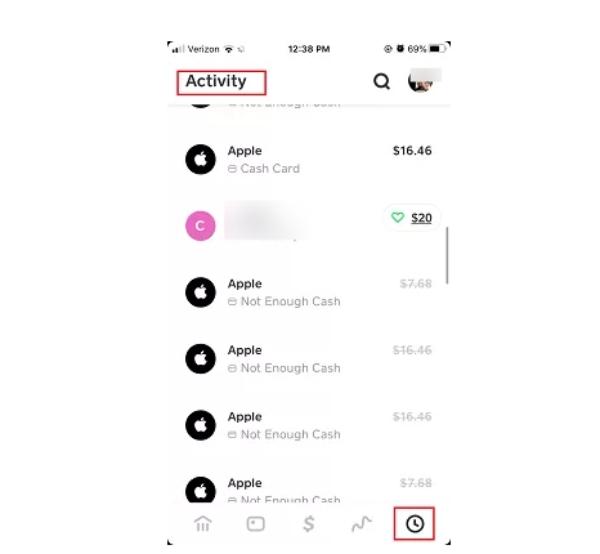
Navigate to the Activity Tab: Tap the clock icon in the bottom right corner of the main screen. This will display your transaction history and pending requests.
-
Locate the Interaction: Scroll through your activity feed to find the specific transaction, payment, or request from the business or individual you wish to block.
Accessing the Profile
Once you’ve found the relevant interaction, you need to access the sender’s profile.
-
Tap the Interaction: Tapping on the specific transaction or request will open a detailed view of that activity.
-
View Sender’s Profile: On the transaction detail screen, the sender’s name (often their Cashtag, e.g.,
$BusinessName) will be displayed prominently. Tap on their name or Cashtag to navigate to their Cash App profile page.
The Blocking Mechanism
On the sender’s profile page, you will find the options to manage your interaction with them.
-
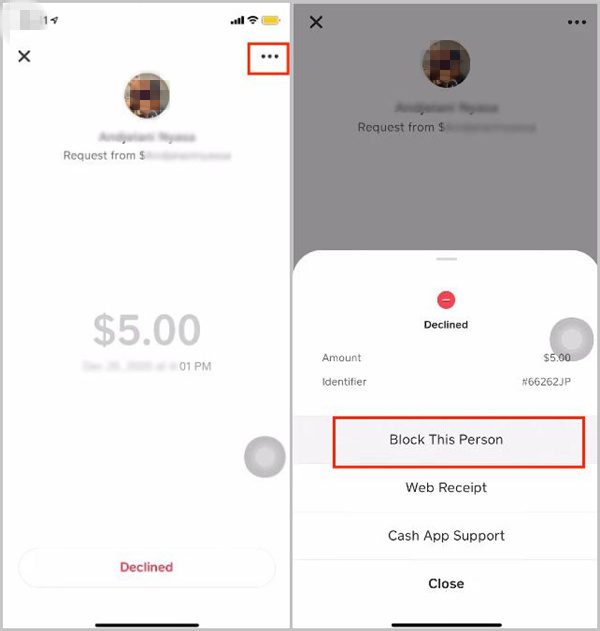
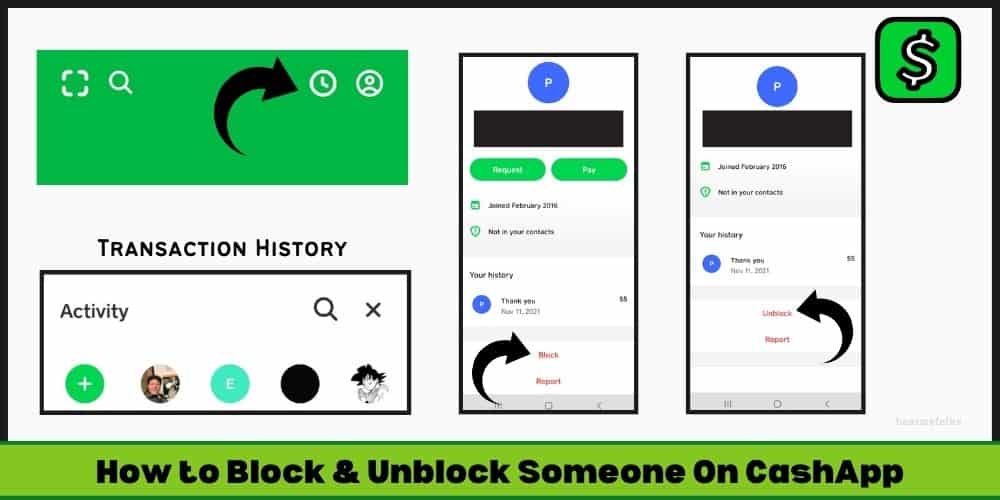
Locate the Options Menu: On the top right corner of the profile screen, look for an icon typically represented by three horizontal lines (a hamburger menu) or three dots (ellipsis). Tap this icon to reveal a dropdown menu.
-
Select ‘Block’ or ‘Report & Block’: In the dropdown menu, you will usually find an option labeled “Block” or “Report & Block.” If you simply wish to cease contact, “Block” is sufficient. If the interaction was suspicious or harmful, “Report & Block” is the more appropriate choice, as it notifies Cash App of potential policy violations.
-
Confirm Your Action: The app will prompt you with a confirmation message, explaining the implications of blocking (e.g., you will no longer be able to send or receive money from this person, and they cannot view your profile). Confirm your decision.
Confirmation and Effects
Upon successful blocking, the system will update, and the blocked party will be unable to:
-
Send you money or payment requests.
-
View your Cash App profile details (such as your Cashtag, profile picture, or any public information).
-
Initiate any direct communication within the app.
It’s important to note that blocking does not delete any existing transaction history between you and the blocked party. Those records will remain in your activity feed for your reference and for Cash App’s records.
Beyond Blocking: Reporting and Enhanced Digital Security
While blocking is an effective tool for managing personal interactions on Cash App, there are instances where merely blocking isn’t enough. Certain unwanted interactions warrant reporting to Cash App directly, especially when they involve potential fraud, scams, or violations of the platform’s terms of service. This proactive measure not only protects you but contributes to the overall security of the Cash App ecosystem.
When to Report, Not Just Block
Reporting is a critical step when an interaction goes beyond simple annoyance and enters the realm of malicious or deceptive activity. Consider reporting if you encounter:
-
Phishing Attempts: Messages or requests designed to trick you into revealing personal information (e.g., bank details, Social Security Number, Cash App PIN) or clicking on suspicious links.
-
Scams: Any attempt to defraud you of money, often involving promises of large returns, sweepstakes, or emergency pleas.
-
Impersonation: Someone pretending to be a legitimate business, a Cash App representative, or a government agency.
-
Harassment or Threats: Any form of abusive or threatening communication.
When selecting “Report & Block,” Cash App reviews the reported user’s activity. This helps them identify and address bad actors, enhancing the safety for all users. Provide as much detail as possible in the report to assist their investigation.
Understanding Cash App’s Security Protocols
Cash App employs various security protocols, including encryption for transactions, fraud detection algorithms, and PIN/Touch ID verification for sending payments. However, no digital security system is foolproof without user diligence. Users are the first line of defense against social engineering tactics and sophisticated scams. Familiarizing yourself with Cash App’s official security advice and knowing how to use its integrated security features is fundamental.
Best Practices for Transaction Security
To minimize the need for blocking or reporting, adopt these best practices:
-
Verify Recipients: Always double-check the Cashtag, name, and profile picture of the recipient before sending money. Many scams rely on similar-looking Cashtags.
-
Only Send to Known Individuals/Businesses: Avoid sending money to unknown entities or individuals you haven’t explicitly verified.
-
Be Skeptical of Unsolicited Requests: Legitimate businesses rarely request payments via Cash App unless pre-arranged. Treat any unexpected request with extreme caution.
-
Use Strong, Unique Passwords/PINs: Ensure your Cash App PIN is not easily guessable and is different from other passwords.
-
Enable Two-Factor Authentication: Add an extra layer of security to your account with 2FA, if available.
Phishing and Scams Awareness
Many “business” interactions that require blocking or reporting are, in fact, sophisticated scams. Phishing attempts often leverage official-looking emails or messages that direct users to fake login pages. Scams might promise non-existent services or products in exchange for upfront payment. Being aware of these common tactics, understanding that Cash App will never ask for your PIN, and recognizing the red flags (e.g., urgency, poor grammar, unrealistic offers) are crucial technical literacy skills for digital financial safety.
Proactive Privacy Management and Account Control
Beyond reactive measures like blocking, Cash App users can adopt proactive strategies to manage their digital privacy and control their account’s exposure. These measures leverage the app’s settings and user interface to minimize unwanted interactions and safeguard personal information.
Reviewing Your Transaction History
Regularly auditing your Cash App activity log is a simple yet effective privacy practice.
-
Access Activity Tab: Periodically navigate to the clock icon in the Cash App.
-
Scrutinize Transactions: Review all outgoing and incoming transactions. Look for any unrecognized payments, unexpected requests, or interactions from unfamiliar Cashtags. This routine check can help identify potential compromises or unauthorized activities early, allowing you to block or report promptly.
Managing Notifications and Permissions
Cash App offers settings to customize your notification preferences, which can reduce the influx of unwanted alerts.
-
Navigate to Profile Icon: Tap your profile picture or icon on the Cash App home screen.
-
Access Privacy & Security: Scroll down and select “Privacy & Security” or “Notifications.”
-
Adjust Settings: Here, you can toggle notifications for payments, requests, and other activities. While you can’t prevent someone from sending a request solely through notification settings, reducing intrusive alerts can make the app experience less overwhelming and help you focus on legitimate interactions.
Understanding Your Cash App Profile Visibility
Your Cash App profile, particularly your Cashtag, acts as your public identifier on the platform. While blocking directly controls who can interact with you, understanding the visibility of your profile information is a foundational aspect of privacy.
-
Cashtag: This is your unique identifier. It’s designed to be shareable, but awareness of who has your Cashtag is important.
-
Public Profile Information: Some basic information, such as your profile picture and chosen display name, might be visible to others who search for your Cashtag. While Cash App generally defaults to minimal public exposure, it’s good practice to ensure your profile picture and name are appropriate and don’t reveal sensitive personal details you wouldn’t want widely known.
Linking and Unlinking Bank Accounts/Cards
Though not directly related to blocking, managing your linked financial instruments is a critical aspect of overall account control and security.
-
Access Linked Banks/Cards: From your profile, navigate to “Linked Banks” or “Connected Accounts.”
-
Review and Manage: Periodically review the bank accounts and debit/credit cards linked to your Cash App. Unlink any accounts that are no longer in use or that you don’t recognize. This prevents unauthorized access to your funds if your Cash App account were ever compromised, adding a layer of technical security to your financial data.
Troubleshooting and Advanced Considerations
Even with clear instructions, users may encounter specific scenarios or questions when managing unwanted business interactions on Cash App. Understanding these nuances, along with advanced tips, can further enhance your control over the application.
What if I blocked someone accidentally?
Accidental blocking can happen. Fortunately, Cash App provides a mechanism to reverse this action.
-
Locate the Blocked Profile: To unblock, you typically need to find the profile of the person or business you blocked. If you remember their Cashtag or have a past transaction with them, you can often search for their Cashtag directly using the search icon (magnifying glass) on the Cash App home screen, or find them in your activity history.
-
Access Profile and Unblock: Once on their profile page, look for the same options menu (three dots or lines) in the top right corner. Within this menu, you should now see an option to “Unblock.” Tap this and confirm your action. Once unblocked, they will regain the ability to send you money, requests, and view your profile.
Blocking vs. Declining Payments
It’s important to distinguish between blocking a contact and simply declining an incoming payment.
-
Declining a Payment: When someone sends you money or a request, you have the option to “Decline” it. Declining specifically refuses that particular transaction. It does not prevent the sender from initiating future transactions or communications. It’s a one-time refusal for a single event.
-
Blocking a Contact: As discussed, blocking is a more permanent and comprehensive action. It prevents all future financial interactions and communications from that specific individual or business within Cash App. Choose declining for isolated, legitimate but unwanted transactions, and blocking for persistent, unwanted, or suspicious contacts.
Dealing with Multiple Unwanted Interactions
If you find yourself repeatedly blocking new “business” accounts that exhibit similar patterns of unsolicited requests or suspicious behavior, it might indicate a broader issue or a targeted campaign.
-
Consistent Reporting: Ensure you are consistently using the “Report & Block” feature, especially if the interactions suggest fraudulent activity. This helps Cash App’s internal systems identify and potentially shut down networks of malicious users.
-
Review Your Shared Information: Consider if your Cashtag or other identifying information is being broadly distributed in an unintended way. Review privacy settings on other social media platforms where you might have shared your Cashtag.
-
Contact Cash App Support: For persistent or complex issues that don’t seem to be resolved by individual blocking and reporting, reaching out to Cash App support directly through the app can provide additional assistance. They may have advanced tools to investigate and intervene.
Implications for Businesses Using Cash App
From a technical and operational perspective, businesses utilizing Cash App should be acutely aware of user control features like blocking. Responsible app usage for businesses includes:
-
Obtaining Consent: Only sending payment requests to customers who have explicitly agreed to receive them.
-
Clear Communication: Ensuring all transaction details and notes are professional and relevant to the transaction, avoiding marketing spam.
-
Verification: Double-checking Cashtags before sending payments or requests to prevent mistaken transactions that lead to user frustration and potential blocks.
-
Respecting User Choices: Recognizing that a user’s decision to block them is a signal to cease contact and respect their digital boundaries.
Adhering to these principles ensures a positive user experience, reduces the likelihood of being blocked, and promotes a healthier digital payment ecosystem for everyone.
aViewFromTheCave is a participant in the Amazon Services LLC Associates Program, an affiliate advertising program designed to provide a means for sites to earn advertising fees by advertising and linking to Amazon.com. Amazon, the Amazon logo, AmazonSupply, and the AmazonSupply logo are trademarks of Amazon.com, Inc. or its affiliates. As an Amazon Associate we earn affiliate commissions from qualifying purchases.