
In an increasingly digital world, managing money often transcends physical banks and traditional payment methods. Online payment platforms have become indispensable tools for everything from everyday shopping to managing complex business finances and earning income online. Among these, PayPal stands out as a pioneering and widely adopted service, enabling millions to send, receive, and manage money securely across borders. Establishing a PayPal account is more than just signing up for another service; it’s opening a gateway to a myriad of financial opportunities and conveniences that can streamline your personal finances, fuel your side hustles, or empower your business operations.
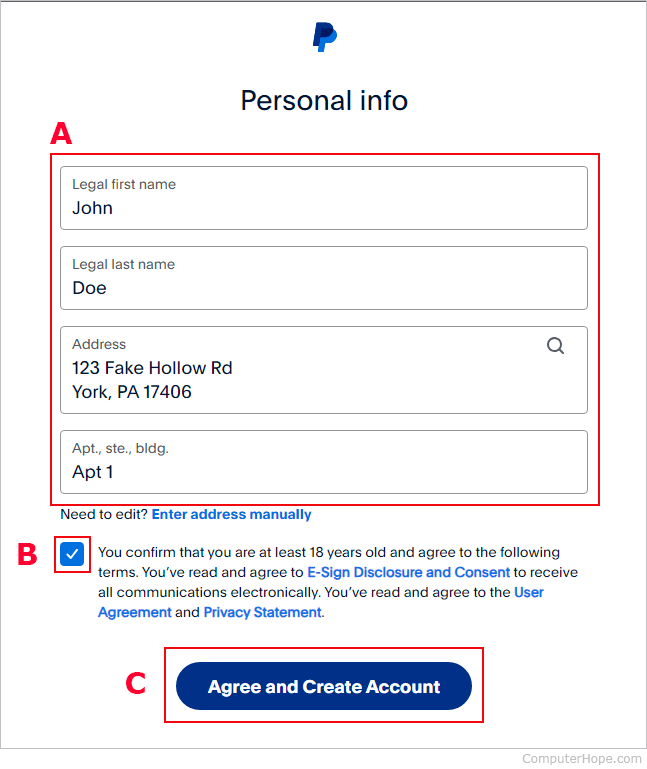
This comprehensive guide will walk you through the process of applying for a PayPal account, ensuring you understand not only the “how” but also the “why” behind each step, grounding it firmly within the context of sound financial management and digital literacy.
The Indispensable Role of PayPal in Modern Finance
Before delving into the mechanics of account creation, it’s crucial to appreciate PayPal’s strategic position in the contemporary financial landscape. It’s far more than a simple payment processor; it’s a versatile financial ecosystem.
Understanding PayPal’s Value Proposition
PayPal’s enduring popularity stems from its multi-faceted value proposition. For individuals, it simplifies online purchases, allows for easy peer-to-peer money transfers, and offers a secure method for receiving payments, whether from family, friends, or clients for freelance work. For businesses, especially small to medium-sized enterprises (SMEs) and sole proprietors, PayPal provides robust solutions for invoicing, accepting payments from customers worldwide, and even managing payroll for contractors. Its global reach means that geographical boundaries often become less of a barrier for financial transactions, making international trade and remittances more accessible.
Furthermore, PayPal has built a formidable reputation for security. By acting as an intermediary between your bank account or credit card and the merchant, it adds an extra layer of protection, reducing the exposure of your sensitive financial information to multiple third parties. This emphasis on security is a cornerstone of its financial utility, giving users peace of mind in an era of escalating cyber threats.
Personal vs. Business Accounts: Choosing the Right Financial Tool
One of the first critical decisions you’ll make when applying for a PayPal account is whether to open a Personal or Business account. This choice isn’t merely a formality; it has significant implications for how you manage your finances, your reporting obligations, and the tools available to you.
-
Personal Accounts: These are designed for individuals who primarily want to send and receive money from friends and family, shop online, or occasionally receive payments for personal services (like selling items on marketplaces). They are generally simpler to set up and have fewer features tailored for commercial activity. While you can receive payments for goods and services with a personal account, a business account is often recommended as your transaction volume grows or if you require professional invoicing and reporting tools.
-
Business Accounts: Tailored for entrepreneurs, freelancers, sole proprietors, and larger companies, business accounts offer a suite of advanced features. These include the ability to accept payments via website integrations, issue professional invoices, manage multi-user access, utilize advanced reporting tools for accounting, and often benefit from specific merchant services and customer support. Choosing a business account signals a professional approach to your financial dealings and provides the necessary infrastructure to scale your commercial activities securely and compliantly. For anyone earning income online, running an e-commerce store, or offering professional services, a business account is the financially prudent choice, providing clarity and separation between personal and professional funds.
Making the correct choice from the outset can save you administrative headaches down the line and ensure you have the appropriate financial tools at your disposal to achieve your objectives.
Step-by-Step Guide to Opening Your PayPal Account
The process of applying for a PayPal account is straightforward, designed to be user-friendly while adhering to stringent financial regulations.
Essential Information You’ll Need
Before you begin, gather the following information. Having these details readily available will expedite the application process:
- For Personal Accounts: Your full legal name, a valid email address, phone number, physical address, and date of birth. You will also need a bank account or credit/debit card to link for verification and funding purposes.
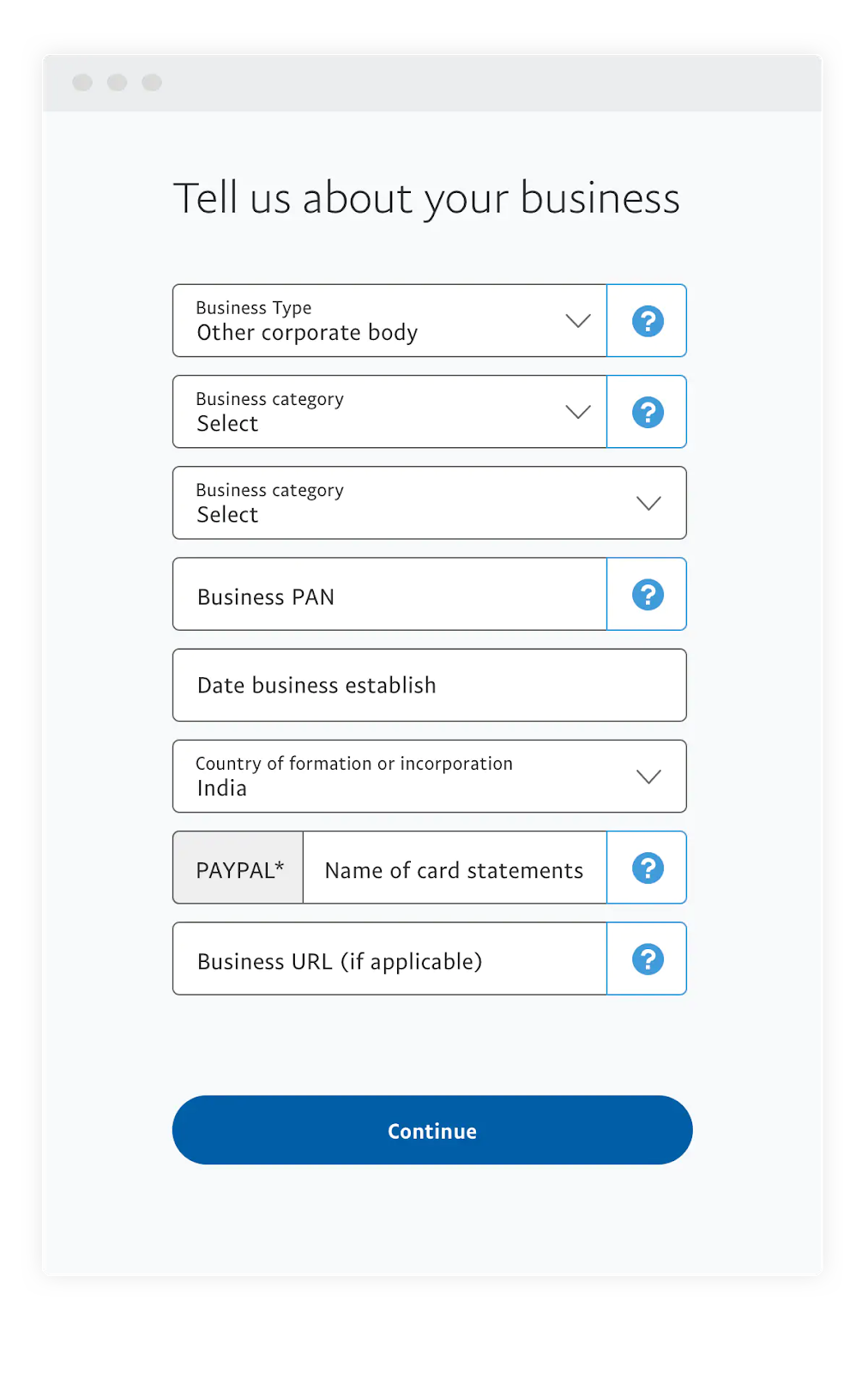
- For Business Accounts: All of the above, plus your business name, business address, business phone number, business type (e.g., sole proprietorship, corporation), and potentially an Employer Identification Number (EIN) or equivalent tax ID if operating as a registered entity. You’ll also link a business bank account or card.
Navigating the Registration Process
- Visit the PayPal Website: Go to the official PayPal website (paypal.com) and click on the “Sign Up” or “Open a Free Account” button.
- Choose Account Type: Select either “Personal Account” or “Business Account” based on your financial needs.
- Enter Your Details: Follow the prompts to enter the required personal or business information. This includes creating a secure password. Make sure to use an email address that you actively monitor, as this will become your primary PayPal ID and the channel for important financial notifications.
- Agree to Terms: Review PayPal’s User Agreement and Privacy Policy carefully. These documents outline your rights and responsibilities, as well as how your financial data is handled. Consent to them to proceed.
- Verify Your Email: PayPal will send a verification link to the email address you provided. Click this link to confirm your email and activate your account. This is a crucial security step that authenticates your identity.
Linking Your Financial Instruments
Once your account is created, the next vital step is to link a funding source. This allows you to add money to your PayPal balance, send payments, and withdraw funds.
- Linking a Bank Account: This is generally the most common and cost-effective method for larger transactions and withdrawals. You’ll typically provide your bank’s routing number and your account number. PayPal may then make two small deposits (e.g., $0.01 and $0.02) to your bank account, which you’ll need to confirm on PayPal’s site to verify ownership. This process helps prevent fraud and ensures the funds belong to you.
- Linking a Credit or Debit Card: This provides an alternative funding source, particularly useful for immediate payments or when you don’t have sufficient balance in your PayPal account. You’ll enter the card number, expiration date, and security code. PayPal might charge a small, temporary authorization fee (e.g., $1.95), which is later refunded, to confirm the card’s validity.
Linking at least one financial instrument is critical for unlocking the full functionality of your PayPal account and is a cornerstone of its utility as a financial tool.
Securing and Maximizing Your PayPal Account for Financial Transactions
An active PayPal account is a valuable financial asset. Protecting it and understanding its capabilities are paramount to a secure and efficient digital finance experience.

The Importance of Account Verification
Beyond email and linked financial instrument verification, PayPal often encourages, and sometimes requires, further identity verification, especially for business accounts or when transaction volumes increase. This may involve providing government-issued ID (like a driver’s license or passport) and proof of address. While it might seem like an extra hurdle, this process is essential for:
- Compliance: Meeting Know Your Customer (KYC) and Anti-Money Laundering (AML) regulations globally.
- Increased Limits: Verified accounts typically have higher sending and receiving limits, which is crucial for managing larger sums of money or for growing businesses.
- Enhanced Security: It adds a layer of protection against fraud and identity theft, safeguarding your funds.
- Full Feature Access: Some advanced features and services may only be available to fully verified accounts.
Leveraging PayPal’s Security Features
PayPal offers robust security features designed to protect your financial interests:
- Two-Factor Authentication (2FA): Enable 2FA (often via SMS or an authenticator app) to add an extra layer of security. Even if someone obtains your password, they won’t be able to access your account without the second verification code.
- Fraud Protection: PayPal closely monitors transactions for suspicious activity. If an unauthorized transaction occurs, their buyer and seller protection policies can help you recover funds. However, always exercise caution and report suspicious activity immediately.
- Strong Passwords and Regular Audits: Use unique, complex passwords and consider a password manager. Periodically review your transaction history for any unfamiliar activity.
- Secure Browsing: Always access PayPal through its official website (check for “https://” and the padlock icon) and avoid clicking suspicious links in emails.
Understanding Transaction Limits and Fees
A key aspect of financial management with PayPal is understanding its fee structure and transaction limits.
- Fees: While sending money to friends and family within the same country from your PayPal balance or linked bank account is often free, fees usually apply for receiving payments for goods and services, international transfers, and certain currency conversions. These fees can vary based on transaction type, amount, and region. For businesses, understanding these processing fees is crucial for accurate profit calculation and pricing strategies.
- Limits: Initially, new accounts may have transaction limits, which can be increased upon successful verification. Being aware of these limits prevents unexpected delays or declined transactions, especially for larger payments or withdrawals. Regularly check your account settings for current limits and learn how to raise them if necessary.
Beyond Account Creation: Harnessing PayPal for Your Financial Goals
Once your PayPal account is set up and secure, its potential as a financial tool truly comes into play, supporting a wide array of personal and business objectives.
Everyday Applications: Online Shopping and Peer-to-Peer Payments
For personal finance, PayPal excels in convenience. It allows for quick, secure online shopping without repeatedly entering credit card details on various merchant websites. Its “One Touch” feature further streamlines the checkout process. For peer-to-peer payments, splitting bills with friends, sending money to family, or even donating to charities becomes a matter of a few clicks or taps, often without fees if funded from a bank account or PayPal balance. This convenience can significantly simplify daily financial interactions.
Empowering Online Income and Side Hustles
For individuals looking to generate online income, a PayPal account is almost a prerequisite. It serves as a primary method for receiving payments from:
- Freelance Platforms: Many platforms for writers, designers, programmers, and consultants use PayPal for disbursing payments.
- E-commerce Sales: If you sell goods on platforms like eBay, Etsy, or your own online store, PayPal is a common and trusted payment gateway.
- Affiliate Marketing & Content Creation: Many affiliate programs and ad networks pay out through PayPal.
- Side Hustles: From pet-sitting to tutoring, receiving payments from clients is simplified.
Using a business account in these scenarios allows for proper record-keeping, easy generation of invoices, and segregation of personal and business funds—a crucial practice for tax purposes and financial clarity.
International Transfers and Currency Exchange Considerations
PayPal’s global reach is one of its most powerful financial features. It enables you to send and receive money across borders, supporting a wide range of currencies. While incredibly convenient, it’s important to be aware of the associated costs. Currency conversion fees can apply when sending or receiving money in a different currency than your primary one. These fees, often a percentage above the wholesale exchange rate, can impact the final amount received or sent. Savvy users monitor exchange rates and understand PayPal’s conversion policies to minimize costs, particularly for significant international transactions. This knowledge is vital for maximizing your funds when operating in a global marketplace.
Troubleshooting and Best Practices for a Smooth Financial Experience
Even with a robust system like PayPal, occasional issues can arise. Knowing how to navigate them and adhere to best practices ensures a consistently smooth financial experience.
Common Pitfalls and How to Avoid Them
- Phishing Scams: Be vigilant about emails or messages claiming to be from PayPal. Always check the sender’s address and hover over links to verify their legitimacy before clicking. PayPal will never ask for your password or sensitive financial details via email.
- Insufficient Funds: Ensure your linked bank account or PayPal balance has sufficient funds before attempting payments to avoid declined transactions and potential bank fees.
- Incorrect Information: Double-check recipient email addresses or phone numbers when sending money. Money sent to the wrong person can be difficult, if not impossible, to retrieve.
- Account Freezes/Limitations: These can occur due to suspicious activity, high transaction volumes for unverified accounts, or non-compliance with policies. The best way to avoid this is to fully verify your account, understand PayPal’s User Agreement, and keep your account information up-to-date.
Tips for Maintaining Account Health and Security
- Regular Monitoring: Periodically review your PayPal activity log and linked bank/card statements to spot any unauthorized transactions.
- Keep Software Updated: Ensure your operating system, web browser, and antivirus software are always up-to-date to protect against vulnerabilities.
- Use Strong, Unique Passwords: Never reuse passwords across multiple services.
- Educate Yourself: Stay informed about common online scams and PayPal’s security updates.
- Contact Support: If you encounter any issues or suspect fraudulent activity, contact PayPal customer support immediately through their official channels.
In conclusion, applying for a PayPal account is a strategic step toward embracing digital finance. By understanding the different account types, diligently following the application process, and prioritizing security and financial awareness, you can effectively leverage PayPal as a powerful tool to manage your money, facilitate online transactions, and achieve your personal and business financial objectives in the modern economy.
aViewFromTheCave is a participant in the Amazon Services LLC Associates Program, an affiliate advertising program designed to provide a means for sites to earn advertising fees by advertising and linking to Amazon.com. Amazon, the Amazon logo, AmazonSupply, and the AmazonSupply logo are trademarks of Amazon.com, Inc. or its affiliates. As an Amazon Associate we earn affiliate commissions from qualifying purchases.