
The ubiquity of digital transactions has streamlined many aspects of our financial lives, but for many, physical currency – the familiar rustle of paper bills – remains a vital part of their financial ecosystem. Whether it’s receiving a cash gift, cashing a check, or simply preferring to handle some transactions in person, there are times when you need to bridge the gap between paper money and your digital Cash App balance. This guide will demystify the process, offering a comprehensive look at how to effectively deposit physical cash into your Cash App account, ensuring you can seamlessly integrate your tangible funds with your digital wallet.
Understanding Cash App and Physical Currency Integration
Cash App, a popular peer-to-peer payment service developed by Block, Inc. (formerly Square), is primarily designed for digital transfers between users. While its core functionality revolves around electronic transactions, it acknowledges the reality that many users still interact with physical cash. The platform has therefore developed several methods to accommodate the conversion of paper money into usable digital funds within the app. This integration is crucial for a broad user base, catering to those who might not have direct bank accounts or prefer a hybrid approach to managing their finances.
The Role of Cash App in the Modern Financial Landscape
In an era dominated by smartphones and instant gratification, Cash App has carved out a significant niche by offering a user-friendly and accessible platform for a wide range of financial activities. From sending money to friends and family to investing in stocks and Bitcoin, the app aims to consolidate various financial needs into a single, intuitive interface. Its emphasis on simplicity and speed has made it a go-to solution for everyday transactions, bill payments, and even small-scale commerce. However, its continued relevance hinges on its ability to adapt to diverse user behaviors, which includes the persistent use of cash.
Bridging the Physical and Digital Divide
The need to deposit paper money into Cash App arises from this very duality. Imagine receiving a birthday card with crisp bills, or getting paid in cash for a freelance gig. These are scenarios where digital convenience meets tangible reality. Cash App’s ability to facilitate this transition ensures that users are not left with unusable physical currency when they want to leverage the speed and security of their digital account. This process is more than just a convenience; it’s an essential function that allows Cash App to remain a truly comprehensive financial tool for a diverse range of users.
Key Considerations Before Depositing Cash
Before diving into the mechanics of depositing paper money, it’s essential to understand a few fundamental aspects. Cash App itself does not have physical branches where you can walk in and deposit cash directly. Instead, it partners with third-party retail locations to act as intermediaries. This means there will be fees associated with these services, and certain limits might apply. Familiarizing yourself with these conditions will help you choose the most suitable method and avoid any unexpected charges or inconveniences. Understanding these parameters is the first step towards a smooth and successful cash deposit.
Methods for Adding Paper Money to Your Cash App
Cash App offers a primary and highly effective method for depositing physical cash directly into your account: utilizing their partnership with a vast network of retail stores. This system allows you to convert your paper bills into digital funds without needing a traditional bank account. While other methods might exist for adding money to Cash App (like linking a bank account or receiving direct transfers), when it comes to paper money, the retail deposit is the cornerstone of their solution.
The Cash App Card and Retail Deposits
The core of adding paper money lies in the Cash App Card. If you don’t already have one, you’ll need to order it through the app. Once you receive your physical or virtual Cash App Card, you can use it as the key to unlock the cash deposit functionality at participating retailers. These retailers act as Cash App’s physical touchpoints, equipped with point-of-sale systems that can process your cash and credit it to your Cash App balance.
Step-by-Step: Depositing Cash at a Retailer
-
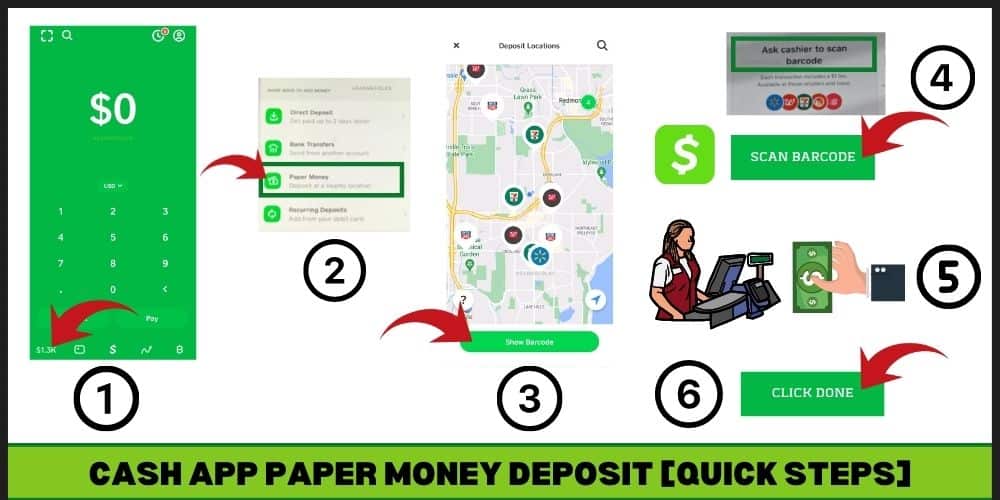
Locate a Participating Retailer: Cash App has partnered with a wide array of retail chains across the United States, including but not limited to Walmart, Walgreens, Dollar General, and CVS. You can find the nearest participating location directly within the Cash App itself. Navigate to your Cash App home screen, tap on the “Add Cash” button, and then select “Add Cash at a store.” The app will then display a map highlighting available locations.
-
Generate a Barcode: Once you’ve chosen your retail location, you’ll need to specify the amount of cash you wish to deposit. After entering the amount, Cash App will generate a unique barcode. This barcode is essential for the transaction and should be presented to the cashier at the store. It’s advisable to have this barcode ready on your phone before you arrive at the store to expedite the process.
-
Present the Barcode and Cash to the Cashier: At the checkout counter, inform the cashier that you wish to make a Cash App deposit. Present the generated barcode on your phone. The cashier will scan this barcode, which will prompt their system to ask for the amount of cash you are depositing. Hand over your paper money to the cashier.
-
Confirmation and Fund Availability: The cashier will then complete the transaction, adding the cash to your Cash App balance. You should receive a confirmation notification from Cash App on your phone shortly after the transaction is processed. The funds typically appear in your Cash App balance almost instantly, although in rare cases, it might take a few minutes.
Fees and Limits Associated with Retail Deposits
It’s crucial to be aware of the associated fees and limits for this service. Cash App typically charges a fee of $3.50 for each cash deposit made at a retail location. This fee is fixed, regardless of the amount deposited. There are also daily and weekly limits on how much cash you can deposit. Currently, users can deposit up to $500 per transaction, $1,000 per week, and $4,000 per month. Always check the latest fee structure and limits within the Cash App itself or on their official support pages, as these can be subject to change.
Alternative (Indirect) Methods for Cash Conversion
While retail deposit is the direct way to add paper money, it’s worth noting how other forms of cash can be indirectly converted. For instance, if you receive a physical check, you can deposit it into a bank account and then link that bank account to Cash App to transfer funds electronically. Similarly, if you have cash that you’ve deposited into a traditional bank account, you can then link that account to Cash App for seamless transfers. These are not direct “paper money to Cash App” conversions but represent ways to move physical cash into the digital realm via intermediate steps.

Maximizing Your Cash App Experience with Physical Currency
Effectively integrating paper money into your Cash App workflow can significantly enhance your financial flexibility. By understanding the available methods and adhering to best practices, you can ensure that your physical cash is always readily accessible and usable within your digital financial life. This section delves into strategies and tips to make the process as smooth and beneficial as possible.
Strategic Use of Retail Deposits
The retail deposit feature is not just a way to get cash into your app; it’s a tool that can be strategically employed. For individuals who receive regular cash payments for services or gifts, setting up a routine of depositing this cash at a nearby retailer can be highly efficient.
Planning Your Deposits
- Consolidate Your Trips: Instead of making multiple small trips to deposit small amounts, consider consolidating your cash and making a single deposit when you reach a more significant sum. This can help you minimize the per-transaction fee if you’re mindful of the limits.
- Proximity is Key: Identify the most convenient participating retailers in your area. Having a few reliable options close to your home or workplace can save you time and make the process less of a chore.
- Leverage Your Shopping Trips: If you’re already planning a trip to Walmart or Walgreens for groceries or other necessities, make your Cash App deposit part of that errand. This multi-tasking approach makes the fee feel more justified.
Understanding Deposit Limits and Planning Accordingly
The daily, weekly, and monthly limits on cash deposits are important to consider, especially for those who handle larger sums of cash. If your income or cash flow exceeds these limits, you might need to explore alternative deposit methods or spread your deposits over longer periods. For instance, if you receive $700 in cash one week, you’ll need to plan to deposit $500 in one week and the remaining $200 in the following week to stay within the $1,000 weekly limit.
The Cash App Card as Your Financial Hub
The Cash App Card is central to virtually all of Cash App’s functionalities, including cash deposits. It acts as a debit card linked directly to your Cash App balance. This means that once your paper money is converted, it can be spent directly using the card, both online and in-store, or withdrawn as cash from ATMs.
Benefits of Using the Cash App Card
- Instant Spending Power: As soon as your deposit is confirmed, the funds are available for immediate use with your Cash App Card. This eliminates the waiting period associated with traditional bank transfers.
- ATM Withdrawals: You can also use your Cash App Card to withdraw cash from ATMs if you need physical currency for specific transactions. While there are ATM fees, Cash App offers a certain number of fee-free withdrawals per month if you meet specific direct deposit requirements.
- Direct Deposits: For those who receive regular income, setting up direct deposit to your Cash App account (using your account and routing numbers) is the most efficient way to manage funds. This bypasses the need for cash deposits altogether for your primary income.
Security Features of the Cash App Card
The Cash App Card comes with robust security features to protect your funds. You can instantly freeze or unfreeze your card directly from the app if you misplace it or suspect unauthorized activity. Furthermore, Cash App utilizes encryption and fraud detection systems to safeguard your transactions.
Troubleshooting Common Issues with Cash Deposits
Despite the straightforward nature of the Cash App deposit process, users may occasionally encounter challenges. Understanding these common issues and their solutions can save you time and frustration.
Barcode Scanning Problems
- Ensure Sufficient Brightness: Make sure your phone screen is bright enough for the scanner to read the barcode clearly.
- Clean Screen: A smudged or dirty phone screen can interfere with barcode readability. Wipe your screen before presenting it.
- Barcode Integrity: Ensure the barcode is fully rendered on your screen and not cut off by the edge.
- Cashier Assistance: If the barcode repeatedly fails to scan, politely ask the cashier to manually enter the information or try generating a new barcode within the app.
Deposit Not Appearing in Your Balance
- Check Transaction History: Always verify your Cash App transaction history for confirmation of the deposit.
- Wait a Few Minutes: While most deposits are instant, there can be occasional delays. Allow up to 15 minutes for the funds to reflect.
- Retailer Confirmation: Ensure you received a receipt from the retailer confirming the deposit. If you didn’t get a receipt, it might indicate the transaction didn’t complete on their end.
- Contact Cash App Support: If the funds still haven’t appeared after a reasonable waiting period and you have confirmation from the retailer, contact Cash App support through the app’s help section. They can investigate the transaction with the retail partner.

Understanding Fee Structures and Limits
- Verify Current Fees: Fees can change. Always check the “Add Cash” section in your app for the most up-to-date fee for retail deposits.
- Track Your Spending: Keep a running tally of your deposits to ensure you do not exceed the weekly or monthly limits. The app’s transaction history can help with this.
- Overcoming Limits: If you frequently exceed the cash deposit limits, consider alternative methods like linking a bank account for larger transfers or exploring other digital payment platforms that might offer higher limits.
By being prepared and understanding the nuances of the Cash App’s cash deposit system, you can confidently navigate the process and ensure your paper money is always ready to be used digitally, providing a seamless blend of physical and digital financial management.
aViewFromTheCave is a participant in the Amazon Services LLC Associates Program, an affiliate advertising program designed to provide a means for sites to earn advertising fees by advertising and linking to Amazon.com. Amazon, the Amazon logo, AmazonSupply, and the AmazonSupply logo are trademarks of Amazon.com, Inc. or its affiliates. As an Amazon Associate we earn affiliate commissions from qualifying purchases.