
In the modern financial landscape, the boundary between traditional banking and digital wallets has become increasingly porous. Cash App, developed by Block, Inc., has emerged as a cornerstone of personal finance for millions of users, transitioning from a simple peer-to-peer (P2P) payment tool into a robust financial ecosystem. Whether you are looking to pay a friend, invest in stocks, or use the Cash Card for daily expenses, understanding how to efficiently move capital into your account is the first step toward financial agility.
Adding money to your Cash App balance is more than a technical necessity; it is a strategic move in managing your personal cash flow. This guide explores the various methods of funding your account, the financial implications of each, and how to optimize your digital wallet for maximum utility.

1. Connecting Your Financial Ecosystem: Linking Bank Accounts and Cards
Before you can add liquidity to your Cash App balance, you must establish a bridge between your existing financial institutions and the app. This integration is the foundation of your digital financial strategy, allowing for the seamless flow of capital.
The Role of the Linked Debit Card
The most common and efficient way to fund your Cash App is through a linked debit card. From a personal finance perspective, using a debit card is often preferred over a credit card for funding digital wallets because it avoids potential “cash advance” fees and high-interest rates associated with credit-based transfers. When you link a debit card, Cash App establishes a real-time connection to your checking account, allowing for near-instantaneous transfers.
Integrating Traditional Bank Accounts via Plaid
For users who prefer a more direct connection to their savings or checking accounts, Cash App utilizes Plaid—a secure intermediary—to link your bank. This is particularly useful for those who want to move larger sums of money or who do not wish to carry a physical debit card. By linking your bank account directly, you create a secondary layer of liquidity, ensuring that even if your primary card is compromised or expired, your financial pipeline remains intact.
Credit Cards: A Secondary Alternative
While it is possible to link a credit card to Cash App, it is important to understand the financial trade-offs. Cash App typically charges a 3% fee for transactions funded by a credit card. From a wealth-management standpoint, this is generally discouraged unless necessary for short-term liquidity, as the fees can quickly erode the value of your capital.
2. Direct Funding Methods: Moving Capital into Your Balance
Once your financial bridge is built, the process of “Adding Cash” becomes the primary mechanism for increasing your digital balance. Understanding the nuances of these transactions helps in maintaining a healthy personal budget.
Utilizing the “Add Cash” Feature
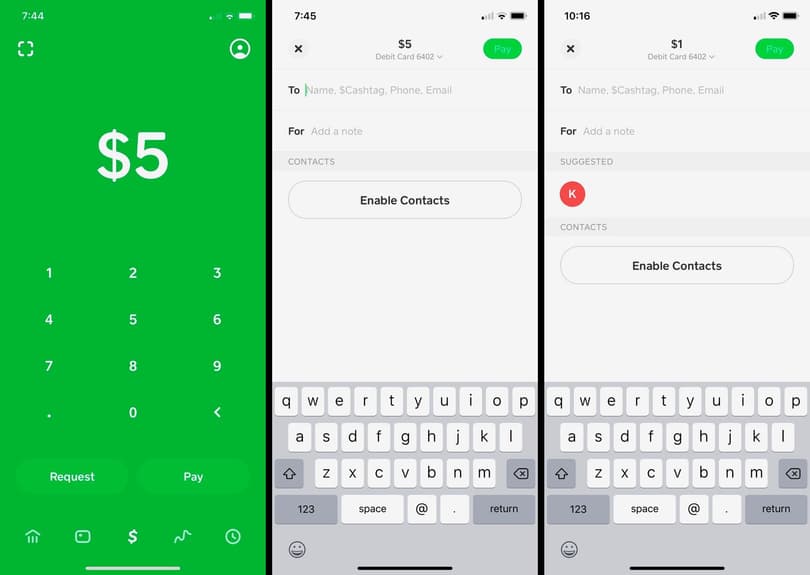
The “Add Cash” button is the heart of the app’s funding interface. To initiate a transfer, you navigate to the Banking tab, select the amount you wish to move, and confirm the transaction via biometric ID or PIN. From a financial planning perspective, this manual transfer method allows for intentional spending. By moving only a specific weekly budget into your Cash App balance, you can use the app as a “digital envelope” for discretionary spending, helping to prevent overspending from your main bank account.
Direct Deposit: Turning Cash App into Your Primary Financial Hub
One of the most sophisticated ways to add money to Cash App is by setting up a Direct Deposit. Cash App provides users with a routing and account number, much like a traditional bank. By directing a portion of your paycheck—or the entirety of it—to Cash App, you bypass the need for manual transfers. This method often unlocks additional financial benefits, such as receiving paychecks up to two days early and qualifying for higher “Boost” rewards on the Cash Card.
Understanding Transfer Limits and Verification
For those using Cash App for business finance or significant personal transactions, understanding limits is crucial. Basic accounts often have lower limits on how much can be added or received. To increase these limits, users must undergo a verification process, providing their full name, date of birth, and the last four digits of their Social Security Number. From a financial security standpoint, this verification protects the ecosystem from fraud and ensures that your larger capital movements remain compliant with financial regulations.
3. Physical and Peer-to-Peer Funding Alternatives

Not all financial transactions happen digitally. Cash App has evolved to accommodate the “unbanked” or those who deal frequently in physical currency, providing bridges between the physical and digital worlds.
Paper Money Deposits at Retail Locations
One of Cash App’s most innovative features is the “Paper Money” deposit. Users can visit participating retailers—such as Walgreens, 7-Eleven, or Walmart—and deposit physical cash directly into their digital balance. To do this, you generate a barcode within the app, which the cashier scans. This feature is a vital tool for those in the gig economy or service industry who receive tips in cash and need a way to digitize those funds for online bill payments or investments. It is important to note that a small fee (usually $1) applies to these transactions, which should be factored into your personal accounting.
Peer-to-Peer Transfers as a Funding Source
Often, the easiest way to add money to your balance is through a transfer from another user. Whether it’s splitting a dinner bill or receiving payment for a side hustle, P2P transfers are instantaneous. From a money-management perspective, this is “found money” that can either be cashed out to a bank or kept within the ecosystem to fund future purchases or investments.
Recurring Deposits for Automated Savings
Consistency is the key to wealth building. Cash App allows users to set up “Auto-Add,” a feature that automatically transfers a set amount of money from your bank to your Cash App balance on a daily, weekly, or bi-weekly basis. This is an excellent strategy for “paying yourself first.” By automating these transfers, you ensure that you are consistently building a balance that can be used for the app’s built-in investment features.
4. Security Protocols and Financial Best Practices
As with any financial tool, adding and maintaining a balance in Cash App requires a disciplined approach to security and risk management. Protecting your digital capital is just as important as acquiring it.
Protecting Your Balance with Security Locks
Cash App offers several layers of protection, including “Security Lock,” which requires a PIN or Touch/Face ID for every transfer. When you add significant funds to your account, enabling these features is non-negotiable. Furthermore, users should enable notification alerts for every transaction. In the world of personal finance, early detection of unauthorized activity is the difference between a minor inconvenience and a total loss of funds.
The Difference Between the App Balance and a Bank Account
It is essential to understand that while Cash App offers bank-like features, it is a financial services platform, not a traditional bank. Funds held in your Cash App balance are generally insured by the FDIC through Cash App’s partner banks (like Lincoln Savings Bank or Wells Fargo), but this insurance usually only applies if you have a Cash Card or have verified your account. For long-term wealth preservation, it is often safer to keep the bulk of your savings in a high-yield savings account and use Cash App as a transactional tool for liquid capital.
Avoiding Common Funding Scams
In the digital age, financial literacy includes scam awareness. Users should never “add money” to their account at the request of someone claiming to be “Cash App Support” or to “verify” their account for a prize. These are common social engineering tactics designed to drain your balance. Legitimate funding only happens through the app’s official interface or recognized retail partners.
5. Optimizing Added Funds for Growth and Rewards
Adding money to your Cash App is only the beginning. Once the capital is in your account, you can deploy it in ways that enhance your overall financial health.
Utilizing Added Funds for Investing and Bitcoin
Cash App integrates a seamless investing platform, allowing users to buy fractional shares of stocks or Bitcoin with as little as $1. By adding money to your balance, you create a pool of capital that can be used for “dollar-cost averaging” into the market. This democratization of investing allows individuals who might not have thousands of dollars for a brokerage account to start building a portfolio with the “spare change” they’ve added to their digital wallet.
Maximizing the Power of Cash Card “Boosts”
The Cash Card, a free Visa debit card linked to your balance, offers “Boosts”—instant discounts at specific merchants. To take full advantage of these, you must have a sufficient balance. For example, if there is a 10% Boost for a grocery store, adding $100 to your Cash App specifically for that trip effectively gives you an immediate 10% return on your capital. This is a powerful tool for reducing monthly expenses and optimizing your budget.
Conclusion: The Strategic Value of a Funded Cash App
Learning how to add money to Cash App is the entry point into a modern, streamlined financial lifestyle. By leveraging debit links, direct deposits, and retail cash points, you create a versatile financial hub that supports everything from daily coffee purchases to long-term stock investments. When managed with a focus on security and intentionality, your Cash App balance becomes more than just a digital wallet—it becomes a dynamic asset in your personal finance toolkit. Through consistent funding and smart deployment of those funds, you can achieve greater control over your money, one transaction at a time.
aViewFromTheCave is a participant in the Amazon Services LLC Associates Program, an affiliate advertising program designed to provide a means for sites to earn advertising fees by advertising and linking to Amazon.com. Amazon, the Amazon logo, AmazonSupply, and the AmazonSupply logo are trademarks of Amazon.com, Inc. or its affiliates. As an Amazon Associate we earn affiliate commissions from qualifying purchases.